1. 서론
This manual provides essential information for the proper use and maintenance of your new Plastic Back Case for OPPO F11. This protective phone case features a durable and elegant design, offering strong protection for your device. It is made from high-quality plastic materials designed to protect your mobile from shocks and scratches. The case is designed for comfortable use, allowing easy access to all phone ports and control buttons. It adds an aesthetic touch to your phone while maintaining its elegant appearance.
The case is shock-absorbing and protects your mobile from stains and dirt, making cleaning and maintenance easy. It provides complete protection without affecting your phone's functions or performance.
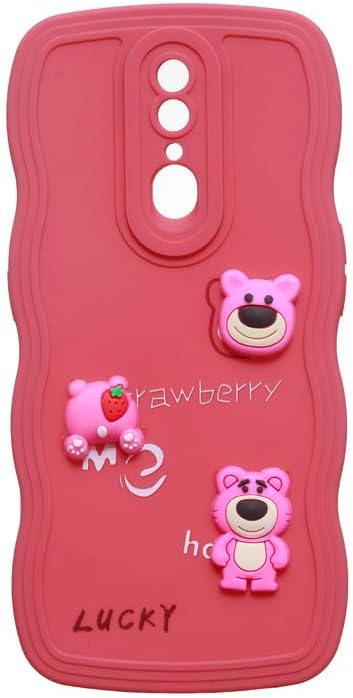
그림 1.1: 전면 view of the Plastic Back Case for OPPO F11.
2. 설정 및 설치
Follow these simple steps to install the protective case on your OPPO F11 device:
- 기기를 청소하세요: Before installation, ensure your OPPO F11 is clean and free of dust, dirt, or fingerprints. Use a soft, lint-free cloth to wipe down the back and sides of your phone.
- 케이스 정렬: Hold the case with the camera cutout aligned with your phone's camera module. Carefully align the charging port and speaker cutouts with their respective openings on your phone.
- 휴대폰을 삽입하세요: Gently push your phone into the case, starting from one side (e.g., the top or bottom). Apply even pressure around the edges until the phone is fully seated within the case. Ensure all corners are securely covered.
- 핏 확인: Once installed, gently press around the edges of the case to ensure it is snug and secure. Verify that all buttons (power, volume) are accessible and functional, and that all ports (charging, headphone jack) are unobstructed.
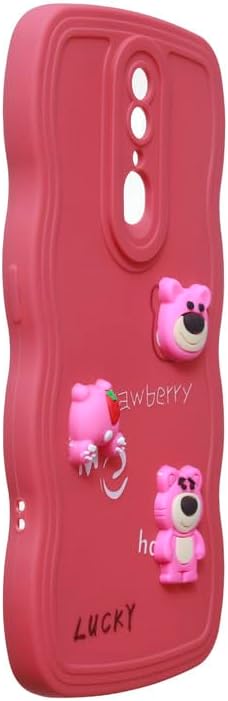
그림 2.1: 각도 view demonstrating the case's fit and access to side buttons.
3. 케이스를 씌운 상태에서 기기 사용하기
The Plastic Back Case is designed to provide protection without hindering the normal operation of your OPPO F11. You should be able to:
- Access all physical buttons (power, volume) easily through the case's precise cutouts.
- Connect charging cables and headphones without removing the case, thanks to accurately sized port openings.
- Utilize the camera and flash without obstruction from the case.
- Maintain a comfortable grip on your device due to the case's ergonomic design.
4. 유지관리 및 관리
To ensure the longevity and appearance of your case, follow these maintenance guidelines:
- 정기 청소: 케이스는 부드러운 천으로 정기적으로 닦아주세요.amp cloth to remove dust and smudges. For stubborn dirt, a small amount of mild soap can be used.
- 가혹한 화학 물질을 피하세요: Do not use abrasive cleaners, solvents, or harsh chemicals, as these can damage the plastic material and its finish.
- 변색 방지: While the case is designed to resist discoloration, prolonged exposure to direct sunlight or extreme temperatures may affect its color over time.
- 조심스럽게 다루십시오: Although the case is durable and shock-absorbing, avoid unnecessary drops or impacts to maximize its protective lifespan.
5. 문제 해결
다음은 몇 가지 일반적인 문제와 해결 방법입니다.
| 문제 | 가능한 원인 | 해결책 |
|---|---|---|
| 케이스가 제대로 맞지 않습니다. | 휴대폰 모델이 잘못되었거나 설치가 잘못되었습니다. | Ensure you have the correct case for OPPO F11. Re-install the case, ensuring the phone is fully seated and aligned. |
| 버튼이 뻑뻑하거나 반응이 없습니다. | Case not fully seated or manufacturing defect. | Remove and re-install the case, ensuring proper alignment. If the issue persists, contact customer support. |
| 케이스가 더럽거나 얼룩져 보입니다. | Accumulation of dust, dirt, or oils. | 부드러운 천으로 케이스를 청소하십시오. damp cloth and mild soap. Avoid abrasive materials. |
6. 사양
Detailed specifications for your Plastic Back Case:
| 특징 | 세부 사항 |
|---|---|
| 제품 치수 | 17 x 7 x 1cm |
| 품목 무게 | 100그램 |
| 제조업체 | 일반적인 |
| ASIN | B0DR94XWR8 |
| 품목 모델 번호 | ABC-CBA238 |
| 호환되는 전화 모델 | OPPO F11 |
| 색상 | 수박 레드 |
| 재료 | 플라스틱 |
| 스타일 | 단색 |
| 특별 기능 | Shock Absorbing |
| 연령대 설명 | 성인 |
| 모델명 | 뒷면 커버 |
| 폼 팩터 | 기본 케이스 |
| 첫 번째 가능한 날짜 | 23년 2024월 XNUMX일 |
7. 보증 및 지원
This product is a protective accessory. Specific warranty information is not provided with this manual. For any support inquiries or issues not covered in this manual, please refer to the retailer's return policy or contact the seller directly through the platform where the product was purchased.


