
KNAON Y50P-BK
KNAON 블루투스 라벨 메이커 Y50P 사용 설명서
Model: Y50P-BK
소개
This manual provides comprehensive instructions for the KNAON Y50P Portable Thermal Label Maker. It covers setup, operation, maintenance, and troubleshooting to ensure optimal performance and a seamless labeling experience. The Y50P is designed for versatile use in home, office, small business, and school environments, offering both Bluetooth and USB connectivity for efficient label printing.

Figure 1: KNAON Y50P Label Maker and included label roll.
상자 안에 무엇이 들어있나요?
Upon unboxing your KNAON Y50P Label Maker, please verify that all the following components are included:
- Y50P Label Maker
- Label Tape 1.97' x 1.18' (50mm x 30mm thermal print paper roll)
- 사용 설명서 (본 문서)
- USB Type-C 케이블
설정
1. 장치 충전
The KNAON Y50P Label Maker is powered by a durable 1200 mAh battery. Before first use, it is recommended to fully charge the device using the provided USB Type-C cable. Connect the Type-C end to the printer and the USB-A end to a compatible power adapter or computer USB port.
2. 라벨 롤 장착
To load the thermal label paper:
- Open the top cover of the label maker.
- Insert the label roll with the printing surface facing upwards, ensuring it aligns correctly with the paper guides.
- Pull a small portion of the label paper out past the print head.
- 윗덮개를 딸깍 소리가 나면서 제자리에 고정될 때까지 단단히 닫으세요.

Figure 2: Proper insertion of the label roll into the KNAON Y50P Label Maker.
3. 앱 설치 및 연결
The KNAON Y50P requires the 'FlashLabel Pro' application for wireless operation via Bluetooth. For wired connection, drivers are required for macOS and Windows.
3.1. Bluetooth Connection (via 'FlashLabel Pro' App)
For iOS and Android devices:
- Download the 'FlashLabel Pro' app from the Apple App Store or Google Play Store.
- Ensure your label maker is turned on and Bluetooth is enabled on your smartphone or tablet.
- Open the 'FlashLabel Pro' app. The app will guide you through the connection process. Select your Y50P printer from the list of available devices.
- Note: The device cannot be connected directly via your phone's Bluetooth settings; connection must be initiated through the 'FlashLabel Pro' app.
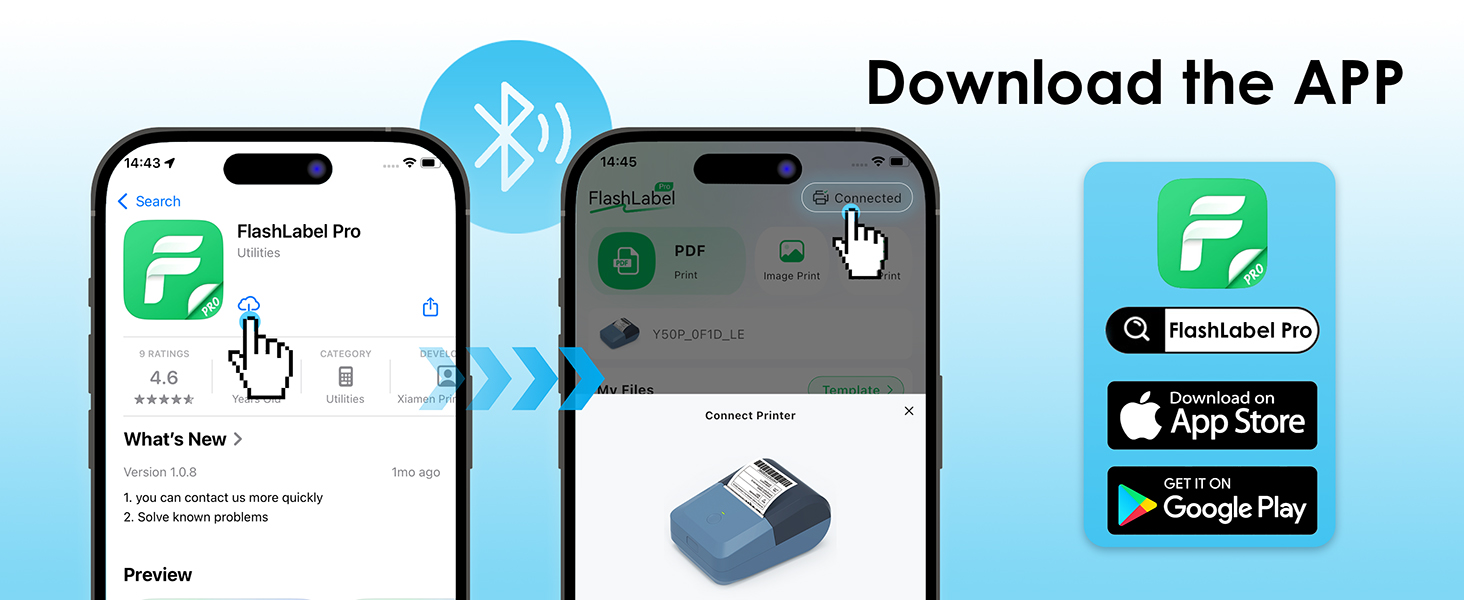
Figure 3: Steps to download and connect the FlashLabel Pro app.

Figure 4: Bluetooth and USB connection options for the label maker.
3.2. USB Cable Connectivity (for macOS and Windows)
For macOS and Windows (7 and above) users:
- Connect the label maker to your computer using the provided USB Type-C cable.
- Drivers must be installed on your operating system for proper functionality. Please refer to the official KNAON website or the support section for driver downloads and installation guides.
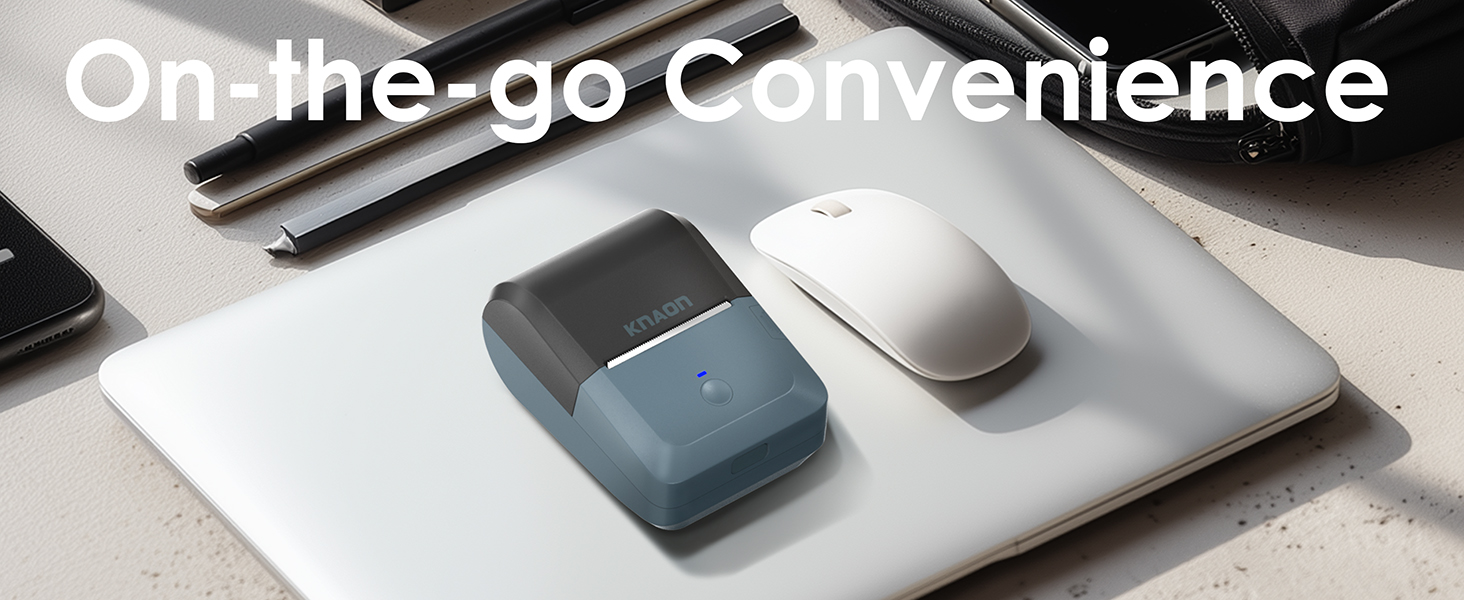
Figure 5: USB cable connection for macOS and Windows.
작동 지침
1. Designing Labels with 'FlashLabel Pro' App
The 'FlashLabel Pro' app provides extensive customization options for your labels:
- After connecting your printer, tap the "+" icon to create a new label.
- Choose the appropriate label size that matches your loaded label roll (e.g., 50x30mm).
- Utilize the app's features to design your label:
- Access over 3,000 pre-designed templates.
- Select from over 5,000 icons.
- Choose from over 100 fonts.
- Add text, barcodes, QR codes, images, and other elements.
- Double-click on elements to edit their content and properties.
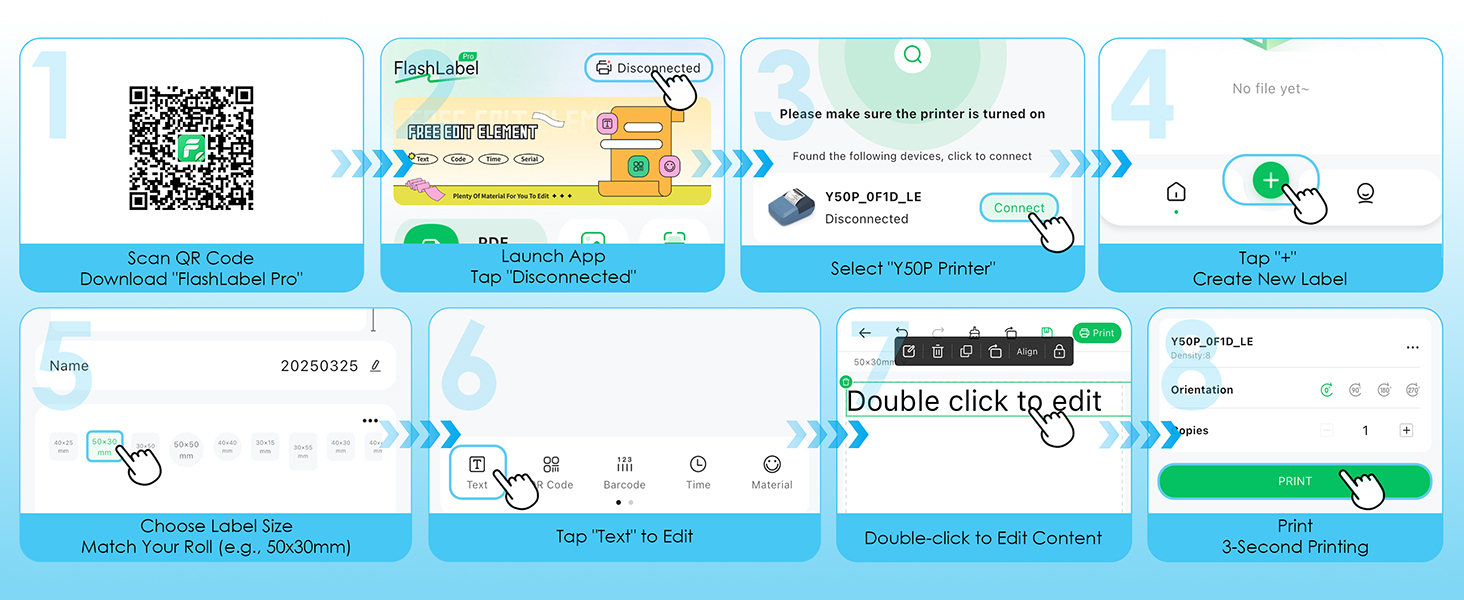
Figure 6: Step-by-step guide for designing and printing labels using the FlashLabel Pro app.
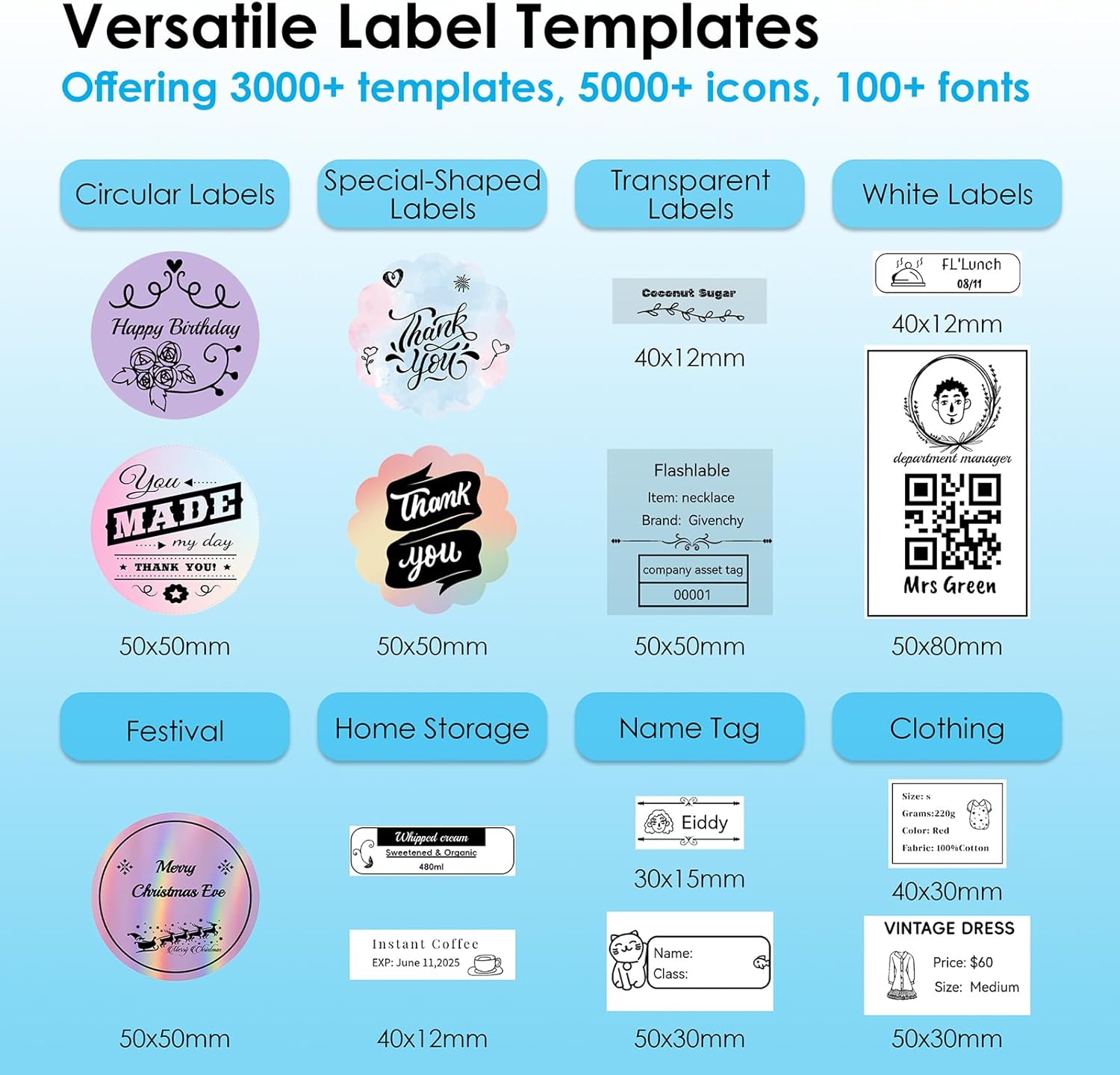
그림 7: 예amples of versatile label templates available in the app.
2. 라벨 인쇄
Once your design is complete, tap the "Print" button in the app. The printer will quickly produce your label.

Figure 8: The four-step process from app to print.
3. Supported Label Sizes and Applications
The KNAON Y50P supports various thermal paper sizes, ranging from 0.6 to 2.2 inches (15-58mm) in width. This versatility makes it suitable for a wide range of labeling needs, including:
- 가정용 수납공간: Organizing pantry items, containers, and storage bins.
- 이름 Tags: Creating personalized name tags for events or personal items.
- 가격 Tags: Generating price labels for retail or small business products.
- Shipping Labels: Printing small shipping or return labels.
- DIY Barcode Labels: Customizing labels with barcodes for inventory.
- Thank-You Labels: Adding a personal touch to packages or gifts.

Figure 9: Versatile applications of the KNAON Y50P Label Maker.

Figure 10: The compact size of the label maker allows for easy portability.
유지
Regular maintenance ensures the longevity and optimal performance of your KNAON Y50P Label Maker.
1. 프린트 헤드 청소
The thermal print head can accumulate dust or residue over time, affecting print quality. To clean it:
- Turn off the label maker and disconnect it from any power source.
- Open the top cover and carefully locate the print head (the dark strip across which the paper feeds).
- 면봉으로 프린트 헤드를 부드럽게 닦아주세요.amp이소프로필 알코올로 닦아주세요. 완전히 건조시킨 후 뚜껑을 닫고 다시 사용하세요.
- Avoid touching the print head with bare hands as oils can transfer and affect printing.
2. 배터리 관리
배터리 수명을 최대화하려면:
- 배터리를 자주 완전히 방전시키지 마세요.
- 장기간 사용하지 않을 때는 기기를 서늘하고 건조한 곳에 보관하세요.
- 배터리 성능을 유지하려면 자주 사용하지 않더라도 정기적으로 기기를 충전하세요.
문제 해결
If you encounter issues with your KNAON Y50P Label Maker, refer to the common problems and solutions below.
| 문제 | 가능한 원인 | 해결책 |
|---|---|---|
| 프린터가 블루투스로 연결되지 않습니다. | Incorrect connection method; Bluetooth off; app not recognizing device. | Ensure you are connecting through the 'FlashLabel Pro' app, not directly via phone settings. Verify Bluetooth is enabled on both devices. Restart the app and printer. |
| Poor print quality (faint, streaky, or incomplete print). | Dirty print head; incorrect label roll insertion; low battery. | Clean the print head as described in the Maintenance section. Re-insert the label roll correctly, ensuring the printing surface faces up. Charge the printer fully. |
| Labels are tilted or misaligned. | Label roll not properly aligned with guides. | Open the cover and ensure the label roll is seated firmly and straight within the paper guides. Adjust if necessary. |
| 프린터가 응답하지 않습니다. | 배터리가 부족하여 기기가 멈췄습니다. | Charge the printer. If unresponsive, try resetting by holding the power button for 10 seconds or until it powers off, then restart. |
| Cannot print via USB on computer. | 드라이버가 설치되지 않았거나 오래되었습니다. | Ensure the correct drivers for your operating system (macOS/Windows) are installed. Visit the KNAON support web최신 드라이버 사이트. |
For further assistance, including instructional guides and troubleshooting videos, please visit the official KNAON support resources.
명세서
Key technical specifications for the KNAON Y50P Portable Thermal Label Maker:
| 특징 | 세부 사항 |
|---|---|
| 모델명 | Y50P-BK |
| 제품 치수 | 4.76인치 깊이 x 3.35인치 너비 x 2.3인치 높이 |
| 품목 무게 | 8.6 온스(약 0.54파운드) |
| 연결 기술 | 블루투스, USB |
| 인쇄 기술 | 열의 |
| 프린터 출력 | 단색화 |
| 최대 흑백 인쇄 해상도 | 300dpi |
| 최대 복사 속도(흑백) | 75ppm(XNUMXppm) |
| 최대 미디어 크기 | 1.97 x 1.18인치(50mm x 30mm) |
| 지원되는 레이블 너비 | 0.6~2.2인치(15~58mm) |
| 배터리 | 1200mAh 리튬이온(포함) |
| 포함된 구성 요소 | Y50P Label Maker, Label Tape, User Manual, USB Type-C Cable |
보증 및 지원
The KNAON Y50P Portable Thermal Label Maker comes with a limited warranty. For details regarding the warranty period and coverage, please refer to the warranty information provided with your product packaging or contact KNAON customer support.
KNAON is committed to providing a seamless user experience. For additional support, including printer drivers, instructional guides, and troubleshooting videos, please visit the official KNAON website or contact their customer service team. You can also visit the KNAON Store on Amazon 자세한 제품 정보와 지원 리소스를 확인하세요.
Ask a question about this manual
Ask about setup, troubleshooting, compatibility, parts, safety, or missing instructions. Manuals+ will review the question and use this page’s manual context to help answer it.