
1. 서론
This manual provides essential information for the assembly, operation, maintenance, and troubleshooting of your Hbada E2 Ergonomic Office Chair. Please read these instructions carefully before use to ensure proper function and longevity of your chair.

Figure 1: Hbada E2 Ergonomic Office Chair, side view.
2. 안전 정보
- 항상 조립 지침을 주의 깊게 따르세요.
- Keep the chair away from direct heat sources to prevent material damage.
- Do not exceed the maximum weight capacity of the chair. Refer to specifications for details.
- Ensure all screws and connections are tightened securely before use and periodically check for looseness.
- 평평하고 안정적인 표면 위에서 의자를 사용하세요.
3. 설치 및 조립
Assembly is required for this product. Detailed step-by-step assembly instructions and all necessary tools are included in the product packaging. Please refer to the separate assembly guide for a complete walkthrough. Ensure all components are present before beginning assembly.

Figure 2: Hbada E2 Ergonomic Office Chair, front view 조립된 제품의 모습입니다.
4. 작동 지침 (조정)
The Hbada E2 chair offers multiple adjustment features to customize your seating experience for optimal comfort and support.
4.1. 헤드레스트 조절
The 3D adjustable headrest can be positioned to support your neck and head effectively.
- 수직 조정: Adjust the headrest up or down by up to 10 cm.
- Forward and Backward Adjustment: Move the headrest forward or backward by up to 3 cm.
- 회전: Rotate the headrest up to 60 degrees to find your preferred angle.

Figure 3: Headrest adjustment capabilities.
4.2. 요추 지지대 조정
The 6-way adjustable lumbar support provides comprehensive lower back protection.
- Forward and Backward Adjustment: Adjust the lumbar support in 3 levels.
- 수직 조정: Move the lumbar support up or down.
- Left-Right Suspension: The floating structure adapts to your movements.

Figure 4: Lumbar support dynamic adjustment features.
4.3. 팔걸이 조정
The 3D armrests can be adjusted to provide optimal elbow support.
- 높이 조정: Adjust armrest height by up to 7.5 cm.
- Forward and Backward Adjustment: Move armrests forward or backward by up to 5 cm.
- 회전: Rotate armrests 40 degrees left and right.

Figure 5: Armrest adjustment options.
4.4. Recline Function and Locking
The chair features a reclining function with three lockable tilt angles.
- Recline up to 135 degrees.
- Lockable angles for 90° (comfortable office), 115° (leisure and entertainment), and 138° (short nap).

Figure 6: Three-level locking recline positions.
4.5. Wired Control Adjustment
The aluminum alloy wired control allows for easy adjustment without bending down.
- Simply toggle the adjuster for one-touch operation of chair functions.

Figure 7: Wired control for easy adjustments.
5. 유지관리
Regular maintenance ensures the longevity and optimal performance of your Hbada E2 chair.
- 청소: For the mesh fabric, gently wipe with a damp cloth and mild soap. Avoid harsh chemicals. For the frame, use a soft, dry cloth.
- 점검: 정기적으로 모든 나사와 볼트가 단단히 조여져 있는지 확인하십시오. 필요한 경우 다시 조이십시오.
- 캐스터 : 바퀴에 머리카락이나 이물질이 끼지 않도록 하여 원활한 움직임을 유지하십시오.
- 과부하를 피하세요: Do not place excessive weight on the chair or armrests beyond the specified capacity.
6. 문제 해결
If you encounter any issues with your Hbada E2 chair, please refer to the following common solutions:
- 의자 삐걱거리는 소리: Check and tighten all assembly bolts. A small amount of silicone spray on moving parts may help, but avoid contact with mesh or upholstery.
- Chair Not Adjusting: Ensure no obstructions are blocking the adjustment mechanisms. Verify that the wired control is functioning correctly.
- 캐스터가 원활하게 굴러가지 않음: Clean any debris from the caster wheels. Ensure they are properly inserted into the chair base.
- Gas Lift Issues: 의자 높이가 고정되지 않으면 가스 리프트를 교체해야 할 수 있습니다. 고객 지원팀에 문의하십시오.
For persistent issues or concerns not addressed here, please contact Hbada customer support.
7. 사양
| 특징 | 세부 사항 |
|---|---|
| 상표 | 흐바다 |
| 모델명 | E2 |
| 색상 | 하얀색 |
| 제품 크기(D x W x H) | 30.51인치 깊이 x 22.24인치 너비 x 18.11인치 높이 |
| 재료 | Alloy Steel (Frame), Mesh (Back, Seat), Foam (Fill) |
| 백 스타일 | 망사 |
| 팔 스타일 | 3D 조절 가능 |
| 리클라이닝 포지션 카운트 | 3 |
| 포함된 구성 요소 | 팔걸이, 쿠션 |
| 표면 추천 | 단단한 바닥, 카펫 |
| 제조업체 | 흐바다 |
| 첫 번째 이용 가능 날짜 | 18년 2024월 XNUMX일 |
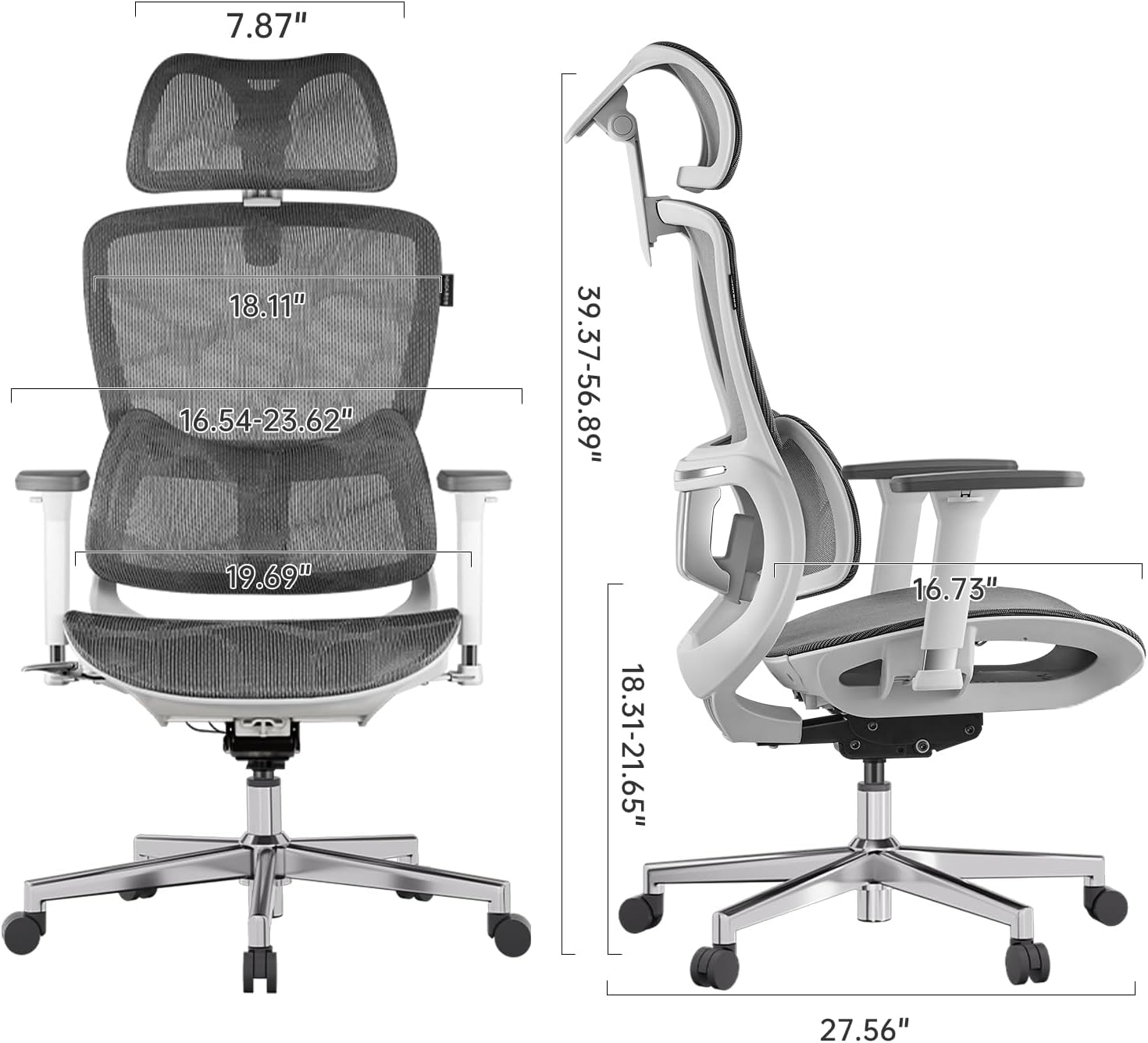
Figure 8: Detailed dimensions of the Hbada E2 Office Chair.
8. 보증 및 지원
Hbada is committed to providing high-quality products and customer satisfaction.
8.1. 반품 정책
이 제품은 구매일로부터 30일 이내에 반품이 가능하며, 반품 정책은 판매처에 따릅니다.
8.2. 보호 계획
표준 보증 기간을 넘어 보장 범위를 확대할 수 있는 선택적 보호 플랜을 구매하실 수 있습니다.
- 2년 보호 계획: 44.99달러를 일회성으로 결제하시면 됩니다.
- 3년 보호 계획: 56.99달러를 일회성으로 결제하시면 됩니다.
- 완벽한 보호: Monthly billing of $16.99, covering eligible past and future purchases.
These plans offer additional coverage and are separate from any manufacturer's warranty.
8.3. 고객 지원
For product inquiries, assembly assistance, or warranty claims, please visit the official Hbada store or contact their customer service directly.

Figure 9: Hbada's commitment to customer service.
방문하세요 흐바다 스토어 자세한 내용은.