
1. 서론
The MT-VIKI 16X16 4K HDMI Matrix Switch is designed to route up to 16 4K HDR HDMI sources to 16 4K HDR display devices. This versatile device allows all outputs to mirror the same signal or independently route unique input signals to each display, creating a fully customized HDMI routing matrix. It supports resolutions up to 4K (3840x2160) at 30Hz and features 8KV ESD protection. Control options include buttons, IR remote, RS232, LAN port, and a WEB GUI.
비디오: 끝view of MT-VIKI HDMI Matrix Switch Series, including 4x4, 8x8, and 16x16 models, highlighting their functionality as both splitters and switchers for multiple audio and video sources.
2. 패키지 내용
패키지에 모든 품목이 들어 있는지 확인하세요.
- 1x HDMI Matrix Switch 16X16
- 1x RS232 케이블
- 1x IR 원격 제어
- 랙 이어 1쌍 및 나사
- 전원 케이블 및 어댑터 1개
- 1x 사용자 설명서

Image: Visual representation of the MT-VIKI 16X16 HDMI Matrix Switch and its included accessories, such as the power adapter, RS232 cable, IR remote, and user manual.
3. 제품 오버view
The MT-VIKI 16X16 HDMI Matrix Switch is a professional-grade device designed for robust audio and video distribution. It features a durable metal chassis suitable for 2U 19-inch rack mounting, with an acrylic crystal button and LED backlit display for clear status indication.
주요 특징:
- 4K 해상도: Supports up to 4K (3840x2160) at 30Hz.
- 오디오 지원 : Supports PCM, Dolby AC3, DTS5.1, DTS7.1, and DSD audio formats. Features 3.5mm stereo audio extraction (switch to OUT16 for this function).
- 제어 옵션: Front panel buttons, IR remote control, RS232, LAN port, and WEB GUI.
- EDID 관리: Advanced EDID settings for optimal display compatibility.
- 랙 장착 가능: Designed for standard 2U 19-inch cabinets/racks.

이미지: 앞면 view of the MT-VIKI 16X16 4K HDMI Matrix Switch, showing the system monitor, power button, input/output selection buttons, and control buttons.
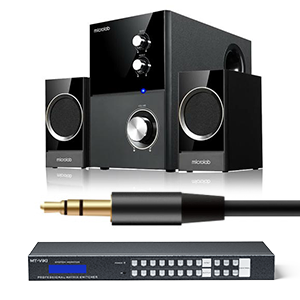
Image: The MT-VIKI HDMI Matrix Switch connected to a 3.5mm speaker system, illustrating its stereo audio extraction capability.
4. 설정
Follow these steps to set up your MT-VIKI 16X16 HDMI Matrix Switch:
- 전원 연결: Connect the provided power adapter to the DC 12V port on the rear panel of the matrix switch and then to a power outlet.
- 입력 장치: Connect your HDMI source devices (e.g., gaming console, laptop, Blu-ray player, PC) to the HDMI INPUT ports (IN1-IN16) on the rear panel using high-quality HDMI 1.4 cables.
- Output Displays: Connect your HDMI display devices (e.g., TV, monitor, projector, LED screen) to the HDMI OUTPUT ports (OUT1-OUT16) on the rear panel.
- 오디오 출력(선택 사항): For 3.5mm stereo audio extraction, ensure your audio device is connected to the 3.5mm audio output port and switch to OUT16 on the matrix.
- 제어 연결(선택 사항):
- RS232 : Connect the RS232 cable to the RS232 IN port for serial control.
- LAN : 네트워크 제어를 위해 이더넷 케이블을 LAN 포트에 연결하십시오. WEB GUI 또는 MatrixController 소프트웨어.
- IR 리모트: Ensure the IR remote has batteries and is pointed towards the IR sensor on the front panel.
- 전원 켜기: Turn on the matrix switch using the power button on the front panel.

Image: A detailed diagram illustrating how to connect various input devices (set-top box, PC, laptop, Blu-ray, decoder) to the HDMI input ports and output devices (TV, monitor, projector, LED screen) to the HDMI output ports of the MT-VIKI 16X16 HDMI Matrix Switch, including audio and LAN connections.
5. 사용 설명서
The MT-VIKI 16X16 HDMI Matrix Switch offers multiple ways to control your video and audio routing.
5.1 스위칭 모드
매트릭스 스위치는 다양한 디스플레이 구성을 지원합니다.
- 스플리터 모드: 모든 디스플레이 출력은 동일한 입력 소스를 공유합니다.
- 매트릭스 및 스플리터 모드: A portion of the displays share a common input source, while others can be independently assigned.
- 매트릭스 모드: 각 디스플레이는 독립적인 입력 소스를 선택할 수 있습니다.
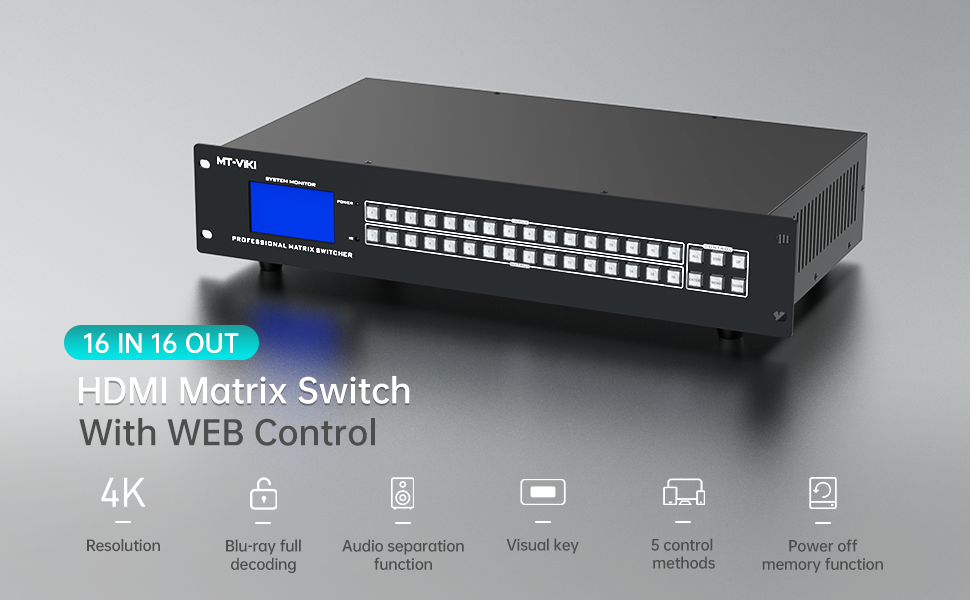
Image: Illustrates three display modes: splitter mode (all displays show the same input), matrix & splitter mode (some displays share an input, others are independent), and matrix mode (each display has a unique input).
Video: Demonstrates the multiple display modes available for the 16x16 HDMI matrix switch, including one-to-all, one-to-one, and mixed switching configurations.
5.2 제어 방법
You can control the matrix switch using the following methods:
- 전면 패널 버튼: Directly select inputs and outputs using the physical buttons on the device.
- IR 원격 제어 : Use the included IR remote for convenient wireless control.
- RS232 제어: Connect to a computer via RS232 for command-line control.
- LAN Port / WEB 그래픽 사용자 인터페이스: 장치의 web-based graphical user interface via the LAN port for remote control from any computer on the network.

Image: Displays the five control methods for the MT-VIKI HDMI Matrix Switch: IR remote control, front panel buttons, LAN control, RS232, and Web 제어.
5.3 EDID 설정
EDID (Extended Display Identification Data) settings are crucial for ensuring optimal display compatibility and resolution. The matrix switch allows you to adjust EDID modes to match your display's capabilities.
Video: Instructions on how to set EDID for the MT-VIKI HDMI Matrix Switch to achieve the best display output.
5.4 Beep Sound Control
You can enable or disable the beep sound that occurs when pressing buttons on the matrix switch.
Video: A short guide on how to turn the beep sound on or off on the MT-VIKI HDMI Matrix Switch.
5.5 Setting 1080p Resolution
For specific scenarios, you may need to manually set the output resolution to 1080p, especially with 8x8 and 16x16 HDMI matrix switches.
Video: Tutorial on how to set the 1080p resolution for 8x8 and 16x16 HDMI matrix switches.
6. 유지관리
To ensure the longevity and optimal performance of your MT-VIKI 16X16 HDMI Matrix Switch, follow these maintenance guidelines:
- 기기를 시원하고 건조하며 통풍이 잘 되는 곳에 보관하세요.
- 기기를 직사광선, 고온 또는 과도한 습기에 노출시키지 마십시오.
- 기기 외부를 부드럽고 마른 천으로 닦으십시오. 액체 또는 에어로졸 세척제를 사용하지 마십시오.
- 모든 케이블 연결부가 단단히 고정되어 있고 손상되지 않았는지 확인하십시오.
- 제조업체에서 제공하는 펌웨어 업데이트가 있는지 주기적으로 확인하십시오. web최상의 성능과 호환성을 보장하기 위해 사이트를 최적화합니다.
7. 문제 해결
If you encounter issues with your MT-VIKI 16X16 HDMI Matrix Switch, refer to the following common troubleshooting tips:
- No Display / Signal Loss:
- 모든 HDMI 케이블 연결을 확인하세요. 케이블이 단단히 꽂혀 있는지 확인하세요.
- 입력 소스에 전원이 공급되고 신호가 출력되는지 확인하십시오.
- Adjust EDID settings to match the display's capabilities (refer to Section 5.3).
- Ensure HDMI cables are of high quality and appropriate length for 4K signals. Long or low-quality cables can cause signal degradation.
- Snowflake / Moire / Flickering:
- These issues often indicate signal interference or degradation. Try using shorter, higher-quality HDMI cables.
- 연결된 모든 장비의 접지 상태를 확인하십시오.
- Adjust the PE (Pre-Emphasis) setting on the matrix switch if available, as suggested in the video below, to compensate for long cable runs.
- 오디오 없음:
- Ensure the audio output is correctly selected (e.g., OUT16 for 3.5mm stereo).
- Check audio settings on both the source device and the display/audio receiver.
- Network Control Issues:
- Verify the LAN cable connection.
- Ensure the matrix switch and your control device are on the same network.
- Check the IP address configuration of the matrix switch.
Video: Provides solutions for common display issues such as no display, long cable problems, snowflake effects, and moire patterns.
8. 사양
| 특징 | 세부 사항 |
|---|---|
| 상표 | MT-비키 |
| 모델 | 16x16 4K30Hz |
| 해결 지원 | Up to 4K (3840x2160) @30Hz |
| ESD 보호 | 8KV |
| 오디오 포맷 | PCM, 돌비 AC3, DTS5.1, DTS7.1, DSD |
| 제어 방법 | Buttons, IR Remote, RS232, LAN Port, WEB 그래픽 사용자 인터페이스(GUI) |
| 랙 마운트 | 2U 19인치 표준 랙 |
| 품목 무게 | 11.73파운드 |
| 패키지 크기 | 22 x 14 x 8 인치 |
| 색상 | 검은색 |
| 커넥터 유형 | HDMI |
| 호환 장치 | Gaming Console, Laptop, Monitor, Personal Computer, Projector, Tablet, Television |
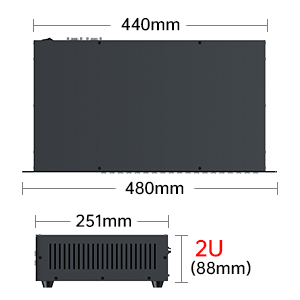
Image: Diagram showing the dimensions of the MT-VIKI HDMI Matrix Switch, indicating a width of 440mm (480mm with rack ears) and a height of 2U (88mm).
9. 보증 및 지원
For warranty information and technical support, please refer to the documentation included with your product or visit the official MT-VIKI website. Contact information for customer service is typically provided in the user manual.


