
1. 서론
This manual provides essential information for the safe and effective operation of your MATRIX APS-4000B Programmable Bench AC Power Supply. The APS-4000B is a single-phase SPWM variable frequency AC power source designed for precise control of AC voltage, current, and frequency. It features a 700VA capacity, with output ranges of 0-150V/0-6A or 0-300V/0-3A, and a frequency range of 45-250Hz. Please read this manual thoroughly before use and retain it for future reference.
2. 안전 정보
부상과 기기 손상을 방지하기 위해 항상 다음 안전 예방 조치를 준수하세요.
- 접지: Ensure the power supply is properly grounded to prevent electric shock.
- 전원: Connect the unit to an AC power source within the specified voltage and frequency range (99-121 Vac, 47-63Hz).
- 통풍: Do not block the ventilation openings. Ensure adequate airflow around the unit to prevent overheating.
- 환경: Operate the power supply in a dry environment, away from moisture, dust, and corrosive gases.
- 서비스: 모든 서비스는 자격을 갖춘 전문가에게 의뢰하십시오. 제품을 직접 열거나 수리하려고 시도하지 마십시오.
- 출력 연결: Ensure all output connections are secure before applying power.
3. 제품 특징
- 출력 사양: Low range 0-150V/0-6A/0-700VA, High range: 0-300V/0-3A/0-700VA.
- 입력: Single phase 99-121 Vac, 47-63Hz.
- 해결: 0.1V/10mA.
- 빈도: 45-250Hz, step 0.1Hz.
- 인터페이스: RS232C for remote control.
- PC 소프트웨어 : Free APS-4000 Series PC software provided for remote control via RS-232C.
- 높은 신뢰성: Utilizes advanced Direct Digital Frequency Synthesizer (DDS) waveform for high frequency stability and accurate measurements.
- Intelligent Analyzing Function: Automatically identifies failure causes and displays error codes.
- 소프트 스타트 기능: Prevents damage from instantaneous impulse current during power-on.
- 단축키: Customizable shortcuts for 110V, 220V, 50Hz, 60Hz.
- Measuring Function: 표시량tage, current, frequency, power, and power factor.
- 메모리 기능: Five sets of memory (M1-M5) to store commonly used voltage and frequency settings for quick recall.
- 키 잠금 기능: Prevents inadvertent changes to settings.
- 사용자 인터페이스: Push-down infinite coding knob switch for adjustments, 4-window 5-digit display.
- 격리: Input and output are isolated for safety.
4. 패키지 내용
The package for the MATRIX APS-4000B Programmable AC Power Supply includes:
- 1 x MATRIX APS-4000B Programmable AC Power Supply
- 1 x RS-232C Cable
- 1 X 전원 코드
- 1 x 사용자 매뉴얼(이 문서)
5. 설정
전원 공급 장치를 설정하려면 다음 단계를 따르세요.
- 짐 풀기: 전원 공급 장치와 모든 액세서리를 포장에서 조심스럽게 꺼내세요. 손상 흔적이 있는지 살펴보세요.
- 놓기: Place the unit on a stable, level surface with adequate ventilation space around it. Ensure the heat dissipation holes are not obstructed.
- 접지: Connect the ground terminal on the rear panel to a reliable earth ground using an appropriate wire.
- AC 입력 연결: Connect the provided power cord to the AC Input outlet on the rear panel and then to a suitable grounded AC power source.
- 부하 연결: Connect your load to the Output jack on the rear panel. Ensure connections are secure and correct polarity is observed if applicable.
- RS-232C Connection (Optional): If using PC control, connect the RS-232C cable from the power supply's RS-232 port to your computer. Install the provided PC software.

그림 5.1: 후면 패널 연결
This image displays the rear panel connections of the power supply. Key components include the RS-232 serial port for PC communication, a heat dissipation fan, the main AC output jack, a fuse protection cover, a ground terminal for safety, and the AC input power outlet.
6. 사용 설명서
This section details the basic operation of the MATRIX APS-4000B.

그림 6.1: 전면 패널view
The front panel features a multi-window digital display for voltage, current, power, and frequency. It includes control knobs for adjustment, various function buttons for settings and shortcuts, and the main power switch.
- 전원 켜기/끄기: Press the main POWER switch on the front panel to turn the unit on or off.
- Setting Output Parameters:
- Use the push-down infinite coding knob switch to navigate through the display parameters (Voltage, Current, Frequency).
- Press the knob to select a parameter, then rotate it to adjust the value. Press again to confirm or move to the next digit.
- The 4-window 5-digit display shows the set and measured values.
- 단축키: Utilize the dedicated shortcut buttons for quick setting of common voltages (110V, 220V) and frequencies (50Hz, 60Hz). These can be self-assembled/configured.
- 메모리 기능(M1-M5): The unit allows storing up to five sets of frequently used voltage (V) and frequency (F) settings. Refer to the detailed programming manual for saving and recalling these settings with a single key.
- 키 잠금 기능: To prevent accidental changes to settings, activate the Key LOCK function. This will disable the front panel controls. Refer to the display for 'LocH' status.
- 소프트 스타트 기능: The power supply incorporates a soft start function to protect both the unit and the load from sudden current surges upon activation.
- Measuring Function: The display provides real-time measurements of voltage (Vrms), current (Arms), frequency (Fre), power (Wattage), and power factor (PF).
- PC 소프트웨어 제어: For advanced control and automation, use the provided PC software. Connect via the RS-232C interface. The software supports commands in ASCII and HEX codes.
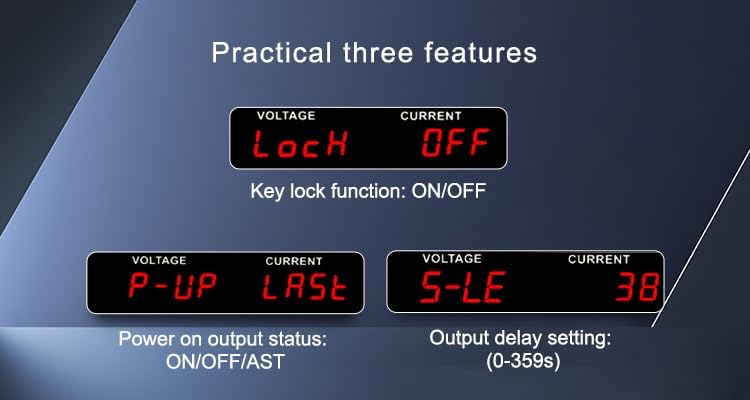
Figure 6.2: Practical Features Display
This image shows three practical features on the display: 'LocH' for Key Lock function (ON/OFF), 'P-UP' for Power On Output Status (ON/OFF/AST), and 'S-LE' for Output Delay Setting (0-359 seconds).
Video 6.3: APS-4000 Series Programmable AC Power Supplies Demonstration
This video provides a visual demonstration of the MATRIX APS-4000 Series Programmable AC Power Supplies, showcasing its features and operational aspects.
7. 유지관리
Proper maintenance ensures the longevity and reliable operation of your power supply:
- 청소: 제품 외부를 부드럽고 마른 천으로 정기적으로 닦아주십시오. 연마성 세제나 용제를 사용하지 마십시오.
- 통풍: Keep the heat dissipation holes clear of dust and debris. Use compressed air to gently clean the fan area if necessary.
- 저장: When not in use for extended periods, store the power supply in a cool, dry place, protected from extreme temperatures and humidity.
- 퓨즈 교체: If the fuse blows, replace it only with a fuse of the same type and rating as specified in the specifications. Ensure the unit is disconnected from the main power before replacing the fuse.
8. 문제 해결
이 섹션에서는 일반적인 문제에 대한 해결 방법을 안내합니다. 복잡한 문제의 경우 기술 지원팀에 문의하십시오.
- 전원 없음: Check the power cord connection, the main power switch, and the fuse on the rear panel. Ensure the AC input voltage는 지정된 범위 내에 있습니다.
- 출력 없음: Verify that the output is enabled. Check for any active protection mechanisms (e.g., overcurrent, overload).
- 과전류 보호: If the load current exceeds the set limit, the output will be turned off, and an audible/visual alarm will activate. Reduce the load or increase the current limit if appropriate.

Figure 8.1: Overcurrent Protection Display
This image illustrates the power supply's display indicating an 'Overcurrent protection' status. When the load current exceeds the set limit, the output is automatically turned off, and an audible and visual alarm is activated.
- Intelligent Analyzing Function: The unit can automatically diagnose certain failures and display corresponding error codes. Consult the detailed programming manual for a list of error codes and their meanings.
- 부정확한 판독: Ensure proper connections and calibration. If issues persist, contact support.
9. 사양
Detailed technical specifications for the MATRIX APS-4000B (700VA) model:

Figure 9.1: APS-4000 Series Specifications Overview
This table provides detailed technical specifications for the APS-4000 series, comparing models A, B, and C. It covers parameters such as capacity (VA), working mode, input and output voltage/current ranges, frequency, resolution, communication interface, protection features, and physical dimensions. Refer to the 'APS4000B' column for this specific model.
| 매개변수 | Value (APS-4000B) |
|---|---|
| 모델명 | APS-4000B |
| 상표 | 행렬 |
| 출력 와트tage | 700 와트 |
| 냉각 방식 | 공기 |
| 품목 치수(L x W x H) | 14.6 x 17 x 6 인치 |
| 품목 무게 | 41 파운드 |
| 제조업체 | 매트릭스 테크놀로지 주식회사 |
| 제조 부품 번호 | APS-4000B-110VIN |
| 내장 미디어 | Programmable AC Power Supply, RS-232 cable |
| 입력 단계 | Single Phase (1∅2W) |
| 입력 Voltage | 99-121VAC |
| 입력 주파수 | 47~63Hz |
| 출력 볼륨tag및 범위 | 0-150VAC / 0-300VAC (Auto) |
| Output Current (L=120V) | 6A |
| Output Current (H=240V) | 3A |
| 출력 주파수 범위 | 45-250Hz (0.1 Step) |
| 권tage 해상도 | 0.1V |
| 현재 해상도 | 10mA |
| 주파수 분해능 | 0.1Hz |
| 통신 인터페이스 | RS-232C |
| 운영 환경 | 0-40℃, 20-80% RH |
10. 보증 및 지원
보증: The MATRIX APS-4000B Programmable Bench AC Power Supply comes with a 3-year warranty from the date of purchase. This warranty covers defects in materials and workmanship under normal use.
지원하다: For technical assistance, troubleshooting, or warranty claims, please contact MATRIX TECHNOLOGY INC. OFFICIAL STORE. Our dedicated support team is available to provide assistance and ensure your satisfaction with MATRIX products.


