
Phanteks M25-140 Gen2
Phanteks M25-140 Gen2 Triple Pack 140mm ARGB High Performance Cooling Fans
사용 설명서
1. 서론
This manual provides comprehensive instructions for the installation, operation, and maintenance of your Phanteks M25-140 Gen2 Triple Pack ARGB High Performance Cooling Fans. Please read this manual thoroughly before installation to ensure proper setup and optimal performance. These fans are designed for efficient thermal management in computer systems, featuring daisy-chain connectivity, integrated D-RGB lighting, and a single cable solution for simplified management.
2. 패키지 내용
- 3x Phanteks M25-140 Gen2 Fans
- 팬 나사
- 설치 가이드(본 문서)
3. 주요 특징
- Daisy-Chain Unified Fan Design: Connect multiple fans easily for a streamlined setup and reduced cable clutter.
- Single Cable Solution (Linq6): Consolidates both fan power (PWM) and lighting controls (D-RGB) into one cable for a cleaner build.
- 통합 D-RGB 조명: Features smooth lighting on fan blades and an infinity mirror effect in the hub for aesthetic customization.
- 세련된 미학: Includes screw covers to provide a polished, professional appearance.
- Versatile Airflow Options: Available in regular and reverse airflow models to optimize system configuration.
- High Cooling Performance: Engineered for effective cooling on radiators and heat sinks.
4. 안전 정보
- 설치하기 전에 컴퓨터 시스템의 전원이 꺼져 있고 벽면 콘센트에서 플러그가 뽑혀 있는지 확인하십시오.
- 손상을 방지하기 위해 구성 요소를 조심스럽게 다루십시오.
- Refer to your motherboard manual for specific fan header locations and D-RGB connection instructions.
- Do not force connectors; ensure proper alignment before plugging in.
- 작은 부품은 어린이의 손이 닿지 않는 곳에 보관하세요.
5. 설정 및 설치
5.1. 시스템을 준비하세요
Before beginning installation, ensure your computer is completely powered down and disconnected from the power supply. Open your PC case to access the fan mounting locations.
5.2. Daisy-Chain Connection
The M25-140 Gen2 fans feature a unified frame design allowing them to be daisy-chained together. Align the connectors on the side of each fan and gently push them together until they click into place. This creates a single block of fans, simplifying installation and cable management.
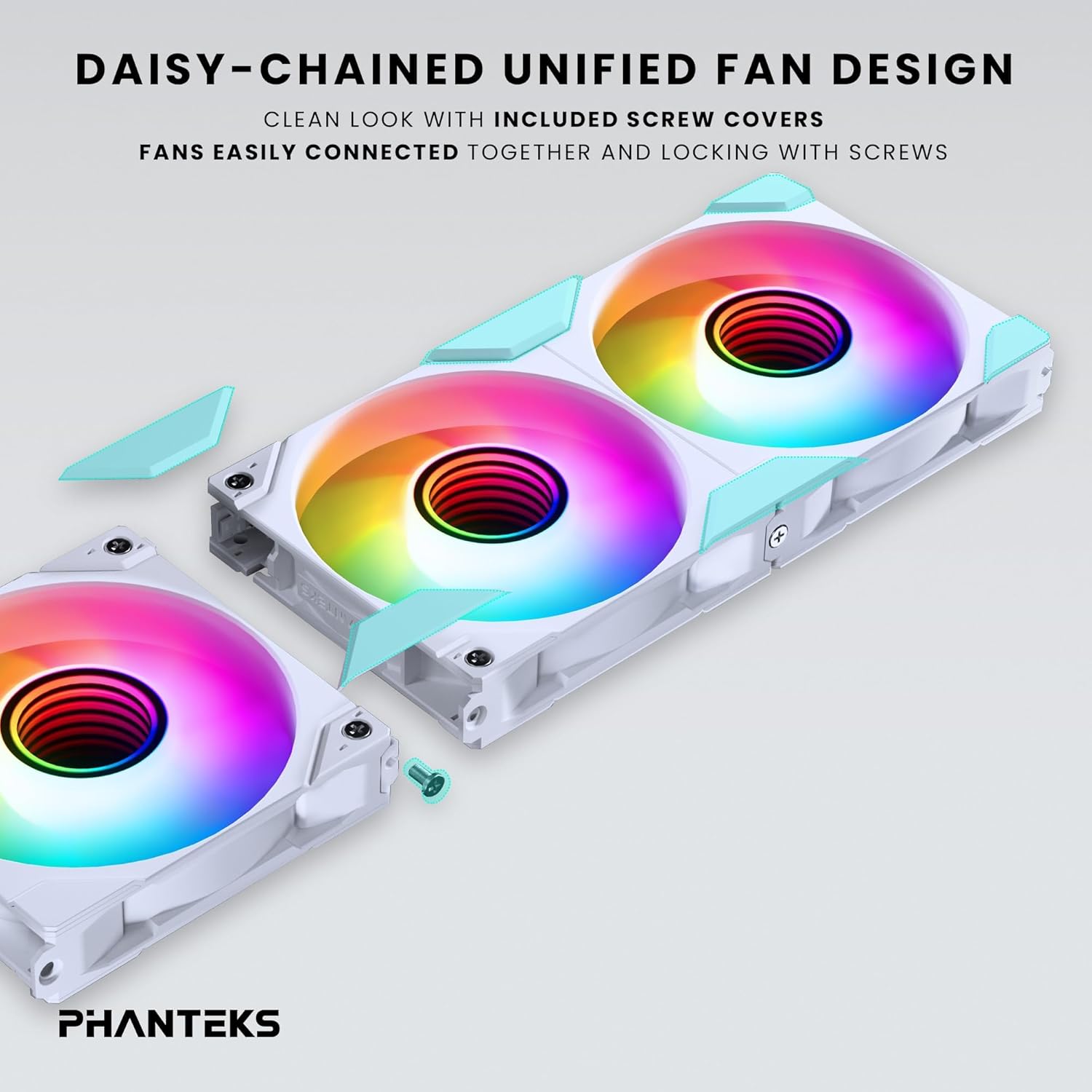
Image: Daisy-chaining Phanteks M25-140 Gen2 fans and applying screw covers.
5.3. Secure Fans
Mount the daisy-chained fan unit to your desired location (e.g., case front, top, or radiator) using the provided fan screws. Ensure the fans are securely fastened to prevent vibration. Once secured, attach the included screw covers for a clean, finished look.
5.4. Cable Connection (Linq6)
Connect the single Linq6 cable from the daisy-chained fan unit to a compatible fan/ARGB controller or motherboard header. This single cable manages both PWM fan speed control and D-RGB lighting. Refer to your motherboard or controller manual for specific connection points.

Image: Detail of the Linq6 single cable solution for fan and D-RGB control.
5.5. Airflow Configuration
The M25-140 Gen2 fans are available in regular and reversed airflow models. Ensure you install the correct fan type for your desired airflow direction. Regular fans pull air from the front to the rear, while reversed fans push air from the rear to the front.

Image: Diagram showing regular and reversed airflow directions for M25-140 Gen2 fans.
6. 운영
6.1. ARGB 조명 제어
Once connected, the D-RGB lighting can be controlled via your motherboard's RGB software (e.g., ASUS Aura Sync, MSI Mystic Light Sync, Gigabyte RGB Fusion 2.0, ASRock Polychrome Sync) or a compatible Phanteks D-RGB controller (e.g., NEXLINQ). Customize colors, effects, and brightness to match your system's aesthetic.

Image: Close-up of the integrated D-RGB lighting with infinity mirror effect in the fan hub.
6.2. 팬 속도 제어
The fan speed (PWM) is controlled through the same Linq6 cable. You can adjust fan curves and speeds via your motherboard's BIOS/UEFI settings or dedicated fan control software provided by your motherboard manufacturer. This allows for optimization between cooling performance and noise levels.
7. 유지관리
정기적인 유지보수는 팬의 최적 성능과 수명 연장을 보장합니다.
- 청소: Periodically clean the fan blades and frame to remove dust buildup. Use compressed air or a soft, dry cloth. Ensure the system is powered off before cleaning.
- 점검: 케이블에 마모나 손상 흔적이 있는지 확인하십시오. 모든 연결부가 단단히 고정되어 있는지 확인하십시오.
- Do not use liquid cleaners directly on the fans or electrical components.
8. 문제 해결
| 문제 | 가능한 원인 | 해결책 |
|---|---|---|
| 팬이 회전하지 않음 | Loose power connection, incorrect header, insufficient power. | Check Linq6 cable connection to motherboard/controller. Ensure power supply is adequate. Verify BIOS settings for fan headers. |
| ARGB 조명이 작동하지 않습니다 | Loose D-RGB connection, incompatible header, software issue. | Ensure Linq6 cable is properly connected to a 3-pin 5V D-RGB header (not 4-pin 12V RGB). Check motherboard RGB software settings. |
| 선풍기에서 이상한 소음이 납니다 | Obstruction, loose mounting, faulty fan. | Inspect for cables or debris obstructing fan blades. Tighten mounting screws. If noise persists, contact support. |
| Fans not detected by software | Incorrect connection, outdated software/drivers. | Verify Linq6 connection. Update motherboard BIOS and chipset drivers. Ensure RGB software is the latest version. |
9. 사양
| 특징 | 세부 사항 |
|---|---|
| 모델 | M25-140 Gen2 (PH-F140M25_G2_DWT01_3P) |
| 팬 크기 | 140mm x 140mm x 25mm |
| 회전 속도 | 최대 1800RPM |
| 기류 용량 | 101.78 분당 입방피트(CFM) |
| 소음 수준 | 36.4데시벨 |
| 전원 커넥터 유형 | 6-Pin (Linq6) |
| 권tage | 12V (Fan), 5V (ARGB) |
| 왓tage | 10 watts (total for pack) |
| 재료 | 폴리부틸렌 테레프탈레이트, 폴리카보네이트 |
| 호환 장치 | Desktop, Gaming PC, Server |
10. 보증 및 지원
Phanteks products are manufactured to the highest quality standards. This product comes with a limited warranty against defects in materials and workmanship. For specific warranty terms and conditions, please refer to the official Phanteks web사이트를 방문하거나 가까운 판매점에 문의하세요.
For technical support, troubleshooting assistance, or to inquire about replacement parts, please visit the official Phanteks support page: www.phanteks.com/support.html
Ask a question about this manual
Ask about setup, troubleshooting, compatibility, parts, safety, or missing instructions. Manuals+ will review the question and use this page’s manual context to help answer it.