소개
Thank you for choosing the Porodo Lifestyle 4K Digital Camera. This camera is designed to capture your world in stunning detail, offering 4K video recording and high-resolution 50MP images. With features like 16x digital zoom, a flip flash, and a 180° rotating screen, it is ideal for vlogging, photography, and various content creation needs. This manual provides essential information on setting up, operating, and maintaining your camera to ensure optimal performance and longevity.
안전 정보
- 카메라를 극한 온도, 직사광선 또는 높은 습도에 노출시키지 마십시오.
- 카메라를 떨어뜨리거나 강한 충격을 주지 마세요.
- Keep the camera away from water and liquids unless specifically designed for underwater use (this model is not).
- 카메라를 분해하거나 개조하지 마십시오. 그렇게 하면 보증이 무효화됩니다.
- 지정된 배터리 유형과 충전 방법만 사용하세요.
- 어린이의 손이 닿지 않는 곳에 보관하세요.
패키지 내용
다음 항목에 대한 상자를 체크해 주세요.
- Porodo Lifestyle 4K Digital Camera
- 충전식 배터리(650mAh)
- Type-C 충전 케이블
- 사용 설명서 (본 문서)
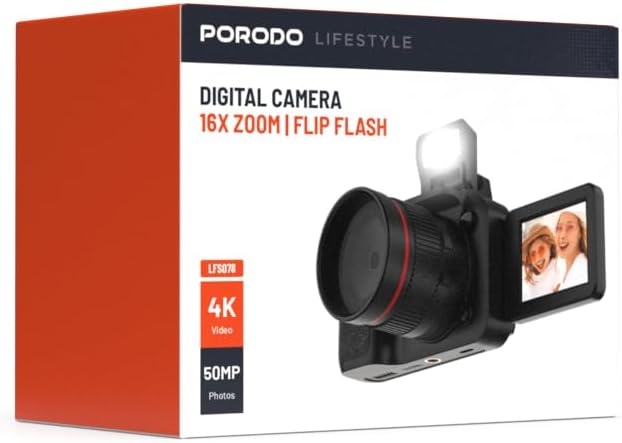
이미지: 앞면 view of the Porodo Lifestyle 4K Digital Camera retail box, showing the camera and key features.

이미지: 뒤로 view of the Porodo Lifestyle 4K Digital Camera retail box, displaying product specifications and features.
제품 끝view
Familiarize yourself with the various parts of your Porodo Lifestyle 4K Digital Camera.

Image: The Porodo Lifestyle 4K Digital Camera shown with its 180° rotating screen flipped open and the integrated flash extended upwards.
- 렌즈: 이미지와 비디오를 캡처하는 주요 광학 부품입니다.
- Flip Flash: 어두운 환경에서 추가적인 조명을 제공합니다.
- 180° Rotating Screen (2.2'' Display): 유연성을 허용합니다 viewing angles, ideal for vlogging and selfies.
- 전원 버튼: 카메라를 켜거나 끕니다.
- 셔터 버튼: 사진을 찍거나 비디오 녹화를 시작/중지합니다.
- 확대/축소 컨트롤: Adjusts the 16x digital zoom.
- 탐색 버튼: 메뉴 탐색 및 설정 조정을 위해.
- C 형 포트 : 충전 및 데이터 전송용입니다.
- 메모리 카드 슬롯: For inserting an SD card (not included).
설정
1. 배터리 설치 및 충전
- 카메라 하단에서 배터리 덮개를 찾으세요.
- 걸쇠를 밀어서 덮개를 엽니다.
- Insert the provided 650mAh battery, ensuring the contacts align correctly.
- 배터리함 덮개를 딸깍 소리가 나면서 단단히 고정될 때까지 닫으십시오.
- Connect the camera to a power source using the Type-C charging cable. The charging indicator will illuminate.
- A full charge takes approximately 2.5 hours. The indicator will change or turn off when charging is complete.
2. 메모리 카드 설치
A memory card (SD card, not included) is required to store photos and videos.
- 카메라 측면이나 하단에 있는 메모리 카드 슬롯을 찾으세요.
- Insert the SD card with the metal contacts facing the correct direction (refer to the diagram near the slot if available) until it clicks into place.
- 제거하려면 카드가 튀어나올 때까지 조심스럽게 밀어 넣으세요.
3. 초기 전원 켜기
- 화면이 켜질 때까지 전원 버튼을 몇 초간 길게 누르세요.
- Upon first use, you may be prompted to set the date and time. Use the navigation buttons to adjust and confirm.
작동 지침
Basic Photo Mode (50MP)
- Turn on the camera. It will typically default to photo mode.
- Frame your shot using the 2.2'' display.
- Press the Shutter button halfway down to focus (if applicable).
- Press the Shutter button fully to capture a 50MP image.

Image: A person holding the Porodo Lifestyle 4K Digital Camera, demonstrating a typical usage scenario for capturing photos.

이미지: 또 다른 view of a person holding the Porodo Lifestyle 4K Digital Camera, illustrating the camera's ergonomic design during use.
Basic Video Mode (4K)
- Switch the camera to video mode (usually via a dedicated button or menu option).
- Press the Shutter button once to start 4K video recording. A recording indicator (e.g., red dot, timer) will appear on the screen.
- 녹화를 중지하려면 셔터 버튼을 다시 누르세요.

Image: The Porodo Lifestyle 4K Digital Camera highlighting its 4K video resolution capability.
Using the 16X Digital Zoom
- While in photo or video mode, use the zoom controls (often marked with 'W' for Wide and 'T' for Telephoto) to adjust the 16x digital zoom.
- 'T' 키를 눌러 확대하고 'W' 키를 눌러 축소하세요.
Using the Flip Flash
- To activate the flash, manually flip it up from its resting position.
- The camera will automatically use the flash when needed in low-light conditions, depending on your flash settings (e.g., Auto, Fill-in, Red-eye reduction).
- To turn off the flash, gently push it back down until it locks into place.
Using the 180° Rotating Screen
- The 2.2'' display can be rotated 180 degrees.
- Flip the screen out from the side of the camera and rotate it to face forward for selfies or vlogging, or to various angles for creative shots.
- Ensure the screen is securely positioned before shooting.

Image: The Porodo Lifestyle 4K Digital Camera illustrating its 2.2-inch display and 180-degree flip screen functionality.
Playback and Deleting Files
- Enter Playback mode (usually via a dedicated button or menu option).
- 탐색 버튼을 사용하여 사진과 동영상을 스크롤하세요.
- 삭제하려면 file, select it and press the Delete button (often marked with a trash can icon). Confirm deletion when prompted.
컴퓨터에 연결하기
- 카메라를 끄세요.
- Connect the camera to your computer using the provided Type-C cable.
- 카메라를 켜세요. 컴퓨터에서 이동식 디스크 드라이브로 나타날 것입니다.
- You can now transfer photos and videos to your computer.
유지
카메라 청소
- 부드럽고 보푸라기가 없는 천을 사용하여 카메라 본체를 청소하세요.
- For the lens and screen, use a specialized lens cleaning cloth and solution. Do not use abrasive materials.
- Avoid spraying cleaning solutions directly onto the camera. Apply to the cloth first.
배터리 관리
- Recharge the battery fully before first use.
- 배터리 수명을 연장하려면 배터리를 자주 완전히 방전시키지 마세요.
- If storing the camera for an extended period, charge the battery to about 50% and remove it from the camera.
저장
- 카메라를 서늘하고 건조한 곳에 보관하고 직사광선과 극한 온도 변화를 피하십시오.
- 카메라 가방이나 케이스를 사용하여 먼지와 흠집으로부터 보호하세요.
문제 해결
| 문제 | 가능한 원인 | 해결책 |
|---|---|---|
| 카메라가 켜지지 않습니다. | 배터리가 방전되었거나 올바르게 설치되지 않았습니다. | 배터리를 충전하십시오. 배터리가 올바른 극성으로 삽입되었는지 확인하십시오. |
| 사진/동영상 촬영이 불가능합니다. | 메모리 카드가 가득 찼거나, 삽입되지 않았거나, 손상되었습니다. | 메모리 카드를 삽입하세요. 불필요한 파일을 삭제하세요. files. 카드를 포맷하십시오(이렇게 하면 모든 데이터가 삭제됩니다). |
| 이미지/동영상이 흐릿합니다. | Lens is dirty. Insufficient light. Camera shake. | Clean the lens. Use the flash or shoot in brighter conditions. Hold the camera steady. |
| 플래시가 작동하지 않습니다. | Flash is not flipped up. Flash setting is off. | Ensure the flash is manually flipped up. Check flash settings in the menu. |
| 카메라가 정지됩니다. | 소프트웨어 오류. | 카메라를 재설정하려면 배터리를 제거했다가 다시 삽입하세요. |
명세서
Detailed technical specifications for the Porodo Lifestyle 4K Digital Camera:

Image: Visual representation of the camera's core capabilities: 4K video, 50MP photos, and 16x digital zoom.

Image: A detailed table outlining the technical specifications of the Porodo Lifestyle 4K Digital Camera.
- 모델 이름: Porodo Lifestyle 4K Digital Camera – 50MP, 16x Zoom, Flip Flash, 180° Rotating Screen
- 품목 모델 번호: 6849108448116
- 상표: 포로도
- 최고 Web캠 이미지 해상도: 50 MP
- 비디오 해상도: 4K(3840x2160)
- 디지털 줌: 16X
- 광학 줌: 1.0
- 표시하다: 2.2'' (180° Rotating Screen)
- 배터리 용량: 650mAh (P76 배터리 1개 포함)
- 근무 시간: 최대 3시간
- 충전 시간: 약 2.5시간
- 충전 포트: C타입
- 포토 센서 기술: CMOS
- 지원됨 File 형식: JPG (images), AVI (videos)
- 이미지 안정화: 디지털
- 종횡비: 16:9, 4:3
- 계량 설명: 점
- 제품 크기: 6 x 13 x 9 cm; 310g
- 원산지: 중국
보증 및 지원
Porodo products are designed with quality and reliability in mind. For warranty information and technical support, please refer to the official Porodo web사이트를 방문하거나 현지 유통업체에 문의하세요.
온라인 지원: 방문하세요 Porodo Store on Amazon 제품 정보 및 업데이트를 확인하세요.
연장 보증 옵션: Additional warranty plans may be available through authorized retailers. Please check with your point of purchase for details.