
1. 서론
구매해주셔서 감사합니다asing the Kaiser MSA-2073M Professional One Body Speaker. This powerful and versatile audio system is designed to deliver clear, robust sound for various events, both indoors and outdoors. Featuring dual 8-inch woofers, 70W RMS power, Bluetooth connectivity, a wireless microphone, and dynamic Infinity Light effects, the MSA-2073M is built to enhance your audio experience. Please read this manual carefully to ensure proper setup, operation, and maintenance of your speaker.
2. 안전 지침
- 화재나 감전을 방지하기 위해 스피커를 비나 습기에 노출시키지 마십시오.
- 스피커 c를 열지 마세요asing. 모든 서비스는 자격을 갖춘 담당자에게 의뢰하세요.
- 스피커를 라디에이터, 난방기, 스토브 또는 기타 열을 발생시키는 기기와 같은 열원에서 멀리 두십시오.
- 제조사가 지정한 부속품/액세서리만 사용하세요.
- 번개가 칠 때나 장기간 사용하지 않을 때는 스피커의 플러그를 뽑아 두세요.
- 적절한 환기를 유지하세요. 환기구를 막지 마세요.
- 스피커 위에 무거운 물건을 올려놓지 마세요.
- Avoid placing the speaker in unstable positions where it might fall.
3. 패키지 내용
포장 내용물을 확인해 주세요. 누락된 품목이나 손상된 품목이 있을 경우 판매점에 문의해 주십시오.
- Kaiser MSA-2073M Professional One Body Speaker
- 무선 마이크
- USB 충전 케이블
- 오디오 케이블 (3.5mm AUX)
- 사용자 설명서
4. 제품 오버view
Familiarize yourself with the different parts and controls of your Kaiser MSA-2073M speaker.

그림 4.1: 전면 View. Shows the speaker's front panel with dual 8-inch woofers and the dynamic Infinity Light display.

그림 4.2: 후면 View. Displays the speaker's rear, including the integrated handle and transport wheels for easy mobility.
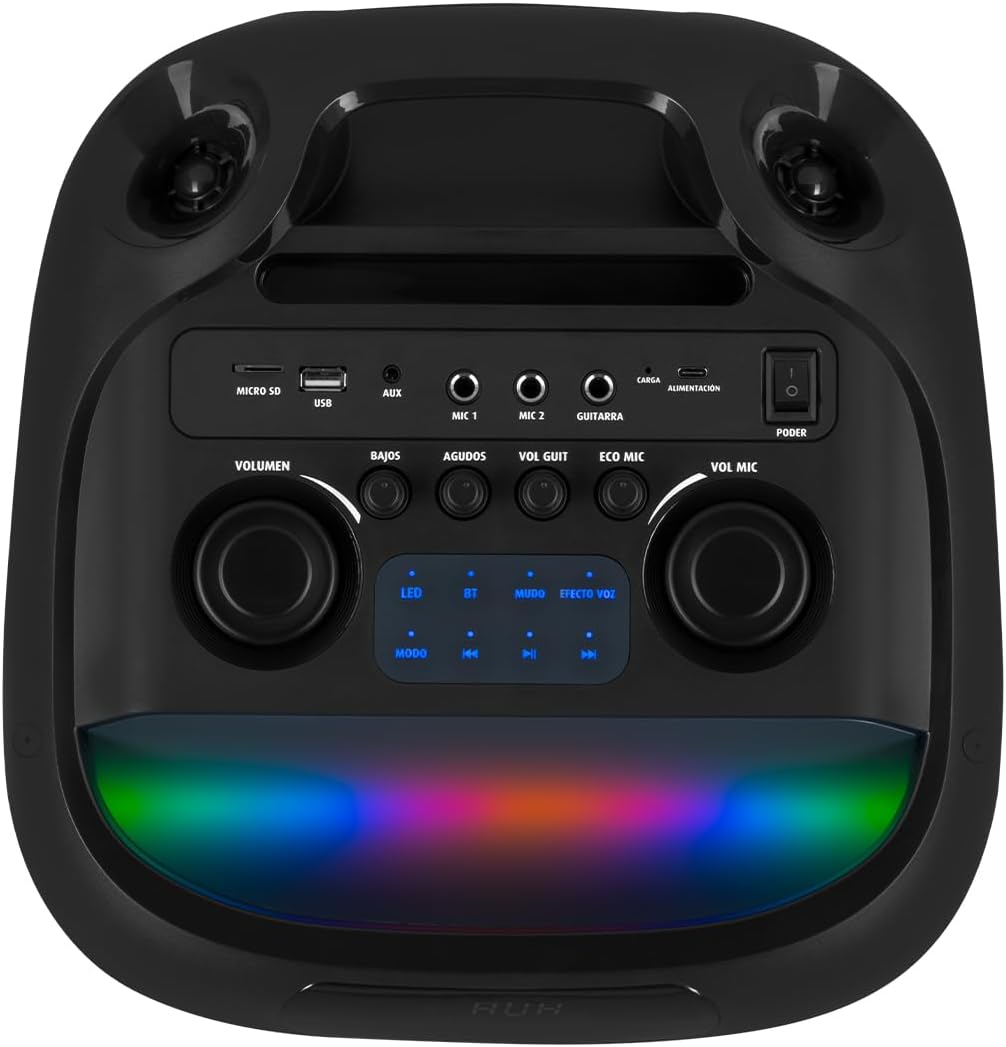
그림 4.3: 제어판. Details the top-mounted control panel with inputs for USB, Micro SD, AUX, two microphones, and a guitar, along with volume, bass, treble, and effect controls.

Figure 4.4: Wireless Microphone. The included wireless microphone for vocal performances and announcements.
5. 설정
5.1 풀기
- 스피커와 모든 부속품을 포장에서 조심스럽게 꺼내십시오.
- 미래의 운송이나 보관을 위해 포장재를 보관하세요.
5.2 초기 충전
Before first use, it is recommended to fully charge the speaker's internal battery.
- Connect the provided USB charging cable to the speaker's charging port (labeled 'CARGA' or 'ALIMENTACIÓN' on the control panel).
- USB 케이블의 다른 쪽 끝을 호환되는 USB 전원 어댑터(포함되지 않음) 또는 전원이 공급되는 USB 포트에 연결합니다.
- The charging indicator light will illuminate. Allow several hours for a full charge.
- 완전히 충전되면 표시등이 바뀌거나 꺼질 수 있습니다. 충전 케이블을 분리하세요.
5.3 전원 켜기/끄기
To power on the speaker, locate the 'PODER' (Power) switch on the control panel and slide it to the 'ON' position. To power off, slide it to 'OFF'.
6. 사용 설명서
6.1 블루투스 연결
Connect your mobile device wirelessly to the speaker.
- Turn on the speaker. The 'BT' indicator on the control panel should blink, indicating it's in pairing mode.
- 모바일 기기에서 블루투스를 활성화하고 사용 가능한 기기를 검색하세요.
- Select "Kaiser MSA-2073M" from the list of devices.
- Once paired, the 'BT' indicator will stop blinking and remain solid. You can now play audio from your device through the speaker.
- 블루투스 범위는 최대 10미터입니다.
6.2 AUX 입력
3.5mm AUX 케이블을 사용하여 외부 오디오 장치를 연결하세요.
- Connect one end of the 3.5mm audio cable to the 'AUX' port on the speaker.
- 다른 쪽 끝을 외부 장치의 헤드폰 잭이나 오디오 출력에 연결합니다.
- Press the 'MODE' button on the speaker until 'AUX' mode is selected.
- 외부 장치에서 오디오를 재생합니다.
6.3 USB/Micro SD 재생
Play music directly from a USB flash drive or Micro SD card.
- Insert a USB flash drive into the 'USB' port or a Micro SD card into the 'MICRO SD' slot.
- The speaker will automatically switch to USB/Micro SD mode and begin playing compatible audio file그렇지 않은 경우 'MODE' 버튼을 눌러 올바른 입력값을 선택하십시오.
- Use the playback controls (play/pause, next/previous track) on the speaker to manage your music.
6.4 마이크 사용
Use the included wireless microphone for karaoke or announcements.
- 무선 마이크의 전원이 켜져 있는지 확인하세요.
- 마이크가 자동으로 스피커에 연결됩니다.
- Adjust the microphone volume using the 'VOL MIC' knob on the control panel.
- Use the 'ECO MIC' knob to adjust the echo effect for the microphone.
- The speaker also features five voice effects for the microphone, accessible via the 'EFECTOS VOZ' button.
6.5 기타 입력
Connect an electric guitar to the speaker.
- Connect your guitar to the 'GUITARRA' input jack on the control panel.
- Adjust the guitar volume using the 'VOL GUIT' knob.
6.6 사운드 조정
오디오 출력을 사용자 지정하세요.
- 음량: 스피커의 전체 볼륨을 조절합니다.
- BAJOS (Bass): 저주파 출력을 조절합니다.
- AGUDOS (Treble): 고주파 출력을 조절합니다.
6.7 Infinity Light Effects
Enhance your listening experience with dynamic LED lighting.
- Press the 'LED' button on the control panel to cycle through different light modes or turn the lights off.
- The lights synchronize with the music for an immersive effect.
6.8 KSR-LINK (True Wireless Stereo)
Connect two MSA-2073M speakers for a true wireless stereo experience.
- 두 스피커 모두 전원이 켜져 있고 Bluetooth 모드에 있지만 어떤 장치에도 연결되어 있지 않은지 확인하세요.
- On one speaker, press and hold the 'MUDO' (Mute) button (which also functions as the KSR-LINK pairing button). You will hear a confirmation tone.
- 두 스피커는 자동으로 서로 페어링됩니다.
- Once paired, connect your mobile device to one of the speakers via Bluetooth as described in section 6.1. Audio will now play in stereo through both speakers.
7. 충전
The speaker features a rechargeable battery for portable use. A full charge allows for prolonged use.
- Connect the USB charging cable to the speaker's charging port and a power source.
- 충전 표시기에 충전 상태가 표시됩니다.
- Avoid overcharging the battery. Disconnect the charger once the battery is full.
8. 유지관리
8.1 청소
- 부드럽고 마른 천으로 스피커를 닦으세요.
- 연마성 세척제, 왁스, 용제를 사용하지 마세요.
8.2 보관
- 스피커는 직사광선과 극한의 온도를 피해 시원하고 건조한 곳에 보관하세요.
- 장기간 보관할 경우, 배터리 수명을 유지하려면 주기적으로 충전하세요.
9. 문제 해결
| 문제 | 가능한 원인 | 해결책 |
|---|---|---|
| 전원이 없습니다 | 배터리가 소진되었습니다. 전원 스위치가 꺼져 있습니다. | Charge the speaker; Turn the power switch to 'ON'. |
| 소리가 나지 않습니다 | 볼륨이 너무 낮습니다. 잘못된 입력 모드를 선택했습니다. 장치가 제대로 연결되지 않았습니다. | Increase volume; Press 'MODE' to select correct input; Reconnect device/Bluetooth. |
| 블루투스가 연결되지 않습니다 | Speaker not in pairing mode; Device too far; Already connected to another device. | Ensure 'BT' indicator is blinking; Move device closer; Disconnect from other devices and try again. |
| 마이크가 작동하지 않습니다 | Microphone is off; Microphone volume is low; Microphone battery is low. | Turn on microphone; Increase 'VOL MIC' knob; Charge/replace microphone battery. |
10. 사양
| 특징 | 사양 |
|---|---|
| 상표 | 황제 |
| 모델 | MSA-2073M |
| 스피커 크기 | 2 x 8 인치 |
| RMS 전원 출력 | 70 와트 |
| PMPO Power Output | 28000 와트 |
| 연결 기술 | 무선(블루투스) |
| 블루투스 범위 | 최대 10미터 |
| 오디오 출력 모드 | 스테레오 재생 |
| 임피던스 | 3옴 |
| 주파수 응답 | 60Hz |
| 제어 방법 | Push Button, Rotary Knobs |
| 전원 | 배터리 |
| 치수(DxWxH) | 37.4 x 36.2 x 80cm |
| 품목 무게 | 10.8 킬로그램 |
| 포함된 액세서리 | 무선 마이크 |
11. 제품 비디오 끝view
Video 11.1: Product Features and Unboxing. 이 영상은 빠른 설명을 제공합니다.view of the Kaiser MSA-2073M speaker, showcasing its unboxing, key features like 70W RMS power, 10m Bluetooth range, included cables, and detailed views of the control panel with independent volume, bass, treble, microphone, guitar, and echo controls. It also highlights the five voice effects for the microphone, 3 Ohm impedance, and convenient transport wheels. The video also mentions the KSR-LINK technology for connecting two speakers.
12. 보증 및 지원
Your Kaiser MSA-2073M speaker comes with a 90일 공장 보증보증 청구를 위해 구매 증빙 서류를 보관하세요.
For technical support, troubleshooting assistance, or warranty inquiries, please contact Kaiser customer service through their official website or the retailer where you purchased the product. Do not attempt to repair the device yourself, as this may void your warranty.