
1. 제품 오버view
The llano 4-in-1 NP-FZ100 Battery Charger is a versatile device designed for Sony NP-FZ100 camera batteries. It integrates a 10400mAh power bank, a 20W PD fast charger, a USB 3.0 card reader, and a secure storage case into a single compact unit. This device is intended to streamline power management and data transfer for photographers and videographers.

Image 1: llano 4-in-1 NP-FZ100 Battery Charger, closed view.

Image 2: Feature comparison highlighting 20W PD charging, SD card reader, built-in power, and battery level display.
2. 패키지 내용
패키지에 모든 품목이 들어 있는지 확인하세요.
- llano 4-in-1 NP-FZ100 Battery Charger (Model: CS2 PRO NP FZ100)
- USB-C to USB-C Cable with USB-A adapter
- 매는 밧줄
- 소프트 휴대용 파우치
- 사용자 설명서
3. 설정
3.1 Initial Charging of the Device
Before first use, fully charge the internal 10400mAh power bank. Connect the provided USB-C cable to the charger's USB-C port and to a compatible USB power adapter (not included). The digital display will show the charging progress of the internal power bank.
3.2 Inserting a Battery for Charging
Open the magnetic flip lid of the charger. Insert one NP-FZ100 battery into the designated charging slot. Ensure the battery is correctly oriented according to the markings inside the slot.

Image 3: llano charger connected to a power adapter, illustrating external charging.
4. 사용 설명서
4.1 Charging NP-FZ100 Batteries
The charger features a single charging slot for NP-FZ100 batteries. When a battery is inserted, the digital display will show its current charge level. The 20W PD fast charging capability allows a full charge in approximately 1.5 hours when connected to a compatible 20W power source. The internal power bank can also charge an inserted battery without external power.

Image 4: Digital display indicating battery charging status.
4.2 파워뱅크로 사용하기
The integrated 10400mAh power bank can charge external devices such as smartphones, tablets, or other USB-powered accessories via its USB-C port. Connect your device using a compatible USB-C cable. The power bank can recharge an NP-FZ100 battery approximately 1.5 times, an iPhone 17 Pro about 2.2 times, and a Galaxy S24 about 1.86 times.

Image 5: Illustration of the internal 10400mAh power bank capacity.
4.3 Using the USB 3.0 Card Reader
The device includes a built-in USB 3.0 card reader for SD cards (SD4.0 compatible). Insert your SD card into the designated slot. Connect the charger to a computer or compatible device using the USB-C cable to transfer files. Data transfer speeds can reach up to 312MB/s for reading and 156MB/s for writing.

Image 6: Demonstrating USB 3.0 high-speed data transmission from an SD card.
4.4 Secure Storage Case
The charger's design incorporates a storage compartment for one NP-FZ100 battery and two SD cards. The magnetic flip lid ensures secure, dustproof storage, protecting your batteries and memory cards during transport.
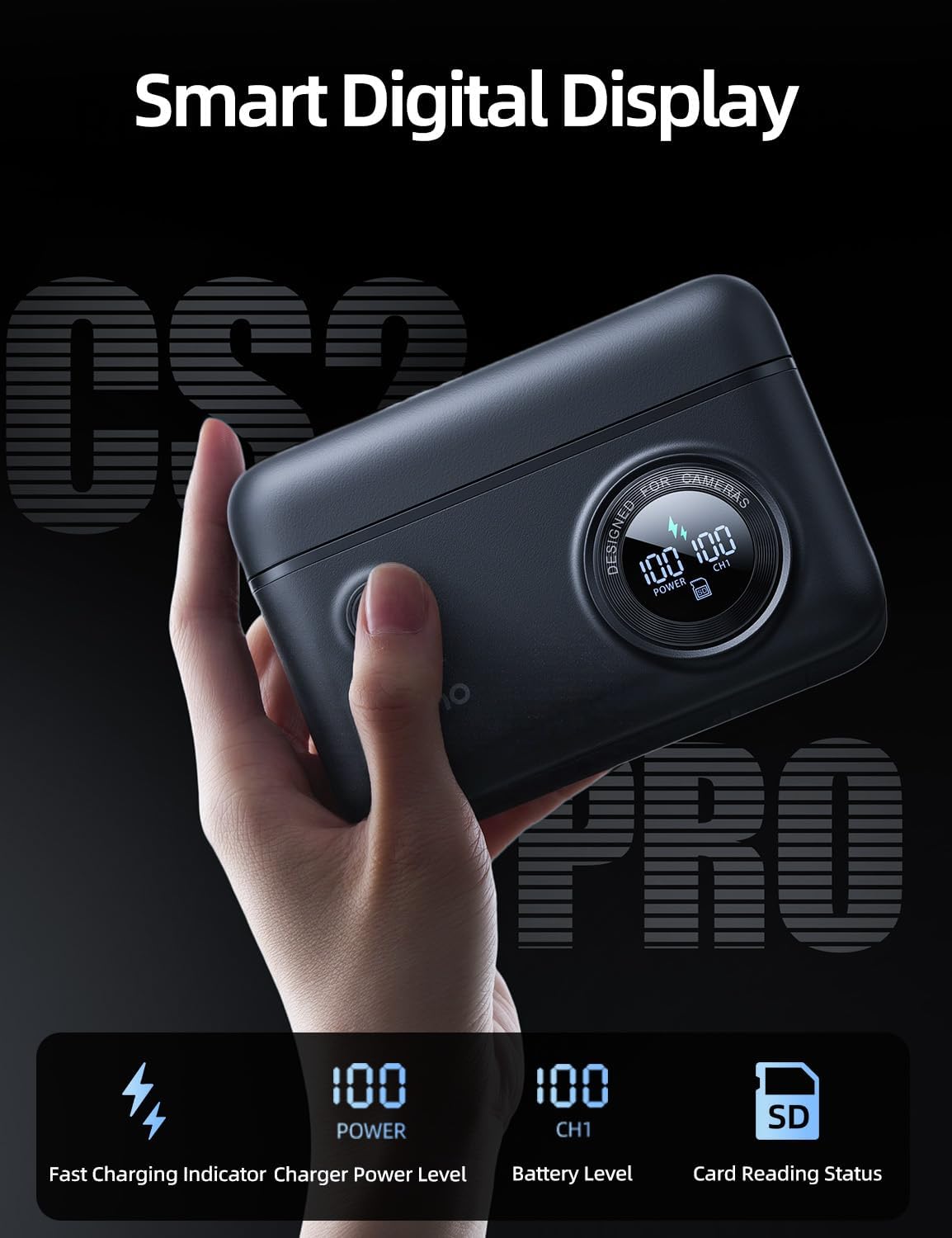
Image 7: The llano charger with its lid open, revealing storage for a battery and SD cards.
4.5 디지털 디스플레이 정보
스마트 디지털 디스플레이는 실시간 정보를 제공합니다.
- 빠른 충전 표시기: Indicates when fast charging is active.
- Charger Power Level: Shows the remaining charge of the internal 10400mAh power bank.
- Battery Level (CH1): 충전 퍼센트를 표시합니다tage of the NP-FZ100 battery in the charging slot.
- Card Reading Status: Indicates when data is being read from or written to an inserted SD card.

이미지 8: 상세 view of the smart digital display and its indicators.
4.6 호환성
The charger is compatible with Sony NP-FZ100 batteries and a wide range of Sony camera models, including:
- Sony A7III, A7IV, A7C, A7CII, A7RV, A7RIII
- 소니 A6600, A6700
- Sony FX3, FX30, FX2
- Sony ZV-E1, ZV-E10II
- Sony A9, A9 II, A1
The USB-C port can also charge various USB-C compatible devices such as iPhone 17, Galaxy 25, iPad Pro 11", Apple Watch, and Apple AirPods.

Image 9: Visual representation of compatible camera models and USB-C devices.
4.7 교육용 비디오
llano 4-in-1 CS2 PRO Battery Charger Kit Overview
비디오 1: 이 비디오는 일반적인 내용을 제공합니다.view of the llano 4-in-1 CS2 PRO Battery Charger Kit, showcasin그 특징과 디자인.
How To Use 4 in 1 Battery Charger Kit
Video 2: This video demonstrates the practical usage of the 4-in-1 Battery Charger Kit, including battery insertion, charging, and card reader functions.
5. 유지관리
- 충전기를 깨끗하게 유지하고 먼지나 이물질이 없도록 하세요. 청소 시에는 부드럽고 마른 천을 사용하세요.
- 극한의 온도, 습도 또는 직사광선에 장치를 노출하지 마십시오.
- Ensure the magnetic lid is closed when not in use to protect the internal components and stored items.
- 충전기를 분해하거나 개조하지 마십시오. 그렇게 하면 보증이 무효화되고 제품이 손상될 수 있습니다.
6. 문제 해결
6.1 기기가 충전되지 않음
- 전원 확인: Ensure the USB-C cable is securely connected to both the charger and a functional power adapter or USB port.
- 케이블 무결성: 케이블 불량 여부를 확인하기 위해 다른 USB-C 케이블을 사용해 보세요.
- 전원 어댑터: Verify that the power adapter provides sufficient output (e.g., 20W PD for fast charging).
6.2 배터리가 충전되지 않음
- 배터리 삽입: Ensure the NP-FZ100 battery is correctly inserted into the charging slot.
- 배터리 상태: Test the battery in another compatible charger or camera to confirm it is not faulty.
- Internal Power Bank Level: If using the internal power bank to charge, ensure it has sufficient charge remaining.
6.3 Card Reader Not Functioning
- 카드 삽입: Ensure the SD card is fully and correctly inserted into the card slot.
- 연결: Verify the charger is properly connected to your computer via the USB-C cable.
- 카드 호환성: Ensure the SD card is not damaged and is compatible with standard SD card readers.
- 드라이버 문제: On your computer, check device manager for any driver issues related to USB devices or card readers.
7. 사양
| 특징 | 사양 |
|---|---|
| 상표 | 일라노 |
| 모델 번호 | CS2 PRO NP FZ100 |
| 제품 치수 | 5인치 깊이 x 3.6인치 너비 x 1.9인치 높이 |
| 색상 | 검은색 |
| Internal Power Bank Capacity | 10400mAh |
| 충전 출력 | 20W PD(전력 공급) |
| 출력 볼륨tage | 8.4 볼트 |
| 입력 Voltage | 9 볼트 |
| 현재 평가 | 2.22 Amps |
| 배터리 충전 시간 | Approx. 1.5 Hours (for NP-FZ100 battery) |
| 카드 리더기 유형 | USB 3.0 (SD4.0 compatible) |
| 카드 리더기 속도 | 최대 312MB/s (읽기) |
| 커넥터 유형 | USB-C |
| 안전 인증 | UL, FCC |
8. 보증 및 지원
This llano product comes with a 1-year warranty from the date of purchase. The warranty covers manufacturing defects and malfunctions under normal use. It does not cover damage caused by misuse, accidents, unauthorized modifications, or natural disasters.
For technical support, warranty claims, or further assistance, please contact llano customer service through the retailer where the product was purchased or visit the official llano web연락처 정보 사이트.