
1. 서론
This manual provides detailed instructions for setting up and operating your AIfasterfly MC200 Wireless Mobile Gaming Controller. Designed for both iPhone and Android devices, this controller enhances your mobile gaming experience with advanced features and ergonomic design. Please read this manual thoroughly before use to ensure optimal performance and longevity of your device.
2. 제품 오버view
2.1 패키지 내용
- AIfasterfly MC200 Wireless Mobile Gaming Controller
- USB 충전 케이블
- 사용자 설명서
2.2 주요 특징
- 무선 블루투스 연결: Seamless connection with zero latency for iPhone and Android.
- 폭넓은 호환성: Supports Xbox Cloud, Steam Link, GeForce Now, and MFi Apple Arcade.
- 접이식 디자인: Fits phones from 4" to 7.3" (10cm-18.5cm) securely.
- 홀 효과 조이스틱 및 트리거: Eliminates drift, dead zones, and physical wear for precise control.
- 터보 기능 : Customizable rapid-fire with 3 speeds (5/12/20 shots/sec).
- 프로그래밍 가능한 뒤로 가기 버튼: Map up to 21 commands per button (ML/MR) for macro programming.
- 조절 가능한 조명: 6 lighting modes with adjustable brightness.
- 긴 배터리 수명: 800mAh battery provides 6+ hours of playtime with dynamic lights.
- 이중 진동: Immersive, non-adjustable vibration feedback.
- 인체공학적 디자인: Textured grips reduce fatigue for extended gaming sessions.
- Keylinker App Optimization: Fine-tune settings via the Keylinker App (search "MC200").

Image: The AIfasterfly MC200 Wireless Mobile Gaming Controller, showcasin인체공학적 디자인과 버튼 레이아웃이 특징입니다.
3. 설정
3.1 전화 설치
- Gently pull the left and right sides of the controller outwards to extend the retractable phone holder.
- Carefully place your smartphone into the holder. The controller is designed to fit phones ranging from 4 inches to 7.3 inches (10cm-18.5cm).
- Ensure your phone is securely seated within the rubber padding and anti-slip textured grips to prevent accidental drops.

Image: A smartphone being securely placed into the retractable holder of the AIfasterfly MC200 controller.

Image: The AIfasterfly MC200 controller extended, illustrating the minimum and maximum phone sizes it can accommodate (100mm-185mm).
3.2 블루투스 페어링
- 를 누르고 계세요 집 button on the controller for 3 seconds until the indicator light begins to flash. This indicates the controller is in pairing mode.
- On your smartphone (iPhone or Android), navigate to the Bluetooth settings.
- Locate and select "Xbox Wireless Controller" from the list of available devices.
- 연결되면 컨트롤러의 표시등이 켜집니다.
- 처음 페어링 후 다시 연결하려면 버튼을 누르기만 하면 됩니다. 집 button. The controller will automatically connect to the last paired device.
- The controller will auto-shutdown if Bluetooth is disabled or if the 집 button is held for 5 seconds.
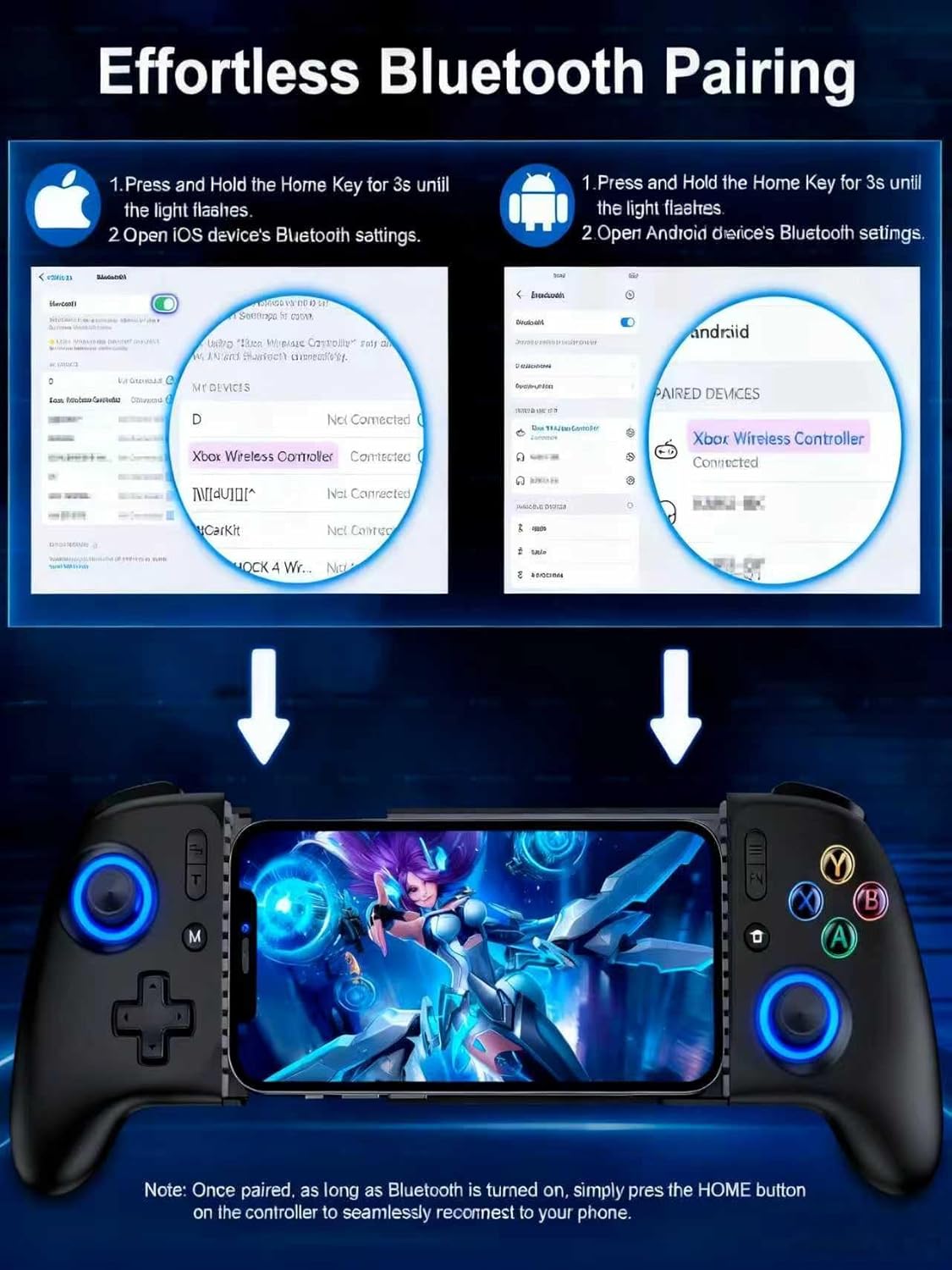
Image: Visual guide demonstrating the Bluetooth pairing process for both iOS and Android devices with the AIfasterfly MC200 controller.
4. 사용 설명서
4.1 홀 효과 조이스틱 및 트리거
The MC200 controller features Hall Effect joysticks and triggers, which utilize magnetic induction principles. This technology prevents common issues such as stick drift, dead zones, and wear-and-tear, providing precise and responsive control for an extended lifespan. You can toggle zero-deadzone mode via M+L3/R3.

Image: Diagram illustrating the Hall Effect joystick technology, highlighting its precision and lack of dead zones.
4.2 터보 기능
Activate the Turbo function for rapid-fire actions in games. The controller offers 3 adjustable Turbo speeds:
- 초당 5발
- 초당 12발
- 초당 20발
Refer to the quick start guide for specific button combinations to activate and adjust Turbo speeds.

Image: The AIfasterfly MC200 controller with an overlay indicating the Turbo button and its three adjustable speeds.
4.3 Programmable Back Buttons (ML/MR)
The MC200 features two programmable back buttons (ML and MR) that allow for macro programming. You can map up to 21 commands per button, including A/B/X/Y, triggers, and D-pad inputs, to create custom game-winning combos. To enter programming mode, hold M + ML/MR.

Image: A diagram highlighting the ML and MR programmable back buttons on the AIfasterfly MC200 controller and the programming function.
4.4 Light Customization
Personalize your gaming experience with 6 lighting modes and adjustable brightness. Cycle through different lighting modes by pressing the FN button. Adjust brightness by pressing FN + L3 (증가) 또는 FN + R3 (감소하다).

Image: The AIfasterfly MC200 controller showcasing its adjustable LED lighting with various modes and brightness levels.
4.5 배터리 수명 및 충전
The controller is equipped with an 800mAh battery, providing over 6 hours of continuous playtime even with dynamic lights activated. Use the provided USB charging cable to recharge the controller. The charging indicator light will show the charging status.

Image: A user enjoying an extended gaming session with the AIfasterfly MC200 controller, highlighting its long battery life.
4.6 이중 진동
Dual motors provide immersive vibration feedback for a more realistic gaming experience in compatible games. Please note that the vibration intensity is non-adjustable.
4.7 Keylinker App Optimization
For advanced customization, download the Keylinker App (search "MC200") on your smartphone. The app allows you to fine-tune button layouts, adjust sensitivity, and manage macros for a personalized gaming setup.
5. 호환성
The AIfasterfly MC200 Wireless Mobile Gaming Controller is compatible with a wide range of iPhone and Android devices. It supports iOS System Version 13.0 and above.
5.1 Supported Devices (Examp레)
- 아이폰: iPhone 6 to iPhone 15 Pro Max (and newer models with iOS 13.0+)
- 삼성 갤럭시: S24, S23, S22, S21, S20, S10, S9, S8 Series, Note 20 Ultra 5G/10, Z Flip 4/3
- 원플러스: 9 프로, 10 프로
- 레드미: K90 프로
- Realme: X2 Pro, 7 Pro
- 엘지: G7 ThinQ
- Nothing: 1
- 반대: X5 Pro 찾기
- Vivo : Pro+, iQOO 3
- 샤오미: 12 Pro, MIX4, POCO X3 Pro
- Smartisan: 프로 3
- Black Shark: 2
- 모토: S50
6. 사양
| 모델 | MC200 |
| 연결성 | 블루투스 |
| 배터리 용량 | 800mAh |
| 노는 시간 | 6+ hours (with dynamic lights) |
| 휴대폰 크기 호환성 | 100mm - 185mm (4" - 7.3") |
| 조이스틱/트리거 | 홀 효과 |
| 프로그래밍 가능한 버튼 | ML/MR (up to 21 commands) |
| 조명 | 6 modes, adjustable brightness |
| 진동 | Dual motors (non-adjustable) |
| 치수 | 9.65 x 4.57 x 2.4인치(패키지) |
| 품목 무게 | 13.4 온스 |
7. 문제 해결
7.1 컨트롤러 페어링 안 됨
- 컨트롤러가 충분히 충전되었는지 확인하세요.
- 스마트폰에서 Bluetooth가 활성화되어 있는지 확인하세요.
- Make sure the controller is in pairing mode (indicator light flashing after holding 집 3초 동안).
- Try restarting both your smartphone and the controller.
- If previously paired, ensure the controller is not connected to another device.
7.2 입력 지연 또는 반응하지 않는 컨트롤
- 휴대폰의 운영체제가 최신 상태인지 확인하세요.
- 휴대폰의 리소스를 확보하려면 불필요한 백그라운드 앱을 모두 종료하세요.
- Move closer to your phone to ensure a strong Bluetooth connection.
- Check if the game you are playing fully supports external controllers.
7.3 Stick Drift or Dead Zones
- The MC200 features Hall Effect joysticks designed to prevent drift. If you experience issues, ensure the controller firmware is up to date via the Keylinker App.
- Try toggling the zero-deadzone mode (M+L3/R3) as described in section 4.1.
7.4 Phone Not Fitting in Holder
- Verify your phone's dimensions are within the supported range of 4" to 7.3" (10cm-18.5cm).
- Remove any bulky phone cases that might prevent a proper fit.
8. 보증 및 지원
The AIfasterfly MC200 Wireless Mobile Gaming Controller comes with a manufacturer's warranty. Please refer to the warranty card included in your package for specific terms, conditions, and duration. For technical support, troubleshooting assistance, or warranty claims, please contact AIfasterfly customer service through the contact information provided on the warranty card or the official AIfasterfly web대지.
보증을 위해 구매 증빙서류를 보관하세요.