
1. 제품 오버view
The FoMaKo M1 is a versatile 5-channel live streaming video mixer switcher designed for professional video production. It supports multiple video inputs, including 4K HDMI, and offers various features for live switching, recording, and streaming.
주요 특징은 다음과 같습니다.
- 6 video source inputs (2x 4K HDMI, 2x 1080P HDMI, 2x USB, 1x webcam, NDI HX support).
- 3 video outputs (2x HDMI, 1x UVC Streaming).
- Simultaneous recording to USB and SD cards.
- Professional audio mixing with 2 mic/line inputs and 1 line output.
- Multi-streaming capabilities to two platforms simultaneously via IP, and USB-A 3.1 plug-and-play streaming.
- Rich effects and transitions including Luma key, Chroma key, Logo insertion, PIP, and DSK.
- Advanced USB 3.1 connectivity for high-speed live streaming and USB 2.0/SD card for PGM recording and firmware updates.
- 내장형 web server for remote control via computers or mobile devices.
- Intelligent PTZ camera control and preset functions.
- Support for both portrait and landscape video modes.
2. 패키지 내용
패키지에 모든 품목이 들어 있는지 확인하세요.
- FoMaKo M1 Video Mixer Switcher Unit
- 전원 공급 장치
- USB 3.1 케이블
- 사용 설명서
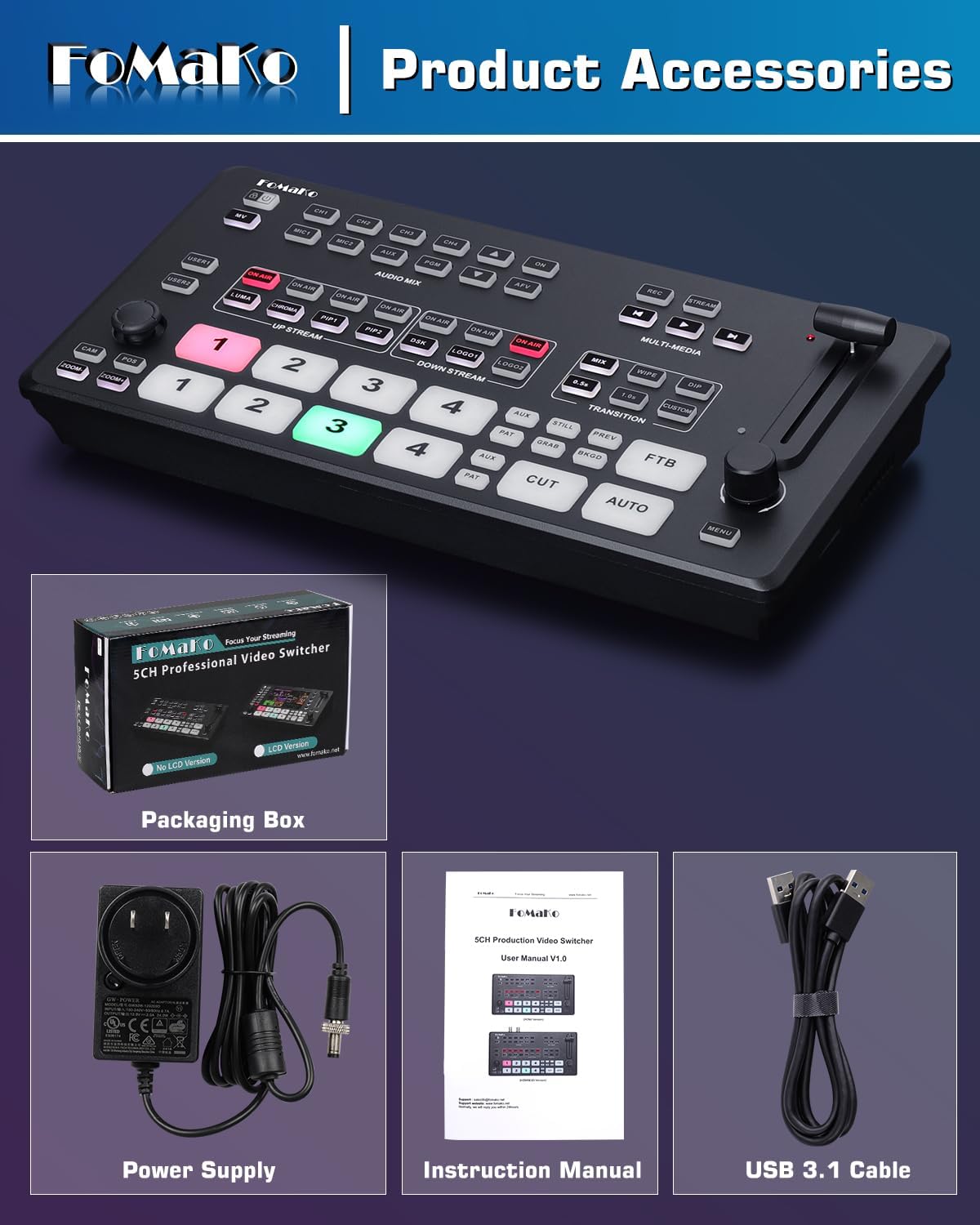
3. 설정 지침
3.1 전원 및 주변 장치 연결
Before operation, ensure all connections are secure.
- Connect the provided power supply to the DC 12V IN port on the rear panel of the M1 switcher.
- Connect your video sources (cameras, laptops, etc.) to the HDMI IN ports. The M1 supports 2x 4K HDMI inputs and 2x 1080P HDMI inputs.
- For UVC streaming, connect a USB 3.1 cable from the UVC AUX port to your computer.
- Connect a monitor to the HDMI PGM Output for program output or to the HDMI AUX Output for auxiliary display.
- Insert an SD card into the SD card slot for video storage and recording.
- Connect microphones or other audio devices to the MIC/LINE IN ports.
- For network control and IP streaming, connect an Ethernet cable to the LAN port.


4. 사용 설명서
4.1 Basic Switching and Transitions
The M1 features an intuitive control panel for live switching.
- Use the numbered buttons (1-4) to select input sources for preview 및 프로그램입니다.
- The T-bar fader allows for manual control of transitions between sources, providing precise speed and effect control.
- Buttons for "CUT" and "AUTO" enable instant cuts or automatic transitions.
- The switcher supports over 30 transition effects, including Mix, Dip, and Wipe.


4.2 오디오 믹싱
The M1 features a Smart Audio Trinity system for comprehensive audio control.
- Independent channel control for volume, mix, and delay for 4 HDMI and 2 mic inputs.
- AFV (Audio-Follow-Video) mode for automatic audio switching.
- Audio delay adjustment (0-1s) for perfect synchronization.
- Smart noise reduction (ALC) for clear microphone output.
4.3 녹음 및 재생
The M1 supports simultaneous recording to both USB and SD cards.
- Record program output (PGM) to a USB drive or SD card.
- Supported recording formats include H.264 encoding.
- 지원됨 file system formats for storage devices: FAT32, NTFS, exFAT.
- Video playback from SD/USB will be routed to the AUX output.


4.4 라이브 스트리밍
The M1 supports multiple streaming methods to various platforms.
- IP Streaming: Stream to two platforms simultaneously.
- USB-A 3.1 Plug and Play Streaming: Direct connection to a computer for UVC streaming.
- Compatible with mainstream platforms such as YouTube Live, Facebook, and TikTok LiveStreaming.

4.5 Advanced Effects and Graphic Overlays
Enhance your live production with various visual effects:
- 루마 키 그리고 크로마키: For green screen effects and background removal.
- 로고 삽입: Add custom logos to your stream.
- PIP(화면 속 화면) 그리고 DSK (Downstream Key): Create multi-layered video compositions.
- Supports up to 8 layers of graphics overlay.
4.6 PTZ 카메라 제어
The M1 can control up to 4 PTZ cameras simultaneously.
- Supports VISCA IP control.
- One-touch preset recall: Activate cameras and instantly call saved positions (1-7) by pressing ON AIR buttons.
4.7 리모컨
Control the M1 switcher remotely via its built-in web 섬기는 사람.
- Access the device control interface through a web browser on a computer or mobile phone.
- Monitor video input, audio status, recording, and streaming information in real-time.
- Scan a QR code to access the control interface.

4.8 세로 및 가로 모드
The M1 supports flexible switching between landscape and portrait modes to adapt to different live streaming needs. Note that PTZ cameras must also support vertical livestreaming mode for this feature to function correctly.

5. 유지관리
5.1 펌웨어 업데이트
Firmware updates can be performed via the USB 2.0 port. Refer to the official FoMaKo website or support documentation for the latest firmware and update instructions.
5.2 냉각 시스템
The M1 features a built-in cooling fan system. The fan speed adjusts automatically based on the switcher's temperature to ensure optimal performance and longevity during long hours of operation.

6. 문제 해결
이 섹션에서는 일반적인 문제에 대한 해결책을 제공합니다. 더 복잡한 문제는 고객 지원에 문의하세요.
- 비디오 출력 없음:
- Ensure all HDMI cables are securely connected to both the M1 switcher and the display/source devices.
- Verify that the input sources are active and sending a signal.
- Check the selected program output on the M1.
- 오디오 출력 없음:
- Confirm audio input levels are correctly set on the M1.
- Check audio connections from microphones or other audio sources.
- Ensure the output device (speakers, headphones) is properly connected and powered.
- Difficulty with Internet Connection for Streaming/Remote Control:
- Verify the Ethernet cable is securely connected to the LAN port on the M1 and to a working router or network switch.
- Check network settings on the M1 (if configurable) and ensure it has a valid IP address.
- Consult your network administrator or internet service provider if network issues persist.
- 녹음 문제:
- Ensure the USB drive or SD card is properly inserted and has sufficient free space.
- Verify that the storage device is formatted to a supported file 시스템(FAT32, NTFS, exFAT).
- Check recording settings on the M1.
7. 사양
| 특징 | 세부 사항 |
|---|---|
| 상표 | 포마코 |
| 모델 번호 | M1 |
| 색상 | 광택 있는 검은색 |
| 커넥터 유형 | HDMI, USB 타입-C |
| 호환 장치 | Camera, Laptop, Monitor |
| 포트 수 | 7 |
| 품목 치수(D x W x H) | 7인치 깊이 x 14인치 너비 x 4인치 높이 |
| 품목 무게 | 1킬로그램 |
| 한국어: | 735530570630 |
| GTIN | 735530570630 |
8. 보증 및 지원
FoMaKo provides comprehensive support for the M1 Video Mixer Switcher:
- 보증: 1-Year manufacturer warranty with free replacement for quality defects (excludes misuse, accident, water damage, or normal wear). An optional 3-Year trade-in program is available for upgraded models.
- 반품 정책: 30-Day no-hassle return and refund.
- 기술 지원: Lifetime technical support with 24-hour response. Free setup guidance and remote assistance are available with your order ID.

