
존스보 ZA-360B
JONSBO ZA-360B PC 케이스 팬 사용 설명서
모델: ZA-360B | 브랜드: 욘스보
1. 서론
This manual provides comprehensive instructions for the installation, operation, maintenance, and troubleshooting of your JONSBO ZA-360B PC Case Fan. The ZA-360B is an all-in-one single frame unit featuring three 120mm ARGB fans, designed for efficient cooling and stunning visual effects with its 4-sides infinity mirror design.

Figure 1: JONSBO ZA-360B PC Case Fan, showcasing its integrated design with three fans and ARGB lighting.
2. 안전 정보
Please read and understand all safety instructions before installing or operating the fan. Failure to do so may result in damage to the product, other components, or personal injury.
- 부품을 설치하거나 제거하기 전에 항상 PC의 전원을 차단하십시오.
- 선풍기의 날개나 배선이 손상되지 않도록 프레임을 잡고 다루십시오.
- Ensure proper grounding to prevent electrostatic discharge (ESD) when handling PC components.
- 선풍기나 케이블을 임의로 개조하지 마십시오. 허가되지 않은 개조는 보증을 무효화하고 안전상의 위험을 초래할 수 있습니다.
- 선풍기를 액체나 과도한 습기로부터 멀리 두십시오.
- Ensure cables are routed safely and do not obstruct fan blades or other moving parts.
3. 패키지 내용
패키지에 모든 품목이 들어 있는지 확인하세요.
- 1 x JONSBO ZA-360B PC Case Fan Unit (integrated 3x120mm fans)
- 장착 나사
- Connection Cables (4-Pin PWM, 3-Pin ARGB)
4. 설정 및 설치
Follow these steps to properly install your JONSBO ZA-360B PC Case Fan:
4.1 사전 설치
- 컴퓨터의 전원을 끄고 전원 콘센트에서 분리하세요.
- PC 케이스를 열어 팬 장착 위치에 접근하세요.
- Identify a suitable mounting location for a 360mm radiator or three 120mm fans (e.g., top, front, or bottom of the case).
4.2 팬 유닛 장착
The ZA-360B is a single frame unit, simplifying installation. It can be fixed with 4 screws, regardless of its orientation, thanks to its 360-degree four-sided mirror design.
- Position the fan unit in your desired mounting location, ensuring proper airflow direction (intake or exhaust).
- Align the screw holes on the fan frame with the corresponding holes on your PC case.
- Secure the fan unit using the provided mounting screws. Tighten them evenly to prevent warping.

Figure 2: The JONSBO ZA-360B fan unit installed within a PC case, demonstrating its fit and aesthetic integration.
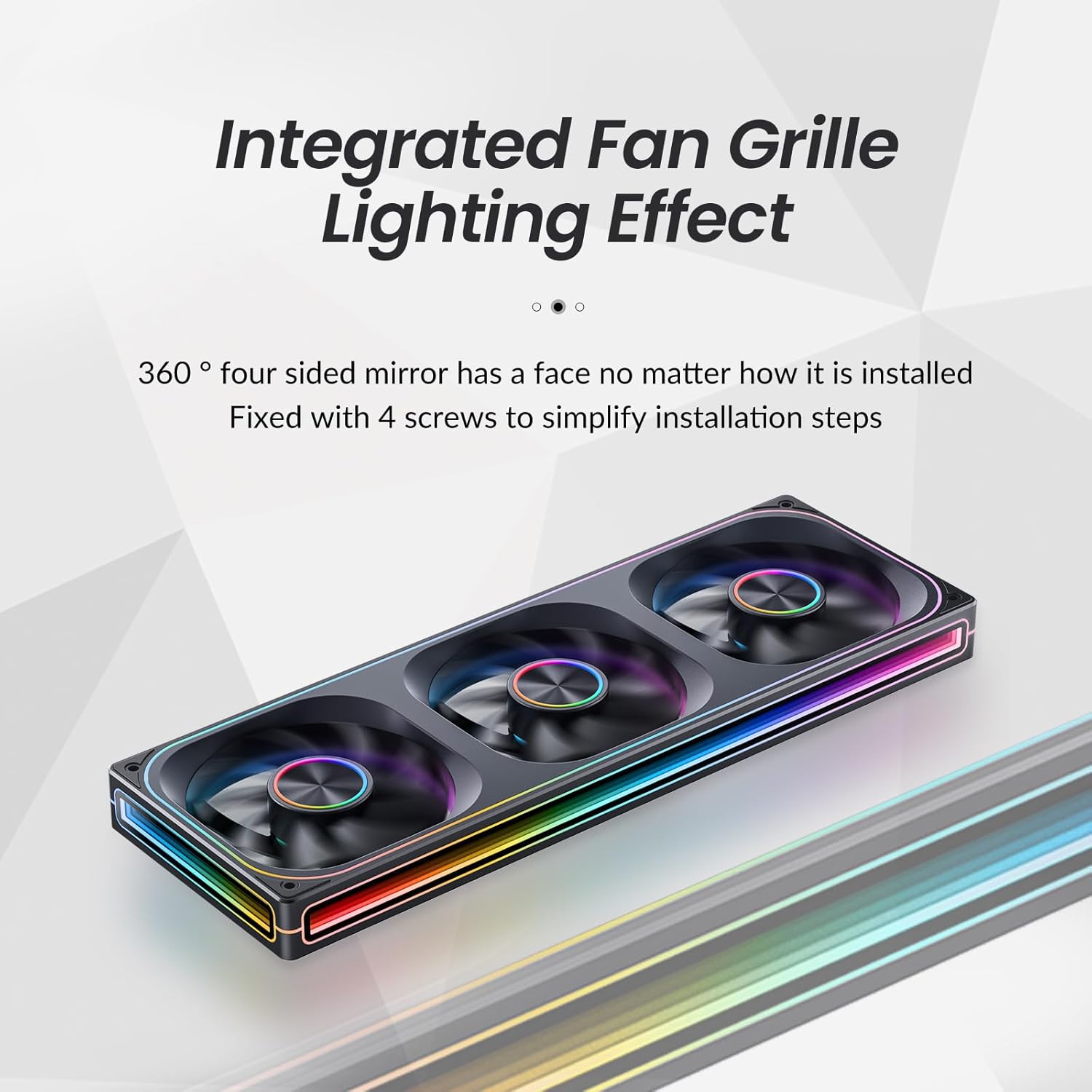
그림 3: 클로즈업 view of the integrated fan grille and lighting effect, highlighting the ease of installation with 4 screws.
4.3 연결 케이블
The ZA-360B features simplified wiring with a single line connection to the motherboard for both power and ARGB control.
- PWM 연결: Connect the 4-Pin PWM cable from the fan unit to an available 4-Pin fan header on your motherboard (e.g., "CPU_FAN", "SYS_FAN"). This allows for automatic fan speed control based on system temperature.
- ARGB 연결: Connect the 3-Pin ARGB cable from the fan unit to a compatible 3-Pin 5V Addressable RGB header on your motherboard (e.g., "D_LED", "ARGB_HEADER"). Ensure the arrow on the connector aligns with the +5V pin on the motherboard header to prevent damage.

Figure 4: Illustration of the simplified wiring, showing a single cable connecting the fan unit to the motherboard for power and ARGB control.
Important Note on ARGB Control: The ZA-360B model has a large number of LED beads (68 LEDs around + 27 LEDs in parallel). If your motherboard has a low-end ARGB controller that cannot support this quantity of LEDs, the fan border lights may not illuminate fully. In such cases, it is recommended to add an external ARGB light controller that supports the required number of LEDs. For ASUS motherboard users, try adjusting the controllable number of LED chips through the latest version of Aura Sync software. Regular motherboards typically do not require an additional controller.
5. 사용 설명서
5.1 팬 속도 제어(PWM)
The JONSBO ZA-360B fan supports Pulse Width Modulation (PWM), allowing your motherboard to dynamically adjust fan speed based on CPU or system temperatures. This ensures optimal cooling performance while minimizing noise when not under heavy load.
- Access your motherboard's BIOS/UEFI settings or a compatible software utility (e.g., ASUS AI Suite, MSI Dragon Center, Gigabyte SIV) to configure fan curves and monitor fan speeds.
- The fan operates within a rotational speed range of 700-2400 RPM (±10%).
5.2 ARGB 조명 제어
The Addressable RGB (ARGB) lighting allows for over 16 million color effects and various dynamic lighting modes, synchronized directly with your motherboard's ARGB software.
- Once the 3-Pin ARGB cable is connected to your motherboard, use the motherboard's RGB synchronization software (e.g., ASUS Aura Sync, MSI Mystic Light Sync, Gigabyte RGB Fusion, ASRock Polychrome Sync) to customize the lighting effects.
- Explore different static colors, breathing effects, wave patterns, and other dynamic modes to personalize your PC's aesthetics.
- The unique light strip layout and 4-sides infinity mirror design create a "Thousand-layer Mirror Illusion," providing a distinctive and elegant lighting experience.

Figure 5: Detail of the front aluminum CD pattern nameplate, contributing to the fan's minimalist aesthetic and light effect integration.
6. 유지관리
Regular maintenance helps ensure optimal performance and longevity of your JONSBO ZA-360B PC Case Fan.
- 먼지 청소: Periodically (e.g., every 3-6 months), power off your PC and use compressed air or a soft brush to gently remove dust accumulation from the fan blades and frame. Dust can impede airflow and increase noise levels.
- 점검: 케이블에 마모나 손상 흔적이 있는지 확인하십시오. 모든 연결부가 단단히 고정되어 있는지 확인하십시오.
- 선풍기나 전기 부품에 액체 세척제를 직접 사용하지 마십시오.
7. 문제 해결
If you encounter issues with your JONSBO ZA-360B PC Case Fan, refer to the following common problems and solutions:
| 문제 | 가능한 원인 | 해결책 |
|---|---|---|
| 팬이 회전하지 않습니다. |
|
|
| ARGB lights are not illuminating or are incomplete. |
|
|
| Fan is making excessive noise. |
|
|
8. 사양
Technical specifications for the JONSBO ZA-360B PC Case Fan:
| 모델 번호 | ZA-360B |
| 제품 치수 | 42 x 15.5 x 4.2cm |
| 무게 | 998g |
| 팬 유형 | PC Case Fan (Integrated 3x120mm ARGB Fans) |
| 냉각 방식 | Air Cooling (FAN) |
| 전원 커넥터 유형 | Fan: 4-Pin PWM / LED: 3-Pin ARGB |
| 권tage | DC 12 Volts (Fan) / 5 Volts (LED) |
| 왓tage | Fan: 5.16W / LED: 5.80W (Total: 10W as per general specifications) |
| 소음 수준 | 21.3-37.3 dB(A) (Max: 37 dB) |
| 최대 회전 속도 | 700-2400 RPM (±10%) |
| 호환 장치 | PC 케이스 |
| LED 유형 | 주소 지정 가능 RGB(ARGB) |
| LED 개수 | 68 LEDs (around frame) + 27 LEDs (in parallel) |
9. 보증 및 지원
보증 정보 및 기술 지원에 대해서는 Jonsbo 공식 웹사이트를 참조하십시오. web사이트를 방문하거나 판매점에 문의하세요. 보증 청구를 위해 구매 증빙 자료를 보관하세요.
For further assistance, you may also consult online PC building communities and forums for tips and shared experiences related to Jonsbo products.
Ask a question about this manual
Ask about setup, troubleshooting, compatibility, parts, safety, or missing instructions. Manuals+ will review the question and use this page’s manual context to help answer it.