
1. 서론
This manual provides detailed instructions for the installation, operation, and maintenance of the ADVANTECH PCIE-1612C-AE 4-Port RS-232/422/485 PCIe Communication Card. This interface module is designed to expand your system's serial communication capabilities, offering robust and reliable data transfer for industrial and commercial applications. Please read this manual thoroughly before attempting to install or operate the device.
2. 안전 정보
장치 손상을 방지하고 개인 안전을 확보하려면 다음 안전 예방 조치를 준수하세요.
- Always disconnect power from your computer system before installing or removing any internal components.
- Wear an anti-static wrist strap and work on an anti-static mat to prevent electrostatic discharge (ESD) damage to the card and other components.
- 민감한 부품에 손이 닿지 않도록 카드 가장자리를 잡고 다루십시오.
- 과열을 방지하려면 컴퓨터 케이스 내부가 적절히 환기되도록 하세요.
- 카드를 습기나 극한 온도에 노출시키지 마십시오.
3. 패키지 내용
모든 품목이 포장에 들어 있는지 확인하세요. 품목이 누락되었거나 손상된 경우 즉시 판매자에게 문의하세요.
- 1 x ADVANTECH PCIE-1612C-AE 4-Port RS-232/422/485 PCIe Communication Card
- Documentation (e.g., Quick Start Guide, Driver CD/USB - may vary by package)
4. 제품 오버view
The ADVANTECH PCIE-1612C-AE is a high-performance PCIe communication card designed for reliable serial data transmission. It features four independent serial ports, configurable for RS-232, RS-422, or RS-485 standards, making it versatile for various industrial and embedded applications.
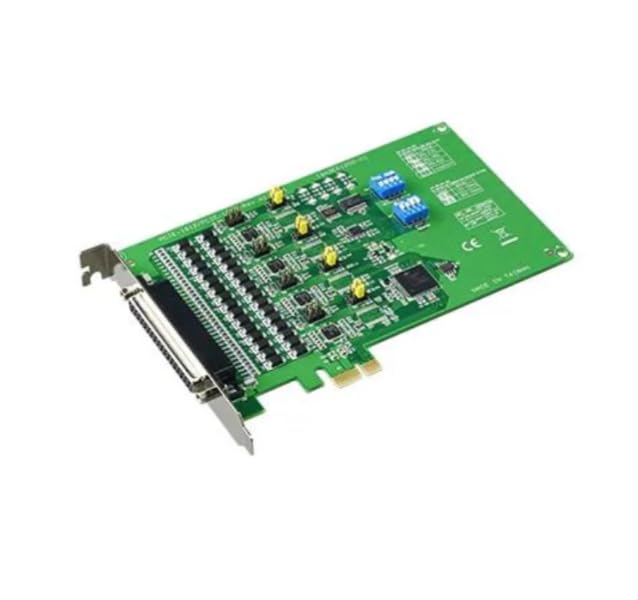
Figure 1: ADVANTECH PCIE-1612C-AE 4-Port RS-232/422/485 PCIe Communication Card. This image shows the physical card with its PCIe connector and four serial port connectors.
주요 특징:
- Number of Channels / Ports: 4포트
- 최대 데이터 전송 속도: 921.6kb/초
- 인터페이스 유형: PCIe, RS-232/422/485
- 운영 공급량tage: 3.3V(XNUMXV)
- 작동 온도 범위: -10°C ~ +60°C
5. 설정
Follow these steps to properly install the PCIE-1612C-AE card into your computer system:
- 시스템 준비: Power off your computer and disconnect the power cord from the wall outlet. Disconnect all peripheral devices.
- 컴퓨터 케이스를 엽니다. 마더보드와 확장 슬롯에 접근하려면 컴퓨터 케이스의 측면 패널을 제거하십시오.
- 사용 가능한 PCIe 슬롯 찾기: Identify an empty PCI Express (PCIe) slot on your motherboard. The PCIE-1612C-AE requires a standard PCIe slot.
- 슬롯 커버 제거: Remove the metal slot cover corresponding to the chosen PCIe slot from the back of your computer case.
- 카드를 설치하세요: Carefully align the PCIE-1612C-AE card with the PCIe slot. Apply even pressure to both ends of the card until it is firmly seated in the slot. Ensure the card's bracket is flush with the back of the computer case.
- 카드를 안전하게 보호하세요: Secure the card's bracket to the computer case using the screw or latch mechanism provided by your case.
- 사건 종결: 컴퓨터 측면 패널을 다시 제자리에 놓고 고정하십시오.
- 전원 다시 연결: Reconnect the power cord and all peripheral devices. Power on your computer.
- 드라이버 설치: Once the operating system boots, it may automatically detect the new hardware. Install the necessary drivers from the provided media or download them from the ADVANTECH website. Follow the on-screen instructions for driver installation.
6. 운영
After successful installation and driver setup, the PCIE-1612C-AE card's serial ports will be available in your operating system's Device Manager (Windows) or equivalent system information utility (Linux). Each port can be configured for its specific communication parameters (baud rate, data bits, parity, stop bits, flow control) through your operating system's settings or application software.
- 연결 장치: Connect your RS-232, RS-422, or RS-485 compatible devices to the corresponding ports on the PCIE-1612C-AE card using appropriate serial cables.
- 소프트웨어 구성 : Use your serial communication software or application to select the correct COM port number assigned to each physical port on the card and configure the communication parameters to match your connected device.
- RS-422/485 Mode: For RS-422/485 modes, ensure proper termination and biasing are applied if required by your network topology. Refer to your device's documentation for specific requirements.
7. 유지관리
The PCIE-1612C-AE card is designed for long-term reliability with minimal maintenance. However, adhering to general computer maintenance practices will help ensure optimal performance:
- 먼지 제거: Periodically open your computer case (after disconnecting power) and use compressed air to gently remove dust buildup from the card and surrounding components. Dust can impede heat dissipation and lead to component failure.
- 환경 제어: 작동 환경이 지정된 온도 및 습도 범위 내에 유지되도록 하세요.
- 케이블 관리 : Keep internal cables tidy to maintain good airflow within the case.
8. 문제 해결
If you encounter issues with your PCIE-1612C-AE card, consider the following troubleshooting steps:
- 카드가 감지되지 않음:
- 카드가 PCIe 슬롯에 완전히 장착되었는지 확인하십시오.
- 다른 PCIe 슬롯에 카드를 설치해 보세요.
- Check your computer's BIOS/UEFI settings to ensure PCIe slots are enabled.
- 드라이버가 설치되지 않거나 작동하지 않습니다:
- Verify you have downloaded the correct drivers for your operating system and card model from the ADVANTECH web대지.
- Uninstall any previous serial port drivers before installing new ones.
- Check Device Manager for any error codes related to the serial ports.
- 통신 오류:
- Confirm that the serial cable is correctly connected and not damaged.
- Verify that the communication parameters (baud rate, data bits, parity, stop bits, flow control) in your software match those of the connected device.
- For RS-485, check for proper wiring (A/B lines) and termination.
- Test with a known working serial device or loopback test if possible.
9. 사양
| 특징 | 사양 |
|---|---|
| 모델 번호 | PCIE-1612C-AE |
| 제조업체 | 어드밴텍 |
| 제품 유형 | 인터페이스 모듈 |
| Number of Channels / Ports | 4포트 |
| 인터페이스 유형 | PCIe, RS-232/422/485 |
| 최대 데이터 속도 | 921.6kb/초 |
| 운영 공급량tage | 3.3V(XNUMXV) |
| 최소 작동 온도 | 영하 10도 |
| 최대 작동 온도 | +60°C |
| 품목 무게 | 7 파운드 |
10. 보증 및 지원
For warranty information, please refer to the documentation included with your purchase or contact your reseller or ADVANTECH directly. Warranty terms and conditions may vary by region and purchase agreement.
For technical support, driver downloads, or further assistance, please visit the official ADVANTECH website or contact their customer support services. Provide your product model number (PCIE-1612C-AE) and any relevant system information when seeking support.