
소개
This manual provides detailed instructions for the safe and efficient operation of your Phomemo M836-B Portable Thermal Printer. The M836-B is an inkless, wireless thermal printer designed for portability and convenience, supporting various paper sizes including US Letter and A4. Please read this manual thoroughly before using the printer to ensure optimal performance and longevity.
제품 끝view
주요 특징
- 잉크 없는 열전사 인쇄: Utilizes thermal technology, eliminating the need for ink cartridges or ribbons.
- 무선 연결 : Supports Bluetooth for seamless connection with iOS and Android devices.
- USB 연결: Compatible with Windows, macOS, ChromeOS, and Linux via USB Type-C.
- 고해상도: Offers a print resolution of 300 DPI for clear text and graphics.
- 휴대성 있는 디자인: Compact and lightweight, ideal for travel and on-the-go printing.
- 다양한 크기의 용지 지원: Accommodates various thermal paper sizes, including US Letter (8.5'' x 11'') and A4.
- 흑백 출력: Prints in black and white.

Image: The Phomemo M836-B printer demonstrating its inkless thermal printing capability, highlighting no mess from ink.

이미지: 오버view of the Phomemo M836-B's key features, including wireless connectivity, inkless operation, 2600mAh battery capacity, and 300 DPI resolution.
패키지 내용
패키지에 모든 품목이 들어 있는지 확인하세요.
- Phomemo M836-B Portable Thermal Printer
- Thermal Paper (as specified in the box)
- USB Type-C 케이블
- 사용 설명서 (본 문서)
설치 가이드
1. 프린터 충전하기
- Connect the provided USB Type-C cable to the printer's charging port.
- USB 케이블의 다른 쪽 끝을 호환되는 USB 전원 어댑터(포함되지 않음)나 컴퓨터의 USB 포트에 연결합니다.
- The indicator light will show charging status. Charge the printer fully before first use.
2. 용지 넣기
The Phomemo M836-B supports both thermal paper rolls and sheet-fed thermal paper.
- 용지함 커버를 엽니다.
- For roll paper: Insert the thermal paper roll into the designated slot, ensuring the printing side faces upwards. Gently pull a small length of paper out.
- For sheet-fed paper: Insert the thermal paper sheet into the input slot, ensuring it is straight and aligned.
- 용지 보관함 덮개를 단단히 닫으세요.

Image: Illustration of how to load different types of thermal paper (roll and sheet) into the Phomemo M836-B printer, showing the paper selection mechanism.
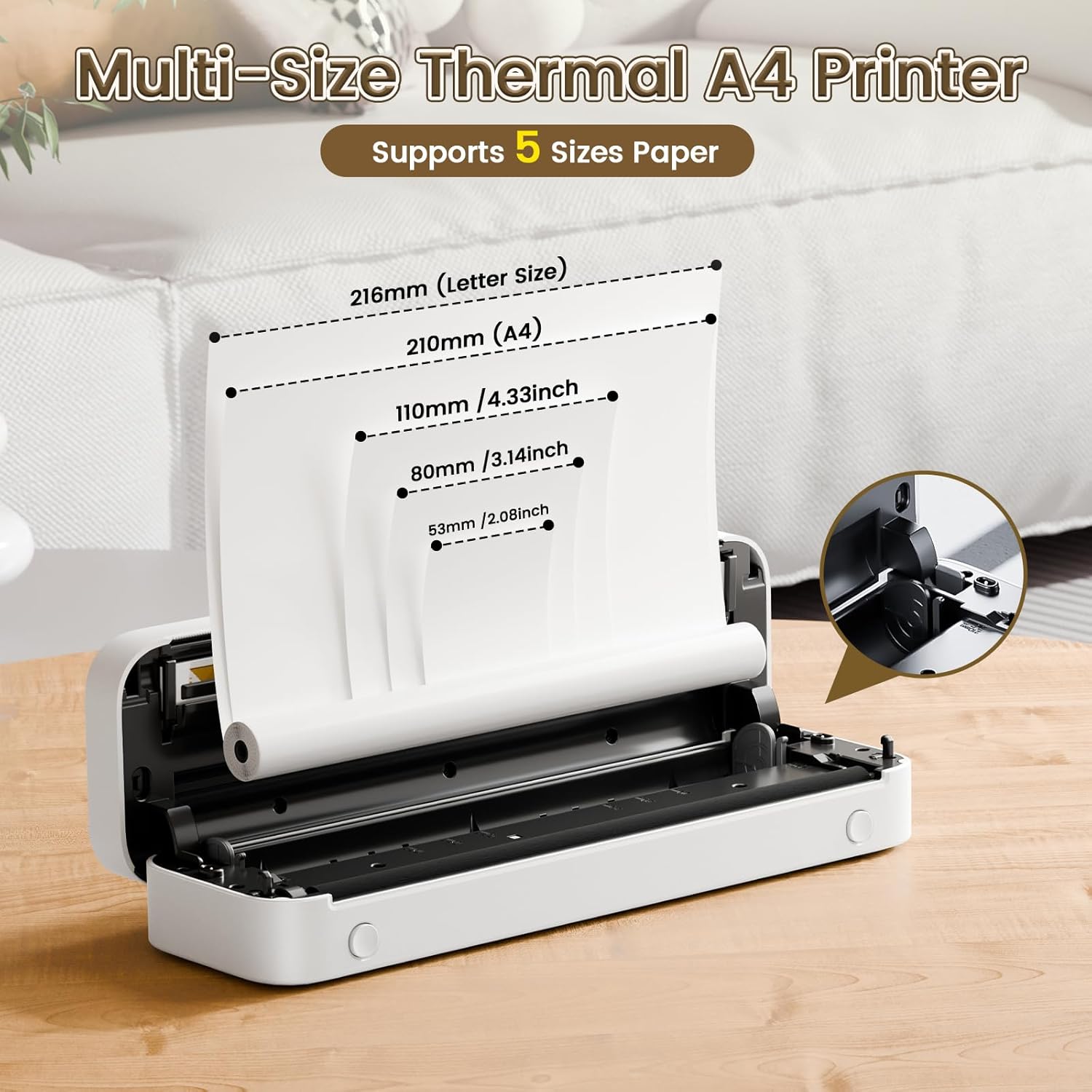
Image: The Phomemo M836-B printer demonstrating support for multiple paper sizes, including US Letter (216mm) and A4 (210mm).
3. 장치에 연결
이 프린터는 블루투스와 USB 연결을 모두 지원합니다.
Bluetooth Connection (for iOS/Android)
- Download the official Phomemo app from your device's app store.
- Turn on the printer by pressing and holding the power button.
- 모바일 기기에서 Bluetooth를 활성화하세요.
- Open the Phomemo app, search for the printer (M836-B), and pair with it.
- 화면의 지시에 따라 페어링 과정을 완료하세요.
USB Connection (for Windows/macOS/ChromeOS/Linux)
- 프린터가 켜져 있는지 확인하십시오.
- 제공된 USB Type-C 케이블을 사용하여 프린터를 컴퓨터에 연결하십시오.
- Phomemo 공식 웹사이트를 방문하세요. web사이트 (www.phomemo.com) to download and install the appropriate drivers for your operating system.
- 드라이버 설치가 완료되면 컴퓨터에서 프린터를 인식할 수 있습니다.

Image: Diagram illustrating the two types of connections supported by the Phomemo M836-B: Bluetooth for Android, iOS, and iPad, and USB for Windows, macOS, ChromeOS, and Linux.
작동 지침
Printing from Mobile Devices
- Ensure your printer is charged, loaded with paper, and connected via Bluetooth to your mobile device.
- Phomemo 앱을 엽니다.
- Select the document or image you wish to print from within the app.
- Adjust print settings (e.g., paper size, density) as needed.
- Tap the print button to initiate printing.
Printing from Computers
- Ensure your printer is charged, loaded with paper, and connected via USB to your computer with drivers installed.
- 문서를 열거나 file 컴퓨터로 인쇄하고 싶으신가요?
- "로 이동하세요File" > "Print" (or use the shortcut Ctrl+P/Cmd+P).
- Select the Phomemo M836-B from the list of available printers.
- Adjust print preferences (e.g., paper size, orientation) as required.
- "인쇄"를 클릭하세요.
Paper Handling Tips
- Always use high-quality thermal paper for best results.
- Ensure the paper is loaded correctly with the printable side facing the print head.
- Avoid exposing thermal paper to direct sunlight or high temperatures, as this can degrade print quality over time.
- Manually tear off printed documents carefully after printing, as the printer does not have an automatic cutter.
유지
프린터 청소
- 프린터를 끄고 전원에서 분리하십시오.
- 부드럽고 털이 없는 천을 살짝 사용하세요.amp이소프로필 알코올을 사용하여 프린트 헤드를 부드럽게 닦아주세요. 완전히 건조시킨 후 사용하십시오.
- 프린터 외부를 부드럽고 마른 천으로 닦으십시오. 연마성 세척제나 용제를 사용하지 마십시오.
저장
- 프린터를 직사광선과 극한 온도 변화를 피해 서늘하고 건조한 곳에 보관하십시오.
- If storing for an extended period, ensure the printer is fully charged to maintain battery health.
- Keep thermal paper in its original packaging in a dark, cool place to prevent premature fading.
문제 해결
If you encounter issues with your Phomemo M836-B printer, refer to the following common problems and solutions:
Printer Not Turning On
- 배터리 확인: Ensure the printer is sufficiently charged. Connect it to a power source and try again.
- 전원 버튼: 전원 버튼을 몇 초간 길게 눌러 제대로 작동하도록 하십시오.
Connectivity Issues (Bluetooth/USB)
- 블루투스:
- Ensure Bluetooth is enabled on your device and the printer is within range.
- Unpair and re-pair the printer in your device's Bluetooth settings.
- 프린터와 모바일 기기를 다시 시작하세요.
- USB:
- USB 케이블이 프린터와 컴퓨터에 모두 제대로 연결되어 있는지 확인하세요.
- Ensure the correct printer drivers are installed on your computer. Reinstall if necessary.
- 다른 USB 포트나 케이블을 사용해 보세요.
Poor Print Quality (Blurry, Faded, Streaks)
- 프린트 헤드 청소: 유지 관리 섹션의 청소 지침을 따르십시오.
- Paper Quality/Type: Ensure you are using high-quality thermal paper and that it is loaded correctly.
- 인쇄 밀도: Adjust print density settings in the Phomemo app or printer driver.
- 서류 보관: Thermal paper exposed to heat or light can degrade. Try a fresh roll of paper.
용지 걸림
- Turn Off Printer: Immediately turn off the printer.
- 종이 제거: Gently pull out any jammed paper. Do not force it, as this can damage the printer.
- 새로 고침 : Ensure paper is loaded correctly and not wrinkled or bent before restarting.
기술 사양
| 특징 | 사양 |
|---|---|
| 상표 | 포메모 |
| 모델명 | M836-B |
| 연결 기술 | 블루투스, USB 타입 C |
| 인쇄 기술 | 열의 |
| 프린터 출력 | 단색화 |
| 최대 인쇄 해상도 | 300DPI |
| 최대 인쇄 속도(흑백) | 분당 1.5 페이지 |
| 호환 장치 | Android Devices, Mac, Windows, iPhone, iPad |
| 최대 미디어 크기 | 8.5 x 11인치 (미국 레터 사이즈) |
| 용지 크기 지원 | 미국 A4 용지 |
| Printing Media Type | 감열지 |
| 품목 무게 | 1.53파운드(약 694g) |
| 제품 크기(D x W x H) | 7.8D x 26.4W x 4.5H 센티미터 |
| 제어 방법 | 앱 |
| 원산지 | 중국 |
보증 및 지원
Specific warranty details for the Phomemo M836-B Portable Thermal Printer are not provided within this document. For information regarding warranty coverage, technical support, or service, please refer to the warranty card included with your product or contact Phomemo customer service directly through their official web사이트 또는 제품 포장에 제공된 연락처 정보를 참조하세요.
공식 Phomemo Web대지: www.phomemo.com