
1. 서론
The VOLTCRAFT PMM 3005-20 is a versatile 2-in-1 device, combining a digital multimeter (DMM) with an adjustable power supply. It is designed for precise electrical measurements and providing stable power to external circuits. This manual provides essential information for safe and effective operation of your device.
2. 안전 지침
Read and understand all safety information before using the device. Failure to follow these instructions may result in electric shock, fire, or damage to the device.
- This device complies with CAT II 600 V safety standards. Always adhere to these ratings.
- Do not exceed the maximum input ratings for any measurement function.
- 장치의 접지가 올바르게 되어 있는지 확인하세요.
- The device features built-in overvoltage, overcurrent, and short-circuit protection for enhanced safety.
- An intelligent, temperature-controlled fan prevents overheating during operation. Ensure ventilation openings are not blocked.
- Only use specified fuses for replacement. Refer to the rear panel for the correct fuse rating.
- Disconnect the device from all power sources before performing any maintenance or servicing.
3. 제품 오버view
3.1 전면 패널
The front panel provides the user interface for both the multimeter and power supply functions.

This image shows the front panel of the VOLTCRAFT PMM 3005-20, highlighting the 2.8-inch TFT LCD display, function buttons (V, I, Ω/OVP, ⇆/OCP, DISP, Mode), On/Off button, rotary encoder, input terminals (VΩHz, A, COM), output terminals (+, -), and a 5V 1A USB port.
3.2 후면 패널
The rear panel contains the main power input and communication port.

This image displays the rear panel of the VOLTCRAFT PMM 3005-20, showing the AC power input socket, main power switch, fuse compartment, and the USB communication port for PC connection.
3.3 포함된 구성 요소
패키지에는 다음 품목이 포함되어 있습니다.
- VOLTCRAFT PMM 3005-20 Digital Multimeter and Power Supply unit
- USB 케이블
- 전원 케이블
- Test lead pair (red and black)
- Spare 250 V fuse
- Software CD (for USB communication)
- 사용 설명서 (본 문서)
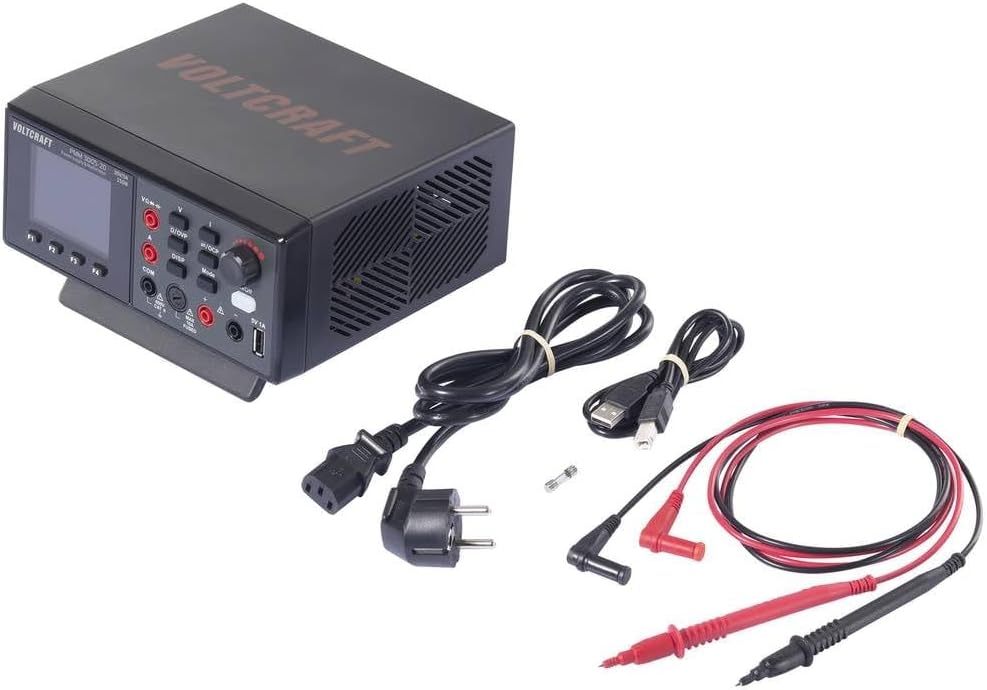
This image shows the VOLTCRAFT PMM 3005-20 unit along with its accessories: power cable, USB cable, test leads, and a spare fuse.
4. 설정
- Connect the power cable to the AC input on the rear panel and plug it into a suitable power outlet (200-240 V AC, 50/60 Hz).
- (Optional) For PC communication, connect the USB cable from the device's rear USB port to your computer. Install the provided software from the CD.
- Turn on the main power switch located on the rear panel.
- Press the front panel 'On/Off' button to power on the device.
5. 사용 설명서
5.1 전원 공급 모드
- Connect the load to the output terminals (+ and -) using appropriate cables.
- Use the rotary encoder to adjust the desired output voltage (0-30 V) and current limit (0-5 A). The display shows 'Set' values.
- Press the 'Mode' button to switch between voltage 및 현재 조정.
- The display shows real-time output voltage와 현재.
- The device provides a maximum power output of 150 W.
- The front panel also features a 5V 1A USB output for charging or powering small devices.
5.2 멀티미터 모드
- Connect the test leads to the appropriate input terminals (VΩHz for voltage/resistance/capacitance, A for current, COM for common).
- Press the 'V', 'I', 'Ω/OVP', or '⇆/OCP' buttons to select the desired measurement function (DC/AC Voltage, DC/AC Current, Resistance, Capacitance).
- The 2.8-inch TFT LCD display provides clear readings with 20000 counts resolution (10 mV/1 mA).
- Observe the measurement results on the display.
5.3 USB Communication (SCPI)
The device supports SCPI commands for remote control and data logging via the USB interface. Refer to the software CD and detailed programming manual for specific commands and setup.
6. 유지관리
6.1 청소
Disconnect the device from all power sources before cleaning. Use a soft, damp 천. 연마성 세척제나 용매를 사용하지 마십시오.
6.2 퓨즈 교체
If the device does not power on or experiences a power-related issue, the fuse may need replacement.
- 장치에서 전원 케이블을 분리합니다.
- Locate the fuse holder on the rear panel.
- Open the fuse holder and replace the blown fuse with a new 250 V fuse of the correct rating (e.g., F3A).
- 퓨즈 홀더를 단단히 닫으십시오.
7. 문제 해결
- 기기의 전원이 켜지지 않습니다: Check the power cable connection. Ensure the rear power switch is ON. Check and replace the fuse if necessary.
- No output from power supply: Ensure the output is enabled (if applicable, check front panel controls). Verify voltage and current limits are set correctly. Check for short circuits in the load.
- 잘못된 멀티미터 판독값: Ensure test leads are connected to the correct terminals for the selected function. Verify the measurement range is appropriate.
- 과열: Ensure ventilation openings are not blocked. The intelligent fan should activate to prevent overheating.
8. 사양
| 특징 | 값 |
|---|---|
| 모델 | PMM 3005-20 (VC-15445415) |
| 유형 | Digital Multimeter & Power Supply (2-in-1) |
| 표시하다 | 2.8-inch TFT LCD, 20000 counts |
| 안전 등급 | CAT II 600V |
| 전원 공급 장치 출력 볼륨tage | 0-30V DC |
| Power Supply Output Current | 0-5A DC |
| 최대 전력 출력 | 150와트 |
| 권tage 해상도 | 10 mV |
| 현재 해상도 | 1mA |
| 멀티미터 기능 | DC/AC 볼륨tage, DC/AC Current, Resistance, Capacitance |
| 의사소통 | USB (SCPI compatible) |
| 입력 전원 | 200-240V AC, 50/60Hz |
| 치수(길이 x 너비 x 높이) | 18.5 x 20 x 9.2cm |
| 무게 | 1.2kg |
| 포함된 구성 요소 | Unit, USB cable, Power cable, Test leads, Spare fuse, Software CD, Manual |
9. 보증 및 지원
This VOLTCRAFT product is designed for reliability and performance. Spare parts availability in the EU is guaranteed for 1 year from the date of purchase.
For technical support, troubleshooting assistance, or warranty claims, please contact your VOLTCRAFT dealer or authorized service center. Keep your purchase receipt as proof of purchase.