
1. 제품 오버view
The CINETREAK Stream-1 is a versatile HDMI Super Source Camera Video Switcher Mixer designed for professional live streaming and video production. It integrates multiple video inputs, advanced mixing capabilities, and direct streaming functionalities, making it an ideal solution for creators and broadcasters.
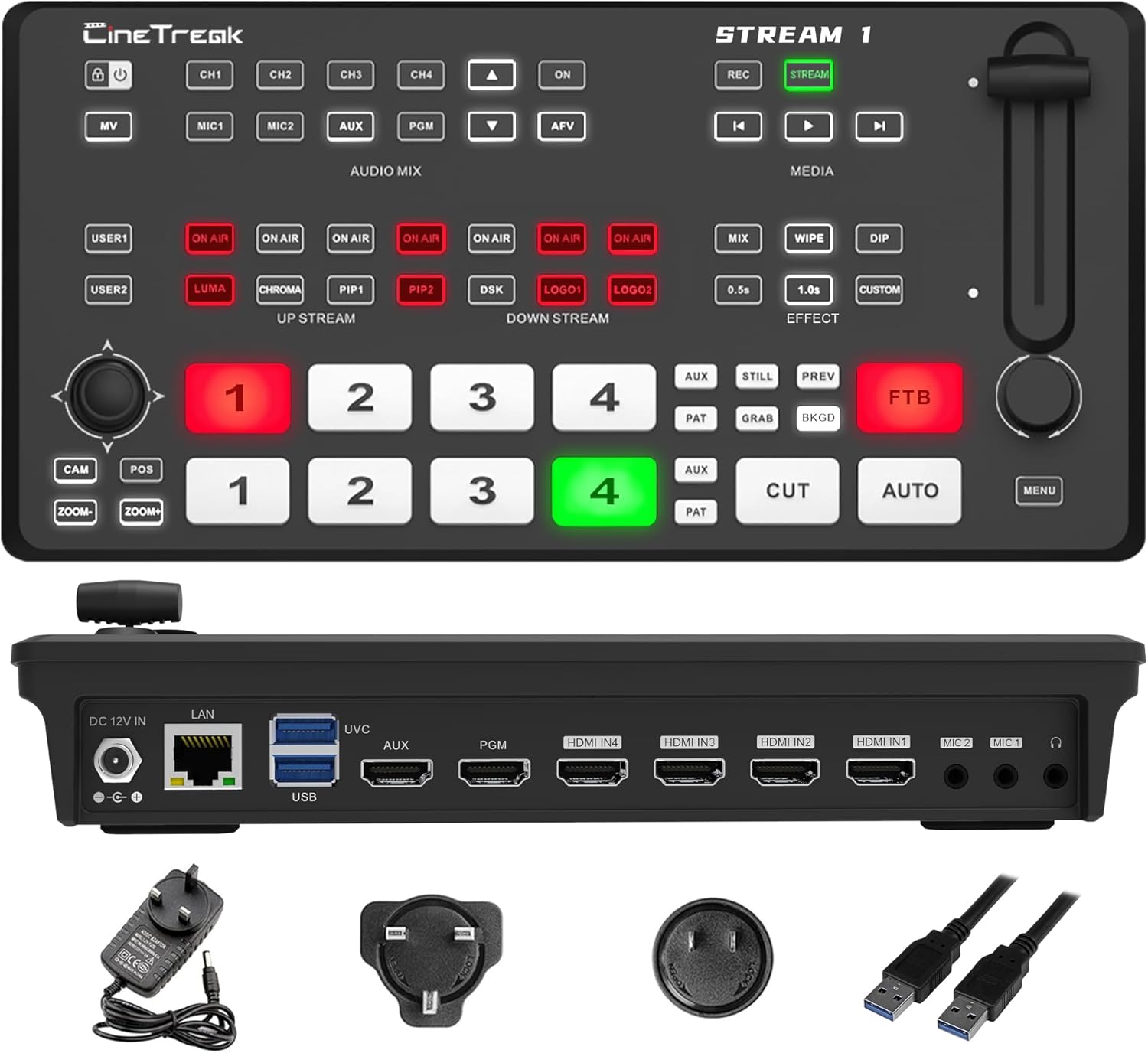
Figure 1: CINETREAK Stream-1 Video Switcher with power adapter and USB cables.
2. 주요 특징
- Rich Connection Ports: Features 4 HDMI inputs and one AUX channel for media library access. Includes one PGM output and one AUX output, both configurable to output any video channel or a clean PGM source. Equipped with 2 USB ports, a UVC 3.0 port, an RJ45 port, and HDMI 1 and HDMI 2 supporting 4K input for superior visual quality.
- Down & Pull Stream: Seamlessly integrate unencrypted video sources into the stream switcher for real-time output. The RTMPS protocol enables simultaneous live broadcasting to two destinations, ensuring efficient and versatile streaming.
- PTZ Camera Control & Advanced Host System: Built-in PTZ control for up to 4 cameras via the VISCA protocol, with support for wireless IP control from a PC or smartphone. Access the host system through the device's IP address to remotely manage the mixer in real time, including enabling the tally function for streamlined production control.
- REC, Playback & Customizable PIP: Enables recording of high-bitrate Full HD video files with instant playback functionality. Supports two Picture-in-Picture (PIP) layouts, featuring adjustable cropping and resizing options to accommodate diverse creative and production requirements.
- Professional Studio Features: Equipped with chroma and luma keying for advanced virtual studio effects, over 30 transition effects, and seamless switching between landscape and 9:16 portrait orientations. Supports live streaming in both formats for versatile broadcasting.
3. 설정 가이드
3.1 패키지 내용
시작하기 전에 모든 항목이 있는지 확인하세요.
- CINETREAK Stream-1 Video Switcher
- 전원 어댑터
- USB 케이블
- 사용 설명서 (본 문서)
3.2 장치 연결

Figure 2: Rear panel connections of the Stream-1, showing DC 12V IN, LAN, USB/UVC, AUX, PGM, HDMI IN (1-4), MIC (1-2), and Headphone ports.
- 전원 연결: Connect the provided power adapter to the DC 12V IN port on the rear panel and plug it into a power outlet.
- HDMI 입력: Connect your video sources (cameras, computers, gaming consoles) to the HDMI IN 1-4 ports. HDMI 1 and HDMI 2 support 4K resolution.
- HDMI 출력: Connect your program monitor to the PGM HDMI output and your auxiliary monitor to the AUX HDMI output.
- USB 연결:
- 연결하다 webcam to the UVC USB port for direct webcam input.
- Connect a USB storage device to the USB port for recording or media playback.
- 네트워크 연결 : Connect an Ethernet cable to the LAN port for IP control and network streaming.
- 오디오 입력 : Connect microphones to the MIC 1 and MIC 2 ports. Connect headphones to the headphone jack for audio monitoring.
4. 사용 설명서
4.1 기본 스위칭
The Stream-1 features a clear control panel for intuitive operation. The top row of buttons (1-4) represents the Preview (PVW) inputs, and the bottom row (1-4) represents the Program (PGM) outputs. To switch sources:
- Press a button in the PVW row to select the next source for preview.
- Press a button in the PGM row to immediately switch that source to the live output (Cut transition).
- 사용하세요 자동차 button for a smooth transition between PVW and PGM, or the 자르다 button for an instant switch.
- Adjust the T-bar fader for manual transitions.
4.2 오디오 믹싱
The AUDIO MIX section allows control over audio inputs. Use the dedicated buttons for MIC1, MIC2, AUX, and PGM to enable or disable audio sources. Adjust audio levels using the on-screen menu and rotary knob.
4.3 Media Playback and Management
The Stream-1 supports media playback from connected USB storage devices or internal memory. Access the MEDIA menu to manage and play video files, images, and logos.

Figure 3: Illustration of the Stream-1's down-stream and up-stream capabilities, including IP control for professional and easy operation.
4.4 Picture-in-Picture (PIP) and Picture-on-Picture (POP)
Create dynamic layouts with PIP and POP functions. The Stream-1 supports two customizable PIP layouts with adjustable cropping and resizing. Access these features via the PIP1 and PIP2 buttons in the UP STREAM section.

그림 4: 시각적 예amples of Picture-on-Picture (POP) and Picture-in-Picture (PIP) configurations.
4.5 Keying Effects (Chroma & Luma)
Utilize chroma key (green screen) and luma key for advanced virtual studio effects. Select the desired keying type using the CHROMA and LUMA buttons in the UP STREAM section and configure settings via the menu.

그림 5: 예amples of Downstream Key (DSK) functionality, showing chroma keying and graphic overlays.
4.6 전환 효과
Choose from over 30 transition effects to enhance your production. Use the MIX, WIPE, and DIP buttons in the EFFECT section, and adjust parameters like transition speed (e.g., 0.5s) or select custom effects.
4.7 PTZ 카메라 제어
Control up to 4 PTZ cameras directly from the Stream-1 using the VISCA protocol. Use the CAM, POS, and ZOOM buttons along with the joystick to pan, tilt, and zoom your cameras. Wireless IP control is also available via PC or smartphone.
4.8 녹음 및 재생
Record your live program in Full HD to a connected USB storage device. Use the REC button to start/stop recording. Recorded files can be instantly played back through the device.
4.9 라이브 스트리밍
The Stream-1 supports RTMPS protocol for direct live streaming to platforms like YouTube, Facebook, Twitch, and OBS. You can stream to two destinations simultaneously. Configure streaming settings via the menu.

Figure 6: The Stream-1 supports simultaneous RTMPS live streaming to two destinations, including popular platforms.
4.10 Landscape and Portrait Livestreaming
The Stream-1 allows seamless switching between traditional landscape (16:9) and vertical (9:16) orientations, catering to various social media platforms and content formats.

그림 7: 예amples of video layouts optimized for Portrait Mode livestreaming.

그림 8: 예amples of video layouts optimized for Landscape Mode livestreaming.
4.11 Webcam Input Operation
The Stream-1 can accept a webcam as an input source via its UVC USB port. This video demonstrates connecting a DJI Pocket 3 as a web캠 소스.
Video 1: Demonstrates connecting a DJI Pocket 3 camera as a webcam input to the CINETREAK Stream-1, showing the process of plugging in the USB cable, powering on the camera, selecting webcam mode, and viewing the input on the switcher's multiview.
5. 유지관리
To ensure the longevity and optimal performance of your CINETREAK Stream-1, follow these maintenance guidelines:
- 청소: Use a soft, dry cloth to clean the exterior of the device. Avoid using liquid cleaners or aerosols directly on the unit.
- 통풍: 기기 주변에 적절한 공기 흐름이 유지되도록 하십시오. 통풍구를 막지 마십시오.
- 펌웨어 업데이트: Periodically check the official CINETREAK website for firmware updates to access new features and improvements. Follow the provided instructions carefully for any update process.
- 저장: 장시간 사용하지 않을 경우, 직사광선과 극한의 온도를 피해 시원하고 건조한 곳에 보관하세요.
6. 문제 해결
If you encounter issues with your Stream-1, refer to the common problems and solutions below:
| 문제 | 가능한 원인 | 해결책 |
|---|---|---|
| 출력에 영상 신호가 없습니다. | Incorrect input selection, loose HDMI cables, incompatible resolution. |
|
| 오디오 출력이 없습니다. | Audio input not enabled, incorrect audio levels, faulty cables. |
|
| 스트리밍 문제(버퍼링, 연결 끊김). | Weak internet connection, incorrect streaming settings, server issues. |
|
| PTZ 카메라가 응답하지 않습니다. | Incorrect protocol, network issues, camera power. |
|
7. 사양
| 특징 | 세부 사항 |
|---|---|
| 제품 치수 | 86 x 30 x 10 인치 |
| 품목 무게 | 2.23파운드 |
| 모델 번호 | 4개의 HDMI |
| 색상 | 검은색 |
| 커넥터 유형 | HDMI |
| 호환 장치 | 데스크탑 |
| 케이블 유형 | HDMI |
| HDMI 입력 | 4 (HDMI 1 & 2 support 4K) |
| USB 포트 | 2 (including 1 UVC 3.0) |
| 네트워크 포트 | RJ45 (LAN) |
| PTZ 제어 | Up to 4 cameras via VISCA protocol |
| 스트리밍 프로토콜 | RTMPS (dual destination support) |
| 녹음 | Full HD, high-bitrate to USB storage |
| 키잉 | Chroma Key, Luma Key |
| 전환 | Over 30 effects |
| 정위 | Landscape (16:9) & Portrait (9:16) |
8. 보증 및 지원
CINETREAK products are designed for reliability and performance. This product comes with a manufacturer's warranty. For specific warranty terms and conditions, please refer to the warranty card included with your product or visit the official CINETREAK web대지.
For technical support, troubleshooting assistance, or any inquiries regarding your Stream-1, please contact CINETREAK customer service. Contact information can typically be found on the official product web웹사이트 또는 구매 서류에서 확인하실 수 있습니다.
Please note that only products purchased from the official CINETREAK store or authorized resellers are eligible for warranty service.