
제품 끝view
The ATTACK SHARK X98PRO is a versatile wireless mechanical keyboard designed for both gaming and productivity. It features a compact 98-key layout, a customizable TFT screen, a multi-functional CNC metal knob, and tri-mode connectivity for seamless use across various devices and operating systems.

The ATTACK SHARK X98PRO keyboard in Starry Black with its distinctive yellow keycaps and coiled USB-C cable.
주요 특징
- Fully Customizable Smart Screen: A 1.14-inch TFT screen capable of displaying custom GIFs, system status, battery life, time, and connection mode.
- Multi-Functional CNC Metal Knob: Precision control for volume, brightness, RGB effects, and connection modes.
- 3중 모드 연결: 블루투스 5.0, 2.4G 무선 및 USB-C 유선 연결을 지원합니다.
- 핫스왑 가능 스위치: Compatible with 3-pin and 5-pin mechanical switches for personalized typing feel.
- Premium Gasket Mount: Features a 20-point cross-beam gasket mount with 5 layers of sound-dampening materials for a satisfying and quiet keystroke.
- RGB 백라이트: Offers multiple lighting effects and customization options.
- 대용량 4000mAh 배터리: 무선 사용 시간을 연장해 줍니다.
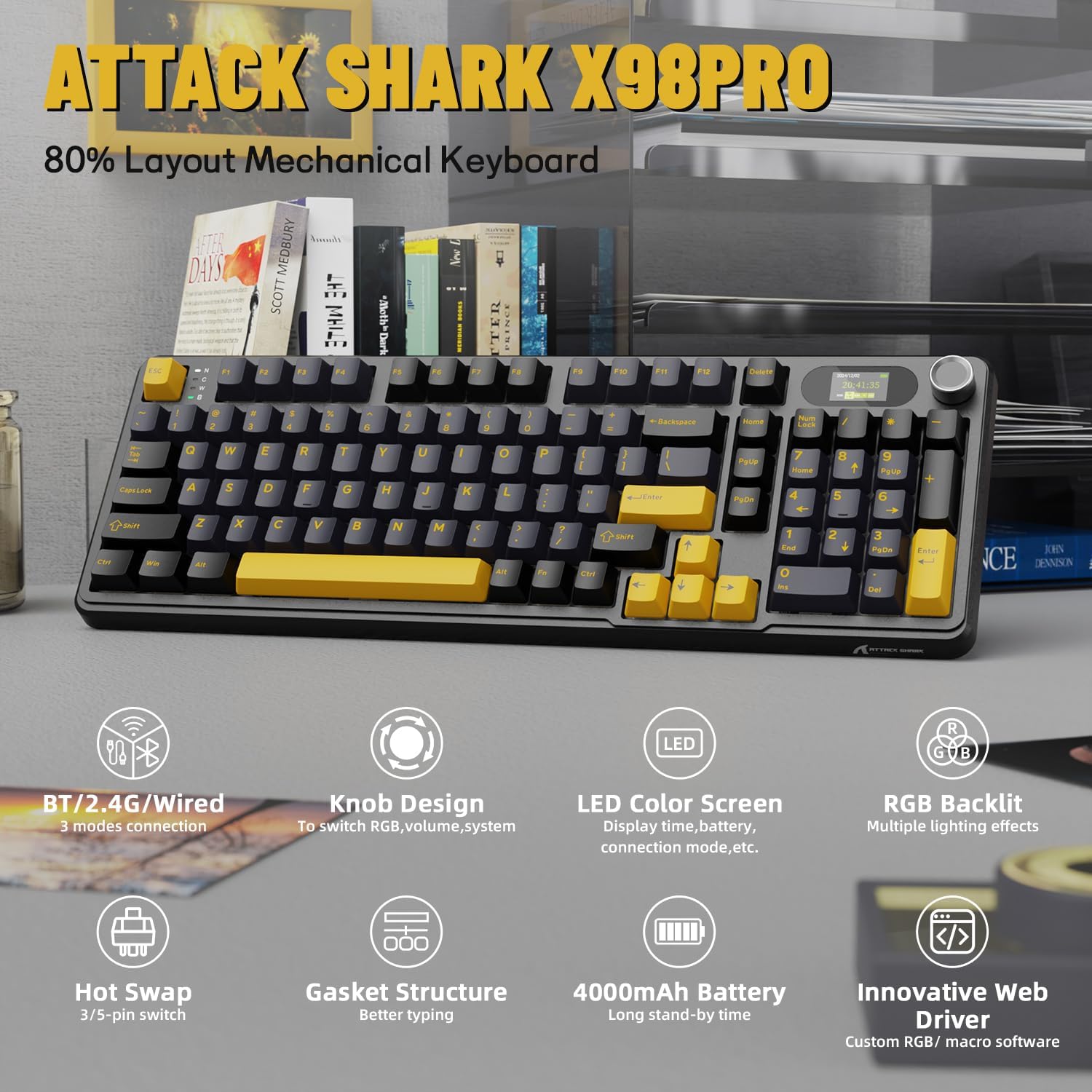
오버view of the ATTACK SHARK X98PRO's main features, including its tri-mode connection, knob design, LED color screen, RGB backlighting, hot-swappable switches, gasket structure, 4000mAh battery, and innovative web 운전사.
공식 제품 영상 쇼asing the ATTACK SHARK X98PRO 98-key mechanical keyboard, highlighting its design and TFT display capabilities.
설정
패키지 내용
시작하기 전에 패키지에 모든 품목이 들어 있는지 확인하세요.
- 어택 샤크 X98PRO 키보드
- USB-C-USB-A 브레이드 케이블
초기 충전
For optimal performance, fully charge the keyboard before its first use. Connect the provided USB-C cable to the keyboard's USB-C port and the other end to a powered USB-A port on your computer or a wall adapter. The 4000mAh battery ensures extended usage.
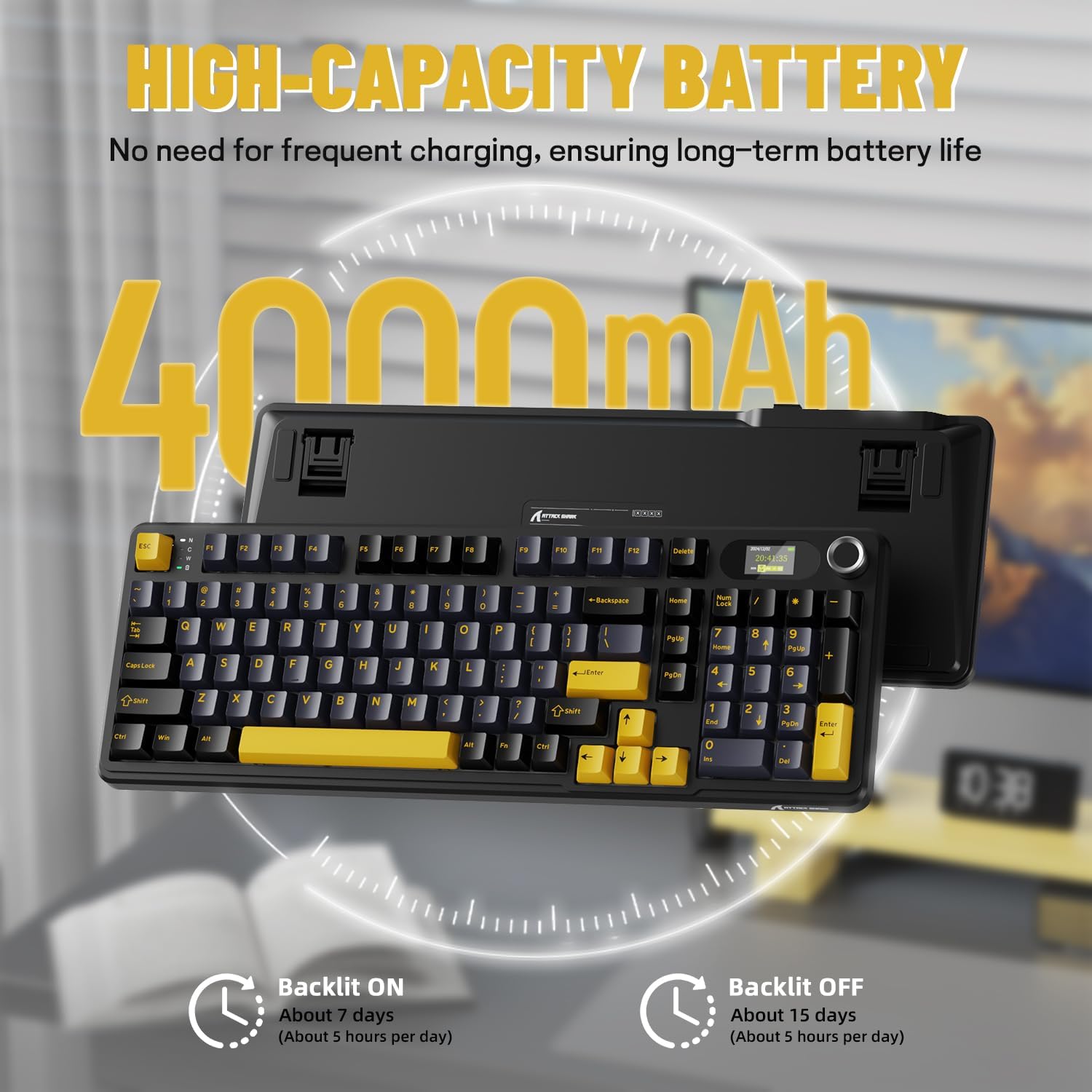
Details on the keyboard's high-capacity 4000mAh battery, indicating approximately 7 days of use with backlight on (5 hours/day) and 15 days with backlight off (5 hours/day).
연결 옵션
The X98PRO keyboard offers three connection modes:
- USB-C 유선 모드: Connect the keyboard directly to your device using the provided USB-C cable. This mode offers the most stable connection and charges the keyboard simultaneously.
- 2.4G 무선 모드: Insert the 2.4G USB dongle (usually found in a compartment on the keyboard) into your device's USB port. The keyboard will automatically connect.
- Bluetooth 5.0 모드: Enable Bluetooth on your device and put the keyboard into Bluetooth pairing mode (refer to operating instructions for specific key combinations). Select the keyboard from your device's Bluetooth list to connect. The keyboard can store up to three Bluetooth connections.

The keyboard supports tri-mode connection: USB-C wired, 2.4GHz wireless, and Bluetooth 5.0, allowing connection to multiple devices like PCs, laptops, and tablets.
Official product video demonstrating the ATTACK SHARK X98PRO Wireless Keyboard in use, highlighting its wireless capabilities.
작동 지침
Multi-Function Knob and TFT Screen
The CNC metal knob provides intuitive control over various keyboard functions. Rotate the knob to adjust settings such as light intensity, light speed, and light color. Press the knob to confirm selections or switch between different menu options on the TFT screen.
The 1.14-inch TFT smart screen displays essential information including the current time, battery level, connection mode, and system status. It can also be customized to show personalized GIFs or animations.
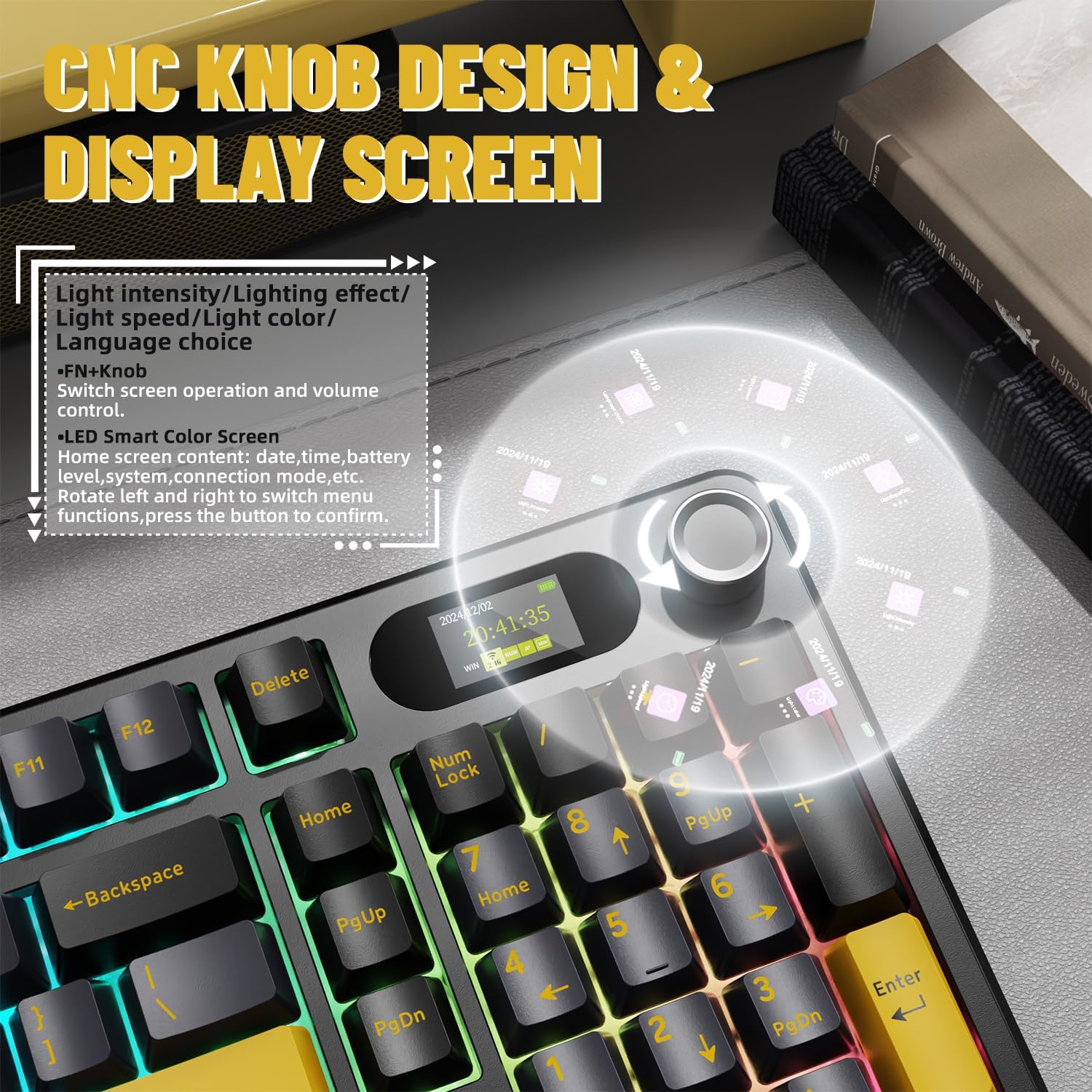
상세한 view of the CNC knob and TFT display, explaining how to navigate menus, adjust light settings, and control volume. The screen can show time, battery, and connection mode.
RGB 백라이트 제어
The keyboard features full RGB backlighting with over 16 million colors and various dynamic effects. You can switch light effects, change light colors, and adjust backlight brightness and speed directly from the keyboard using key combinations, typically involving the Fn key and other designated keys.

The keyboard supports music rhythm synchronization and allows customization of various lighting effects through its driver. Key combinations for switching light effects, color, brightness, and speed are also shown.
사용자 정의
핫스왑 가능 스위치
The X98PRO keyboard is equipped with a hot-swappable PCB, allowing you to easily change mechanical switches without soldering. It supports both 3-pin and 5-pin switches, providing flexibility to customize your typing experience with different switch types (e.g., linear, tactile, clicky).
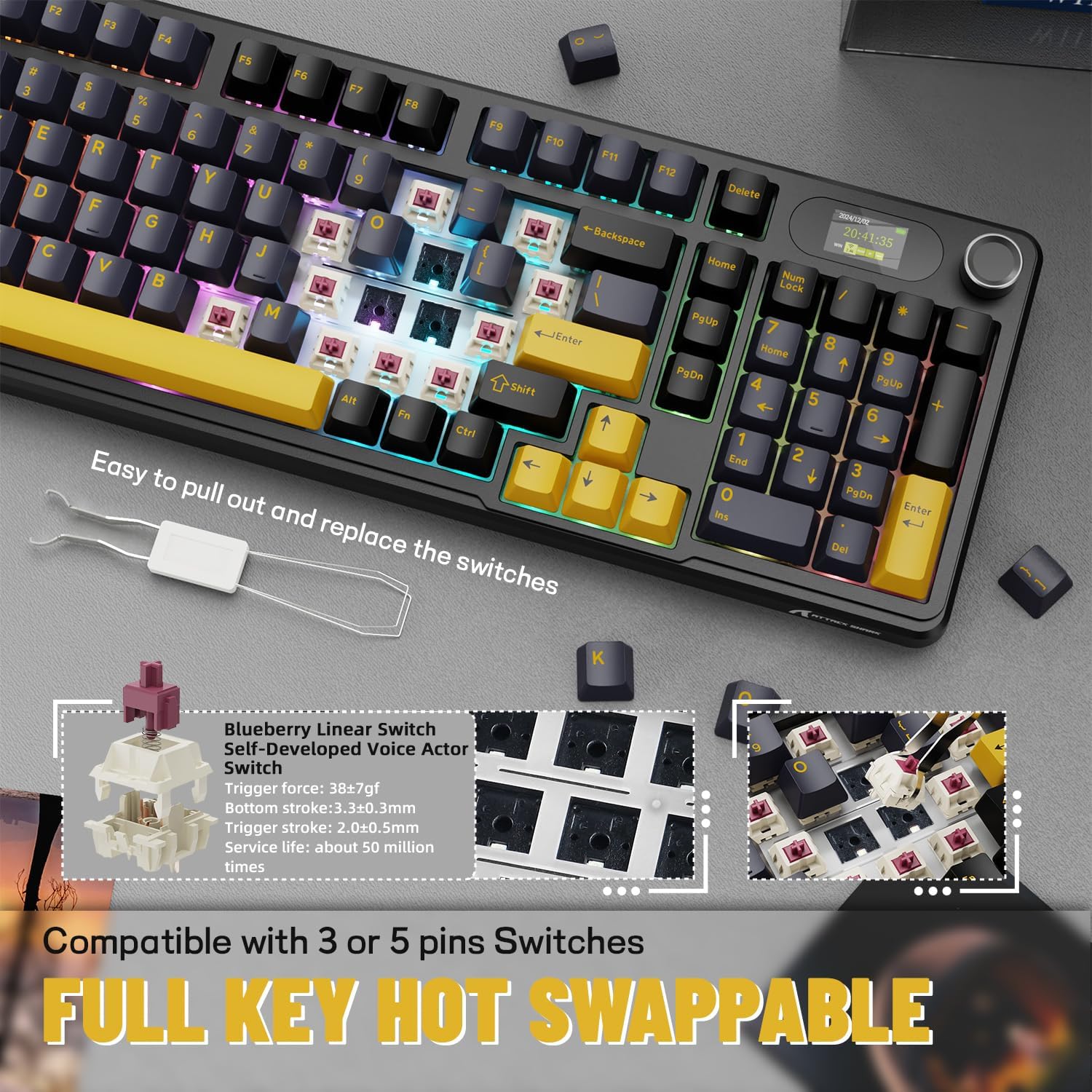
Demonstration of the hot-swappable feature, allowing users to easily replace switches. The keyboard is compatible with both 3-pin and 5-pin mechanical switches.
Web-기반 드라이버
The keyboard utilizes an intuitive web-based driver for advanced customization. This driver allows you to:
- Edit and upload custom GIFs to the TFT screen.
- RGB 조명 효과와 색상을 사용자 정의합니다.
- Remap keys and create custom key combinations.
- Set up programmable macros for enhanced productivity or gaming.
No software installation is needed; simply access the driver through your web 브라우저.

혁신적인 web driver allows for full programmability, customization of backlight colors and effects, creation of custom key combinations, and setting screen animations, including GIF images.
유지
Proper maintenance ensures the longevity and performance of your ATTACK SHARK X98PRO keyboard.
일반 청소
- 키보드의 키캡 사이사이에 쌓인 먼지를 제거하려면 압축 공기를 정기적으로 사용하십시오.
- 키캡과 키보드 표면은 부드럽고 약간 d로 닦으세요.amp보푸라기가 없는 천을 사용하세요. 강한 화학 물질이나 연마재는 사용하지 마세요.
- 더욱 꼼꼼한 청소를 위해서는 키캡 제거 도구를 사용하여 키캡을 조심스럽게 분리할 수 있습니다.
스위치 케어
As the switches are hot-swappable, ensure they are seated correctly after any replacement. Avoid excessive force when inserting or removing switches to prevent damage to the PCB or switch pins.
배터리 관리
- 배터리를 자주 완전히 방전시키지 마세요.
- 장시간 사용하지 않을 때는 키보드를 서늘하고 건조한 곳에 보관하세요.
- Use only the provided or a certified USB-C cable for charging.
문제 해결
일반적인 문제 및 솔루션
- 연결 문제:
- Ensure the keyboard is in the correct mode (BT, 2.4G, or Wired).
- For 2.4G, ensure the dongle is securely inserted and try a different USB port.
- For Bluetooth, ensure the keyboard is in pairing mode and your device's Bluetooth is enabled. Try re-pairing.
- 키보드가 충전되어 있는지 확인하세요.
- TFT Screen Not Displaying Correctly:
- 키보드의 배터리 수준을 확인하세요.
- 접근하기 web-based driver to reconfigure or update the screen content.
- Ensure the keyboard firmware is up to date (if applicable, check manufacturer's web대지).
- Unexpected Key Presses (Miss-clicks):
- This can sometimes occur with sensitive switches. Ensure your typing posture does not put unintended pressure on keys.
- Consider if different switch types might be more suitable for your typing style (leveraging the hot-swap feature).
- 배터리 수명이 짧음:
- 키보드를 사용하기 전에 완전히 충전되었는지 확인하십시오.
- Reduce RGB backlight brightness or turn it off when not needed to conserve battery.
- Ensure the keyboard is not constantly searching for a connection in wireless modes.
For more detailed troubleshooting or advanced issues, refer to the official ATTACK SHARK website and its web-based driver for specific diagnostic tools or firmware updates.
명세서
| 특징 | 세부 사항 |
|---|---|
| 상표 | 공격상어 |
| 모델 | X98PRO |
| 연결 기술 | 2.4GHz, 블루투스, USB-C |
| 키보드 설명 | 기계적 |
| 키의 개수 | 98 |
| 특징 | Customizable Display Keys (TFT Screen) |
| 전원 | 배터리 구동 |
| 배터리 용량 | 4000mAh |
| 호환 장치 | 노트북, PC, 태블릿 |
| 품목 무게 | 2.86파운드 |
| 패키지 크기 | 17.4 x 7.72 x 2.09 인치 |
| 원산지 | 중국 |
| 첫 번째 이용 가능 날짜 | 19년 2024월 XNUMX일 |
보증 및 지원
The ATTACK SHARK X98PRO Wireless Mechanical Keyboard comes with a standard manufacturer's warranty. For specific details regarding warranty coverage, duration, and terms, please refer to the warranty card included with your product or visit the official ATTACK SHARK web대지.
For technical support, product inquiries, or assistance with any issues not covered in this manual, please contact ATTACK SHARK customer service through their official website or designated support channels. Keep your purchase receipt or proof of purchase handy for warranty claims.
공식 브랜드 스토어: ATTACK SHARK 스토어 (아마존)