
1. 서론
The DATOUBOSS PSW-E-12V 2000W Pure Sine Wave Inverter is designed to convert 12V DC battery power into stable 220V-230V 50Hz AC power. This inverter provides a clean and reliable power source for various electronic devices, making it ideal for use in RVs, boats, solar power systems, and during emergency power outag에스.
Its pure sine wave output ensures compatibility with sensitive electronics, reducing noise and electrical interference. The robust aluminum casing offers durability and protection for both domestic and outdoor applications.
포함 사항:
- 1 x DATOUBOSS 12V 220V Pure Sine Wave 2000W Inverter
- 배터리 케이블 2개(빨간색 및 검은색)
- 1 x 사용자 설명서
2. 안전 지침
Please read all safety instructions carefully before installing and operating the inverter. Failure to follow these instructions may result in electric shock, fire, or serious injury.
- 통풍: 인버터 주변에 충분한 환기가 이루어지도록 하세요. 환기구를 막지 마세요.
- 환경: 인버터는 직사광선, 열원 및 가연성 물질을 피해 건조하고 서늘하며 통풍이 잘 되는 곳에 설치하십시오.
- 물 노출: Do not expose the inverter to water, rain, or moisture.
- 사이: Ensure all connections are tight and secure to prevent loose connections, which can cause overheating and fire.
- 접지: 인버터는 반드시 적절하게 접지되어야 합니다.
- 어린이들: 인버터를 어린이의 손이 닿지 않는 곳에 보관하세요.
- 적격 직원: 설치 및 유지관리는 자격을 갖춘 인력만이 수행해야 합니다.
- 하중 용량: Do not exceed the inverter's rated power capacity.
- 배터리 용량tage: 배터리 용량 확인tage는 인버터의 입력 전압과 일치합니다.tag전자(12V DC).
경고: 높은 볼륨tage inside. Do not open the inverter casing.
3. 제품 오버view
The DATOUBOSS PSW-E-12V 2000W inverter features a compact design with multiple output ports and an intelligent cooling system.
주요 특징:
- Pure Sine Wave Output: Provides stable and clean power for sensitive electronics.
- High Efficiency: Conversion efficiency greater than 92%.
- Multiple Output Ports: 2 EU AC sockets, 1 USB 2.1A port, and 1 Type-C port.
- LCD Display: Real-time monitoring of input/output voltage, power, frequency, and fault indications.
- Comprehensive Protection: Overload, overheating, high/low voltage, short circuit, reverse polarity protection.
- Intelligent Cooling Fan: Automatically activates based on internal temperature to prevent overheating and ensure quiet operation.
구성 요소 식별:
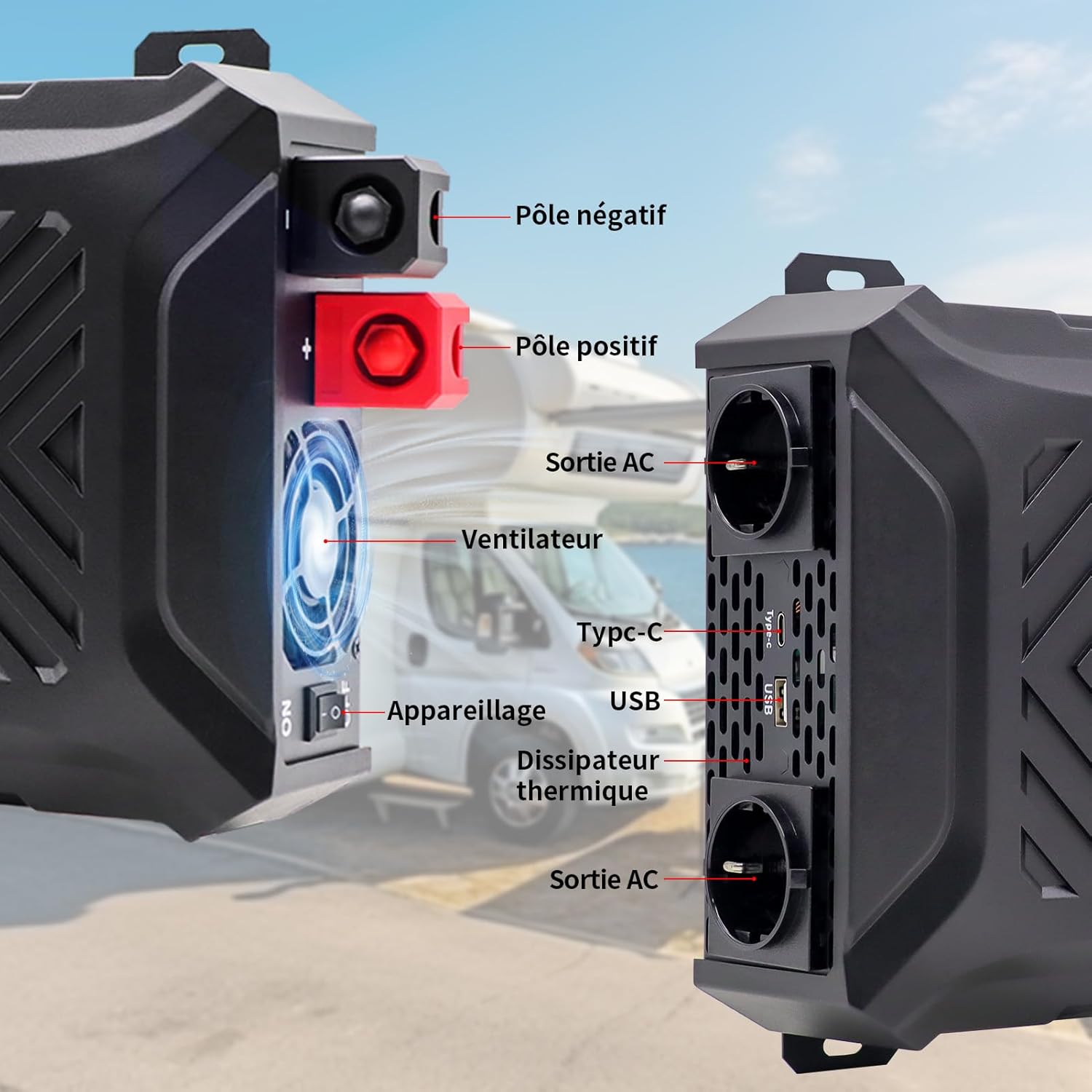
이미지: 앞면과 측면 view of the inverter with labels for the negative pole, positive pole, AC output sockets, fan, Type-C port, USB port, and heat sink.

이미지: 상세 view of the inverter's LCD screen, AC output sockets, USB port, and Type-C port, with labels for input voltage, 출력 볼륨tage, real-time power, output frequency, and battery level.

Image: The DATOUBOSS inverter connected to various devices, illustrating its multiple output options including two EU AC outlets, a USB port, and a Type-C port, along with its 12V DC input.
4. 설정 지침
인버터를 올바르게 설치하고 연결하려면 다음 단계를 따르십시오.
4.1 인버터 장착
- Choose a secure, flat, and well-ventilated location.
- Ensure there is sufficient space around the inverter for airflow, especially around the fan and heat sink.
- Mount the inverter using appropriate screws and brackets (not included unless specified).
4.2 배터리 연결
The inverter requires a 12V DC battery system. Ensure the battery type is compatible (GEL, SLA, LI, FLD, AGM, CLA, LifePO4).

Image: Icons representing various compatible battery types including GEL, SLA, LI, FLD, AGM, CLA, and LifePO4, indicating the inverter's versatility.
- Turn off the inverter: 인버터의 전원 스위치가 'OFF' 위치에 있는지 확인하세요.
- Connect the negative cable: Connect the black battery cable to the negative (-) terminal of the battery and then to the negative (-) terminal of the inverter.
- Connect the positive cable: Connect the red battery cable to the positive (+) terminal of the battery and then to the positive (+) terminal of the inverter.
- 보안 연결: Tighten all connections firmly to prevent sparks or overheating.
- 접지: 인버터의 접지 단자를 적절한 접지에 연결하십시오.
중요한: Always connect the battery cables in the correct polarity. Reverse polarity can damage the inverter and void the warranty. Use the provided battery cables or cables of appropriate gauge for the power rating.
4.3 Optional Solar Panel Connection
The inverter can be integrated into a solar power system. A solar charge controller is required for this setup.

Image: A diagram illustrating the connection of solar panels to a solar charge controller, which then connects to a battery bank, and finally to the DATOUBOSS inverter to power various household appliances.
5. 사용 설명서
Once the inverter is properly installed and connected, follow these steps to operate it.
5.1 전원 켜기/끄기
- 전원을 켜려면: After ensuring all connections are secure, switch the inverter's power button to the 'ON' position. The LCD screen will illuminate, displaying current status.
- 전원을 끄려면: Disconnect all AC loads from the inverter, then switch the inverter's power button to the 'OFF' position.
5.2 LCD 디스플레이 사용
The LCD screen provides real-time information about the inverter's operation and status.
- 입력 Voltag전자(DC): 현재 볼륨을 표시합니다.tage 배터리에서.
- 출력 볼륨tag전자(AC): Shows the inverter's AC output voltage.
- 출력 전력(W): Indicates the real-time power consumption of connected devices.
- 출력 주파수(Hz): Displays the AC output frequency (50Hz).
- 배터리 잔량 표시기: Shows the approximate charge level of the connected battery.
- 오류 표시기: Displays error codes or symbols if a protection mechanism is triggered.

Image: The inverter's LCD screen displaying operational data, alongside icons representing various safety protections such as overvoltage, overheating, overload, and undervoltage.
5.3 장치 연결
- Plug your AC appliances into the EU sockets.
- Connect USB-powered devices to the USB 2.1A port.
- Connect Type-C powered devices to the Type-C port.
메모: The total power consumption of all connected devices must not exceed the inverter's rated continuous power (2000W). For inductive loads (e.g., motors, refrigerators), the starting surge power can be significantly higher than the running power. Ensure the inverter's peak power (4000W) can handle these surges.
6. 유지관리
정기적인 유지관리는 인버터의 수명과 최적의 성능을 보장합니다.
6.1 청소
- Ensure the inverter is turned off and disconnected from all power sources before cleaning.
- Use a soft, dry cloth to wipe the exterior of the inverter.
- Periodically check and clean the ventilation openings to ensure proper airflow. Do not use liquid cleaners or solvents.
6.2 보관
- 인버터를 장기간 보관할 경우 배터리에서 분리하여 서늘하고 건조한 곳에 보관하세요.
- Ensure the battery connected to the inverter is properly maintained according to its manufacturer's instructions, especially if it's a lead-acid battery requiring periodic charging.
7. 문제 해결
이 섹션에서는 인버터 사용 중 발생할 수 있는 일반적인 문제에 대해 설명합니다.
| 문제 | 가능한 원인 | 해결책 |
|---|---|---|
| 출력 볼륨 없음tage / Inverter not turning on | 배터리 연결이 느슨함, 배터리 볼륨이 낮음tage, inverter switch off, internal fuse blown. | Check battery connections. Charge or replace battery. Ensure inverter switch is ON. Contact support if fuse is suspected. |
| Inverter shuts down / Overload alarm | 연결된 부하가 인버터의 정격 출력을 초과했습니다. | Reduce the total load by disconnecting some appliances. Check appliance wattage. |
| 과열 경보 | Poor ventilation, excessive ambient temperature, prolonged high load. | Ensure proper ventilation. Move inverter to a cooler location. Reduce load. |
| 낮은 볼륨tag전자 알람 | 배터리 용량tage가 너무 낮습니다. | Charge the battery immediately. Disconnect loads to prevent deep discharge. |
| 높은 볼륨tag전자 알람 | 배터리 용량tage가 너무 높아요. | Check battery charging system. Disconnect inverter from battery if voltage remains high. |
| Abnormal noise from inverter | Fan operating, or inductive load causing slight hum. | Normal operation for fan. If noise is excessive or unusual, contact support. |
이러한 해결 방법을 시도한 후에도 문제가 지속되면 고객 지원팀에 문의하세요.
8. 사양
Technical details for the DATOUBOSS PSW-E-12V 2000W Pure Sine Wave Inverter.

Image: The DATOUBOSS inverter with its dimensions labeled: 37 cm (14.57 in) length, 28.5 cm (11.22 in) width, and 18 cm (7.09 in) height, along with the included red and black battery cables.
| 특징 | 세부 사항 |
|---|---|
| 상표 | 다투보스 |
| 모델명 | PSW-E |
| 모델 번호 | PSW-E-12V 2000W |
| 입력 Voltage | 12볼트 직류 |
| 출력 볼륨tage | 220V-230V 교류 |
| 출력 주파수 | 50Hz |
| 연속 전력 | 2000 와트 |
| 피크 파워 | 4000 와트 |
| 변환 효율성 | > 92% |
| 출력파형 | 순수한 사인 웨이브 |
| 출력 포트 | 2 x EU AC Sockets, 1 x USB 2.1A, 1 x Type-C |
| 전원 | 태양광 및 배터리 구동 |
| 제품 치수 | 37L x 28.5W x 18H 센티미터 |
| 추천 용도 | Home and Outdoor Use |
9. 보증 및 지원
DATOUBOSS provides a comprehensive warranty and customer support for your product.
보증 정보:
- 이 제품에는 다음이 포함되어 있습니다. 24개월 제조사 보증 구매일로부터.
- 보증은 정상적인 사용 하에서 재료 및 제조상의 결함을 포함합니다.
- Damage caused by improper installation, misuse, unauthorized modifications, or natural disasters is not covered.
고객 지원:
If you have any questions regarding the use, performance, or troubleshooting of your DATOUBOSS inverter, please do not hesitate to contact our customer service team. We offer friendly and patient customer support.
Please refer to the contact information provided with your purchase or visit the official DATOUBOSS web지원 세부 정보 사이트.