
1. 제품 오버view
The Ultimaxx TTL Flash with LCD is designed to provide versatile and professional lighting for a wide range of Nikon DSLR and mirrorless cameras. It features an intuitive LCD display for easy setting adjustments and supports various flash modes including TTL, Manual, Multi Flash, and Slave modes (S1, S2). The lightweight design ensures it can be mounted directly onto your camera without adding significant bulk, making it suitable for dynamic photography sessions.

Image 1.1: The Ultimaxx TTL Flash unit, shown with its included diffuser and protective carrying case.
2. 상자 안에 무엇이 들어있나요?
패키지에 모든 품목이 들어 있는지 확인하세요.
- 플래시 유닛
- 보호 케이스
- 디퓨저
3. 설정
3.1. 배터리 설치
The flash unit requires 4 AA batteries for operation. These are not included in the package. You can use either alkaline or nickel-metal hydride (NiMH) batteries.
- 플래시 본체 측면에 있는 배터리함을 찾으세요.
- 배터리 덮개를 엽니다.
- 배터리 4개를 넣고, 배터리 칸 안쪽에 표시된 대로 극성(+/-)을 올바르게 맞춰 넣으세요.
- 배터리 덮개를 단단히 닫으세요.
3.2. 카메라에 부착
Follow these steps to securely mount the flash unit onto your Nikon camera's hot shoe:

Image 3.1: Visual guide for attaching the flash to a camera.
- Adjust the Locking Plate: Rotate the locking plate on the flash unit's foot upwards to its highest point.
- Attach the Speedlite: Slide the flash unit's mounting foot into the hot shoe of your camera. Ensure it is fully seated.
- Secure the Locking Plate: Rotate the locking plate downwards to tighten and secure the flash unit firmly to the camera's hot shoe.
4. 플래시 작동법
4.1. 전원 켜기/끄기 및 LCD 디스플레이
To power on the flash, press the 켜짐/꺼짐 button. The intuitive LCD display will illuminate, showing current settings and parameters. To power off, press and hold the 켜짐/꺼짐 단추.

Image 4.1: The LCD display provides clear, backlit information for easy adjustments.
4.2. 제어판 오버view
The flash unit features a user-friendly control panel for adjusting various settings. Refer to the diagram below for button identification:
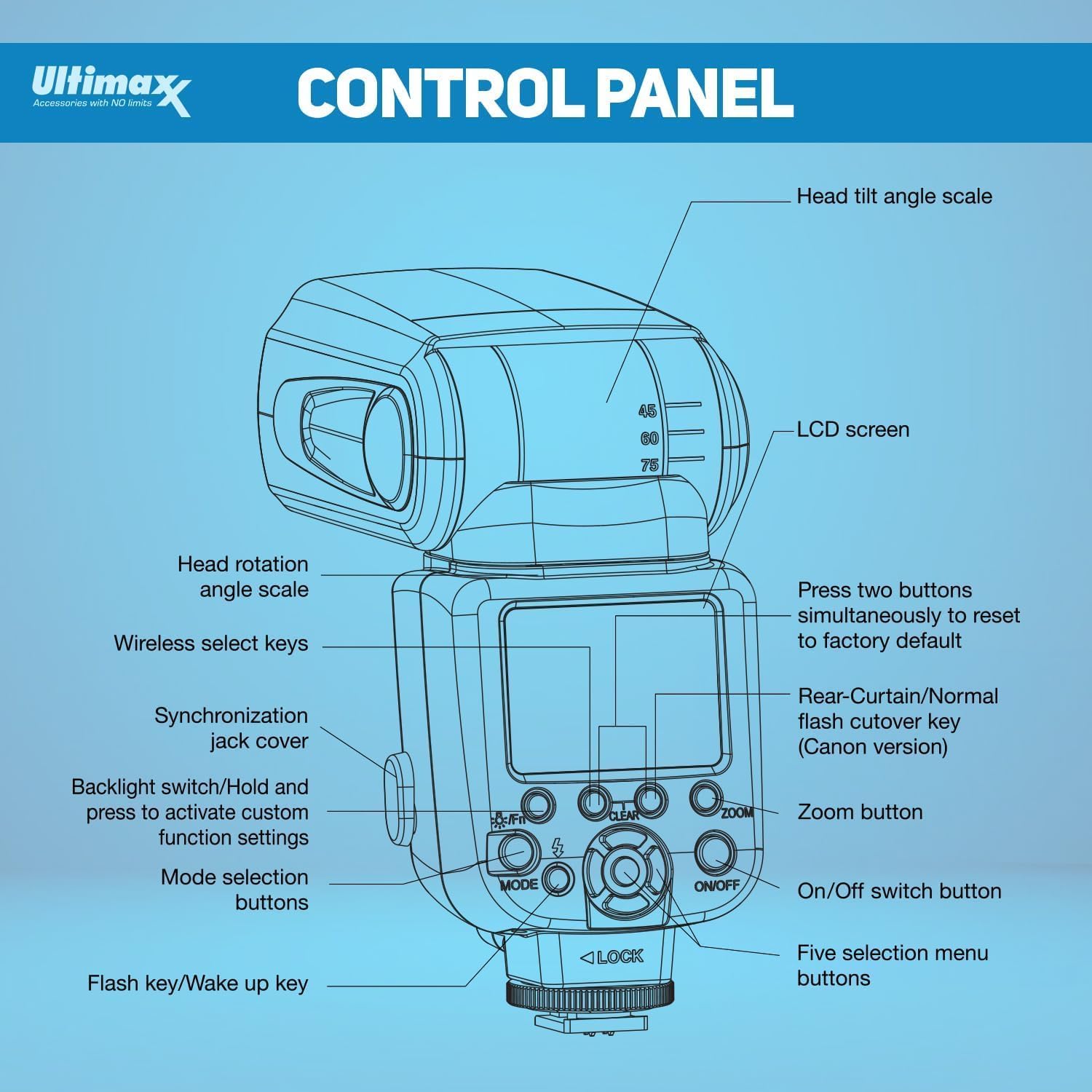
Image 4.2: Detailed diagram of the flash unit's control panel.
4.3. 플래시 모드
The Ultimaxx TTL Flash supports several operating modes:
- TTL (Through The Lens): The flash automatically adjusts its output for accurate and consistent lighting based on the camera's metering system.
- 수동(M): Allows you to manually set the flash power output from 1/1 (full power) down to 1/128 for precise control.
- 멀티 플래시 모드: Creates multiple flashes in a single exposure for dynamic, creative effects.
- Slave Modes (S1, S2): Enables the flash to be triggered wirelessly by another flash unit. S1 mode triggers on the first flash, S2 ignores the pre-flash of a TTL system.
4.4. Using the Diffuser and Reflector
- External Diffuser: The included external diffuser can be attached to the flash head to soften harsh light, producing more natural-looking results.
- 내장형 광각 디퓨저: Pull out the small white panel from the flash head to engage the built-in wide-angle diffuser, useful for broader light spread.
- Built-in Reflector Board: Pull out the small white card from the flash head to use it as a reflector, bouncing light forward to add catchlights or fill shadows.
4.5. Flash Exposures Bracketing Function (FEB)
This function allows the flash to automatically trigger three consecutive shots with varying exposures (one normal, one underexposed, one overexposed) with a single press of the shutter button. This helps in selecting the optimal lighting for your image.

Image 4.3: The Flash Exposures Bracketing function captures multiple exposures for optimal results.
4.6. 제품 시연 영상
Watch this video for a visual guide on the features and operation of the Ultimaxx TTL Flash:
Video 4.1: A demonstration of the Ultimaxx TTL Flash features and usage.
5. 유지관리
- 청소: Use a soft, dry cloth to clean the exterior of the flash unit. For the LCD screen, use a microfiber cloth. Avoid using harsh chemicals or abrasive materials.
- 저장: When not in use, store the flash unit in its protective case in a cool, dry place, away from direct sunlight and extreme temperatures.
- 배터리: 장기간 사용하지 않을 경우 누액 및 손상을 방지하기 위해 플래시에서 배터리를 제거하십시오.
6. 문제 해결
- 플래시가 터지지 않음:
- 배터리가 올바르게 설치되었고 충분히 충전되어 있는지 확인하세요.
- Check that the flash is securely mounted on the camera's hot shoe.
- Verify camera and flash settings are compatible (e.g., flash enabled in camera menu).
- 불규칙적인 노출:
- In TTL mode, ensure the flash head is pointed correctly (e.g., bounced off a ceiling or wall).
- In Manual mode, adjust power output as needed.
- 플래시와 피사체 사이에 장애물이 있는지 확인하십시오.
- LCD 화면이 표시되지 않음:
- Confirm the flash is powered on.
- 배터리가 부족하면 교체하세요.
7. 사양
| 특징 | 세부 사항 |
|---|---|
| 상표 | 얼티맥스 |
| 호환 카메라 모델 | Nikon DSLRs & Mirrorless with i-TTL support (D7500, D500, D600, D610, D700, D750, D780, D800, D810, D850, D3100, D3200, D3300, D3400, D5100, D5200, D5500, D5600, Z30, Z5, Z6, Z6II, Z6III, Z7, Z7II, Z8, Z9 & More) |
| 가이드 번호 | 58 (ISO 100, 105mm 기준) |
| 플래시 모드 | TTL, Manual, Multi, Slave (S1, S2) |
| 줌 범위 | 24-105mm (자동/수동) |
| 회전 | 0-360° Horizontal, -7° to 90° Vertical |
| 표시하다 | 백라이트 LCD |
| 전원 공급 장치 | AA 배터리 4개(포함되지 않음) |
| 색온도 | 5600K±200K |
| 무선 전송 | Optical Slave (S1/S2) |
| 동기화 옵션 | HSS, Rear Curtain Sync |
| 플래시 동기화 속도 | 1/250 |
| 품목 무게 | 1.23파운드 |
| 패키지 크기 | 9.49 x 3.98 x 3.23 인치 |
| 배터리 수명 | 6시간 |
8. 보증 및 지원
For warranty information, product support, or service inquiries, please contact Ultimaxx directly through their official channels. Details are typically provided with your purchase documentation or on the manufacturer's web대지.