
소개
This manual provides detailed instructions for the proper use and maintenance of your AWEI T16 Wireless Earbuds. Please read this manual thoroughly before using the product to ensure optimal performance and longevity.
패키지 내용
- AWEI T16 Wireless Bluetooth Headset (Left and Right Earbuds)
- 충전 케이스
- USB-C 충전 케이블
- 사용자 설명서 (본 설명서)

Image: The AWEI T16 Wireless Earbuds displayed within their open charging case, showing both earbuds and the interior of the case.
설정
1. 초기 충전
Before first use, fully charge the earbuds and the charging case. Connect the provided USB-C charging cable to the charging port on the case and a compatible USB power source. The LED indicators on the charging case will show the charging status.

Image: The AWEI T16 charging case open, with the earbuds inside, showing the illuminated LED battery indicators on the front of the case.
A full charge for the charging case typically takes 1.5 hours. The earbuds will charge automatically when placed inside the case.
2. 블루투스 페어링
- 이어폰이 충전되어 있는지 확인하세요.
- 충전 케이스를 엽니다. 이어버드가 자동으로 페어링 모드로 진입하며, 이어버드의 LED 표시등이 깜박입니다.
- 기기(스마트폰, 태블릿, 노트북)에서 Bluetooth를 활성화하고 사용 가능한 기기를 검색하세요.
- 검색된 장치 목록에서 "AWEI T16"을 선택하여 연결하십시오.
- Once connected, a voice prompt will confirm successful pairing, and the earbud LED lights will turn off or flash slowly.
The earbuds utilize Bluetooth 5.3 technology for a stable connection up to 10 meters. After initial pairing, the earbuds will automatically reconnect to the last paired device when removed from the case.
작동 지침
전원 켜기/끄기
- 전원 켜기: Open the charging case, and the earbuds will automatically power on. Alternatively, press and hold the touch control area on both earbuds for approximately 3 seconds.
- 전원 끄기 : Place the earbuds back into the charging case and close the lid. They will automatically power off and begin charging. Alternatively, press and hold the touch control area on both earbuds for approximately 5 seconds.
터치 컨트롤
The AWEI T16 earbuds feature smart touch controls on each earbud for various functions:
- 재생/일시 중지: 왼쪽(L) 또는 오른쪽(R) 이어버드를 한 번 탭하세요.
- 다음 노래: Double tap on the Right (R) earbud.
- 이전 노래: Double tap on the Left (L) earbud.
- 볼륨 업: Triple tap on the Right (R) earbud.
- 볼륨 작게 : Triple tap on the Left (L) earbud.
- 전화 받기/종료: 수신 전화나 통화 중일 때 한쪽 이어버드를 한 번 탭합니다.
- 전화 거부: 전화가 오는 동안 한쪽 이어버드를 2초간 길게 누르세요.
- Voice Assistant 활성화 : 통화 중이 아닐 때 한쪽 이어버드를 2초간 길게 누릅니다.

Image: A single AWEI T16 earbud being held, illustrating its compact design and the location of the touch control surface.
싱글 및 듀얼 이어버드 사용
The AWEI T16 earbuds support flexible usage modes:
- 듀얼 이어버드 모드: Both earbuds connect simultaneously for stereo sound. This is the default mode when both are removed from the case.
- 단일 이어 버드 모드 : Either the left or right earbud can be used independently. Simply remove one earbud from the case, and it will connect to your device. The other earbud can remain in the case or be used later.
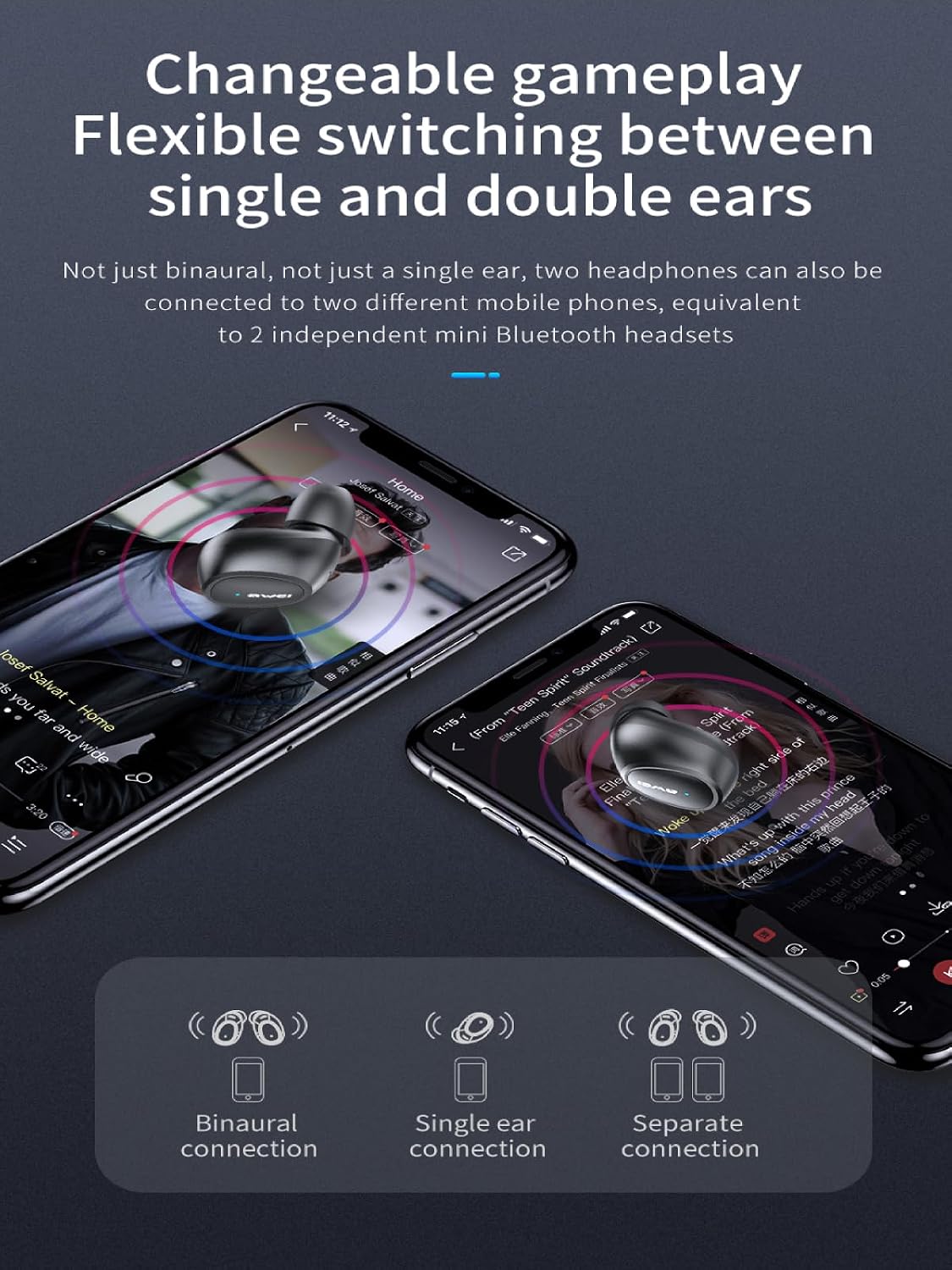
Image: The AWEI T16 earbuds resting in their open charging case, indicating they are ready for either single or dual earbud use.
유지
청소
정기적인 청소는 음질과 위생을 유지하는 데 도움이 됩니다.
- 부드럽고 마른 보푸라기 없는 천으로 이어폰과 충전 케이스를 닦으세요.
- 연마성 세척제, 알코올, 화학 용제는 사용하지 마세요.
- Gently remove any earwax or debris from the earbud mesh using a small, clean brush or cotton swab.
방수 기능(IPX6)
The AWEI T16 earbuds are rated IPX6 waterproof, meaning they are protected against powerful water jets. This makes them suitable for workouts and light rain.
- 이어버드를 물에 담그지 마세요.
- 충전 케이스는 방수 기능이 없습니다. 물에 젖지 않도록 보관하십시오.
- 손상을 방지하려면 이어버드를 충전 케이스에 다시 넣기 전에 건조한지 확인하세요.

Image: The AWEI T16 charging case in a closed state, emphasizing its compact and portable design for protection and storage.
저장
사용하지 않을 때는 이어버드를 충전 케이스에 보관하여 보호하고 충전 상태를 유지하세요. 서늘하고 건조한 곳에 극한의 온도를 피해 보관하세요.
문제 해결
| 문제 | 해결책 |
|---|---|
| 이어폰이 기기와 페어링되지 않습니다. |
|
| 한쪽 이어버드만 작동합니다. |
|
| 소리가 나지 않거나 볼륨이 작습니다. |
|
| 충전 케이스가 충전되지 않습니다. |
|
명세서
| 특징 | 세부 사항 |
|---|---|
| 모델명 | T16 |
| 상표 | 아웨이 |
| 연결 기술 | 무선(블루투스 5.3) |
| 귀 위치 | 귀에 |
| 제어 유형 | 터치 컨트롤 |
| 방수 레벨 | IPX6 방수 |
| 연속 재생 시간 | 7시간(이어버드) |
| 총 재생 시간 (충전 케이스 포함) | Up to 37 hours (dual-ear mode), Up to 74 hours (single-ear mode, alternating) |
| 충전 케이스 배터리 용량 | 300mAh |
| 충전 시간(케이스) | 1.5시간 (Type-C 이용 시) |
| 스피커 크기 | 6mm |
| 품목 무게 | 0.14 킬로그램 |
보증 및 지원
The AWEI T16 Wireless Earbuds come with a 1년 보증 구매일로부터.
For warranty claims, technical support, or further assistance, please contact your retailer or visit the official Awei web사이트. 보증 확인을 위해 구매 증빙 자료를 보관하세요.


