
Temtop PMD371 & Airing2000 Bundle
Temtop PMD371 및 Airing2000 전문가용 공기질 모니터링 패키지 사용 설명서
Model: PMD371 & Airing2000 | Brand: Temtop
1. 서론
This user manual provides detailed instructions for the operation and maintenance of the Temtop PMD371 and Airing2000 Professional Air Quality Monitoring Bundle. This bundle offers a comprehensive solution for precise particle and air quality monitoring in various environments, including laboratories, cleanrooms, and field applications. The PMD371 is designed for detailed particle detection and environmental monitoring, while the Airing2000 extends capabilities with advanced particulate and formaldehyde detection. Please read this manual thoroughly before using the devices to ensure proper function and safety.
2. 안전 정보
- 기기를 극한의 온도, 습도 또는 직사광선에 노출시키지 마세요.
- 기기를 떨어뜨리거나 강한 충격을 주지 마십시오.
- 기기를 분해하거나 개조하지 마십시오. 모든 서비스는 자격을 갖춘 전문가에게 맡기십시오.
- 기기를 물이나 기타 액체로부터 멀리하십시오.
- 밀폐된 공간에서 작업할 때는 적절한 환기를 확보하십시오.
- Use only the specified power adapters and accessories provided by Temtop.
3. 패키지 내용
패키지에 모든 품목이 들어 있는지 확인하세요.
- Temtop PMD371 Particle Counter
- Temtop Airing2000 Particulate Monitor
- USB 충전 케이블 (2개)
- 전원 어댑터(x2)
- 사용 설명서 (본 문서)
- 교정 인증서(해당되는 경우)
4. 제품 오버view

Image: The Temtop PMD371 (right) and Airing2000 (left) air quality monitors, showcasing their distinct designs and displays.
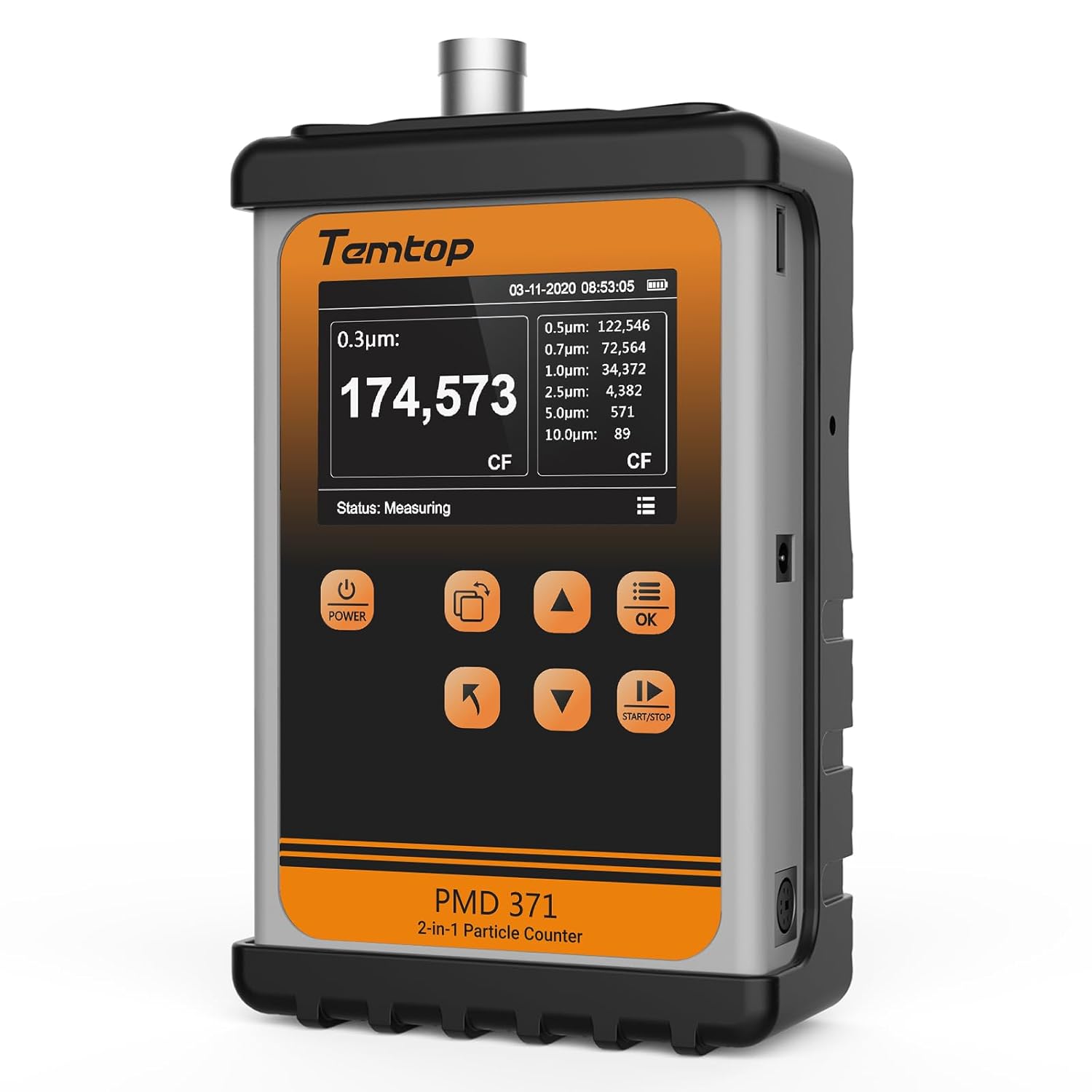
이미지: 앞면 view of the Temtop PMD371 Particle Counter, highlighting its display and control buttons.

이미지: 앞면 view of the Temtop Airing2000 Particulate Monitor, showing its ergonomic design and display.
4.1 Temtop PMD371 Particle Counter
The PMD371 is a precision instrument designed for multi-size particle detection and environmental monitoring. It features a robust all-metal construction for durability and reliable data collection.
- 디스플레이 화면: Shows real-time particle counts (0.3µm, 0.5µm, 1.0µm, 2.5µm, 5.0µm, 10.0µm), PM2.5, PM10, temperature, and humidity.
- 전원 버튼: 장치를 켜거나 끕니다.
- 기능 버튼: Navigation and selection for various modes and settings.
- 입구 포트: Where air samples are drawn in for analysis.
- USB 포트: 충전 및 데이터 전송용입니다.

Image: The Temtop PMD371 highlighting its durable all-metal casing, ensuring robust performance.

Image: The Temtop PMD371 illustrating its compact size (170 x 110 x 48 mm) and lightweight design (1.76 lbs), emphasizing its portability.
4.2 Temtop Airing2000 Particulate Monitor
The Airing2000 is designed for comprehensive field monitoring, providing accurate measurements of PM2.5, PM10, TSP, temperature, humidity, and formaldehyde.
- 디스플레이 화면: Shows real-time readings for PM2.5, PM10, TSP, temperature, humidity, and HCHO.
- 전원 버튼: 기기를 켜거나 끄는 데 사용합니다.
- 탐색 버튼: 메뉴 탐색 및 설정 조정을 위해.
- 공기 흡입구/배출구: Ports for air samp링.
- 충전 포트: 내부 배터리를 충전합니다.

Image: The Temtop Airing2000 showcasing its enterprise-grade precision, industrial-grade pumping sensor, comprehensive monitoring, instant data access, user-friendly operation, and portable design.

Image: The Temtop Airing2000 demonstrating its comprehensive monitoring capabilities, including particulate concentration (PM2.5, PM10, TSP), particle count (0.3µm, 0.5µm, 1.0µm), and environmental conditions (temperature, humidity).

이미지: 자세한 view of the Temtop Airing2000's internal pump-suction sensor, highlighting its advanced optics and wide particle size detection capabilities.
5. 설정
5.1 초기 충전
Before first use, fully charge both the PMD371 and Airing2000 devices. Connect the provided USB charging cables to the respective devices and plug them into the power adapters. A full charge typically takes 3-4 hours. The battery indicator on the screen will show charging status.
5.2 전원 켜기/끄기
- 전원을 켜려면: 누르고 계세요 힘 화면이 켜질 때까지 버튼을 누르세요.
- 전원을 끄려면: 길게 누르세요. 힘 화면이 꺼질 때까지 버튼을 누르세요.
5.3 기본 설정
Upon first power-on, you may need to set the date, time, and preferred units. Navigate through the menu using the arrow buttons and confirm selections with the OK 단추.
- 날짜 및 시간: Set current date and time for accurate data logging.
- 단위: Select preferred units for temperature (°C/°F) and particulate matter (µg/m³).
6. 사용 설명서
6.1 Taking Measurements with PMD371
- 놓기: Position the PMD371 in the area you wish to monitor. Ensure the air inlet is unobstructed.
- 측정 시작: 를 누르세요 시작/중지 button to begin continuous monitoring. The screen will display real-time particle counts and environmental data.
- 본문 해석:
- Particle Counts: Displays the number of particles per liter for various sizes (0.3µm, 0.5µm, 1.0µm, 2.5µm, 5.0µm, 10.0µm).
- PM2.5/PM10: Shows the concentration of particulate matter in micrograms per cubic meter (µg/m³).
- 온도/습도: Displays ambient temperature and relative humidity.
- Stop Measurement: 를 누르세요 시작/중지 button again to pause or stop monitoring.
- 데이터 로깅: The device automatically logs data. You can access historical data through the menu.

Image: The Temtop PMD371's screen displaying detailed particle count data for various sizes (0.3µm, 0.5µm, 0.7µm, 1.0µm, 2.5µm, 5.0µm, 10.0µm) and PM2.5/PM10 concentrations.
6.2 Taking Measurements with Airing2000
- 놓기: Hold the Airing2000 or place it in the desired monitoring location. Ensure the air inlet is clear.
- 측정 시작: The device typically starts measuring automatically upon power-on. Observe the real-time readings on the display.
- 본문 해석:
- PM2.5/PM10/TSP: Displays concentrations of various particulate matters.
- HCHO: Shows formaldehyde concentration.
- 온도/습도: Displays ambient temperature and relative humidity.
- 데이터 관리: Use the navigation buttons to review historical data or adjust settings.
6.3 Data Transfer and Analysis
Both devices support data export. Connect the devices to a computer using the provided USB cables. The devices will appear as a removable storage device, allowing you to access logged data files (e.g., CSV format) for further analysis using spreadsheet software.
7. 유지관리
7.1 청소
- Wipe the exterior of the devices with a soft, dry cloth.
- 연마성 세척제, 용제 또는 강력한 화학 물질을 사용하지 마십시오.
- Ensure the air inlet and outlet ports are free from dust and debris. Use a soft brush or compressed air if necessary, but avoid forcing anything into the ports.
7.2 보관
- 기기를 서늘하고 건조한 곳에 보관하고 직사광선과 극한 온도 변화를 피하십시오.
- If storing for an extended period, ensure the batteries are partially charged (around 50%) to prolong battery life. Recharge every 3-6 months.
7.3 교정
The devices are factory calibrated. For professional applications requiring high accuracy, periodic re-calibration by authorized service centers is recommended. Refer to Temtop's official web교정 서비스를 받으시려면 해당 사이트를 방문하거나 고객 지원팀에 문의하십시오.
8. 문제 해결
| 문제 | 가능한 원인 | 해결책 |
|---|---|---|
| 장치의 전원이 켜지지 않습니다. | 배터리가 부족합니다. 기기가 고장났습니다. | 기기를 완전히 충전하세요. 문제가 지속되면 지원팀에 문의하세요. |
| 부정확한 판독값. | Sensor obstruction; environmental interference; need for calibration. | Ensure air inlets are clear. Move away from strong air currents or dust sources. Consider professional calibration. |
| 화면이 검게 나오거나 멈췄습니다. | 소프트웨어 오류; 배터리 부족. | Recharge the device. Perform a hard reset (refer to specific device manual for button combination, usually holding power for 10+ seconds). |
| 컴퓨터에 연결할 수 없습니다. | Faulty USB cable; driver issue; device not in data transfer mode. | Try a different USB cable or port. Ensure the device is powered on and in data transfer mode if applicable. |
9. 사양
9.1 Temtop PMD371 Particle Counter
- Particle Size Channels: 0.3µm, 0.5µm, 1.0µm, 2.5µm, 5.0µm, 10.0µm
- Measurement Range (PM2.5/PM10): 0~999μg/m³
- 온도 범위: -10°C ~ 50°C(14°F ~ 122°F)
- 습도 범위 : 상대습도 0~99%
- 배터리: 충전식 리튬 이온
- 치수: 약 170 x 110 x 48mm(6.7 x 4.3 x 1.9인치)
- 무게: 약 0.8kg (1.76lbs)
- 데이터 저장: 최대 5000개의 데이터 세트
9.2 Temtop Airing2000 Particulate Monitor
- Particulate Measurement: PM2.5, PM10, TSP
- Formaldehyde (HCHO) Range: 0-1.0 mg / m³
- 온도 범위: -10°C ~ 50°C(14°F ~ 122°F)
- 습도 범위 : 상대습도 0~99%
- 배터리: Rechargeable Lithium-ion (Extended battery life)
- 데이터 저장: Ample storage for continuous logging
- 센서 유형: Industrial-grade pumping sensor
10. 보증 및 지원
10.1 보증 정보
Temtop products typically come with a standard manufacturer's warranty covering defects in materials and workmanship. Please refer to the warranty card included with your product or visit the official Temtop web자세한 보증 조건은 해당 웹사이트를 참조하십시오. 구매 영수증을 보관하여 구매 증빙 자료로 활용하십시오.
10.2 고객 지원
For technical assistance, troubleshooting, or service inquiries, please contact Temtop customer support:
- Web대지: www.temtop.com
- 이메일: 공식 연락처 섹션을 참조하세요. web대지.
- 핸드폰: 공식 연락처 섹션을 참조하세요. web대지.
When contacting support, please have your product model number (PMD371 & Airing2000) and purchase date ready.
관련 문서 - PMD371 & Airing2000 Bundle
 |
Tempop PMD 371 입자 계수기 사용자 매뉴얼 Temtop PMD 371 입자 계수기 사용 설명서입니다. 이 설명서는 정확한 공기질 모니터링을 위한 장치 작동, 설정, 교정, 유지 관리, 문제 해결, 사양 및 보증 정보를 다룹니다. |
 |
Temtop PM900M Laser Particle Sensor: Technical Specifications, Applications, and User Guide This document provides comprehensive details about the Temtop PM900M Laser Particle Sensor. It covers the sensor's working principle based on Mie scattering, technical specifications, applications in air quality monitoring and consumer electronics, connector pinout, communication protocols, dimensions, typical output features including compliance and reliability testing results, and essential installation and operation precautions. Contact information for Elitech Technology, Inc. is also included. |
 |
Temtop PMS 21 원격 입자 계수기 사용자 설명서 Temtop PMS 21 원격 입자 계수기의 사용 설명서로, 기능, 작동, 설정, 프로토콜, 유지 관리, 사양 및 보증 정보를 자세히 설명합니다. |
 |
Temtop PMD 331 Particle Counter: User Manual, Specifications, and Maintenance Guide This user manual provides comprehensive information on the Temtop PMD 331 Particle Counter, including product overview, operations, maintenance, troubleshooting, specifications, and warranty details. Learn how to operate, calibrate, and maintain your device for accurate particle measurement. |
 |
Lasair Pro Aerosol Particle Counter Operations Manual | Particle Measuring Systems This operations manual provides detailed instructions and specifications for the Lasair® Pro Aerosol Particle Counter by Particle Measuring Systems. Learn about setup, operation, maintenance, and troubleshooting for this advanced particle counter. |
 |
MET ONE HHPC+ 系列微尘粒子计数器中文操作手册 - Hach Company Hach Company 的 MET ONE HHPC+ 系列微尘粒子计数器中文操作手册。提供仪器安全、安装、操作、数据管理、清洁与维护的详细指南,是无尘室微污染监控的必备参考。 |
Ask a question about this manual
Ask about setup, troubleshooting, compatibility, parts, safety, or missing instructions. Manuals+ will review the question and use this page’s manual context to help answer it.