
SIMATE S2
SIMATE S2 전동 스쿠터 사용 설명서
모델 : S2
For Kids Ages 6-14, Rider Height 4.0 ft-5.3 ft
1. 서론
Thank you for choosing the SIMATE S2 Electric Scooter. This manual provides essential information for the safe operation, maintenance, and troubleshooting of your new scooter. Please read it thoroughly before first use and keep it for future reference. Proper use and maintenance will ensure a long and enjoyable experience.
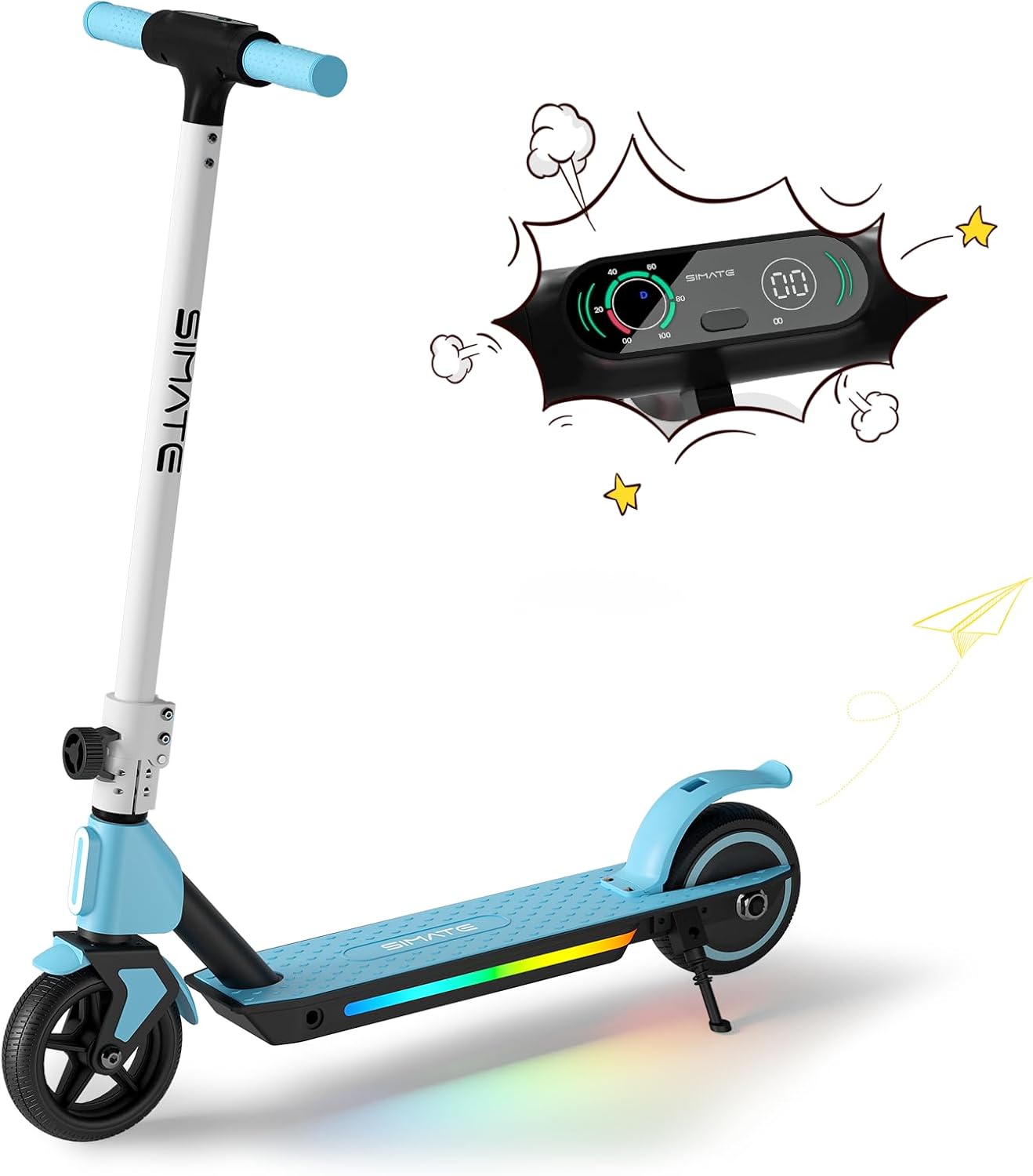
Figure 1: SIMATE S2 Electric Scooter (Blue)
The SIMATE S2 Electric Scooter features a sleek design with an integrated LED display and colorful lights on the deck. It is designed for easy learning and use, making it an ideal choice for young riders.
2. 안전 정보
경고: 라이딩 시에는 항상 헬멧과 적절한 안전 장비를 착용하십시오. 어린이는 반드시 어른의 감독 하에 라이딩해야 합니다.
- Do not ride in wet conditions, on uneven surfaces, or near traffic.
- 매번 라이딩하기 전에 모든 볼트와 패스너가 조여져 있는지 확인하세요.
- Familiarize yourself with both the electronic brake and foot brake.
- 스쿠터는 한 명의 라이더만을 위해 설계되었습니다.
- The motor will not engage until the riding speed reaches 2 mph for safety.
3. 구성 요소 이상view
The SIMATE S2 Electric Scooter consists of several key components:
- 핸들바: Adjustable height for comfortable riding.
- LED 디지털 디스플레이: Shows speed, speed gear, and battery capacity.
- 전자식 스로틀: 가속을 제어합니다.
- 전자 브레이크: Lever on the handlebar for quick stopping.
- 풋 브레이크: Rear fender brake for additional stopping power.
- 갑판: Non-slip surface with colorful LED lights.
- 바퀴: Solid anti-puncture rubber tires for smooth riding.
- 접는 메커니즘: 보관 및 운반이 용이합니다.

Figure 2: Handlebar and Display Features
The intuitive LED display provides real-time information about your ride, enhancing safety and control.

Figure 3: Dual Brake System
The scooter is equipped with both an electronic brake and a foot brake for reliable stopping power in various conditions.
4. 설정
Follow these steps to set up your SIMATE S2 Electric Scooter:
- 풀다: 포장에서 모든 구성 요소를 조심스럽게 제거합니다.
- 펴다: Release the folding mechanism and raise the handlebar stem until it locks into place. Ensure it is securely latched.
- 핸들바 높이 조정: 퀵 릴리스 cl을 풉니 다.amp on the handlebar stem. Adjust the handlebar to a comfortable height for the rider, ensuring the rider can maintain a slight bend in their elbows while holding the grips. Tighten the clamp 안전하게.
- 초기 청구 : 처음 사용하기 전에 스쿠터 배터리를 완전히 충전하십시오. 충전기를 충전 포트에 연결하고 전원 콘센트에 꽂으십시오. 충전이 완료되면 충전기의 표시등이 바뀝니다.

그림 4: 간편한 보관을 위한 접이식 디자인
The scooter's foldable design makes it easy to store and transport, fitting conveniently into car trunks.
5. 사용 설명서
To operate your SIMATE S2 Electric Scooter:
- 전원 켜기: Press and hold the power button on the LED display to turn on the scooter.
- Kick-Start Assist: For safety, the motor will only engage after the scooter reaches a speed of 2 mph (3.2 km/h). Place one foot on the deck and use the other foot to push off the ground, similar to a traditional kick scooter.
- 가속화: Once moving, gently press the electronic throttle with your thumb to accelerate.
- 제동: To slow down or stop, release the throttle and use either the electronic brake lever on the handlebar or press down on the rear foot brake. Use both brakes simultaneously for quicker stops.
- LED 조명: The colorful LED lights on the deck and front light activate automatically when the scooter is powered on, enhancing visibility and style.
- 전원 끄기 : Press and hold the power button to turn off the scooter when you are finished riding.

Figure 5: Large-Sized LED Digital Display
The clear LED display provides essential riding information at a glance, including current speed and battery level.

Figure 6: Front and Pedal Lights
The integrated lighting system enhances visibility and adds a fun element to the ride, especially in low-light conditions.
Video 1: SIMATE Electric Kids Scooter in action, demonstrating riding and features.
Watch this video to see the SIMATE Electric Scooter's features and how it performs in various settings.
6. 유지관리
정기적인 유지보수는 스쿠터의 수명 연장과 안전한 작동을 보장합니다.
- 청소: 광고로 스쿠터를 닦으세요amp cloth after each use. Do not use harsh chemicals or abrasive cleaners. Avoid direct water spray to prevent damage to electronic components.
- 배터리 관리 : Charge the battery fully after each ride. If storing for an extended period, charge the battery every 30-60 days to maintain its health. Do not overcharge or completely drain the battery.
- 타이어: The scooter is equipped with solid anti-puncture rubber tires, requiring minimal maintenance. Periodically check for debris or damage.
- 브레이크: Regularly check the functionality of both the electronic and foot brakes. Ensure they respond promptly and effectively.
- 패스너: Periodically inspect all screws, bolts, and connections to ensure they are tight and secure.

Figure 7: Anti-Puncture Tire and Non-Slip Pedal
The durable solid tires and non-slip deck are designed for low maintenance and enhanced safety.
7. 문제 해결
일반적인 문제 및 해결 방법:
| 문제 | 가능한 원인 | 해결책 |
|---|---|---|
| 스쿠터가 켜지지 않습니다. | 배터리가 약함; 연결이 느슨함. | 배터리를 완전히 충전하십시오. 모든 케이블 연결 상태를 확인하십시오. |
| 모터가 작동하지 않습니다. | Not kick-started; safety feature activated. | Ensure scooter is moving at least 2 mph before pressing throttle. |
| 범위나 속도가 감소함. | 배터리 부족; 과부하; 오르막 주행; 추운 날씨. | Charge battery fully. Ensure rider weight is within limits. Performance may vary with conditions. |
| 브레이크가 효과적이지 않습니다. | Brake mechanism issue. | Inspect brake levers and foot brake for damage or obstruction. Contact support if issues persist. |
8. 사양
| 특징 | 세부 사항 |
|---|---|
| 모델명 | S2 |
| 상표 | 시메이트 |
| 연령대 (권장) | 6-14년 |
| 라이더 높이(권장) | 4.0피트 - 5.3피트 |
| 모터 파워 | 130와트 |
| 최대 속도 | 8.7mph(14km/h) |
| 최대 범위 | 최대 5마일(8km) |
| Max Load (Weight Limit) | 154 파운드 |
| 충전 시간 | 2-3시간 |
| 제품 치수 | 32인치 길이 x 16인치 너비 x 6인치 높이 |
| 프레임 소재 | 알류미늄 |
| 타이어 종류 | Solid Anti-Puncture Rubber |
| 브레이크 시스템 | Electronic Brake & Foot Brake |
| 특별 기능 | Digital Display, Colorful Lights, Lightweight, Foldable, Rechargeable |

그림 8: 주요 제품 사양
A summary of the SIMATE S2 Electric Scooter's performance and physical characteristics.
9. 보증 및 지원
The SIMATE S2 Electric Scooter comes with a limited warranty. Please refer to the warranty card included in your product packaging for specific terms and conditions.
For technical support, replacement parts, or any inquiries not covered in this manual, please contact SIMATE customer service:
- 온라인 지원: 방문하세요 SIMATE Store on Amazon.
- 제조업체: Jinhua Smart Electric Technology Co., Ltd
Ask a question about this manual
Ask about setup, troubleshooting, compatibility, parts, safety, or missing instructions. Manuals+ will review the question and use this page’s manual context to help answer it.