
1. 제품 오버view
The COUGAR FV150 RGB is a mid-tower gaming case designed for high-performance PC builds. It features a dual-chamber design, separating the main components from cables, storage drives, and the power supply unit (PSU) for a clean aesthetic and improved airflow. The case supports various motherboard form factors and offers extensive cooling options, including pre-installed ARGB fans.
주요 특징:
- 듀얼 챔버 디자인: 명확한 제공 view of your build through glass panels while concealing cables and other components.
- GPU 지원: Accommodates graphics cards up to 400mm in length, with options for vertical GPU orientation.
- 마더보드 호환성: Supports Mini-ITX, Micro-ATX, and ATX motherboards.
- 하단 팬 브래킷 설계: Simplifies fan installation by allowing attachment prior to setup.
- Extensive Fan & Water Cooling Support: Multiple fan mounting points and radiator support up to 360mm.
- 끊김 없는 RGB 동기화: Integrated universal fan hub for easy ARGB lighting control.
- 최신 I/O 패널: Includes 2 x USB Type-A and 1 x USB 3.2 Type-C ports.
- 유연한 스토리지: Supports combinations of 3.5" HDDs and 2.5" SSDs.
- 자석식 먼지 필터: Located on the top and right side for easy maintenance.

이미지 1.1: 각도 view of the COUGAR FV150 RGB case, highlighting its dual-chamber design and pre-installed ARGB fans.
2. 설정 및 설치
Follow these steps for proper installation of your PC components into the COUGAR FV150 RGB case.
2.1 포장 풀기 및 초기 검사
- 케이스를 포장에서 조심스럽게 꺼내세요.
- 운송 중 파손 흔적이 있는지 케이스를 검사하십시오.
- Remove the tempered glass side panel by unscrewing the thumb screws, if present, or by releasing 래치 메커니즘.
2.2 마더 보드 설치
- Ensure the correct standoffs are installed for your motherboard form factor (Mini-ITX, Micro-ATX, or ATX).
- I/O 쉴드를 케이스 후면 개구부에 넣으십시오.
- Carefully align your motherboard with the standoffs and I/O shield, then secure it with screws.
2.3 전원 공급 장치(PSU) 설치
- The FV150 RGB supports bottom-mount PSUs.
- Slide the PSU into its designated compartment in the secondary chamber from the rear of the case.
- Secure the PSU with screws from the exterior rear of the case.
2.4 저장 드라이브 설치
- Locate the drive bays in the secondary chamber.
- For 3.5" HDDs, slide the drive into the appropriate tray and secure it.
- For 2.5" SSDs, mount them to the designated brackets or trays.
2.5 그래픽 카드(GPU) 설치
- 케이스 후면에 있는 필요한 확장 슬롯 덮개를 제거하십시오.
- Insert your GPU into the PCIe slot on the motherboard and secure it with screws.
- The case supports GPUs up to 400mm. For vertical GPU mounting, a separate riser cable and bracket (not included) are required.
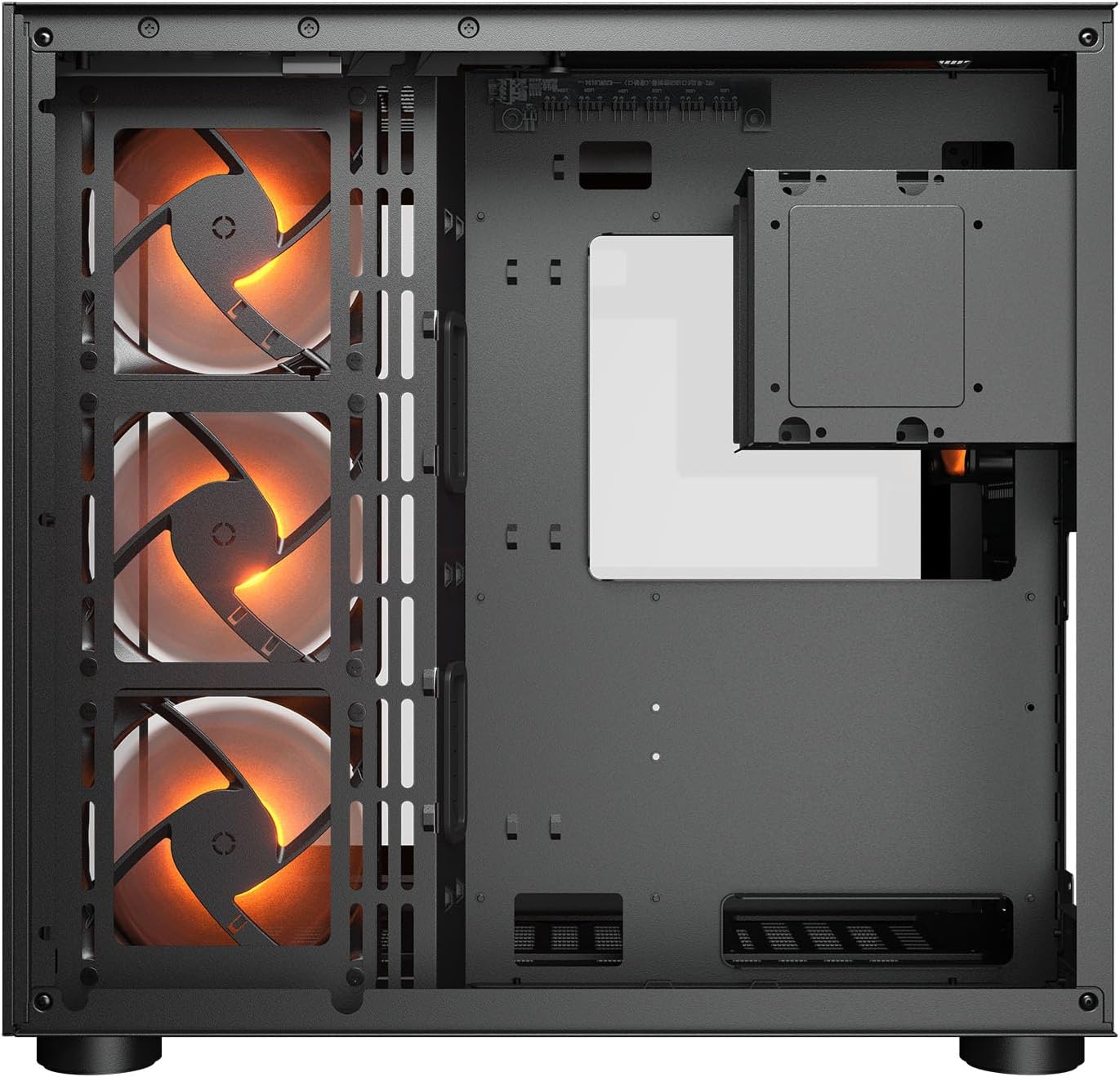
이미지 2.1: 내부 view illustrating the main chamber for motherboard and GPU installation, with pre-installed side fans.
2.6 팬 및 라디에이터 설치
- The case comes with 3 x 120mm ARGB side fans and 1 x 120mm ARGB rear fan pre-installed.
- Additional fans can be installed at the top (3 x 120mm or 2 x 140mm) and bottom (3 x 120mm or 2 x 140mm).
- Utilize the engineered bottom fan bracket for easier installation of bottom fans.
- For water cooling, radiators up to 360mm can be mounted on the top and 240mm on the side.

Image 2.2: Top internal view, showing potential mounting locations for additional cooling fans or radiators.
2.7 케이블 관리
- Route all power and data cables through the cutouts to the secondary chamber.
- 활용하다 ample space and tie-down points in the secondary chamber to organize cables for optimal airflow and a clean appearance.
2.8 Connecting Front I/O Panel
- Connect the front panel cables (USB 3.2 Type-C, USB Type-A, audio, power, reset, LED) to the corresponding headers on your motherboard.
3. 사용 설명서
모든 구성 요소를 설치하고 연결하면 시스템의 전원을 켤 수 있습니다.
3.1 전원 켜기
- PSU 스위치가 'ON' 위치에 있는지 확인하세요.
- 케이스 전면 I/O 패널에 있는 전원 버튼을 누르세요.
3.2 RGB 조명 제어
- The integrated universal fan hub allows for easy synchronization of ARGB lighting.
- Connect the hub to your motherboard's ARGB header (5V 3-pin) to control lighting effects via motherboard software.
- Alternatively, use the dedicated RGB button on the front I/O panel to cycle through pre-set lighting modes if not connected to a motherboard header.
4. 유지관리
정기적인 유지관리는 PC 구성 요소의 최적의 성능과 수명을 보장하는 데 도움이 됩니다.
4.1 먼지 필터 청소
- The COUGAR FV150 RGB features magnetic dust filters on the top and right side, along with a ventilated bottom cover.
- Gently remove the magnetic dust filters.
- Clean them using compressed air or by rinsing with water (ensure they are completely dry before reattaching).
- Periodically clean the ventilated bottom cover.
4.2 일반 청소
- 부드럽고 마른 천으로 케이스 외부 표면을 닦아주세요.
- For tempered glass panels, use a glass cleaner and a microfiber cloth to avoid streaks.
- 마감재를 손상시킬 수 있는 강한 화학 물질이나 연마재의 사용은 피하세요.
5. 문제 해결
이 섹션에서는 일반적으로 발생할 수 있는 문제에 대한 해결책을 제공합니다.
5.1 시스템 전원이 켜지지 않음
- 파워서플라이를 확인하세요: Ensure the power supply unit is properly connected to the wall outlet and the PSU switch is in the 'ON' position.
- 전면 패널 연결: 케이스에서 나오는 전원 버튼 케이블이 마더보드의 전면 패널 헤더에 올바르게 연결되어 있는지 확인하십시오.
- Internal Power Cables: Confirm all necessary power cables (24-pin ATX, 8-pin CPU, PCIe for GPU) are securely connected to the motherboard and components.
5.2 팬이 회전하지 않거나 RGB 조명이 작동하지 않음
- 팬 연결: Ensure all fan power cables are securely connected to the fan hub or motherboard headers.
- RGB Connections: Verify the ARGB cables are correctly connected to the fan hub and the hub is connected to a 5V 3-pin ARGB header on the motherboard.
- Software/Button: If connected to the motherboard, check your motherboard's RGB control software. If not, try pressing the RGB button on the case's I/O panel to cycle modes.
5.3 USB 포트가 작동하지 않습니다
- 내부 USB 헤더: Confirm that the USB 3.0 and USB Type-C cables from the front I/O panel are correctly plugged into the corresponding headers on your motherboard.
- 메인보드 드라이버: Ensure you have installed the latest chipset and USB drivers for your motherboard.
6. 사양
Detailed technical specifications for the COUGAR FV150 RGB Gaming Case.

Image 6.1: Case dimensions for planning your setup.
| 특징 | 사양 |
|---|---|
| 제품 이름 | FV150 RGB |
| 케이스 폼 팩터 | 미드 타워 |
| 마더보드 호환성 | 미니-ITX, 마이크로-ATX, ATX |
| 치수(폭 x 높이 x 깊이) | 300 x 400 x 415mm(11.8인치 x 15.7인치 x 16.3인치) |
| I/O 패널 | USB 3.2 Gen 2 Type-C x 1, USB-A 3.0 x 2, 4 Pole Headset Audio Jack, RGB Button |
| 3.5인치 드라이브 베이 | 2 |
| 2.5인치 드라이브 베이 | 1+1 (converted from 3.5" drive bays) |
| 확장 슬롯 | 7+3 |
| 수직 GPU 지원 | 예 |
| 냉각 팬 지지대(상단) | 3 x 120mm 또는 2 x 140mm |
| Cooling Fan Support (Bottom) | 3 x 120mm 또는 2 x 140mm |
| Cooling Fan Support (Side) | 3 x 120mm |
| Cooling Fan Support (Rear) | 1 x 120mm |
| Pre-installed Fans (Side) | 3 x 120mm ARGB (Reversed) |
| Pre-installed Fans (Rear) | 1 x 120mm ARGB |
| Pre-installed Fan Speed | 1000(±10%) RPM |
| Pre-installed Fan Connector | 5V 3 Pin (ARGB) / 3 Pin (Fan) |
| 최대 팬 수 | 10 |
| 수냉식 지원 (상단) | 360mm / 280mm / 240mm |
| Water Cooling Support (Side) | 240mm / 120mm |
| 수냉식 냉각 지원 (후면) | 120mm |
| RGB Hub Sync with M/B | 예 |
| 최대 그래픽 카드 길이 | 400mm(15.7인치) |
| 최대 CPU 쿨러 높이 | 180mm(7.1인치) |
| 최대 PSU 길이 | 210mm(8.3인치) |
| 재료 | 금속 |
| 품목 무게 | 6.83 킬로그램 |
7. 보증 정보
COUGAR products are manufactured to the highest quality standards. This product is covered by a manufacturer's warranty against defects in materials and workmanship. The specific duration and terms of the warranty may vary by region and retailer. Please retain your proof of purchase for warranty claims.
For detailed warranty information, please refer to the official COUGAR web사이트를 방문하거나 가까운 판매점에 문의하세요.
8. 지원
If you encounter any issues or have questions regarding your COUGAR FV150 RGB Gaming Case that are not covered in this manual, please contact COUGAR customer support.
- Visit the official COUGAR webFAQ, 드라이버 다운로드, 지원 연락처 정보를 제공하는 사이트입니다.
- Contact your retailer for assistance with product returns or exchanges.