
1. 서론
Welcome to the user manual for your Emerson CKSS7071 Sunrise Smartset Alarm Clock Radio. This device is designed to enhance your daily routine with its unique features, including a sunrise simulation, soothing sound options, Bluetooth connectivity, and an 8-color dimmable LED display. Please read this manual thoroughly to understand the full functionality and ensure proper use and care of your new alarm clock radio.
동영상 1 : 위에view of the Emerson CKSS7071 Sunrise Smartset Alarm Clock Radio. This video demonstrates the key features and design of the product.
2. 중요한 안전 정보
- 기기를 작동하기 전에 모든 지침을 읽으십시오.
- 이 지침을 향후 참고용으로 보관하세요.
- 이 기기를 물 근처에서 사용하지 마십시오.
- 마른 천으로만 닦으십시오.
- 환기구를 막지 마십시오. 제조업체의 지침에 따라 설치하십시오.
- 라디에이터, 난방 조절기, 스토브 또는 기타 장치(다음을 포함)와 같은 열원 근처에 설치하지 마십시오. amp열을 생성하는 발전기.
- 전원 코드가 밟히거나 끼지 않도록 보호하세요. 특히 플러그, 편의용 콘센트 및 기기에서 나오는 부분은 보호하세요.
- 제조사가 지정한 부속품/액세서리만 사용하세요.
- 번개 폭풍 시 또는 장기간 사용하지 않을 때는 기기의 플러그를 뽑아두세요.
- 모든 서비스는 자격을 갖춘 서비스 담당자에게 의뢰하십시오. 전원 코드나 플러그가 손상되었거나, 액체가 쏟아졌거나, 물체가 기기에 떨어졌거나, 기기가 비나 습기에 노출되었거나, 정상적으로 작동하지 않거나, 떨어졌을 때와 같이 기기가 어떤 식으로든 손상된 경우 서비스가 필요합니다.
3. 패키지 내용
패키지를 열었을 때 모든 품목이 들어 있는지 확인하세요.
- Emerson CKSS7071 Sunrise Smartset Alarm Clock Radio
- AC 전원 어댑터
- 사용자 설명서
4. 제품 오버view
4.1 정면 View

이미지 1: 앞쪽 view of the alarm clock, featuring the digital time display and the sunrise simulation light panel.
The front of the unit features the main 1.2-inch LED time display and the large circular light panel for sunrise simulation and ambient lighting. Indicators for AM/PM, Alarm 1/2, and Bluetooth status are also visible.
4.2 측면 View (통제 수단)
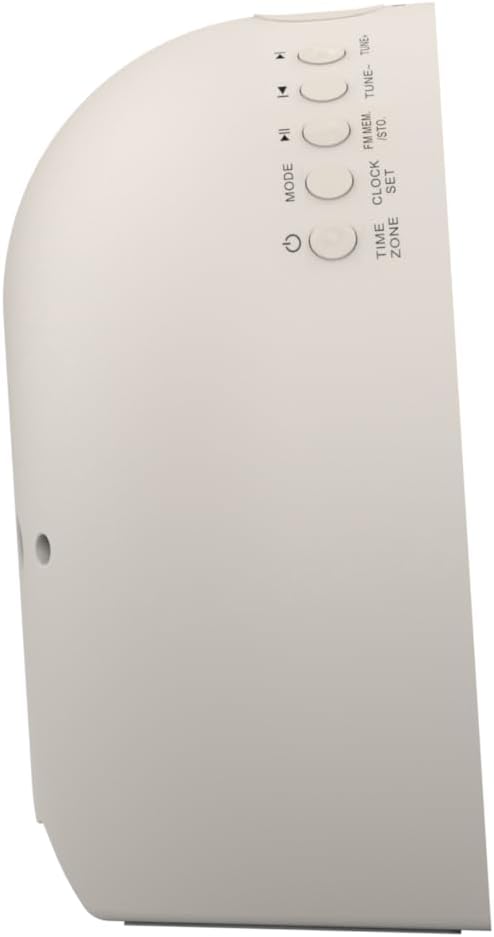
이미지 2: 옆 view of the alarm clock, highlighting the control buttons for various functions.
The side panel houses the primary control buttons, including Power, Mode, Clock Set, Time Zone, Tune/Skip, and Volume controls. These buttons are used for setting time, alarms, and navigating audio functions.
4.3 후면 View

이미지 3: 뒤쪽 view of the alarm clock, showing the speaker grille and power connection port.
The rear of the unit features the main speaker grille and the power input port for connecting the AC adapter.
5. 설정
5.1 전원 연결
- Plug the AC power adapter into the DC IN jack located on the back of the unit.
- Plug the other end of the adapter into a standard wall outlet (AC 100-240V, 50/60Hz).
- 장치의 전원이 자동으로 켜집니다.
5.2 SmartSet Automatic Time Setting
The SmartSet system automatically sets the correct time and date as soon as you plug in the unit. It also maintains time and alarm settings during power disruptions or outages, provided the button cell battery is installed.
5.3 배터리 백업 설치
A button cell battery (CR2032, included) is required for battery backup. This ensures that time and alarm settings are retained during a power outage.
- 장치 하단에서 배터리 칸을 찾으세요.
- 배터리 덮개를 엽니다.
- Insert one CR2032 button cell battery, ensuring the correct polarity (+/-).
- 배터리 덮개를 단단히 닫으세요.
6. 사용 설명서
6.1 Setting the Clock Manually
- 를 누르고 계세요 시계 설정 단추. 시간 숫자가 깜박입니다.
- 사용하세요 튜닝 -/+ 시간을 조정하려면 버튼을 누르세요. 시계 설정 확인합니다.
- 분 숫자가 깜박입니다. 사용하세요 튜닝 -/+ 분을 조정하려면 버튼을 누르세요. 시계 설정 확인합니다.
- Continue this process to set the year, month, and day.
- 누르다 시계 설정 다시 누르면 시간 설정 모드가 종료됩니다.
6.2 알람 설정 (알람 1 및 알람 2)
The unit features dual alarms. Follow these steps for each alarm:
- 를 누르고 계세요 경보 1 or 경보 2 버튼을 누릅니다. 알람 시간 숫자가 깜빡입니다.
- 사용하세요 튜닝 -/+ 알람 시간을 조정하는 버튼입니다. 해당 버튼을 누르십시오. 경보 확인 버튼을 클릭하세요.
- 알람이 울리면 분 단위 숫자가 깜빡입니다. 튜닝 -/+ 알람 시간을 조정하려면 버튼을 누르십시오. 해당 버튼을 누르십시오. 경보 확인 버튼을 클릭하세요.
- Select the alarm source (Buzzer, FM Radio, or Soothing Sound). Press the respective 경보 확인 버튼을 클릭하세요.
- 알람 볼륨을 조정하려면 다음을 사용하세요. 볼륨 -/+ buttons. Press the respective 경보 확인 버튼을 클릭하세요.
- The alarm is now set. The alarm indicator (AL1 or AL2) will appear on the display.
6.3 일출 시뮬레이션
The sunrise simulation feature gradually brightens the light panel before your set alarm time, mimicking a natural sunrise to gently wake you.
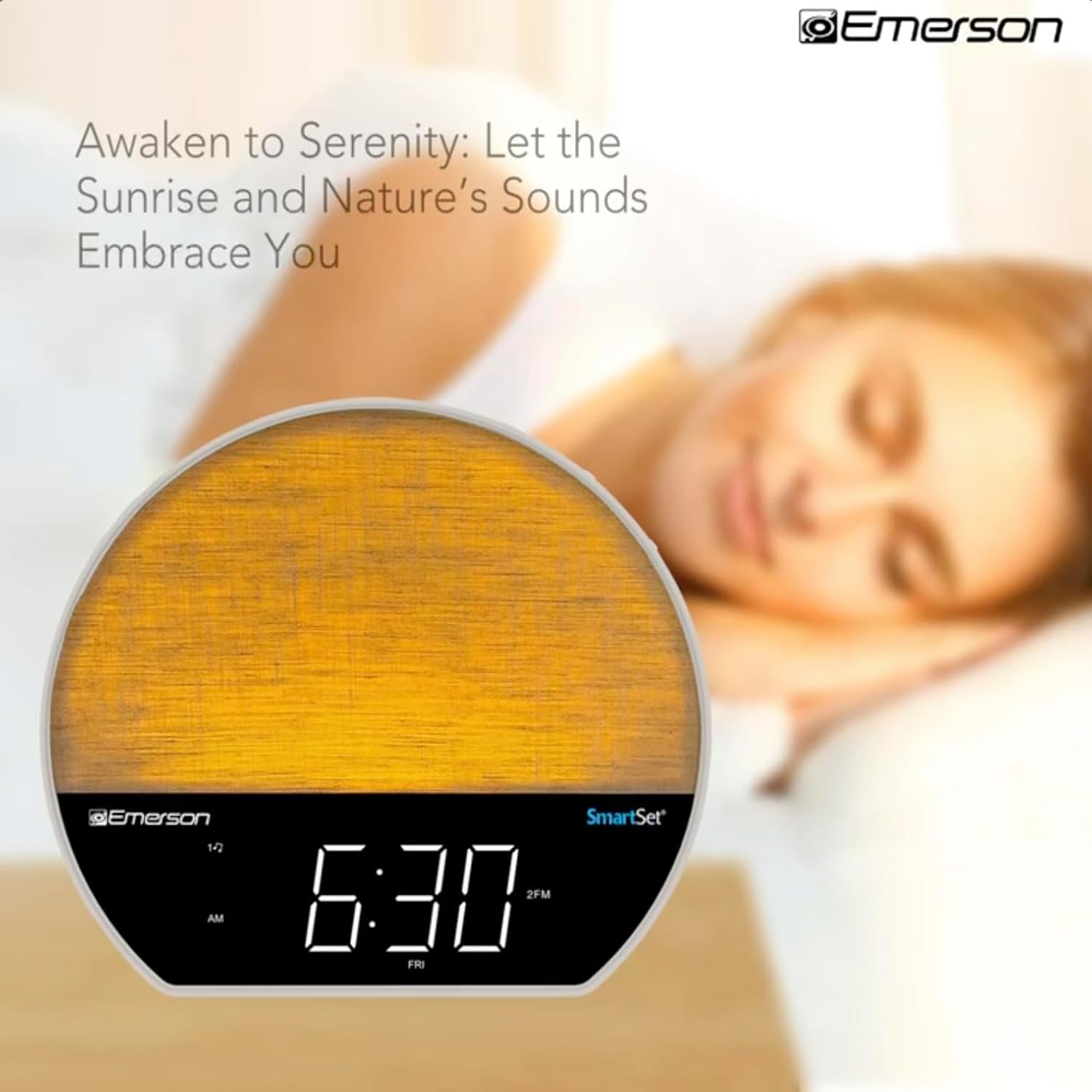
이미지 4: The alarm clock simulating a sunrise with a warm, increasing 광도.
To activate, ensure the sunrise option is selected during alarm setup. The light will begin to brighten 30 minutes before the alarm sounds.
6.4 Soothing Sounds and White Noise
The unit includes 6 soothing sounds and white noise to help with relaxation or waking up.
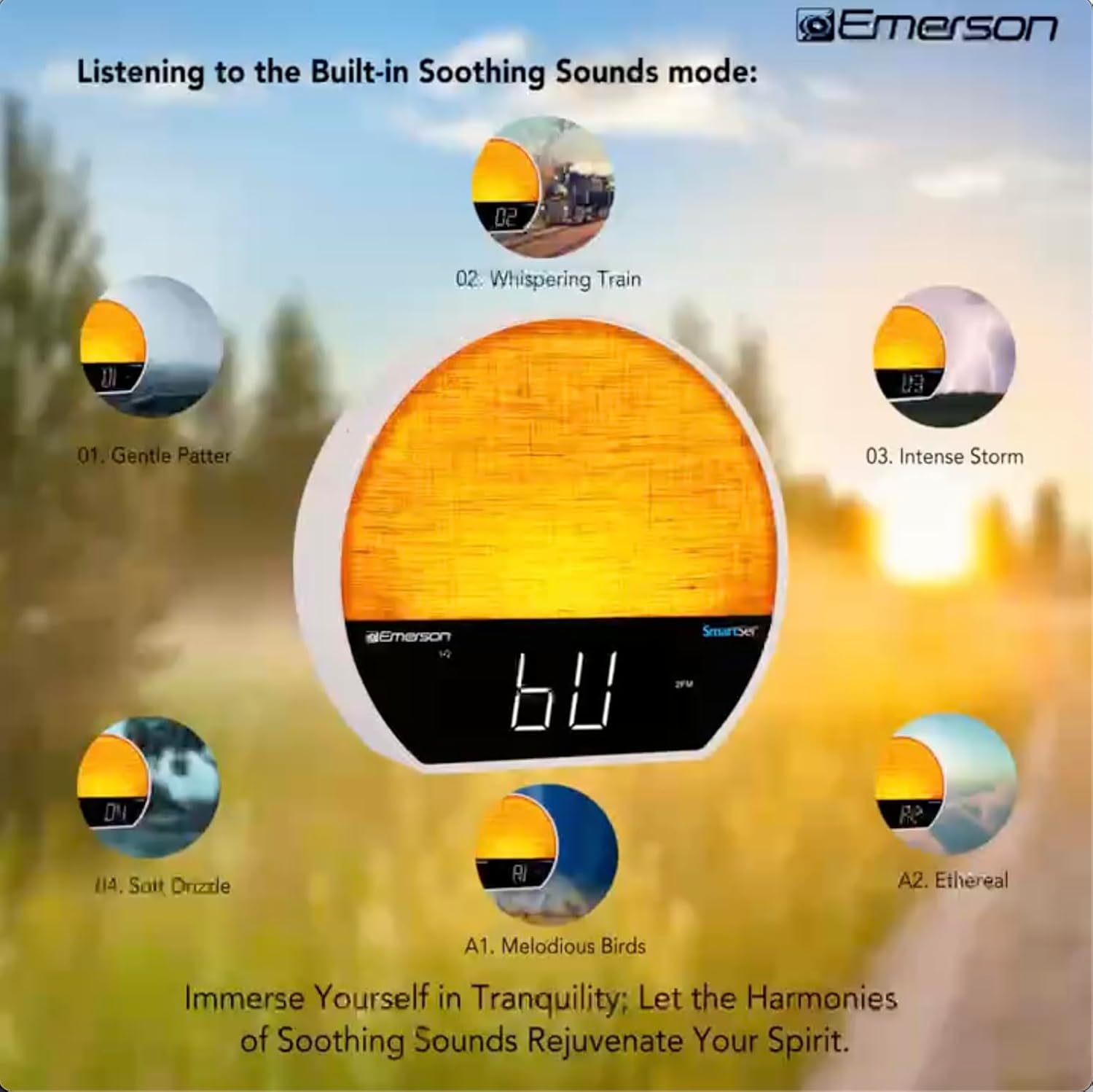
이미지 5: Visual representation of the six soothing sound modes available on the alarm clock.
- 를 누르세요 방법 button repeatedly until the Soothing Sound mode is selected.
- 사용하세요 튜닝 -/+ buttons to cycle through the available sounds (e.g., Gentle Patter, Whispering Train, Intense Storm, Soft Drizzle, Melodious Birds, Ethereal, White Noise).
- 를 사용하여 볼륨을 조정합니다. 볼륨 -/+ 버튼.
6.5 블루투스 스피커 기능
스마트폰이나 블루투스 기능이 있는 다른 기기를 연결하여 오디오를 무선으로 스트리밍하세요.

이미지 6: The alarm clock in Bluetooth mode, paired with a mobile device for audio streaming.
- 를 누르세요 방법 button until 'BT' appears on the display, indicating Bluetooth mode.
- On your device, enable Bluetooth and search for 'Emerson CKSS7071'.
- 페어링할 기기를 선택하세요. 페어링이 성공하면 확인음이 울립니다.
- 이제 알람시계 스피커를 통해 기기의 오디오를 재생할 수 있습니다.
6.6 FM 라디오 작동
좋아하는 FM 라디오 방송을 들어보세요.
- 를 누르세요 방법 'FM'이 디스플레이에 나타날 때까지 버튼을 누르세요.
- 를 누르세요 튜닝 -/+ buttons briefly to manually tune to a station.
- 를 누르고 계세요 튜닝 -/+ 버튼을 눌러 다음에 청취 가능한 방송국을 자동으로 검색합니다.
- 방송국을 저장하려면 버튼을 길게 누르세요. FM MEM 사전 설정 번호가 깜빡일 때까지 버튼을 누르세요. 사용하세요 튜닝 -/+ 사전 설정 번호를 선택한 다음 누르세요 FM MEM 다시 저장합니다.
6.7 LED Decor and Dimmer Control
Customize the ambient light with 8 different colors and adjust the brightness.

이미지 7: The alarm clock demonstrating its 8-color dimmable LED decor options.
- 를 누르세요 빛 button to cycle through the 8 available colors or turn the light off.
- To adjust the brightness of the LED decor light, press and hold the 빛 button. The brightness will cycle through 5 levels. Release the button at your desired brightness.
6.8 디스플레이 밝기 조절
Adjust the brightness of the 1.2-inch LED time display.

이미지 8: The alarm clock illustrating the five distinct levels of display luminescence.
를 누르세요 주차 button (often combined with another function, refer to button labels) to cycle through 4 levels of display brightness (Bright, Moderate, Dim, Faint).
6.9 슬립 타이머
Set a timer for the audio to automatically turn off after a specified duration.

이미지 9: The alarm clock set for a sunset sleep timer, providing a harmonious end to the day.
- While audio is playing (FM or Soothing Sound), press the 잠 단추.
- 반복해서 누르세요 잠 button to cycle through available sleep timer durations (e.g., 15, 30, 60, 90 minutes, or OFF).
- The audio will automatically turn off after the selected time.
6.10 스누즈 기능
알람이 울리면 누르세요 선잠 (보통 상단에 있는 큰) 버튼을 누르면 알람이 몇 분 동안 일시적으로 꺼집니다. 알람은 설정된 스누즈 시간 후에 다시 울립니다.
7. 유지관리
7.1 청소
- 청소하기 전에 항상 전원 콘센트에서 장치의 플러그를 뽑으십시오.
- 부드럽고 마른 천을 사용하여 외부 표면을 닦으세요.
- 액체 세척제, 연마 세척제 또는 화학 스프레이는 마감재를 손상시킬 수 있으므로 사용하지 마십시오.
7.2 배터리 교체
If the time and alarm settings are not retained during a power outage, the button cell backup battery may need to be replaced. Follow the instructions in section 5.3 to replace the CR2032 battery.
8. 문제 해결
| 문제 | 가능한 원인 | 해결책 |
|---|---|---|
| 장치의 전원이 켜지지 않습니다. | 전원 어댑터가 연결되지 않았거나 결함이 있습니다. | AC 어댑터가 장치에 단단히 꽂혀 있고 벽면 콘센트에 잘 연결되어 있는지 확인하세요. |
| 전원이 꺼진 후 시간/알람 설정이 손실되었습니다.tage. | 백업 배터리가 방전되었거나 설치되어 있지 않습니다. | Install or replace the CR2032 button cell battery (see section 5.3). |
| 알람이 울리지 않습니다. | 알람이 활성화되지 않았거나 볼륨이 너무 낮습니다. | Ensure the alarm is set and activated (AL1/AL2 indicator on). Increase alarm volume. |
| Bluetooth 장치를 페어링할 수 없습니다. | Unit not in Bluetooth mode or device too far. | Ensure the unit is in Bluetooth mode ('BT' displayed). Move your device closer to the unit. Try unpairing and re-pairing. |
| FM 라디오 수신이 좋지 않습니다. | 안테나가 확장되지 않았거나 간섭이 있습니다. | Extend the FM wire antenna fully and reposition it for better reception. Avoid placing near other electronic devices. |
| 디스플레이가 너무 밝거나 어둡습니다. | 화면 밝기 조절 설정이 필요합니다. | 를 누르세요 주차 button to cycle through brightness levels (see section 6.8). |
9. 사양
| 특징 | 세부 사항 |
|---|---|
| 모델 번호 | CKSS7071 |
| 전원 | AC 100-240V, 50/60Hz (via AC adapter) |
| 배터리 백업 | 1 x CR2032 Button Cell Battery (included) |
| 디스플레이 유형 | 1.2-inch LED Display |
| 블루투스 버전 | V5.4 |
| 편안한 소리 | 6 Nature Sounds + White Noise |
| LED Decor Colors | 8 Dimmable Colors |
| 제품 치수(W x D x H) | 7.09인치 x 3.15인치 x 6.37인치 |
| 무게 | 지정되지 않음 |
10. 보증 정보
Emerson products are manufactured to the highest quality standards. This product is covered by a limited warranty against defects in materials and workmanship for a period of one (1) year from the original date of purchase. This warranty does not cover damage caused by misuse, accident, unauthorized modification, or normal wear and tear. Proof of purchase is required for all warranty claims. Please retain your receipt.
11. 고객 지원
If you have any questions, require assistance, or experience issues with your Emerson CKSS7071 Sunrise Smartset Alarm Clock Radio, please contact our customer support team.
- Web대지: 에머슨 공식 웹사이트를 방문하세요. webFAQ 및 지원 리소스를 위한 사이트입니다.
- 이메일: 제품 포장이나 공식 문서를 참조하세요. web고객 서비스 이메일 문의 사이트입니다.
- 핸드폰: 제품 포장이나 공식 문서를 참조하세요. web고객 서비스 전화번호 사이트입니다.
Please have your model number (CKSS7071) and proof of purchase ready when contacting support.


