
소개
This manual provides detailed instructions for the setup, operation, and maintenance of your ASUS VA249QG Eye Care Monitor. The VA249QG features a 23.8-inch IPS panel with Full HD (1920 x 1080) resolution, offering 178° wide viewing angles and vivid image quality. It incorporates a 120Hz refresh rate with Adaptive-Sync technology and 1ms MPRT to ensure a smooth visual experience. Additionally, TÜV Rheinland-certified Flicker-free and Low Blue Light technologies are included for enhanced view편안함을.
상자 안에 무엇이 들어있나요?
패키지에 모든 품목이 들어 있는지 확인하세요.
- ASUS VA249QG Monitor
- HDMI 케이블
- 전원 코드
- 빠른 시작 가이드
- 보증 카드

설치 지침
1. 모니터 조립
- 모니터와 스탠드 구성품을 포장에서 조심스럽게 꺼내세요.
- 스탠드 받침대를 스탠드 목에 부착하고 제공된 나사로 고정합니다.
- 조립된 스탠드를 모니터 뒷면의 장착 슬롯에 맞춰 딸깍 소리가 나면서 제자리에 고정될 때까지 밀어 넣으십시오.
2. 케이블 연결하기
필요한 케이블을 모니터 뒷면 포트에 연결하세요.
- 힘: 전원 코드를 모니터의 전원 입력 단자에 연결한 다음 전원 콘센트에 꽂으십시오.
- 비디오 입력 : Connect an HDMI, DisplayPort, or VGA cable from your computer's video output to the corresponding port on the monitor.
- 오디오 출력: 원하는 경우 헤드폰이나 외부 스피커를 이어폰 잭에 연결하세요.
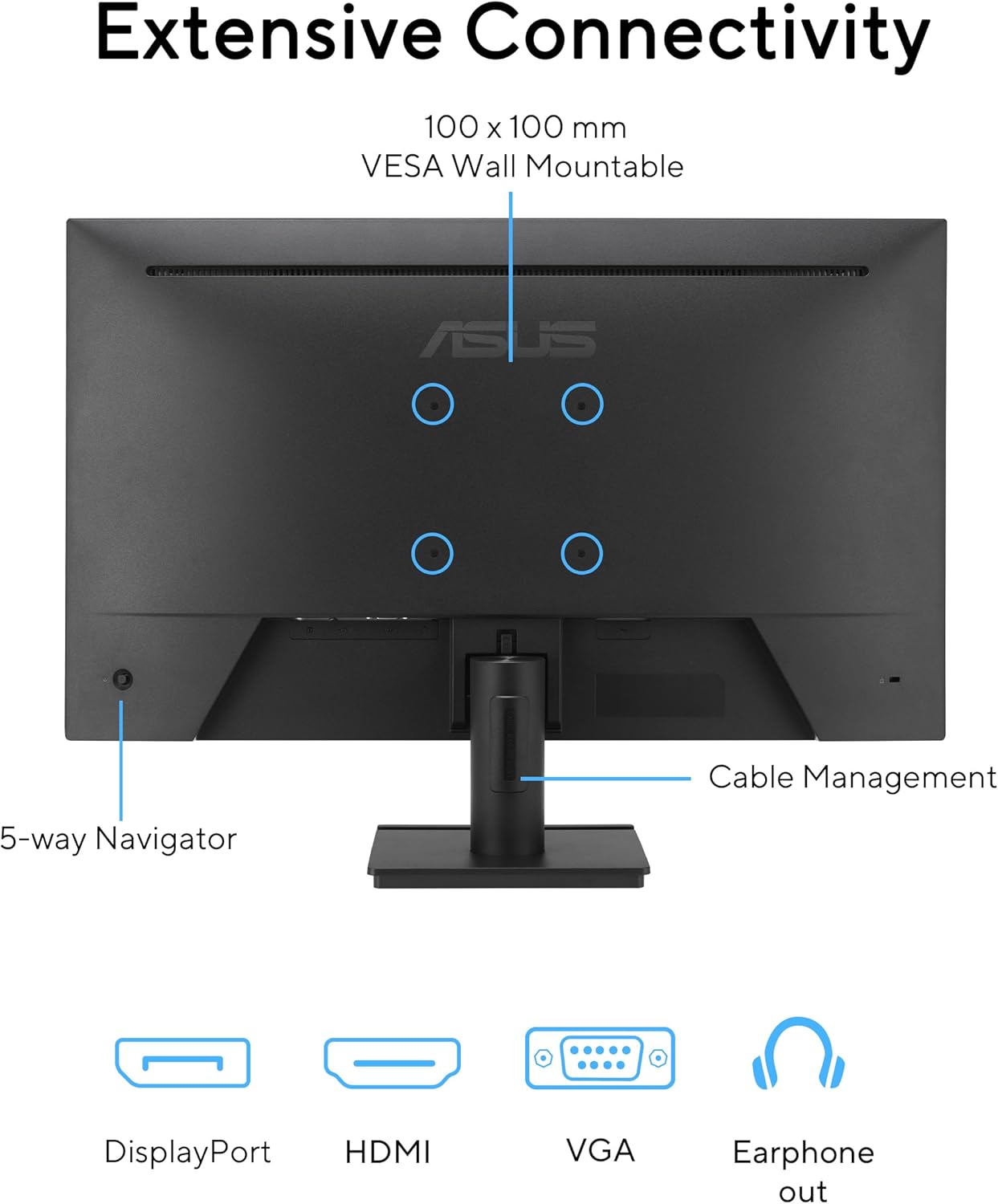
3. 벽면 장착 (선택 사항)
The monitor is VESA wall-mountable (100 x 100 mm). Remove the stand before attaching a VESA-compatible wall mount kit (sold separately).
작동 지침
1. 전원 켜기/끄기
Press the power button, typically located on the bottom right of the monitor, to turn the monitor on or off.
2. 화면 디스플레이(OSD) 메뉴
Use the 5-way navigator joystick, located on the rear of the monitor, to access and navigate the OSD menu. This menu allows you to adjust various display settings.
3. 디스플레이 설정
- 해결: The native resolution is 1920x1080 (Full HD). Ensure your computer's display settings match this for optimal clarity.
- 새로 고침 빈도: The monitor supports up to 120Hz refresh rate. Configure your operating system's display settings to utilize this for smoother motion.
- 적응형 동기화: Enable Adaptive-Sync in the OSD menu and your graphics card settings to synchronize the monitor's refresh rate with your GPU's frame rate, reducing screen tearing.
- 눈 건강 관리 기능:
- 로우 블루 라이트: Adjust the blue light filter level in the OSD menu to reduce eye strain during prolonged use.
- 깜박임 없음: This technology minimizes screen flickering for a more comfortable view경험.

4. 오디오
The monitor includes built-in speakers. Volume can be adjusted via the OSD menu or your computer's audio settings. For private listening, connect headphones to the earphone jack.
5. Viewing Angles and Convenience


유지
1. 화면 청소
- 모니터를 끄고 전원 코드를 뽑습니다.
- 부드럽고 보풀이 없는 천을 살짝 사용하십시오. damp물이나 특수 스크린 세척제로 세척하세요.
- 화면 표면을 부드럽게 닦으세요. 과도한 힘을 가하지 마세요.
- Do not use alcohol, ammonia-based cleaners, or abrasive materials.
2. C 청소asing
- 부드럽고 마른 천을 사용하여 모니터를 닦으세요.asing.
- 잘 지워지지 않는 얼룩은 가볍게 닦아내세요.amp젖은 천으로 닦은 후 마른 천으로 닦아낼 수 있습니다.
- 모니터에 액체를 직접 분사하지 마십시오.
3. 일반 관리
- 모니터를 직사광선, 열원, 과도한 습기로부터 멀리 두세요.
- 모니터 주변의 환기가 적절하게 이루어지도록 하세요.
- 모니터나 케이블 위에 무거운 물건을 올려놓지 마세요.
문제 해결
전원이 없습니다
- 전원 코드가 모니터와 전원 콘센트에 모두 단단히 연결되어 있는지 확인하세요.
- 다른 장치를 연결하여 전원 콘센트가 작동하는지 확인하세요.
- 모니터의 전원 버튼이 눌러져 있는지 확인하십시오.
신호 없음
- Confirm that the video cable (HDMI, DisplayPort, or VGA) is securely connected to both the monitor and your computer.
- 컴퓨터가 켜져 있고 절전 모드가 아닌지 확인하세요.
- Use the OSD menu to select the correct input source (e.g., HDMI, DisplayPort).
- 가능하다면 다른 비디오 케이블이나 포트를 사용하여 테스트해 보세요.
이미지 문제 (깜빡임, 색상 왜곡)
- 비디오 케이블에 손상이나 느슨한 연결이 있는지 확인하세요.
- Adjust the monitor's resolution and refresh rate in your computer's display settings to match the monitor's native resolution (1920x1080) and supported refresh rate (up to 120Hz).
- OSD 메뉴를 통해 모니터 설정을 공장 초기값으로 재설정하세요.
- 그래픽 카드 드라이버가 최신인지 확인하세요.
사운드 문제
- OSD 메뉴와 컴퓨터의 볼륨 설정을 확인하세요.
- If using the earphone jack, ensure headphones/speakers are properly connected.
- 컴퓨터의 사운드 설정에서 올바른 오디오 출력 장치가 선택되었는지 확인하세요.
명세서
| 특징 | 사양 |
|---|---|
| 화면 크기 | 23.8 인치 |
| 패널 유형 | IPS |
| 해결 | 1920 x 1080(풀HD) |
| 종횡비 | 16시 9분 |
| 새로 고침 빈도 | 120Hz |
| 응답 시간 | 1ms MPRT |
| View잉 각도 | 178°(수평)/178°(수직) |
| 색상 영역 | 99% sRGB |
| 연결성 | 1x HDMI, 1x DisplayPort, 1x VGA, 1x Earphone Jack |
| 스피커 | 내장형 |
| VESA 벽걸이 | 100 x 100mm |
| 치수(길이x너비x높이) | 7.4 x 21.3 x 16인치(스탠드 포함) |
| 무게 | 6.7파운드 |
| 눈 관리 기능 | 플리커 프리, 로우 블루 라이트 |

보증 및 지원
The ASUS VA249QG monitor typically comes with a 3-year limited warranty. Please refer to the included Warranty Card for specific terms and conditions, including coverage details and duration.
기술 지원, 드라이버 다운로드 또는 기타 문의 사항은 ASUS 공식 지원 페이지를 방문해 주십시오. web사이트 또는 고객 서비스 부서에 문의하십시오.
환경 정보
ASUS is committed to environmental sustainability. The VA249QG monitor adheres to stringent environmental certifications and incorporates eco-friendly design principles.
- 환경 인증 : The VA249QG meets requirements for certifications such as EPEAT Silver, Energy Star, and TCO Certified, indicating compliance with environmental performance criteria.
- 친환경 포장: Packaging is made from at least 80% recycled cardboard, designed to minimize weight and volume, conserving resources and optimizing transport efficiency.
- Energy-Efficient Features: The monitor includes an Eco-mode to minimize power consumption.
- 친환경 소재: Extensive research and development ensure that the VA249QG is made from eco-friendly materials, including 85% post-consumer recycled (PCR) plastics and components free of mercury.
