
Beatfoxx CDB-1016U
Beatfoxx CDB-1016U BK 붐박스 사용 설명서
Model: CDB-1016U
소개
The Beatfoxx CDB-1016U Boombox is a versatile audio system designed for both home and portable use. It combines classic audio formats with modern connectivity options, offering a comprehensive listening experience. This manual provides detailed instructions for setting up, operating, and maintaining your device.

그림 1: 전면 view of the Beatfoxx CDB-1016U BK Boombox, showing the speakers, control panel, and carrying handle.
설정
장치 전원 공급
The Beatfoxx CDB-1016U Boombox can be powered using the included AC power cable or by batteries for portable use.
- AC 전원: Insert the AC power cable into the AC IN jack on the back of the unit and plug the other end into a standard wall outlet (AC 230V ~ 50Hz).
- 배터리 전원: For portable operation, open the battery compartment on the bottom of the unit. Insert six (6) Type C (UM-2) batteries, ensuring correct polarity (+/-). Close the battery compartment securely.

Figure 2: The boombox operating on AC power, with an illustration of the required Type C batteries for portable use.
작동 지침
컨트롤 오버view
Familiarize yourself with the main controls located on the top and front of the boombox.

그림 3: 상세 view of the boombox's control panel, cassette compartment, carrying handle, and CD compartment.
- 전원 버튼: 기기를 켜거나 끕니다.
- MODE 버튼: Switches between CD, USB, Bluetooth, Radio (FM/AM), and AUX modes.
- 볼륨 노브: 오디오 출력 레벨을 조정합니다.
- 튜닝 노브: Used for manual tuning in Radio mode.
- 재생/일시정지 버튼: 재생을 시작하거나 일시 중지합니다.
- 정지/배출 버튼: Stops playback and opens the CD compartment or ejects cassette.
- 건너뛰기/검색 버튼(<< / >>): 트랙을 건너뛰거나 빨리 감기/되감기를 합니다.
- 반복/프로그래밍 버튼: Repeats current track/all tracks or programs CD/USB playback order.
- 폴더 버튼: Navigates through folders on USB.
- REC 버튼 : Initiates recording to cassette.
Selecting Playback Sources
The boombox supports multiple audio sources. Use the 방법 버튼을 눌러 순환합니다.

Figure 4: Visual representation of the seven available playback sources on the boombox.
CD 재생
- 를 누르세요 방법 버튼을 눌러 CD 모드를 선택합니다.
- 를 누르세요 중지/꺼내기 CD 수납부를 여는 버튼입니다.
- Place a CD (CD, CD-R, CD-RW, MP3 CD) onto the spindle with the label side facing up.
- Close the CD compartment. The display will show "READING" and then the total number of tracks.
- 를 누르세요 재생/일시정지 버튼을 눌러 재생을 시작합니다.
- 사용하세요 건너뛰기/검색 트랙 사이를 탐색하는 버튼입니다.
- 누르다 반복하다 현재 트랙이나 모든 트랙을 반복합니다.
카세트 재생 및 녹음
The boombox features a built-in cassette player and recorder.

Figure 5: The cassette compartment of the boombox shown open, ready for tape insertion.
재생:
- 카세트실을 엽니다.
- 카세트 테이프를 넣으세요.
- 구획을 닫습니다.
- 를 누르세요 놀다 button on the cassette controls to start playback.
- 사용 전륜 or 리우 빨리 감기 또는 되감기 기능을 위해.
- 누르다 중지/꺼내기 재생을 중지하고 테이프를 꺼내십시오.
녹음:
You can record from CD, USB, Radio, or AUX input to a cassette tape.
- 빈 카세트 테이프 또는 녹음 가능한 카세트 테이프를 해당 칸에 넣으십시오.
- Select the desired source (CD, USB, Radio, or AUX) using the 방법 단추.
- Start playback on the source (e.g., play a CD, tune to a radio station).
- 를 누르세요 기록 button on the cassette controls. The unit will automatically start recording the audio from the selected source onto the cassette.
- 누르다 멈추다 on the cassette controls to end recording.
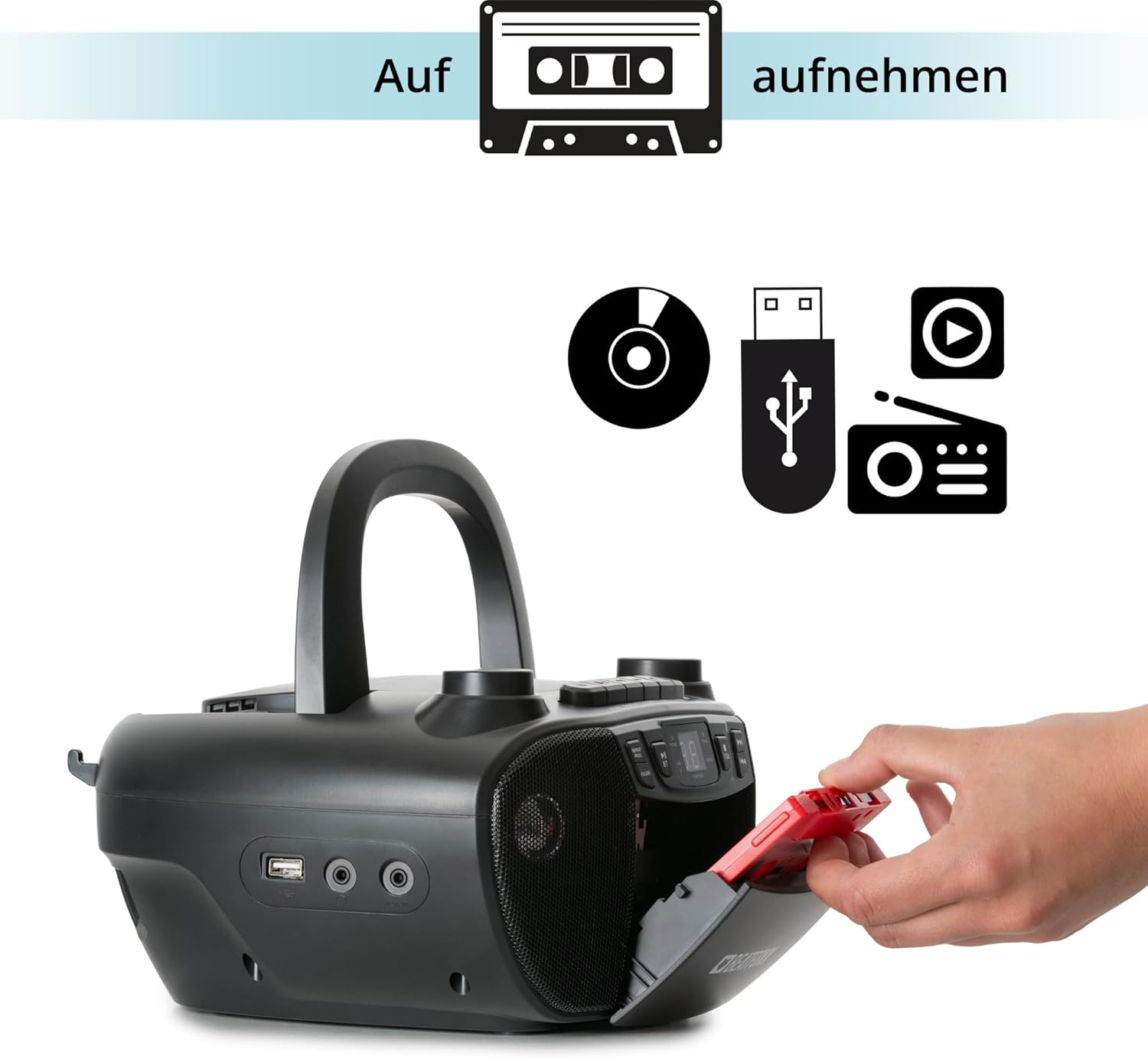
Figure 6: Illustration of the boombox's recording capability, showing a cassette tape being inserted for recording from CD, USB, or radio.
라디오(FM/AM)
- Extend the telescopic antenna for better FM reception.
- 를 누르세요 방법 button to select Radio mode (FM or AM).
- 사용하세요 동조 원하는 라디오 방송국에 수동으로 맞추려면 다이얼을 사용하십시오.
블루투스 연결
- 를 누르세요 방법 버튼을 눌러 블루투스 모드를 선택하세요. 디스플레이에 "BT"가 표시되고 깜빡이면 페어링 모드임을 나타냅니다.
- Bluetooth가 지원되는 기기(스마트폰, 태블릿)에서 Bluetooth를 활성화하고 사용 가능한 기기를 검색하세요.
- Select "Beatfoxx CDB-1016U" from the list of devices.
- Once paired, the "BT" indicator on the boombox will stop flashing and remain solid.
- 이제 기기에서 붐박스로 무선으로 오디오를 스트리밍할 수 있습니다.
USB 재생
- MP3 오디오가 포함된 USB 플래시 드라이브를 삽입하세요 fileUSB 포트에 s.
- 를 누르세요 방법 button to select USB mode. The unit will automatically start playing the first track.
- 사용하세요 건너뛰기/검색 트랙 사이를 탐색하는 버튼입니다.
- 사용하세요 폴더 button to navigate through folders on the USB drive.

그림 7: 상세 view of the boombox's connectivity options, including the USB port, headphone output, and AUX input.
AUX 입력
Connect external audio devices (e.g., MP3 players, smartphones without Bluetooth) to the boombox using a 3.5mm audio cable (not included).
- Connect one end of the 3.5mm audio cable to the AUX IN jack on the boombox.
- 다른 쪽 끝을 외부 장치의 헤드폰 잭이나 오디오 출력에 연결합니다.
- 를 누르세요 방법 AUX 모드를 선택하려면 버튼을 누르세요.
- 외부 기기에서 오디오를 재생하세요. 소리는 붐박스 스피커를 통해 출력됩니다.
헤드폰 출력
For private listening, connect standard 3.5mm headphones to the HEADPHONE jack. Audio will automatically mute from the speakers when headphones are connected.
유지
청소
- 청소하기 전에 항상 전원에서 장치의 플러그를 뽑으십시오.
- 부드럽고 마른 천을 사용하여 외부 표면을 닦으세요.
- 연마성 세척제, 왁스 또는 용제는 마감재를 손상시킬 수 있으므로 사용하지 마십시오.
- CD 렌즈의 경우, CD 렌즈 전용 세척제를 사용하십시오.
- For the cassette head, use a cassette head cleaning kit.
배터리 관리
- 장기간 사용하지 않을 경우 배터리 누출을 방지하기 위해 배터리를 제거하세요.
- 오래된 건전지와 새 건전지, 다른 종류의 건전지를 혼용하지 마세요.
- 사용한 배터리는 현지 규정에 따라 책임감 있게 폐기하십시오.
문제 해결
| 문제 | 가능한 원인 | 해결책 |
|---|---|---|
| 전원이 없습니다 | 전원 케이블이 연결되지 않았습니다. 배터리가 소모되었거나 잘못 삽입되었습니다. | Ensure AC cable is securely plugged in. Check battery polarity and replace if necessary. |
| 소리가 나지 않습니다 | Volume too low; Wrong mode selected; Headphones connected. | Increase volume. Press MODE button to select correct source. Disconnect headphones. |
| CD가 건너뛰거나 재생되지 않음 | CD가 더럽거나 긁혔거나, CD가 잘못 삽입되었습니다. | Clean CD with a soft cloth. Re-insert CD correctly. Try another CD. |
| 블루투스가 페어링되지 않습니다 | 붐박스가 페어링 모드가 아닙니다. 기기가 너무 멀리 떨어져 있습니다. 기기에서 블루투스가 비활성화되어 있습니다. | Ensure boombox is in BT mode and "BT" is flashing. Move device closer. Enable Bluetooth on your device. |
| 라디오 수신 불량 | 안테나가 확장되지 않았습니다. 신호가 약합니다. | Fully extend the telescopic antenna. Adjust antenna position. Try tuning to a stronger station. |
명세서
| 특징 | 세부 사항 |
|---|---|
| 상표 | Beatfoxx |
| 모델 번호 | CDB-1016U (Manufacturer Ref: 00104749) |
| 색상 | 검은색 |
| 연결 기술 | 보조 입력, USB, 블루투스 |
| 호환 장치 | Portable audio devices, MP3 players, Smartphones, Tablets |
| 스피커 유형 | 스테레오 재생 |
| 전원 | AC Power Cable, 6 x Type C Batteries |
| 오디오 출력 전력 | 2 x 1.2W |
| 지원되는 형식 | CD, MP3, CD-R, CD-RW, Cassette, FM/AM Radio, Bluetooth, USB |
| 품목 무게 | 1.6 킬로그램 |
| 치수(폭 x 높이 x 깊이) | 24 x 13 x 22.5cm (대략) |
보증 및 지원
This Beatfoxx product comes with a standard manufacturer's warranty. Please refer to the warranty card included in your product packaging for specific terms and conditions.
For technical support, troubleshooting assistance, or warranty claims, please contact Beatfoxx customer service through their official web제품을 구매한 사이트 또는 소매점에 문의하십시오. 보증 확인을 위해 구매 증빙 자료를 보관하십시오.
Ask a question about this manual
Ask about setup, troubleshooting, compatibility, parts, safety, or missing instructions. Manuals+ will review the question and use this page’s manual context to help answer it.