1. 서론
This manual provides detailed instructions for the FREEWOLF M68 60% Wireless Gaming Keyboard. Please read this manual carefully before using the product to ensure proper operation and longevity.

Figure 1: FREEWOLF M68 Wireless Gaming Keyboard (Shimmer color variant)
2. 제품 오버view
주요 특징:
- 3중 모드 연결: 유선(USB-C), 2.4GHz 무선 및 블루투스 5.0 연결을 지원합니다.
- 다중 장치 호환성: Connects to Windows, Mac, Linux, PC, Laptop, iPad, iOS, and Android devices.
- 컴팩트한 60% 레이아웃: Features 67 keys, optimizing desktop space.
- PBT 키캡: Durable Polybutylene Terephthalate keycaps with clear legends.
- 레인보우 LED 백라이트: Offers constant and breathing modes with adjustable brightness and speed.
- 오래 지속되는 배터리: Built-in 2000mAH battery provides extended usage.
- 인체공학적 디자인: Double leg braces allow for three adjustable typing angles.
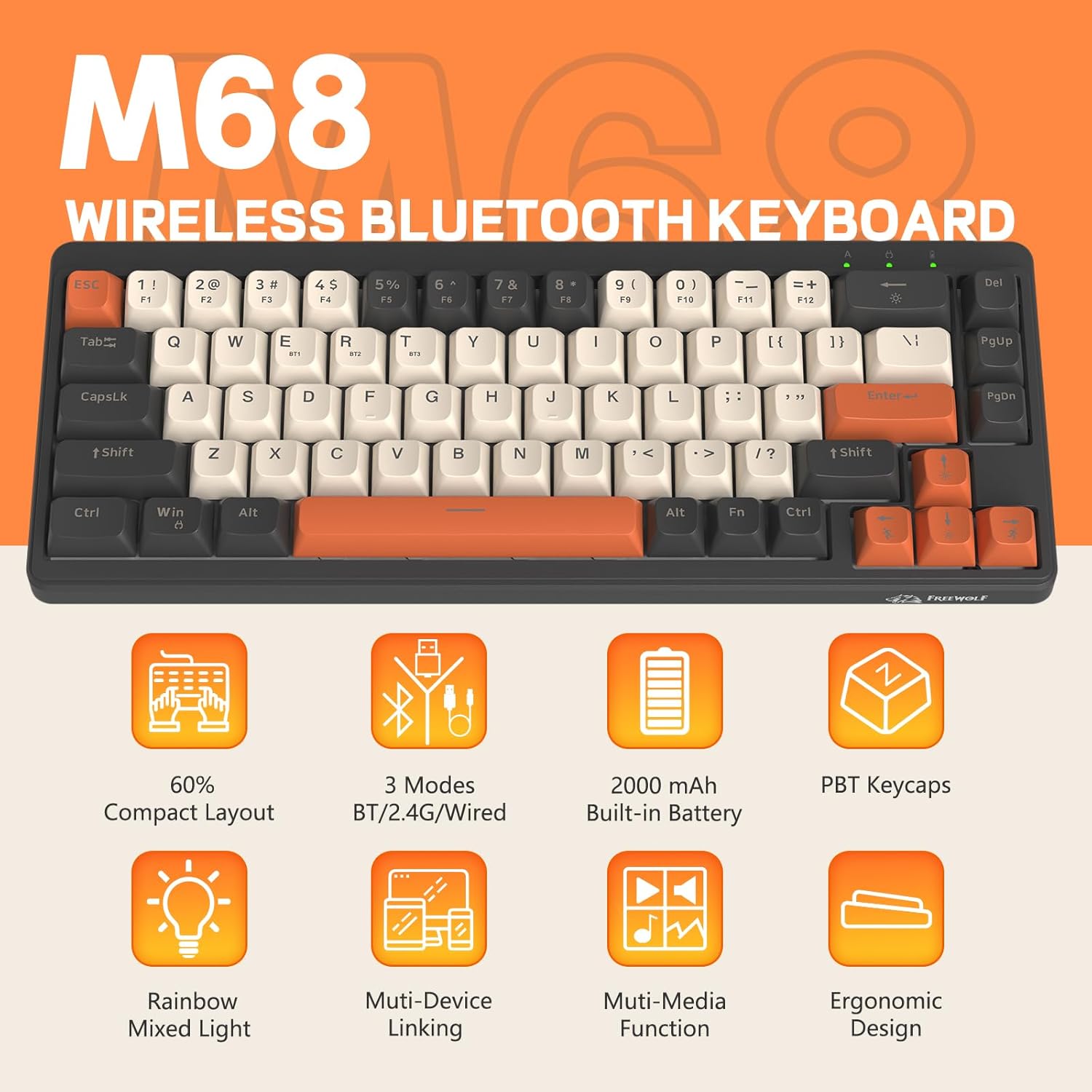
그림 2: 이상view of FREEWOLF M68 key features.
3. 설정 및 연결
3.1. Tri-Mode Connection Overview
The M68 keyboard supports three connection methods: wired via USB-C, 2.4GHz wireless via a USB receiver, and Bluetooth 5.0. You can switch between these modes using the dedicated switch on the keyboard.

그림 3: 상세 view of the 3-mode connection options.
3.2. 유선 연결
- 키보드에서 USB-C 포트를 찾으세요.
- 제공된 USB-C 케이블을 키보드에 연결하고 다른 쪽 끝을 컴퓨터의 USB 포트에 연결하세요.
- 키보드의 모드 스위치가 유선(USB) 위치로 설정되어 있는지 확인하십시오.
- 키보드는 시스템에서 자동으로 인식됩니다.
3.3. 2.4GHz 무선 연결
- Locate the 2.4GHz USB receiver (often stored in a compartment on the keyboard).
- USB 수신기를 컴퓨터의 사용 가능한 USB 포트에 연결합니다.
- 키보드의 모드 스위치를 2.4GHz 무선 위치로 설정하십시오.
- 키보드가 자동으로 연결됩니다. 그렇지 않으면 FN + R 페어링을 시작합니다.
3.4. 블루투스 연결
The M68 can connect to up to three Bluetooth devices simultaneously.
- 키보드의 모드 스위치를 Bluetooth 위치로 설정합니다.
- To enter pairing mode for a specific channel (BT1, BT2, or BT3), press and hold FN+Q (BT1용) FN + 승 (BT2의 경우) 또는 FN + 전자 (for BT3) until the corresponding indicator light flashes rapidly.
- On your device (PC, laptop, tablet, phone), open Bluetooth settings and search for "FREEWOLF M68".
- 페어링할 키보드를 선택하세요. 연결되면 표시등이 켜집니다.
- 페어링된 Bluetooth 장치 간에 전환하려면 다음을 누르세요. FN + Q/W/E 간단히.
4. 운영
4.1. 백라이트 제어
The M68 features customizable rainbow LED backlighting.
- FN + 백스페이스: Toggle backlight on/off or switch between constant and breathing modes.
- FN + 왼쪽 화살표: 백라이트 속도를 낮추세요.
- FN + 오른쪽 화살표: 백라이트 속도를 높입니다.
- FN + 위쪽 화살표: 백라이트 밝기를 높입니다.
- FN + 아래쪽 화살표: 백라이트 밝기를 낮추세요.

Figure 4: Backlight adjustment key combinations.
4.2. 인체공학적 조정
The keyboard includes double leg braces on the back to adjust the typing angle for comfort.
- Flip the keyboard over to access the leg braces.
- 2s를 조정하세요tage leg braces to achieve your preferred typing angle (flat, one stage, or two stag에).

Figure 5: Ergonomic angle adjustments.
4.3. 배터리 관리
The keyboard has a built-in 2000mAH rechargeable battery.
- 충전 중: Connect the keyboard via the USB-C cable to a power source (computer USB port or wall adapter). The charging indicator will show status.
- 배터리 수명: Up to 60 hours with backlight on, and up to 200 hours with backlight off.
- 절전: The keyboard will enter sleep mode after a period of inactivity to conserve battery. Press any key to wake it up.

Figure 6: Battery capacity information.
5. 유지관리
- 청소: Use a soft, dry cloth to clean the keyboard surface. For keycaps, you may use a slightly damp 천으로 닦아주세요. 과도한 습기는 피해주세요.
- 키캡 제거: If necessary, use a keycap puller to carefully remove PBT keycaps for deeper cleaning or replacement.
- 저장: 키보드는 직사광선과 극한의 온도를 피해 시원하고 건조한 곳에 보관하세요.
- 액체를 피하세요: Do not expose the keyboard to liquids to prevent damage to internal components.
6. 문제 해결
| 문제 | 가능한 원인 | 해결책 |
|---|---|---|
| 키보드가 응답하지 않음(유선) | 케이블 연결이 느슨하여 모드가 올바르지 않습니다. | Ensure USB-C cable is securely connected. Check if the mode switch is set to wired. Try a different USB port. |
| 키보드가 응답하지 않습니다 (2.4GHz) | USB receiver not connected, incorrect mode, pairing issue. | Ensure USB receiver is plugged in. Set mode switch to 2.4GHz. Re-pair by pressing FN + R. Try a different USB port for the receiver. |
| 키보드가 응답하지 않음(블루투스) | Not paired, incorrect mode, device Bluetooth off. | Ensure device Bluetooth is on. Set mode switch to Bluetooth. Enter pairing mode (FN + Q/W/E) and re-pair. Forget the device on your system and re-pair. |
| 백라이트가 작동하지 않거나 멈춰 있습니다. | Backlight off, low battery, software glitch. | 누르다 FN + 백스페이스 to toggle. Charge the keyboard. Try resetting the keyboard (refer to advanced functions if available, or disconnect/reconnect). |
| 키가 등록되지 않거나 두 번 입력됨 | 키캡 아래에 먼지/이물질이 있고 스위치에 문제가 있습니다. | Carefully remove keycap and clean. If issue persists, contact support. |
7. 사양
| 모델 | M68 |
| 상표 | 프리울프 |
| 연결성 | 유선(USB-C), 2.4GHz 무선, 블루투스 5.0 |
| 키 레이아웃 | 60% (67개 키) |
| 키캡 재질 | PBT(폴리부틸렌테레프탈레이트) |
| 백라이트 | 레인보우 LED(RGB) |
| 배터리 용량 | 2000mAh (배터리 용량) |
| 호환 장치 | Laptop, PC, Tablet (Windows, Mac, Linux, iOS, Android) |
| 제품 치수 | 32.51 x 12.5 x 3.99cm |
| 무게 | 600g |
| 특별 기능 | Ergonomic (adjustable angles), Backlit |
8. 보증 및 지원
For warranty information, technical support, or customer service inquiries, please refer to the contact information provided with your purchase or visit the official FREEWOLF web대지.
보증 청구를 위해 구매 증빙서류를 보관하세요.