
1. 서론
The MiBOXER TRI-PW 500W AC Triac Dimmer is designed for precise control of lighting systems in residential and commercial environments. This device integrates WiFi and 2.4GHz technology, allowing for remote operation via compatible applications and MiBOXER remote controls. It supports triac dimming, ensuring compatibility with a wide range of lighting fixtures, including LED, halogen, and incandescent lights, for smooth and consistent dimming from full brightness to a soft glow.
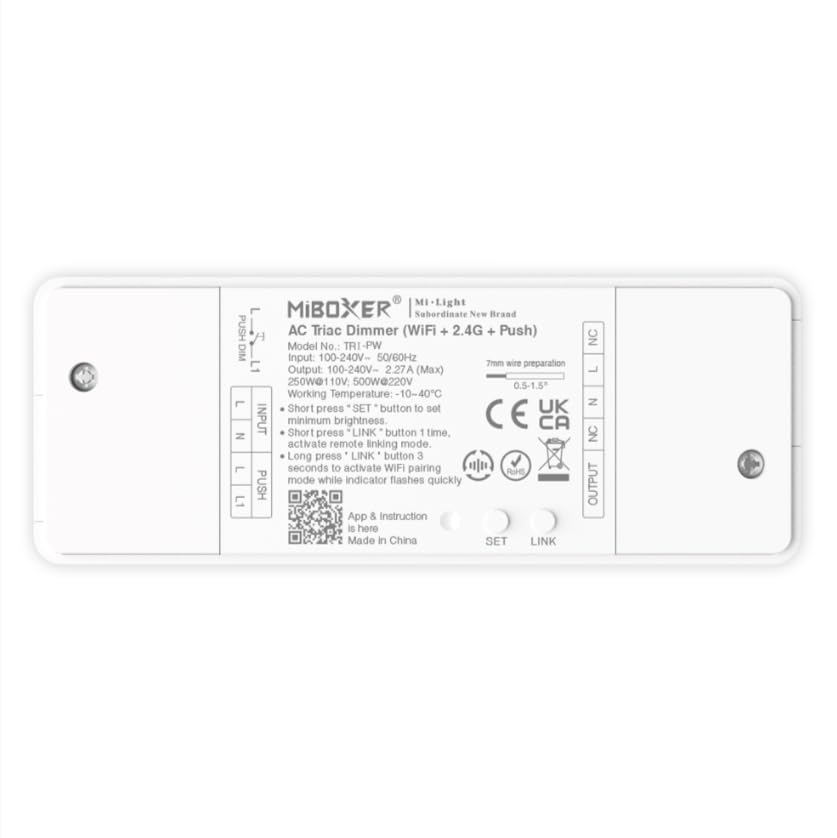
이미지 1.1: 이상view of the MiBOXER TRI-PW 500W AC Triac Dimmer unit.
2. 안전 정보
- 전기 설치: 설치는 해당 지역의 전기 규정 및 법규에 따라 자격을 갖춘 전기 기술자가 수행해야 합니다.
- 전원 차단: 조광기를 설치하거나 수리하기 전에 항상 회로 차단기에서 전원을 차단하십시오.
- 권tage 호환성: 입력 볼륨을 확인하세요tage matches the dimmer's specifications (100-240V AC).
- 하중 용량: Do not exceed the maximum load capacity of 500W. Overloading can cause damage or fire.
- 실내에서만 사용 가능: This device is intended for indoor use in dry locations. Avoid exposure to moisture or extreme temperatures.
- 호환성: Use only with compatible dimmable lighting fixtures (LED, halogen, incandescent).
3. 패키지 내용
패키지에 모든 구성 요소가 들어 있는지 확인하세요.
- MiBOXER TRI-PW 500W AC Triac Dimmer Unit
- User Manual (may be included as a separate document)

Image 3.1: MiBOXER TRI-PW Dimmer unit shown with its packaging and a user manual.
4. 제품 특징
- Powerful 500W Capacity: Supports high-power loads, suitable for various lighting fixtures.
- Triac Dimming Technology: Provides flicker-free dimming for LED, halogen, and incandescent lights.
- WiFi & 2.4GHz Control: Integrates with WiFi and MiBOXER 2.4GHz systems for smartphone or remote control.
- Push Control Compatibility: Allows for quick, on-site dimming adjustments via a push button.
- 앱 및 음성 제어: Compatible with major smart home platforms for app-based and voice command control.
- 메모리 기능: Retains previous lighting settings after power cycles.
5. 사양
| 특징 | 세부 사항 |
|---|---|
| 상표 | 미박서 |
| 모델명 | TRI-PW |
| 특징 | 500W AC 트라이액 조광기 |
| 주파수 대역 클래스 | 싱글 밴드 |
| 무선 통신 표준 | 802.11b |
| 호환 장치 | PUSH 디밍 지원 |
| 추천 용도 | Home lighting systems |
| 연결 기술 | 와이파이 |
| 스마트 홈 호환성 | Smart Home Compatible (e.g., Amazon Alexa, Google Assistant) |
| 적용 범위 | LED, halogen, incandescent, high-power loads |
| 빈도 | 2.4GHz |
| 크기(대략) | 117mm(길이) x 45mm(폭) x 24mm(높이) |
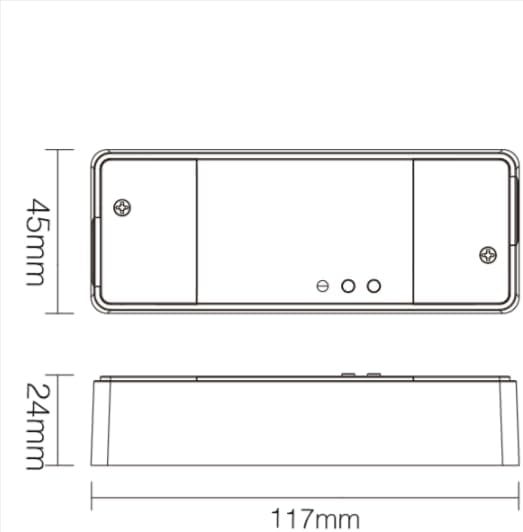
Image 5.1: Technical drawing showing the approximate dimensions of the TRI-PW dimmer.

Image 5.2: Packaging dimensions for the MiBOXER TRI-PW dimmer.
6. 설정 및 설치
중요한: 설치를 시작하기 전에 회로 차단기의 전원이 분리되어 있는지 확인하세요.
배선도
The MiBOXER TRI-PW dimmer supports two primary wiring methods for integration with a push switch. Both methods are suitable for triac dimming LED lights, traditional filament lamps 및 할로겐 lamps.

Image 6.1: Wiring diagrams for connecting the MiBOXER TRI-PW dimmer with a push switch.
Method 1: Single-Wire Push Switch Connection
- Connect the Live (L) and Neutral (N) input wires from your power supply (100-240V~) to the corresponding 'INPUT' terminals on the dimmer.
- Connect the Live (L) and Neutral (N) output wires to your lighting fixture (100-240V~) from the 'OUTPUT' terminals.
- Connect one wire from the push switch to the 'PUSH' terminal on the dimmer.
- Connect the other wire from the push switch to the Live (L) input terminal.
Method 2: Two-Wire Push Switch Connection
- Connect the Live (L) and Neutral (N) input wires from your power supply (100-240V~) to the corresponding 'INPUT' terminals on the dimmer.
- Connect the Live (L) and Neutral (N) output wires to your lighting fixture (100-240V~) from the 'OUTPUT' terminals.
- Connect the two wires from the push switch directly to the 'PUSH' terminals on the dimmer.
After wiring, secure the dimmer in a suitable electrical box or enclosure. Restore power at the circuit breaker.
7. 사용 설명서
7.1. Push Switch Control
- 짧은 보도: Turn the lights ON or OFF.
- 길게 누르기 : Adjust the brightness level. Release the button to set the desired brightness.
7.2. WiFi App Control
The TRI-PW dimmer supports control via a smart app (e.g., Tuya Smart app). No additional 2.4G gateway is required for app control.
- Download the compatible smart home app from your device's app store.
- 계정에 등록하거나 로그인하십시오.
- Put the dimmer into pairing mode (refer to the app's instructions or the dimmer's specific pairing procedure, usually involving a long press of the 'SET' button or power cycling).
- Follow the in-app instructions to add the device to your network.
- Once connected, you can control the dimmer's ON/OFF state and brightness from your smartphone.
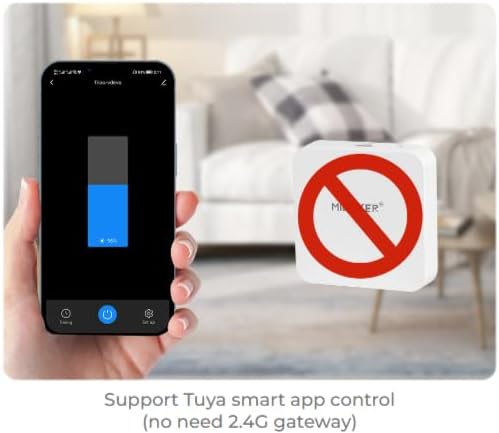
이미지 7.1: Example of controlling the dimmer using a smartphone application.
7.3. 2.4GHz 리모컨
The dimmer can be paired with MiBOXER 2.4GHz remote controls for direct wireless control.
- Ensure the dimmer is powered on.
- Refer to your MiBOXER 2.4GHz remote control's manual for specific pairing instructions. Typically, this involves pressing a "Link" or "Pair" button on the remote within a few seconds of powering on the dimmer or pressing the dimmer's 'SET' button.
- A successful pairing is usually indicated by the connected light flashing.
7.4. 음성 제어 (알렉사/구글 어시스턴트)
The TRI-PW dimmer is compatible with smart home voice assistants like Amazon Alexa and Google Assistant when integrated through a compatible smart home app.
- Ensure your dimmer is successfully connected to the smart home app (e.g., Tuya Smart).
- Amazon Alexa 또는 Google Home 앱을 엽니다.
- Enable the skill or service for the smart home app you are using (e.g., "Tuya Smart" skill).
- Discover devices. Your dimmer should appear in the list.
- Assign a name to your dimmer (e.g., "Living Room Light").
- You can now control your light using voice commands, such as "Alexa, turn on Living Room Light" or "Hey Google, dim Living Room Light to 50%."

Image 7.2: The dimmer is compatible with voice control platforms like Amazon Alexa and Google Assistant.
8. 유지관리
- 청소: Disconnect power before cleaning. Wipe the dimmer with a soft, dry cloth. Do not use liquid cleaners or aerosols.
- 점검: 배선 연결부가 단단히 고정되었는지, 마모 또는 손상 흔적이 있는지 주기적으로 점검하십시오.
- 펌웨어 업데이트: If available, check the smart home app for firmware updates to ensure optimal performance and security.
9. 문제 해결
| 문제 | 가능한 원인 | 해결책 |
|---|---|---|
| 표시등이 켜지지 않습니다. | No power, incorrect wiring, faulty bulb, dimmer not paired. | Check circuit breaker. Verify wiring according to diagrams. Test bulb. Re-pair dimmer with app/remote. |
| 전등이 깜빡거리거나 윙윙거립니다. | Incompatible bulb, overloaded circuit, loose wiring. | Ensure bulbs are dimmable and compatible with triac dimmers. Reduce load. Check wiring connections. |
| Dimmer not responding to app/remote. | Dimmer out of range, WiFi issue, not paired. | Ensure dimmer is within WiFi/2.4GHz range. Check WiFi router. Re-pair dimmer with app/remote. |
| WiFi에 연결할 수 없습니다. | Incorrect WiFi password, 5GHz network, dimmer not in pairing mode. | Verify WiFi password. Ensure you are connecting to a 2.4GHz network. Put dimmer into WiFi pairing mode. |
10. 보증 및 지원
This MiBOXER TRI-PW dimmer comes with a 2년 보증 구매일로부터. 이 보증은 정상적인 사용 하에서 재료 및 제조상의 결함을 포함합니다.
The warranty does not cover damage caused by improper installation, misuse, unauthorized modifications, or acts of nature.
For technical support or warranty claims, please contact your retailer or the manufacturer directly. Please have your purchase receipt and product model number (TRI-PW) available when contacting support.
자세한 내용은 다음을 방문하세요. 아마존의 MiBOXER 스토어.