
1. 서론
구매해주셔서 감사합니다asing the Max Power MPD437 Ultra PRO M2 Portable Bluetooth Speaker. This speaker is designed to provide high-quality audio in various environments, featuring water resistance and dust-proof capabilities for outdoor use. Please read this manual carefully before using the product to ensure proper operation and to maximize its lifespan.
안전 정보
- 스피커를 극한의 온도나 직사광선에 장시간 노출시키지 마세요.
- 스피커를 떨어뜨리거나 강한 충격을 주지 마십시오.
- 스피커를 분해하거나 개조하지 마십시오. 보증이 무효화됩니다.
- 스피커를 의료기기에서 멀리 떨어뜨려 놓으십시오.
- 제공된 충전 케이블만 사용하세요.
2. 패키지 내용
패키지에 모든 품목이 들어 있는지 확인하세요.
- Max Power MPD437 Ultra PRO M2 Portable Bluetooth Speaker
- 전원 케이블
- AUX 케이블
- 사용 설명서 (본 문서)
3. 제품 오버view
Familiarize yourself with the components of your Max Power MPD437 Ultra PRO M2 speaker.
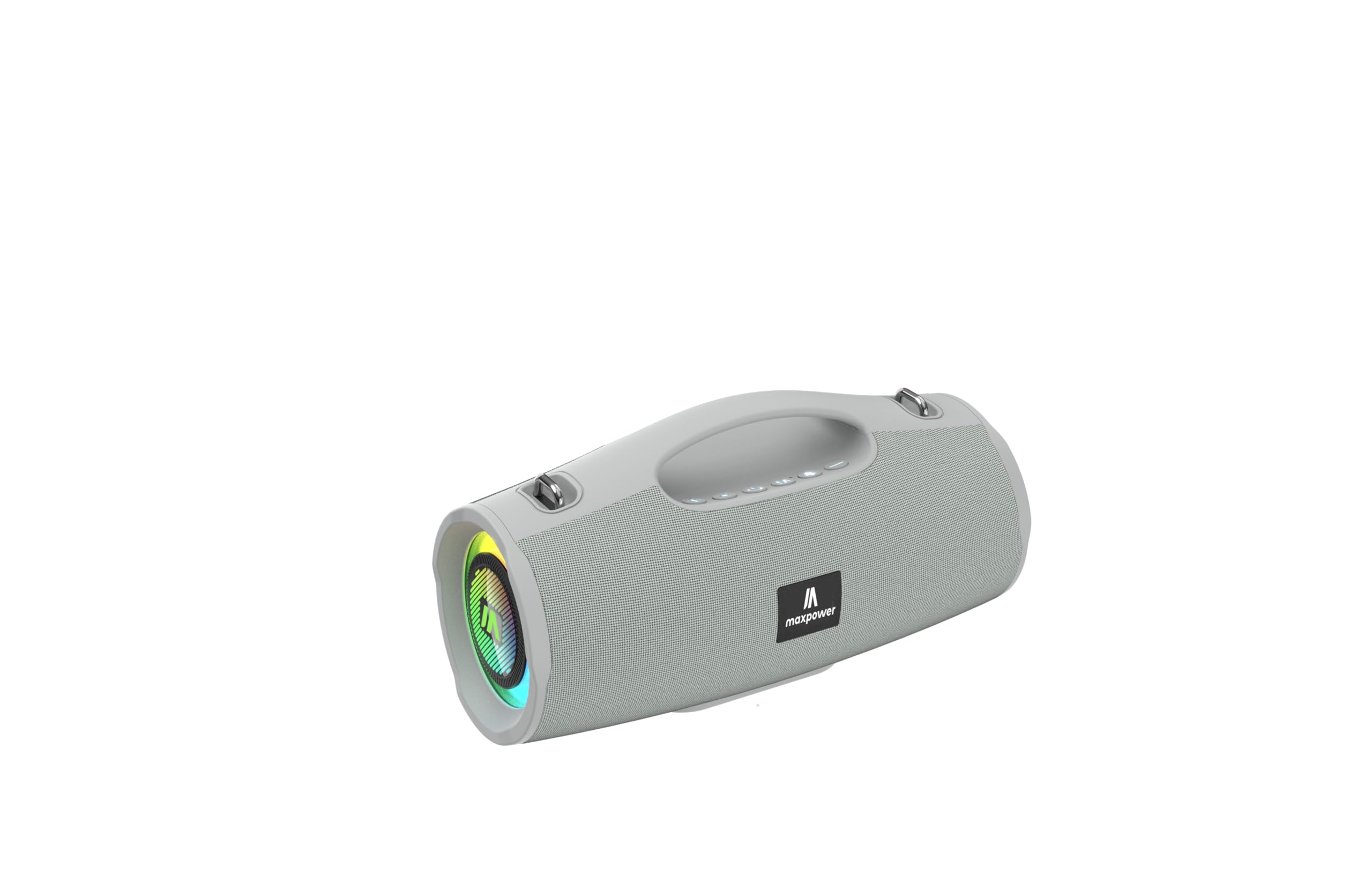
This image displays the Max Power MPD437 Ultra PRO M2 speaker. It features a robust grey casing, an integrated carrying handle at the top, and a series of control buttons. One end of the speaker is equipped with an LED light ring, indicating its operational status and adding visual effects.
주요 구성 요소:
- 통합형 운반 손잡이: 간편한 휴대를 위해.
- 제어 버튼: For power, volume, playback, and mode selection.
- 스피커 그릴: Protects the speaker drivers.
- LED 라이트 링: Provides visual effects and indicates status.
- 충전 포트: 전원 케이블을 연결합니다.
- 보조 입력: 유선 오디오 연결용.
4. 설정
4.1 스피커 충전
- Connect the provided Power Cable to the charging port on the speaker.
- Plug the other end of the Power Cable into a suitable power source.
- LED 표시등이 충전 상태를 표시합니다. 완전히 충전하는 데는 약 3시간이 걸립니다.
- 완전히 충전되면 충전 케이블을 분리하세요.
4.2 블루투스 페어링
- 전원 버튼을 길게 눌러 스피커를 켜세요. 스피커의 LED 표시등이 깜빡이며 블루투스 페어링 모드로 진입합니다.
- 기기(스마트폰, 태블릿, 노트북)에서 Bluetooth를 활성화하고 사용 가능한 기기를 검색하세요.
- Select "MPD437 Ultra PRO M2" from the list of devices.
- 페어링이 완료되면 스피커에서 소리로 확인음이 울리고 LED 표시등이 깜빡임을 멈춥니다.
- 스피커의 전원이 켜지면 마지막으로 페어링된 기기에 자동으로 다시 연결을 시도합니다.
4.3 AUX 연결
- Connect one end of the provided AUX Cable to the AUX input port on the speaker.
- Connect the other end of the AUX Cable to the audio output jack of your device.
- 스피커가 자동으로 AUX 모드로 전환됩니다.
5. 사용 설명서
5.1 전원 켜기/끄기
- 전원 켜기: 전원 버튼을 2~3초 동안 길게 누르세요.
- 전원 끄기 : 전원 버튼을 2~3초 동안 길게 누르세요.
5.2 볼륨 조절
- 볼륨 증가: '+' 버튼을 누르세요.
- 볼륨 감소: '-' 버튼을 누르세요.
5.3 Playback Control (Bluetooth/AUX Mode)
- 재생/일시 중지: 재생/일시 정지 버튼을 누르세요.
- 다음 트랙: '+' 버튼을 길게 누르세요.
- 이전 트랙 : '-' 버튼을 길게 누르세요.
5.4 모드 선택
Press the 'M' (Mode) button to switch between Bluetooth, AUX, and FM Radio modes.
5.5 FM 라디오 작동
- 'M' 버튼을 사용하여 FM 라디오 모드로 전환하세요.
- 재생/일시정지 버튼을 눌러 사용 가능한 FM 방송국을 자동으로 검색하고 저장하세요.
- Use the '+' and '-' buttons to navigate between saved stations.
5.6가지 LED 조명 모드
The speaker features vibrant LED lights. Press the dedicated LED button (if available, or a long press on a specific button) to cycle through different light modes or turn them off.
6. 유지관리
6.1 청소
- 부드러운 천으로 스피커를 닦고 damp 옷감.
- 연마성 세척제, 알코올, 화학 용제는 사용하지 마세요.
- 충전 또는 케이블 연결 전에 모든 포트가 건조한지 확인하십시오.
6.2 보관
- 스피커는 직사광선을 피해 서늘하고 건조한 곳에 보관하십시오.
- 장기간 보관할 경우, 배터리 수명 유지를 위해 몇 달에 한 번씩 배터리를 약 50%까지 충전하십시오.
7. 문제 해결
| 문제 | 가능한 원인 | 해결책 |
|---|---|---|
| 스피커의 전원이 켜지지 않습니다. | 배터리가 소진되었습니다. | 제공된 전원 케이블을 사용하여 스피커를 충전하십시오. |
| 스피커에서 소리가 나지 않습니다. | 볼륨이 너무 작거나 음소거되어 있습니다. 기기가 올바르게 페어링되지 않았습니다. AUX 케이블이 완전히 삽입되지 않았습니다. | Increase volume on both speaker and connected device. Re-pair Bluetooth. Ensure AUX cable is securely connected. |
| 블루투스로 페어링할 수 없습니다. | 스피커가 페어링 모드가 아닙니다. 기기의 블루투스가 꺼져 있습니다. 스피커와 기기 사이의 거리가 너무 멉니다. | Ensure speaker is in pairing mode (flashing LED). Turn on Bluetooth on your device. Move speaker closer to your device (within 35 feet). |
| FM 라디오 수신이 좋지 않습니다. | 현재 위치에서 신호가 약합니다. | 스피커를 신호 수신이 더 잘 되는 곳으로 옮기세요. |
8. 사양
| 모델명 | Ultra Pro M2 |
| 품목 모델 번호 | MPD437 |
| 상표 | 최대 전력 |
| 스피커 유형 | 휴대용 스피커 |
| 연결 기술 | 블루투스, 보조 |
| 무선 통신 기술 | 블루투스 |
| 블루투스 범위 | 35 피트 |
| 특별 기능 | Dustproof, FM Radio, LED Light, Water Resistant |
| 방수 레벨 | 방수 |
| 전원 | 배터리 구동 |
| 배터리 용량 | 3000밀리amp 시간 |
| 충전 시간 | 3시간 |
| 오디오 출력 모드 | 스테레오 재생 |
| 신호 대 잡음 비율 | 85데시벨 |
| 제어 방법 | 만지다 |
| 제품 치수 | 4.5인치 깊이 x 5인치 너비 x 9.9인치 높이 |
| 품목 무게 | 2.65 파운드 |
| 포함된 구성 요소 | AUX Cable, Power Cable |
| 한국어: | 785571466584 |
| GTIN | 785571466584 |
9. 보증 및 지원
9.1 제한 보증
The Max Power MPD437 Ultra PRO M2 Portable Bluetooth Speaker comes with a limited warranty. Please refer to the warranty card included in your package or contact Max Power customer support for detailed warranty terms and conditions.
9.2 고객 지원
For technical assistance, troubleshooting, or warranty inquiries, please contact Max Power customer support. Contact information can typically be found on the product packaging or the official Max Power web대지.