
1. 서론
This instruction manual provides comprehensive guidance for the assembly, operation, and maintenance of your TRYX LUCA L70 E-ATX Mid-Tower PC Case. The LUCA L70 is designed to accommodate a wide range of components, supporting E-ATX, ATX, Micro-ATX, and Mini-ITX motherboards. It features a 270° panoramic tempered glass panel for an unobstructed view of your internal components, a modular design for flexible power supply placement, and extensive cooling capabilities. Please read this manual carefully before beginning assembly to ensure proper installation and safe use.
2. 안전 정보
Always observe the following safety precautions to prevent injury and damage to your components:
- 정전기 : Always ground yourself before handling internal components to prevent electrostatic discharge (ESD) damage. Use an anti-static wrist strap if available.
- 전원 차단: Ensure all power is disconnected from the power supply unit (PSU) and the wall outlet before installing or removing any components.
- 날카로운 모서리: 설치 중 케이스 내부의 날카로운 모서리에 주의하십시오.
- 무게: The PC case, especially when fully assembled with components, can be heavy. Lift with care and seek assistance if necessary.
- 통풍: Ensure adequate airflow around the case to prevent overheating. Do not block ventilation openings.
- 강화 유리: Handle the tempered glass panels with extreme care. They are fragile and can shatter if dropped or subjected to impact. Avoid placing heavy objects on the glass.
3. 제품 오버view 및 기능
The TRYX LUCA L70 PC case offers a blend of aesthetic design and functional features for high-performance PC builds.
3.1 주요 특징
- 270° Panoramic Tempered Glass: Front and side panels feature reinforced tempered glass for an unobstructed view 내부 구성 요소.
- 모듈식 디자인: The power supply unit (PSU) can be positioned at the top or bottom, offering flexibility for various build configurations and improved cable management.
- Excellent Cooling Support: Supports up to nine fans and radiators up to 420mm, ensuring optimal thermal performance for demanding systems.
- 넓은 실내: Accommodates E-ATX motherboards (up to 280mm width), graphics cards up to 460mm in length, and CPU coolers up to 170mm in height. Rear cable management space up to 65mm.
- 저장 옵션 : Features nine 2.5-inch drive bays and two 3.5-inch drive bays for amp르 스토리지.
- Advanced I/O Ports: Includes one USB 3.2 Gen2x2 Type-C port (20Gbps, 30W Power Delivery), two USB 3.0 Type-A ports, and one 3.5mm 4-pole TRRS audio jack.
- 먼지 필터: Equipped with dust filters on the top and bottom to maintain a clean interior.
- Vertical GPU Mount Support: Ready for vertical GPU mounting (riser cable sold separately).
3.2 시각적 오버view

Figure 1: Stylish Design & Superior Performance. This image highlights the internal layout of the TRYX LUCA L70 PC case, showcasing its spacious interior, fan mounting options, and the 270-degree tempered glass panels. It also indicates a 19mm ultra-slim chassis, 4mm thick tempered glass, and an X-shaped floating foot construction that elevates the case by 40mm for improved airflow.
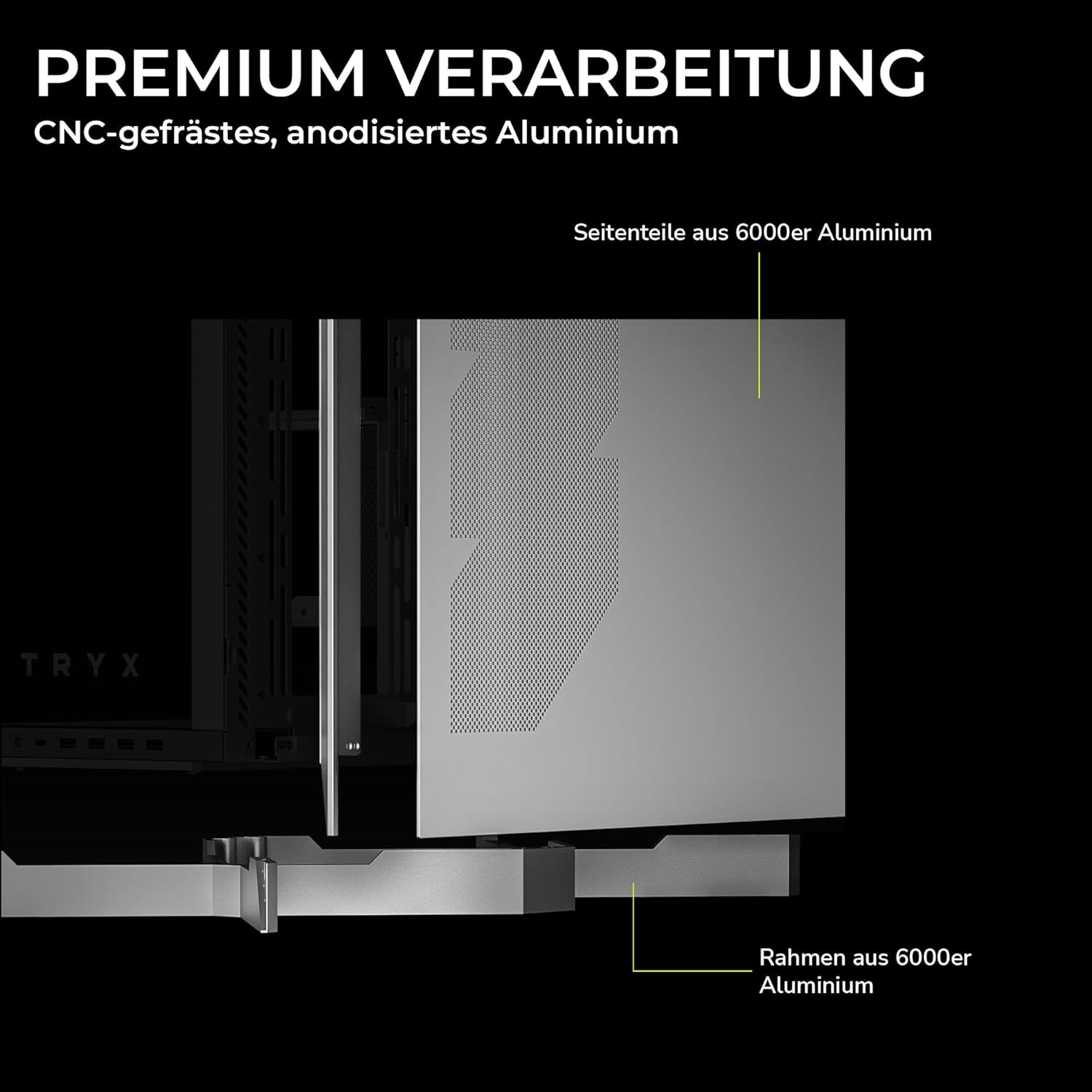
Figure 2: Premium Craftsmanship. This image details the construction materials, specifically highlighting the side panel made from 6000 series aluminum and the frame also constructed from 6000 series aluminum, emphasizing the case's durable and high-quality build.

Figure 3: Effortless Access with Swivel Front Panel. This image demonstrates the swing-out front panel feature, which allows for easy access to the front fan mounts and radiator space, simplifying installation and maintenance.

Figure 4: Modular Design. This illustration shows the flexible power supply unit (PSU) positioning (top or bottom) and the removable motherboard tray, which facilitates easier component installation and cable management. It also indicates various fan and radiator mounting points.

Figure 5: Extensive Connectivity Options. This image details the front I/O panel, including the microphone and speaker jacks, one USB-C 3.2 Gen 2x2 port (with 30W Power Delivery), and two USB-A 3.2 Gen 1 ports.

그림 6: 제품 치수 This image provides a visual representation of the case's approximate dimensions: 26cm (width), 57cm (height), and 54cm (depth). Note that precise dimensions are listed in the specifications section.
4. 설정 및 설치
This section outlines the general steps for installing your PC components into the TRYX LUCA L70 case. Always refer to your individual component manuals for specific installation instructions.
4.1 사건 준비
- 케이스를 평평하고 안정적인 표면에 놓으십시오.
- Carefully remove the tempered glass side panel by unscrewing the thumb screws and gently pulling it away. Set it aside on a soft, non-abrasive surface.
- Remove any other panels or covers as needed for easier access to the interior.
4.2 마더 보드 설치
- CPU, CPU 쿨러(공랭식인 경우), RAM을 마더보드에 먼저 설치한 후 케이스에 장착하십시오.
- 메인보드 폼팩터(E-ATX, ATX, Micro-ATX, Mini-ITX)에 맞는 스탠드오프가 설치되었는지 확인하십시오.
- 마더보드를 케이스 후면의 스탠드오프 및 I/O 쉴드 개구부에 맞춰 조심스럽게 정렬하십시오.
- 제공된 나사로 마더보드를 고정합니다.
4.3 전원 공급 장치(PSU) 설치
- Determine your preferred PSU mounting position (top or bottom) based on your modular design preference.
- Slide the PSU into its designated bay from the rear of the case.
- 케이스 뒷면에서 나사로 PSU를 고정합니다.
- Connect the necessary power cables to your motherboard and other components.
4.4 저장 드라이브 설치
- 2.5인치 드라이브: Locate the 2.5-inch drive mounts (up to 9 available). Secure SSDs or 2.5-inch HDDs using the provided screws or tool-less mechanisms.
- 3.5인치 드라이브: Locate the 3.5-inch drive bays (up to 2 available). Install HDDs into the drive cages, typically using trays or screws.
4.5 그래픽 카드(GPU) 설치
- 케이스 후면에 있는 필요한 확장 슬롯 덮개를 제거하십시오.
- 마더보드의 적절한 PCIe 슬롯에 GPU를 삽입하세요.
- Secure the GPU with screws to the expansion slots.
- If using a vertical GPU mount (riser cable sold separately), follow the instructions provided with your vertical mount kit.
4.6 팬 및 라디에이터 설치
The LUCA L70 supports extensive cooling configurations:
- 맨 위: Up to 2x 120mm / 140mm fans or radiators up to 420mm.
- 옆: Up to 3x 120mm / 140mm fans or radiators up to 420mm.
- 맨 아래: Up to 3x 120mm / 140mm fans or radiators up to 360mm.
- 뒤쪽: 120mm 팬 1개.
Install fans and radiators using the appropriate screws, ensuring correct airflow direction.
4.7 케이블 관리
활용하다 ample cable routing cutouts and tie-down points behind the motherboard tray to manage cables neatly. This improves airflow and aesthetics. The case offers up to 65mm of space for cable management.
4.8 전면 I/O 연결
Connect the front panel cables (USB, audio, power switch, reset switch, LED indicators) to the corresponding headers on your motherboard. Refer to your motherboard manual for header locations.
5. PC 케이스 작동 방법
Once all components are installed and cables are connected, replace all panels, including the tempered glass side panel. Connect your peripherals (monitor, keyboard, mouse) and power cable to the PSU.
- 전원 켜기: Press the power button on the front I/O panel to turn on your PC.
- 전원 끄기 : Shut down your operating system normally. You can also press and hold the power button for a few seconds for a forced shutdown (use only when necessary).
- 다시 시작: Use the reset button on the front I/O panel if available, or restart through your operating system.
6. 유지관리
정기적인 유지관리는 PC 구성 요소의 최적의 성능과 수명을 보장하는 데 도움이 됩니다.
- 먼지 필터: The top and bottom dust filters should be regularly cleaned. Gently remove them and clean with compressed air or rinse with water (ensure they are completely dry before reinstallation).
- 외부 청소: 강화 유리 패널을 포함한 외부 표면을 부드러운 천으로 닦으십시오.amp 천으로 닦으세요. 연마성 세제나 용제는 사용하지 마세요.
- 내부 청소 : Periodically open the case and use compressed air to remove dust buildup from fans, heatsinks, and other components. Ensure the PC is powered off and unplugged before cleaning the interior.
7. 문제 해결
문제가 발생하면 다음의 일반적인 문제 해결 단계를 고려하세요.
- PC 전원이 켜지지 않음:
- 파워서플라이 뒷면의 전원 스위치가 켜져 있는지 확인하십시오.
- Ensure all power cables (24-pin ATX, 8-pin CPU, GPU power) are securely connected.
- 전면 패널 전원 스위치 케이블이 마더보드 헤더에 올바르게 연결되어 있는지 확인하세요.
- 디스플레이 출력 없음:
- 모니터가 그래픽 카드에 연결되어 있는지 확인하십시오 (내장 그래픽을 사용하는 경우가 아니라면 마더보드 I/O 포트에 연결되어 있지 마십시오).
- 그래픽 카드와 RAM 모듈을 다시 장착하세요.
- 과열:
- 팬 연결 상태를 확인하고 팬이 제대로 회전하는지 확인하십시오.
- 먼지 필터와 내부 부품을 청소합니다.
- Verify proper airflow direction within the case.
- USB 포트가 작동하지 않음:
- Ensure the front panel USB cables are correctly connected to the motherboard headers.
- Check your motherboard's BIOS/UEFI settings for USB port configuration.
For more complex issues, consult your motherboard or component manuals, or seek professional assistance.
8. 사양
| 특징 | 사양 |
|---|---|
| 상표 | 트릭스 |
| 모델명 | LUCA L70 |
| 모델 번호 | C-L700N-NN0H-G0W |
| 케이스 유형 | 미드타워 |
| 색상 | 하얀색 |
| 마더보드 호환성 | E-ATX, ATX, 마이크로-ATX, 미니-ITX |
| 치수(폭 x 높이 x 깊이) | 261.8mm x 540.4mm x 571.85mm (약 10.3 x 21.3 x 22.5인치) |
| 무게 | 약 16.2kg(35.7파운드) |
| 재료 | Aluminum Alloy, SGCC Steel, Tempered Glass |
| 확장 슬롯 | 7 |
| 최대 GPU 길이 | 460mm |
| 최대 CPU 쿨러 높이 | 170mm |
| 최대 PSU 길이 | 190mm(ATX) |
| 드라이브 베이 | 9개 x 2.5인치, 2개 x 3.5인치 |
| 팬 지원(상단) | 2x120mm / 140mm |
| 팬 지지대(측면) | 3x120mm / 140mm |
| 팬 지원(하단) | 3x120mm / 140mm |
| 팬 지지대(후면) | 1x 120mm |
| 라디에이터 지지대(상단) | 최대 420mm |
| 라디에이터 지지대(측면) | 최대 420mm |
| 라디에이터 지지대(하단) | 최대 360mm |
| 전면 I / O 포트 | 1x USB 3.2 Gen2x2 Type-C (20Gbps, 30W PD), 2x USB 3.0 Type-A, 1x 3.5mm 4-pole TRRS Jack |
| 먼지 필터 | 위, 아래 |
| 특별 기능 | 270° Tempered Glass, Modular Design, Vertical GPU Mount Ready |
| GTIN | 06977029650209 |
9. 보증 및 지원
9.1 보증 정보
The TRYX LUCA L70 PC Case comes with a 2년 보증 from the date of purchase. This warranty covers defects in materials and workmanship under normal use. It does not cover damage caused by misuse, accident, modification, unauthorized repair, or improper installation. Please retain your proof of purchase for warranty claims.
9.2 기술 지원
For technical assistance, troubleshooting, or warranty inquiries, please contact TRYX customer support. Refer to the official TRYX website or your retailer's support channels for the most up-to-date contact information. When contacting support, please have your product model (LUCA L70) and proof of purchase ready.