
1. 서론
This manual provides comprehensive instructions for the safe and efficient use of your Fiteye 32-Inch Portable Touch Screen Monitor, Model FIT-32-1300M. Please read this manual thoroughly before operating the device and retain it for future reference.
The Fiteye portable monitor combines a 32-inch Full HD touch screen with an integrated 13MP camera, Android operating system, and a built-in battery, all mounted on a movable stand with wheels. It is designed for versatile use in various environments.
2. 패키지 내용
아래 나열된 모든 품목이 패키지에 들어 있는지 확인하세요.
- 1 x Fiteye 32-Inch Touch Screen Monitor
- 1 x Pole
- 1 x 베이스
- 1 x 사용자 설명서
- 1 x 충전기
- 1 x 전원 케이블
- 1 x 원격 제어
3. 제품 오버view
The Fiteye 32-Inch Portable Touch Screen Monitor offers a range of features for enhanced usability and flexibility.

그림 1: Fiteye 32-Inch Portable Touch Screen Monitor. This image displays the monitor mounted on its wheeled stand, showcasin전체적인 디자인과 휴대성을 고려했을 때.
주요 특징:
- 32-Inch Full HD Touch Screen: Provides a 1920x1080 resolution display with touch functionality.
- Integrated 13MP Camera: Allows for video conferencing and calls without external peripherals.
- 휴대성 있는 디자인: Equipped with a stable base and five silent wheels for easy movement between rooms.
- 내장 배터리: A 15000mAh battery provides approximately 6-7 hours of usage, eliminating the need for constant power outlets.
- 안드로이드 운영 체제: Supports installation of various applications from the Google Play Store.
- 무선 스크린 캐스팅: Supports Apple AirPlay, Miracast, Android DLNA, and Chromecast for mirroring content from mobile devices or laptops.
- 화면 조절 가능: Offers 90-degree vertical rotation, 10-20 degree tilt adjustment, and 6 inches of height adjustment.
- 음성 원격 제어: Enables convenient operation from a distance.
4. 설정 지침
Follow these steps to assemble and prepare your Fiteye Portable Monitor for first use.
4.1 조립
- Connect Pole to Base: The three hexagonal screws required to connect the pole to the base are pre-inserted at the bottom of the pole. Unscrew them, align the pole with the base, and then re-insert and tighten the screws to secure the pole to the base.
- Attach Monitor to Pole: The four corner screws for attaching the monitor to the pole are pre-inserted on the back of the monitor. Unscrew them, align the monitor with the top of the pole, and then re-insert and tighten the screws to secure the monitor.
메모: Ensure all screws are securely tightened before moving or operating the device.
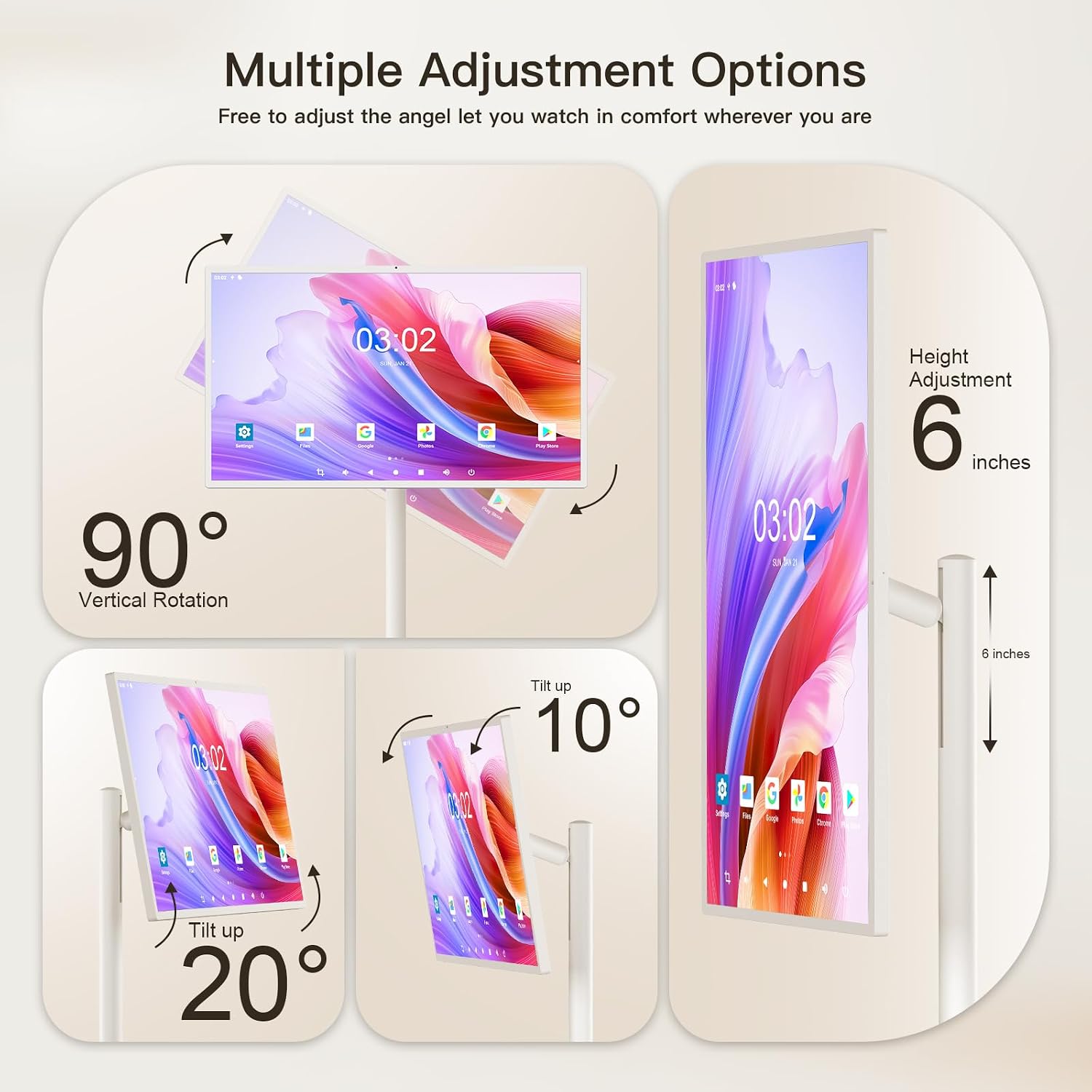
그림 2: Multiple Adjustment Options. This diagram illustrates how the screen can be rotated 90 degrees vertically, tilted up to 20 degrees, and adjusted in height by 6 inches.
4.2 초기 충전
Before first use, fully charge the monitor's built-in battery.
- Connect the provided power cable to the charger.
- 충전기를 표준 전기 콘센트에 꽂습니다.
- Connect the other end of the power cable to the charging port on the monitor.
- Allow the monitor to charge until the battery indicator shows a full charge.
메모: The monitor features a 15000mAh battery, providing approximately 6-7 hours of usage on a full charge.
5. 사용 설명서
This section details how to operate your Fiteye Portable Monitor.
5.1 전원 켜기/끄기
- To power on, press and hold the power button located on the monitor's frame until the screen illuminates.
- To power off, press and hold the power button until a power-off menu appears, then select "Power Off". A short press will put the device into sleep mode.
5.2 터치스크린 조작
The monitor features an Incell touch screen for direct interaction.
- 수도꼭지: 항목을 선택하거나 애플리케이션을 엽니다.
- 강타: 메뉴를 탐색하고, 페이지를 스크롤하거나, 화면 간에 전환하세요.
- 핀치 투 줌: Adjust the zoom level in supported applications.
5.3 원격 제어 사용
The included voice remote control allows for convenient operation from a distance.
- Point the remote control towards the monitor.
- Use the directional pad and selection button to navigate the Android interface.
- Press the microphone button to activate voice commands for search and control.

그림 3: Android Operating System. This image shows the monitor displaying the Android 12 OS home screen with various application icons, along with the remote control used for navigation.
5.4 안드로이드 OS 탐색
The monitor runs on an Android operating system, similar to a large tablet.
- Access the Google Play Store to download and install applications.
- Navigate the home screen, app drawer, and settings using touch or the remote control.
- Utilize the built-in whiteboard application for writing, drawing, and presentations.
5.5 Wireless Screen Casting and Mirroring
Mirror content from your phone, tablet, or laptop to the monitor.
- Ensure both the monitor and your source device are connected to the same Wi-Fi network.
- On the monitor, open the screen casting application (e.g., AirPlay, Miracast, DLNA, Chromecast).
- On your source device, select the screen mirroring or cast option and choose the Fiteye monitor from the list of available devices.
- The monitor also supports wired screen casting via its HDMI interface.

그림 4: Wireless Screen Casting. This image demonstrates how various devices like phones, tablets, and laptops can wirelessly mirror their screens to the Fiteye monitor.
5.6 화면 조정
The monitor offers flexibility in screen positioning:
- Vertical/Horizontal Rotation: The screen can be rotated 90 degrees to switch between portrait and landscape orientations. If the screen does not rotate in one direction, attempt rotation in the opposite direction. Do not force rotation.
- 높이 조정: The screen height can be adjusted by approximately 6 inches along the pole.
- 기울기 조정: The screen can be tilted up to 20 degrees for optimal view각도를 나타냅니다.
5.7 통합 카메라
The 13MP integrated camera is suitable for video calls and conferencing.
- Access the camera through compatible applications (e.g., video conferencing apps).
- Ensure adequate lighting for optimal camera performance.
6. 유지관리
Proper maintenance ensures the longevity and performance of your Fiteye Portable Monitor.
- 화면 청소: 전자제품 전용으로 제작된 부드럽고 보풀 없는 천을 사용하세요. 잘 지워지지 않는 얼룩은 가볍게 두드려 닦아주세요.amp천에 물이나 화면 세척액을 묻혀 닦아주세요. 강한 화학 물질이나 연마재는 사용하지 마세요.
- 본체 청소: Wipe the monitor's body and stand with a soft, dry cloth.
- 배터리 관리 : 배터리 수명을 연장하려면 배터리를 자주 완전히 방전시키지 마십시오. 장기간 사용하지 않을 경우 기기를 서늘하고 건조한 곳에 보관하십시오.
- 저장: When not in use, store the monitor in a stable position to prevent accidental tipping.
주의: Do not spray cleaning liquids directly onto the screen or any part of the device.
7. 문제 해결
This section addresses common issues you might encounter with your Fiteye Portable Monitor.
| 문제 | 가능한 원인 | 해결책 |
|---|---|---|
| 모니터 전원이 켜지지 않습니다. | Battery is discharged; Power cable not connected; Power button not pressed correctly. | Ensure the monitor is fully charged. Verify the power cable is securely connected. Press and hold the power button for a few seconds. |
| 터치 스크린이 반응하지 않습니다. | Software glitch; Screen is dirty; Protective film still on. | Restart the monitor. Clean the screen with a soft, lint-free cloth. Remove any protective films. |
| Cannot connect via wireless screen casting. | Devices not on the same Wi-Fi network; Casting app not open; Network interference. | Ensure both devices are on the same Wi-Fi network. Open the appropriate casting application on the monitor. Try restarting your Wi-Fi router. |
| Screen rotation is stuck. | Physical obstruction; Incorrect rotation attempt. | Ensure there are no obstructions. If it cannot rotate in one direction, try rotating it in the opposite direction. Do not apply excessive force. |
| 원격 제어가 작동하지 않습니다. | Low battery in remote; Obstruction between remote and monitor; Remote not paired. | Replace remote control batteries. Ensure a clear line of sight. Refer to the remote control pairing instructions (if applicable, not detailed in provided data). |
8. 사양
Detailed technical specifications for the Fiteye 32-Inch Portable Touch Screen Monitor.
| 특징 | 세부 사항 |
|---|---|
| 모델 번호 | FIT-32-1300M |
| 화면 크기 | 32 인치 |
| 화면 해상도 | 1920 x 1080 픽셀 (풀 HD 1080p) |
| 종횡비 | 16시 9분 |
| 화면 표면 | 광택있는 |
| 운영 체제 | Android OS (Version not specified, but implied by 'Android 12 OS' in image) |
| 숫양 | 6GB |
| 저장 | 128GB |
| 통합 카메라 | 13MP |
| 배터리 용량 | 15000mAh (approx. 6-7 hours usage) |
| 제품 크기(LxWxH) | 15.7 x 29 x 54 인치 |
| 품목 무게 | 56.9파운드 |
| 색상 | 크림 화이트 |
9. 보증 및 지원
Fiteye is committed to providing quality products and customer satisfaction.
If you have any questions or require technical assistance with your Fiteye portable monitor, please contact our customer support team. We offer 24-hour online service and technical support.
Please refer to your purchase documentation or the Fiteye official web구체적인 보증 조건과 연락처 정보는 해당 사이트를 참조하세요.