
1. 서론
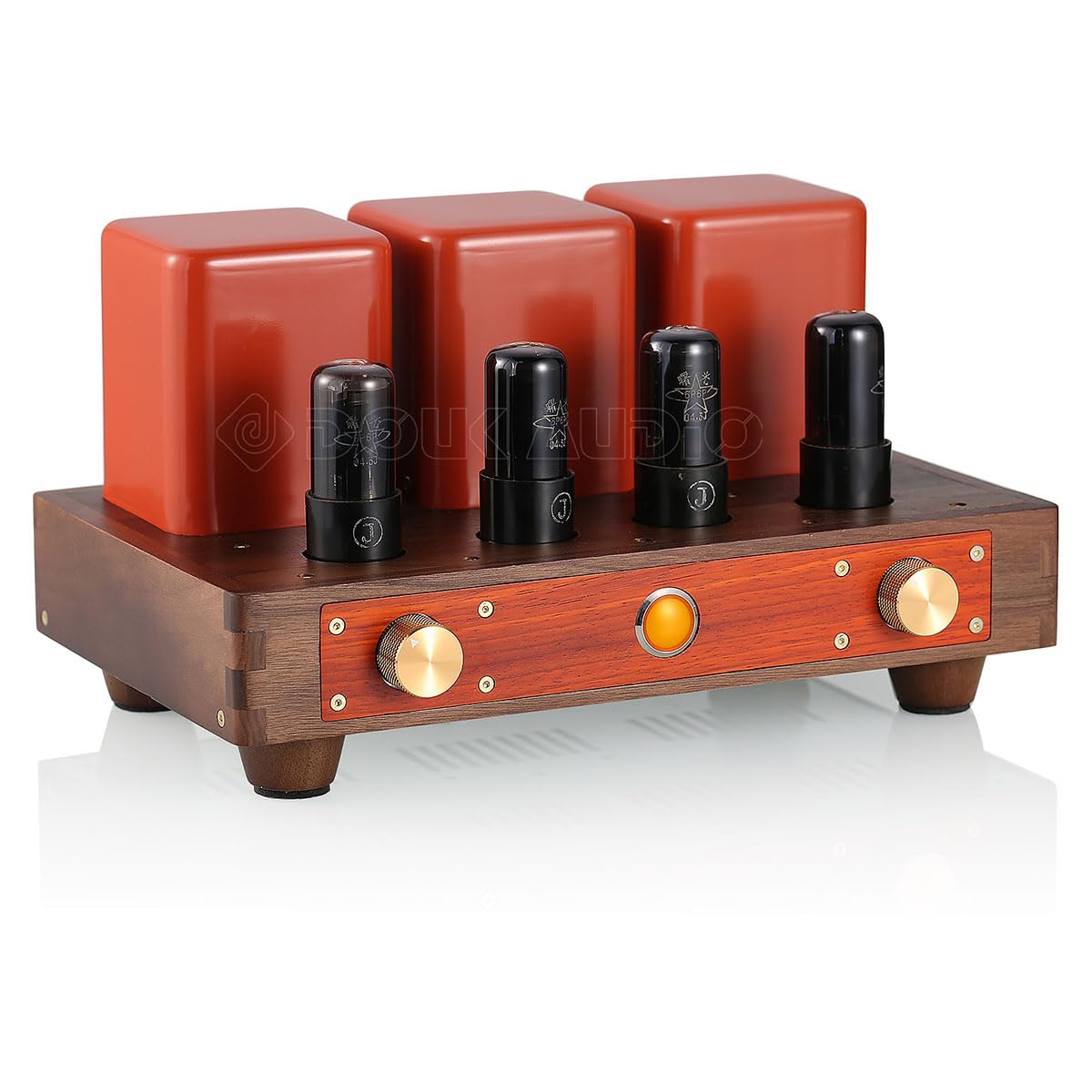
The Nobsound HiFi 6P6P Vacuum Tube Push-Pull Amplifier is designed to provide a high-fidelity audio experience. This amplifier utilizes four 6P6P vacuum tubes in a push-pull configuration, combined with an OPA2604 driver stage, to effectively filter digital sound from audio sources. This design significantly reduces background noise and enhances dynamic performance, delivering a harmonious, warm, detailed, and smooth sound characteristic of vacuum tube amplifiers. It is suitable for driving common bookshelf speakers and high-sensitivity floor-standing speakers.
2. 안전 지침
- 전원 공급 장치: 확인하십시오 amplifier는 올바른 볼륨의 전원 콘센트에 연결되어 있습니다.tage as specified on the device. Use only the provided power cord.
- 통풍: 배치하다 amplifier in a well-ventilated area. Do not block ventilation openings. Maintain adequate space around the unit for proper airflow to prevent overheating, especially due to the heat generated by vacuum tubes.
- 수분: 노출시키지 마십시오 amplifier to rain, moisture, or excessive humidity. Avoid placing liquids near the unit.
- 열: 유지하다 amplifier away from direct sunlight, radiators, heat registers, stoves, or other heat-producing appliances. Vacuum tubes operate at high temperatures; avoid touching them during operation or immediately after shutdown.
- 이물질: Do not insert any objects into the openings of the amplifier. This could cause electric shock or damage.
- 서비스: 이 제품을 직접 수리하려고 하지 마십시오. 모든 수리는 자격을 갖춘 서비스 담당자에게 맡기십시오. 장치를 열면 위험한 전압에 노출될 수 있습니다.tages 또는 기타 위험 요소.
- 튜브 취급: Handle vacuum tubes with care. Ensure they are properly seated in their sockets before powering on the unit.
- 접지: 전기 위험을 방지하기 위해 적절한 접지를 확인하십시오.
3. 패키지 내용
다음 품목이 패키지에 포함되어 있는지 확인하세요.
- 기본 Amplifier Unit * 1
- 6P6P Vacuum Tubes * 4
- 전원코드 * 1

4. 제품 특징
- Advanced Audio Filtering: 그만큼 amplifier uses four 6P6P vacuum tubes in a push-pull configuration with an OPA2604 driver stage. This design effectively filters digital sound from common audio sources, significantly reducing background noise and improving dynamic performance.
- 넓은 주파수 응답: Boasts a broad frequency response of 30-30kHz (-1dB), ensuring comprehensive coverage from rich low-mid frequencies to clear high frequencies.
- 높은 출력 전력: Features a push-pull circuit design providing a maximum output of 12W+12W, suitable for various speaker types.
- Optimized Power Supply and Transformers: Incorporates a self-developed high-frequency power supply and high-quality Japanese Z11 output transformers to enhance performance and ensure system stability. It is equipped with a standard ICE socket.
- 예술적 디자인: Crafted with natural walnut and rosewood materials, featuring red decorative accents that create a unique artistic aesthetic. The front panel includes a volume knob and a power indicator lamp.
- 사용자 친화적인 인터페이스: Equipped with RCA audio inputs and banana speaker audio outputs for convenient connectivity. Includes 2A fuse protection for safety.
5. 설정
5.1 풀기 및 검사
- 조심스럽게 amp앰프와 포장에 포함된 모든 액세서리.
- Inspect all components for any signs of damage during transit. If any damage is found, contact your retailer immediately.
5.2 튜브 설치
The 6P6P vacuum tubes may be shipped separately to prevent damage. Install them as follows:
- Identify the four tube sockets on the top panel of the amp리퍼.
- Carefully align the pins of each 6P6P vacuum tube with the corresponding holes in the socket. The tubes are keyed, so they will only fit in one orientation.
- 각 튜브를 소켓에 단단히 고정될 때까지 부드럽게 아래로 밀어 넣으십시오. 튜브를 억지로 밀어 넣지 마십시오.
5.3 Connecting Audio Sources (RCA Input)
Connect your audio source (e.g., CD player, DAC, phone, tablet, TV set-top box, computer) to the RCA input terminals on the rear panel of the amp리퍼.
- Use high-quality RCA cables.
- Connect the left channel (white/L) output of your source device to the left RCA input of the amp리퍼.
- Connect the right channel (red/R) output of your source device to the right RCA input of the amp리퍼.

5.4 Connecting Speakers (Banana Plug Output)
Connect your passive speakers to the banana plug output terminals on the rear panel. The amplifier supports both 4Ω and 8Ω speakers.
- 확인하십시오 amplifier is turned off before connecting speakers.
- Connect the positive (+) terminal of your left speaker to the corresponding positive terminal (4Ω or 8Ω, depending on your speaker's impedance) for the left channel on the amp리퍼.
- Connect the negative (-) terminal of your left speaker to the corresponding negative terminal (G) for the left channel on the amp리퍼.
- Repeat the process for the right speaker, connecting it to the right channel output terminals.
- 단락을 방지하기 위해 모든 연결부가 단단히 고정되었는지 확인하십시오.


5.5 전원 연결
- Connect the provided power cord to the IEC power inlet on the rear panel of the amp리퍼.
- 전원 코드의 다른 쪽 끝을 적절한 벽면 콘센트에 꽂습니다.

6. 사용 설명서
6.1 전원 켜기/끄기
- 전원을 켜려면 amplifier, press the power switch located on the front panel. The power indicator lamp 밝아질 것이다.
- Allow a few moments for the vacuum tubes to warm up before expecting optimal sound. This warm-up period is normal for tube amp정수기.
- To power off, press the power switch again. The indicator lamp 꺼질 것이다.
6.2 볼륨 조절
Adjust the audio output level using the volume knob on the front panel. Turn clockwise to increase volume and counter-clockwise to decrease it.

7. 유지관리
- 청소: 청소하기 전에 전원을 차단하세요. 부드럽고 마른 천으로 제품 외부를 닦으세요. amp증폭기. 액체 세척제나 연마제를 사용하지 마십시오.
- 통풍: Regularly check that the ventilation openings are clear of dust and debris. Ensure the amplifier is always placed in an area with good airflow.
- 튜브 관리: Vacuum tubes have a finite lifespan. If you notice a degradation in sound quality or if a tube fails, it may need replacement. Consult qualified personnel for tube replacement to ensure correct type and installation.
- 퓨즈 교체: 그만큼 amplifier is equipped with a 2A fuse. If the unit does not power on, check the fuse located near the power inlet on the rear panel. Replace it only with a fuse of the same type and rating.
8. 문제 해결
| 문제 | 가능한 원인 | 해결책 |
|---|---|---|
| 전원이 없습니다 | Power cord not connected; Power outlet faulty; Blown fuse | Check power cord connection; Try a different outlet; Replace fuse (2A) |
| 소리가 나지 않습니다 | Input source not connected; Speaker cables loose; Volume too low; Faulty tubes | Check RCA input connections; Secure speaker cables; Increase volume; Check/replace tubes |
| 왜곡된 소리 | Input signal too strong; Faulty tubes; Speaker impedance mismatch | Reduce input volume from source; Check/replace tubes; Ensure speakers match 4Ω/8Ω output |
| 윙윙거리는 소리 | Ground loop; Nearby electronic interference; Faulty tubes | 적절한 접지를 확인하십시오. 이동 amplifier away from other electronics; Check/replace tubes |
9. 사양
| 특징 | 사양 |
|---|---|
| 상표 | 놉 사운드 |
| 모델 | DJ585 |
| 출력 전력 | 12W + 12W (4Ω/8Ω) |
| 주파수 응답 | 30~30kHz(-1dB) |
| 입력 감도 | 400mV |
| 신호 대 잡음비 (SNR) | -80데시벨 |
| 잔류 소음 | <0.5mVac |
| 입력 인터페이스 | RCA 오디오 입력 |
| 출력 인터페이스 | Banana Speaker Audio Output |
| Included Tubes | 4 x 6P6P Vacuum Tubes |
| 퓨즈 | 2A |
| 제품 무게 | 7.8kg(17.19파운드) |
| 패키지 무게 | 9.0kg(19.84파운드) |
| 치수(폭 x 깊이 x 높이) | 크기는 약 316mm x 193mm x 176mm (12.44인치 x 7.59인치 x 6.92인치)입니다. |
10. 보증 및 지원
For warranty information, technical support, or service inquiries, please refer to the documentation provided with your purchase or contact Nobsound customer support through your retailer or the official Nobsound website. Please have your model number (DJ585) and purchase details ready when contacting support.