
Andesfit A02-SEB
Andesfit Bluetooth Blood Pressure Monitor User Manual
Model: A02-SEB
1. 서론
The Andesfit Bluetooth Blood Pressure Monitor is designed for accurate and convenient blood pressure measurement at home. This device combines advanced technology with user-friendly features, allowing you to monitor your health effectively and share data with healthcare professionals. It is FDA Cleared and CE Certified, ensuring high quality and safety standards.

Figure 1: Andesfit Blood Pressure Monitor with included cuffs and companion app.
2. 포함 사항
Your Andesfit Blood Pressure Monitor package includes the following components:
- Andesfit Blood Pressure Monitor Unit
- Large Blood Pressure Cuff (9-17 inches arm circumference)
- Extra Large Blood Pressure Cuff (13-21 inches arm circumference)
- AA 배터리 4개(포함)
- USB Type-C Cable (for power, not charging batteries)
- 보관 가방
- 사용 설명서 (본 문서)

Figure 2: All components included in the Andesfit Blood Pressure Monitor package.
3. 설정
3.1 장치 전원 공급
The monitor can be powered using the included AA batteries or via the USB Type-C cable. USB power is prioritized if both are connected.
- 배터리 설치: Open the battery compartment on the back of the monitor. Insert the 4 AA batteries, ensuring correct polarity (+/-). Close the compartment.
- USB 전원 : Connect the provided USB Type-C cable to the monitor's USB port and plug the other end into a compatible USB power source (e.g., wall adapter, power bank). Note: The USB port is for power supply only and does not charge the batteries.

Figure 3: Dual power mode options for the monitor.
3.2 커프 부착하기
Select the appropriate cuff size (Large or Extra Large) for your arm. Connect the cuff's air tube securely into the air jack on the side of the monitor unit.

Figure 4: The two included cuff sizes for optimal fit.
3.3 App Installation (Optional but Recommended)
For enhanced tracking and data management, download the "ANDESFITBP" app from your smartphone's app store (Apple App Store or Google Play Store). The app allows for unlimited data storage and easy sharing.
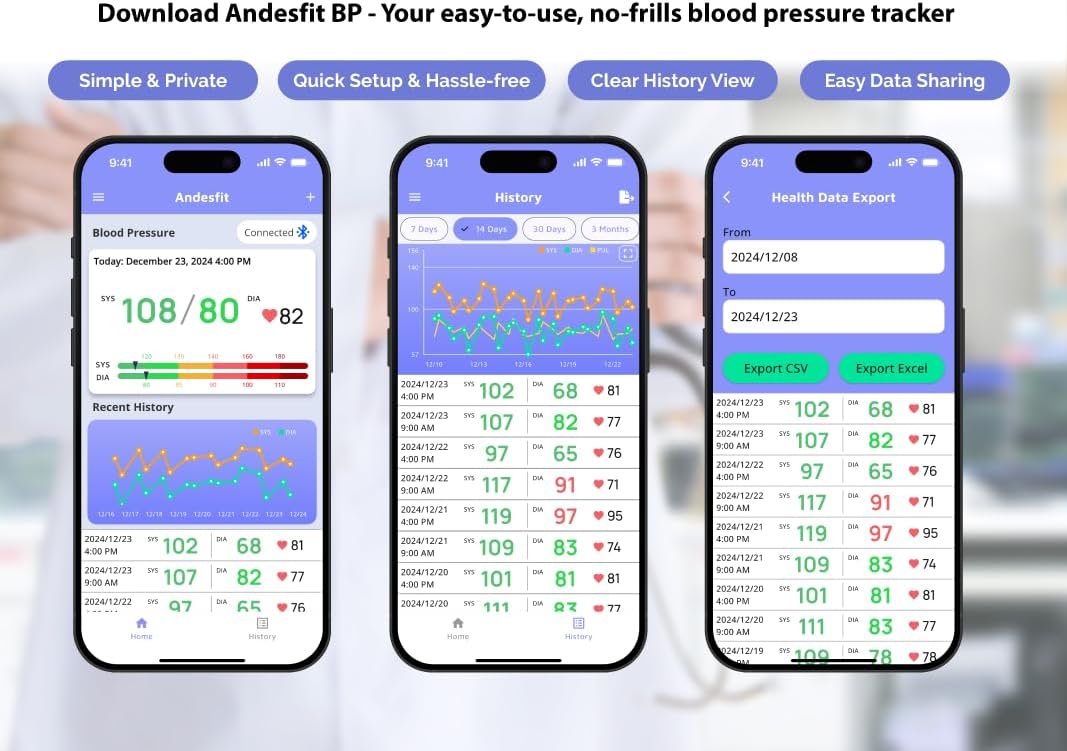
그림 5: 이상view of the Andesfit BP app features.
메모: The app does not require personal data input or login, ensuring your privacy. Data is stored locally on your device and can be synced with Apple Health or Google Fit.
4. 사용 설명서
4.1 측정하기
- 측정 준비: 등을 편안하게 기대고 발을 바닥에 평평하게 놓은 자세로 앉으세요. 팔을 테이블 위에 올려 혈압계가 심장 높이에 오도록 하세요. 측정하는 동안 말하거나 움직이지 마세요.
- 커프를 적용하세요: Wrap the cuff around your bare upper arm, ensuring the air tube is positioned correctly (usually aligned with your middle finger). The cuff should be snug but not too tight.
- 측정 시작: Press the "START/STOP" button on the monitor. The cuff will automatically inflate and then slowly deflate as it measures your blood pressure.
- 결과 읽기: Your Systolic (SYS), Diastolic (DIA), and Pulse (PUL) readings will be displayed on the large 6-inch color LED screen. The screen also features a WHO color-coded indicator for easy interpretation of your blood pressure level.
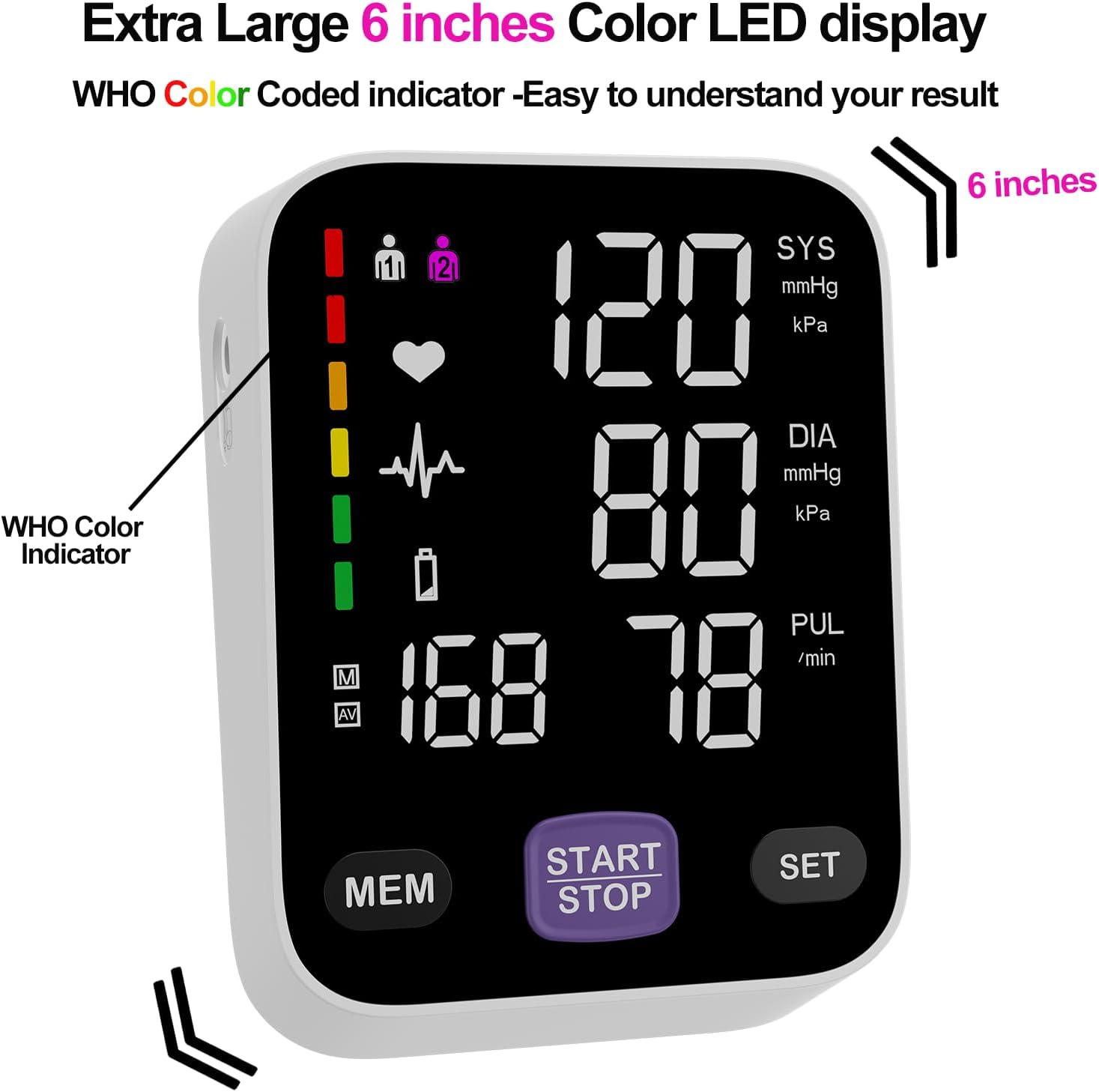
Figure 6: The monitor's large color LED display with WHO color indicator.
4.2 Using the App with the Monitor
Once the app is installed and Bluetooth is enabled on your smartphone, simply switch on your blood pressure monitor and open the app. The app will automatically connect to the device. Your measurement readings will be synced and stored in the app, providing a comprehensive history of your blood pressure trends.
You can export your data as CSV files to share with your doctor or for personal record-keeping.
Video 1: Official Andesfit video demonstrating the Bluetooth blood pressure monitor and app connectivity.
5. 유지관리
- 청소: 모니터와 커프는 부드럽고 마른 천으로 닦으십시오. 연마성 세척제를 사용하거나 기기를 물에 담그지 마십시오.
- 저장: 제공된 보관 가방에 넣어 직사광선과 극한의 온도를 피해 서늘하고 건조한 곳에 보관하세요.
- 배터리 교체: 디스플레이에 배터리 부족 표시등이 켜지면 AA 배터리 4개를 모두 교체하십시오.
6. 문제 해결
If you encounter issues with your Andesfit Blood Pressure Monitor, please refer to the following common solutions:
| 문제 | 가능한 원인 | 해결책 |
|---|---|---|
| 디스플레이가 나오지 않거나 기기가 켜지지 않습니다 | Batteries are low or incorrectly installed; USB cable not connected properly. | Replace batteries or ensure correct polarity. Check USB cable connection. |
| 부정확한 판독 | Improper cuff placement; movement or talking during measurement; incorrect posture. | Ensure cuff is correctly applied and snug. Remain still and silent during measurement. Sit upright with feet flat. |
| 앱이 블루투스로 연결되지 않음 | Bluetooth is off on phone/monitor; app permissions not granted. | Ensure Bluetooth is enabled on both devices. Check app permissions in phone settings. Restart app/monitor. |
7. 사양
| 특징 | 세부 사항 |
|---|---|
| 제품 치수 | 4.5인치 길이 x 4.2인치 너비 x 1.9인치 두께 |
| 품목 모델 번호 | A02-SEB |
| 배터리 | AA 배터리 4개 (포함) |
| 제조업체 | Shenzhen GoodlyMed Technology Co., Ltd. |
| 전원 | 배터리 구동 / USB Type-C |
| 디스플레이 유형 | LED Color Display (6 inches) |
| 커프 사이즈 | 9-17 inches (Large), 13-21 inches (Extra Large) |
| 데이터 저장 | 2 users * 199 readings (device), Unlimited (app) |
| 인증 | FDA Cleared & CE Certified |
8. 보증 및 지원
Andesfit products are designed for reliability and performance. For information regarding warranty coverage and technical support, please contact Andesfit directly. You can find contact details on the official Andesfit web사이트나 구매 플랫폼을 통해서도 구매하실 수 있습니다.
반품 정책: This product typically has a 30-day return policy for refund or replacement, as per standard retail terms.
Ask a question about this manual
Ask about setup, troubleshooting, compatibility, parts, safety, or missing instructions. Manuals+ will review the question and use this page’s manual context to help answer it.