
소개
This manual provides instructions for the AWEI H25 Smart Watch. Please read this manual carefully before using the device to ensure proper operation and maintenance.

Figure 1: AWEI H25 Smart Watch in use.
1. 설정
1.1 패키지 내용
다음 품목이 패키지에 포함되어 있는지 확인하세요.
- AWEI H25 스마트워치
- 충전 케이블
- 사용 설명서 (본 문서)
1.2 장치 충전
Before first use, fully charge the smart watch. Connect the charging cable to the charging port on the back of the watch and to a standard USB power adapter (not included).
- 완전 충전에는 일반적으로 2-3시간이 걸립니다.
- The watch has a 230mAh battery capacity.
- Battery life is approximately 5-7 days with daily use, and up to 30 days in standby mode.

Figure 2: Battery life and performance overview.
1.3 앱 다운로드 및 페어링
To utilize all features, download the companion app to your smartphone. Scan the QR code provided in the watch's interface or search for the app name (usually mentioned in the watch's initial setup screen or packaging) in your phone's app store.
- 스마트폰에서 블루투스를 활성화하세요.
- 함께 제공되는 앱을 열고 화면의 지시에 따라 계정을 만들거나 로그인하세요.
- 앱 내에서 "기기 추가" 또는 "기기 페어링"을 선택하세요.
- 앱이 사용 가능한 기기를 검색합니다. 목록에서 "AWEI H25"를 선택하세요.
- 시계와 스마트폰 모두에서 페어링 요청을 확인하세요.
1.4 시계 화면 사용자 정의
The AWEI H25 features a 1.83-inch screen. You can customize the watch face through the companion app.
- Choose from multiple cloud-based watch faces.
- Upload your own photos to create a personalized watch face.
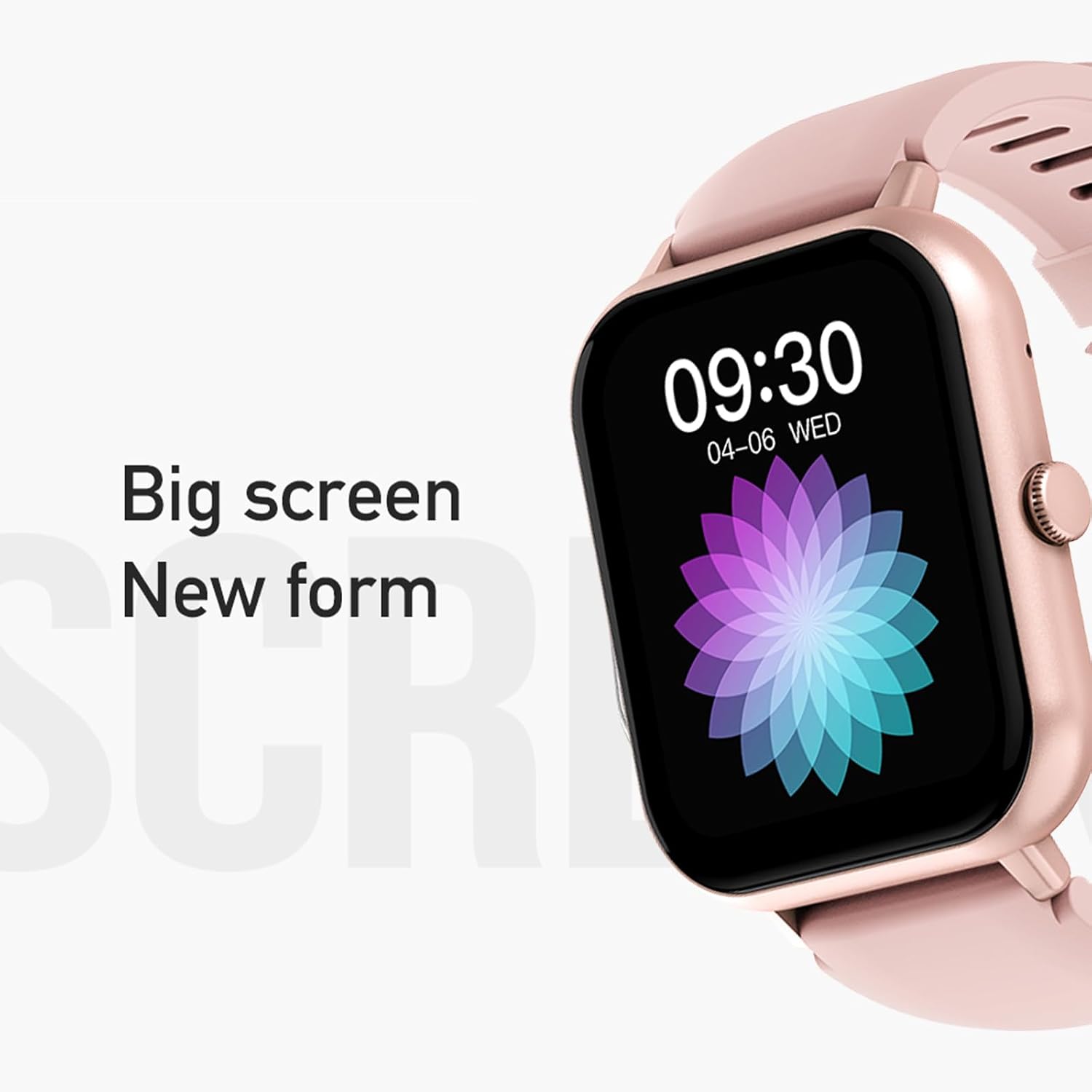
Figure 3: The 1.83-inch screen of the AWEI H25 Smart Watch.
2. 사용 설명서
2.1 기본 탐색
- 위/아래로 스와이프: 메뉴와 알림을 탐색합니다.
- 왼쪽/오른쪽으로 스와이프: 빠른 기능이나 위젯에 접근합니다.
- 측면 버튼을 누르세요: 홈 화면으로 돌아가거나 앱 목록에 접속하세요.
- 측면 버튼을 길게 누르세요: Power on/off or access system settings.
2.2 블루투스 통화 기능
After successful pairing with your smartphone, the watch supports Bluetooth calls.
- 전화 받기: When a call comes in, tap the green icon on the watch screen.
- 전화 걸기: 시계의 다이얼 패드나 연락처 목록을 이용해 전화를 걸어보세요.
2.3 스포츠 모드
The AWEI H25 offers over 100 sport modes to track your physical activity.
- Access the "Sports" menu on the watch.
- Select your desired activity (e.g., Running, Walking, Hiking, Basketball, Cycling, Yoga).
- The watch will track exercise time, calories burned, and other relevant metrics.

그림 4: 이상view of available sport modes.
2.4 상태 모니터링
The watch provides monitoring for various health metrics:
- 심박수 모니터링 : 지속적인 심박수 측정 또는 필요에 따른 심박수 측정.
- 혈압 모니터링 : 추정 혈압 측정값을 제공합니다.
- 혈중 산소 모니터링: 혈중 산소포화도(SpO2)를 측정합니다.
- 여성의 생리 주기: Track and predict menstrual cycles (requires setup in the app).
- 앉아있는 알림: 일정 시간 동안 활동이 없으면 움직이라는 알림을 보냅니다.
메모: The health monitoring features are for reference only and should not be used for medical diagnosis or treatment. Consult a medical professional for health concerns.
2.5 스마트 음성 비서
After binding the watch to the companion app, you can use the smart voice assistant function.
- Click the voice function icon on the watch's menu screen.
- Speak your command (e.g., "What's the weather today?", "Call [Contact Name]").

그림 5: 스마트 음성 비서 인터페이스.
2.6 추가 기능
- 음악 제어: 스마트폰에서 음악 재생을 제어하세요.
- 원격 촬영: 시계를 휴대폰 카메라의 원격 셔터로 사용하세요.
- 알람 시계: 시계에서 바로 알람을 설정하세요.
- 시간 표시: 표준 시간 및 날짜 표시.
- 손목을 돌려서 표시하는 디스플레이: Screen activates when you raise your wrist.
3. 유지관리
3.1 방수 등급(IP67)
The AWEI H25 Smart Watch has an IP67 waterproof rating. This means it is protected against dust ingress and can withstand immersion in water up to 1 meter for up to 30 minutes.
- Suitable for daily use such as washing hands, face, or light rain.
- 적합하지 않은 경우: Swimming, diving, hot showers, saunas, or high-pressure water activities.
- 뜨거운 물, 증기 또는 부식성 액체와의 접촉을 피하십시오.
3.2 청소 및 관리
- 부드럽고 마른 천으로 시계와 시계줄을 정기적으로 닦아주세요.
- 필요한 경우 약간의 d를 사용하십시오.amp 순한 비누를 묻힌 천으로 닦은 후 마른 천으로 물기를 제거하십시오.
- 강한 화학 물질, 연마 세척제 또는 용제를 사용하지 마십시오.
- 적절한 충전을 위해 충전 접점을 깨끗하고 건조하게 유지하세요.
3.3 배터리 관리
- 배터리를 자주 완전히 방전시키지 마세요.
- Do not expose the watch to extreme temperatures (very hot or very cold).
- 시계를 장기간 보관할 경우, 약 50% 정도 충전하여 서늘하고 건조한 곳에 보관하세요.
4. 문제 해결
4.1 장치 전원이 켜지지 않음
- 시계가 완전히 충전되었는지 확인하세요. 충전기에 최소 30분 동안 연결해 두세요.
- Try a long press (approx. 10-15 seconds) of the side button to force a power-on.
4.2 스마트폰과 페어링이 불가능합니다
- 스마트폰에서 Bluetooth가 활성화되어 있는지 확인하세요.
- 시계가 Bluetooth 범위(일반적으로 10m) 내에 있는지 확인하세요.
- 시계와 스마트폰을 모두 다시 시작하세요.
- 휴대폰의 Bluetooth 캐시를 지우고(해당되는 경우) 다시 페어링을 시도하세요.
- 동반 앱이 최신 버전으로 업데이트되었는지 확인하세요.
4.3 부정확한 건강 측정값
- 시계를 손목에 꼭 맞게 착용하세요. 너무 꽉 조이거나 너무 느슨하지 않도록 하세요.
- 시계 뒷면의 센서를 깨끗하게 유지하고 이물질이 끼지 않도록 하십시오.
- 측정하는 동안 과도한 움직임을 피하세요.
- Remember that these readings are for reference and not medical grade.
4.4 Watch Not Receiving Notifications
- 스마트폰에서 해당 앱의 알림 권한을 확인하세요.
- 시계가 Bluetooth를 통해 휴대폰에 연결되어 있는지 확인하세요.
- 시계나 휴대폰에서 "방해 금지" 모드가 활성화되어 있지 않은지 확인하십시오.
5. 사양
| 모델 번호 | H25 |
| 상표 | 아베이 |
| 화면 크기 | 1.83 인치 |
| 배터리 용량 | 230mAh |
| 연결성 | 블루투스 |
| 방수 등급 | IP67 |
| 특별 기능 | 100+ sport modes, Multiple customizable dials, Smart voice assistant, Heart rate, Blood pressure, Blood oxygen monitoring, Bluetooth call function. |
| GPS | GPS 없음 |
6. 보증 및 지원
6.1 제품 보증
The AWEI H25 Smart Watch comes with a one-year warranty from the date of purchase. This warranty covers manufacturing defects under normal use. It does not cover damage caused by misuse, accidents, unauthorized modifications, or failure to follow instructions in this manual.
보증 청구를 위해 구매 증명서를 보관하십시오.
6.2 고객 지원
If you encounter any issues not covered in the troubleshooting section or require further assistance, please contact AWEI customer support. Refer to the product packaging or the official AWEI web최신 연락처 정보는 사이트에서 확인하세요.
