
1. 서론
This manual provides comprehensive instructions for the JHS Pedals Flight Delay Pedal. It covers setup, operation, maintenance, and troubleshooting to ensure optimal performance and longevity of your device. Please read this manual thoroughly before using the pedal.
The JHS Flight Delay pedal is designed to offer essential delay types with user-friendly controls. It features three distinct delay modes: Analog, Reverse, and Digital, alongside modulation options including Chorus and Vibrato. This pedal aims to provide versatile delay effects without complex menu navigation.
2. 안전 정보
- 전원 공급 장치: Use only a regulated 9V DC, center-negative power supply with a minimum current rating of 85mA. Incorrect power supplies can damage the unit and void the warranty.
- 환경: 페달을 물, 습기, 과도한 열 또는 직사광선에 노출시키지 마십시오. 깨끗하고 건조한 환경에서 사용하십시오.
- 손질: Avoid dropping the pedal or subjecting it to strong impacts. Do not attempt to open the enclosure or modify the internal circuitry, as this will void the warranty.
- 케이블 : Ensure all audio cables are in good condition to prevent unwanted noise or signal loss.
3. 패키지 내용
- JHS Pedals Flight Delay Pedal (Model FDBL)
- 사용 설명서 (본 문서)
4. 제품 오버view
The JHS Flight Delay Pedal features a straightforward control layout designed for intuitive use. Below is an illustration of the pedal and a description of its controls.

그림 1: 전면 view of the JHS Pedals Flight Delay Pedal (Blue variant).
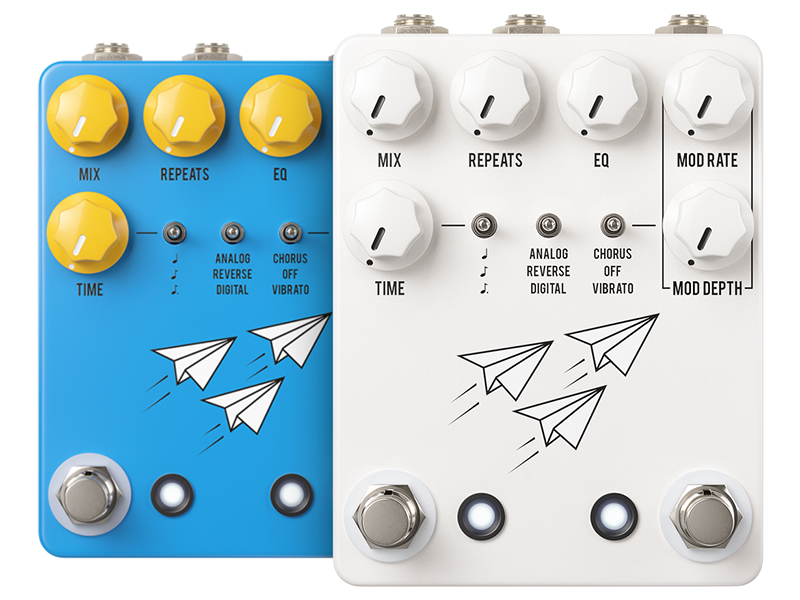
Figure 2: JHS Pedals Flight Delay Pedal shown in both blue and white color options.
통제 수단:
- 믹스 노브: Adjusts the balance between the dry (unaffected) signal and the wet (effected) delay signal. Turning clockwise increases the delay effect's presence.
- 반복 노브: Controls the number of delay repetitions. From a single repeat to self-oscillation.
- EQ 노브: Shapes the tone of the delay repeats, allowing for brighter or darker echoes.
- MOD RATE Knob: Determines the speed of the modulation effect (Chorus or Vibrato).
- 모드 깊이 조절 노브: 변조 효과의 강도 또는 깊이를 조절합니다.
- 시간 노브: Sets the delay time, from short slap-back to long, ambient delays.
- Left Toggle Switch (Delay Mode): Selects between Analog, Reverse, and Digital delay types. Musical note symbols indicate notation intervals for tap tempo.
- Right Toggle Switch (Modulation Type): Selects between Chorus, Off (no modulation), and Vibrato.
- 왼쪽 풋스위치: 지연 효과를 활성화하거나 우회합니다.
- 오른쪽 풋스위치: Typically used for Tap Tempo functionality, allowing you to set the delay time by tapping the switch.
5. 설정
Follow these steps to integrate your Flight Delay Pedal into your audio setup:
- 전원 연결: Connect a regulated 9V DC, center-negative power supply (not included) to the power input jack on the pedal. Ensure the power supply meets the specified requirements (85mA minimum).
- 입력 연결: Connect your instrument (e.g., guitar) or the output of a preceding effects pedal to the INPUT jack on the Flight Delay Pedal using a standard 1/4-inch instrument cable.
- 출력 연결: Connect the OUTPUT jack of the Flight Delay Pedal to your amplifier's input or the input of the next effects pedal in your signal chain using a standard 1/4-inch instrument cable.
- 전원 켜기: Once all connections are secure, connect your power supply to a wall outlet. The pedal is now ready for use.
6. 사용 설명서
6.1 Basic Delay Operation
- 효과 활용하기: Press the left footswitch to toggle the delay effect on or off. The LED indicator will illuminate when the effect is active.
- 지연 시간 조정: 사용하세요 시간 knob to set the duration between repeats. Rotate clockwise for longer delay times, counter-clockwise for shorter times.
- Setting Repeats: 그만큼 반복 knob controls the number of echoes. Turn clockwise for more repeats, reaching self-oscillation at maximum settings.
- Blending the Effect: 사용하세요 혼합 knob to adjust the volume balance between your dry signal and the delayed signal.
- Shaping Delay Tone: 그만큼 EQ knob allows you to brighten or darken the tone of the delay repeats.

Figure 3: Detail of the TIME knob, used to adjust delay duration.

Figure 4: Detail of the REPEATS knob, controlling the number of delay echoes.

Figure 5: Detail of the MIX knob, used to blend dry and wet signals.

Figure 6: Detail of the EQ knob, for tonal adjustment of delay repeats.
6.2 지연 모드
사용하세요 left toggle switch to select one of three distinct delay modes:
- 비슷한 물건: Emulates classic analog delays, providing warm, darker, and decaying repeats.
- 뒤집다: Plays the delay repeats backward, creating unique textural effects.
- 디지털: Offers clear, pristine, and accurate repeats, ideal for modern sounds.
6.3가지 변조 효과
The Flight Delay Pedal includes built-in modulation. Use the right toggle switch to select the modulation type:
- 합창: Adds a swirling, thickening effect to the delay repeats.
- 끄다: Disables the modulation effect.
- 비브라토: Introduces a pitch-bending effect to the delay repeats.
조정하다 모드 비율 그리고 모드 깊이 knobs to fine-tune the speed and intensity of the selected modulation effect.

Figure 7: Detail of the delay mode (left) and modulation type (right) toggle switches.
6.4 Tap Tempo and Notation Intervals
The right footswitch typically functions as a Tap Tempo control. Tap it two or more times to set the delay time. The left toggle switch also features musical note symbols, indicating options for notation intervals (e.g., quarter notes, dotted eighth notes) when using tap tempo. Refer to the official JHS Pedals website or product page for specific tap tempo subdivision instructions.

Figure 8: Detail of the two footswitches, for bypass and tap tempo control.
7. 유지관리
- 청소: 페달 외부를 닦을 때는 부드럽고 마른 천을 사용하세요. 연마성 세제나 용제는 사용하지 마세요.
- 저장: When not in use for extended periods, store the pedal in a cool, dry place, away from extreme temperatures and humidity.
- 케이블 검사: Regularly check all audio and power cables for signs of wear or damage. Replace faulty cables immediately.
8. 문제 해결
- 소리 없음:
- 전원 공급 장치가 올바르게 연결되어 있고 정상적으로 작동하는지 확인하십시오.
- 모든 오디오 케이블이 제대로 연결되고 무결성이 유지되는지 확인하세요.
- Verify that the pedal is engaged (LED illuminated).
- Confirm that the MIX knob is not set to fully dry.
- 원치 않는 소음/윙윙거림:
- 고품질의 절연된 전원 공급 장치를 사용하세요.
- Check for faulty or unshielded audio cables.
- 전기 설비에 적절한 접지가 되어 있는지 확인하십시오.
- 효과가 나타나지 않음:
- Press the left footswitch firmly.
- Check power and cable connections.
9. 사양
| 특징 | 사양 |
|---|---|
| 모델 번호 | FDBL |
| 품목 무게 | 1.17파운드(0.53kg) |
| 제품 치수 | 6.65 x 4.35 x 3.35인치(16.9 x 11.0 x 8.5cm) |
| 전력 요구 사항 | 9V DC, 중심 음극 |
| 현재 추첨 | 85밀리amps |
| 하드웨어 인터페이스 | 1/4인치 오디오 입력/출력 |
10. 보증 정보
JHS Pedals products are covered by a limited warranty against defects in materials and workmanship. The warranty period and terms may vary by region. Please retain your proof of purchase. For detailed warranty information, please visit the official JHS Pedals web사이트를 방문하거나 고객 지원팀에 문의하세요.
11. 지원
If you encounter any issues not covered in this manual or require further assistance, please visit the official JHS Pedals website for FAQs, additional resources, and contact information for customer support.