
소개
This manual provides detailed instructions for the installation, operation, maintenance, and troubleshooting of your ASUS TUF GAMING Z890-PLUS WIFI motherboard. Designed for Intel Core Ultra 200S Plus and 200S Series processors, this ATX motherboard features DDR5 memory support, PCIe 5.0, Wi-Fi 7, and Intel 2.5 Gb Ethernet, offering a robust foundation for high-performance computing.
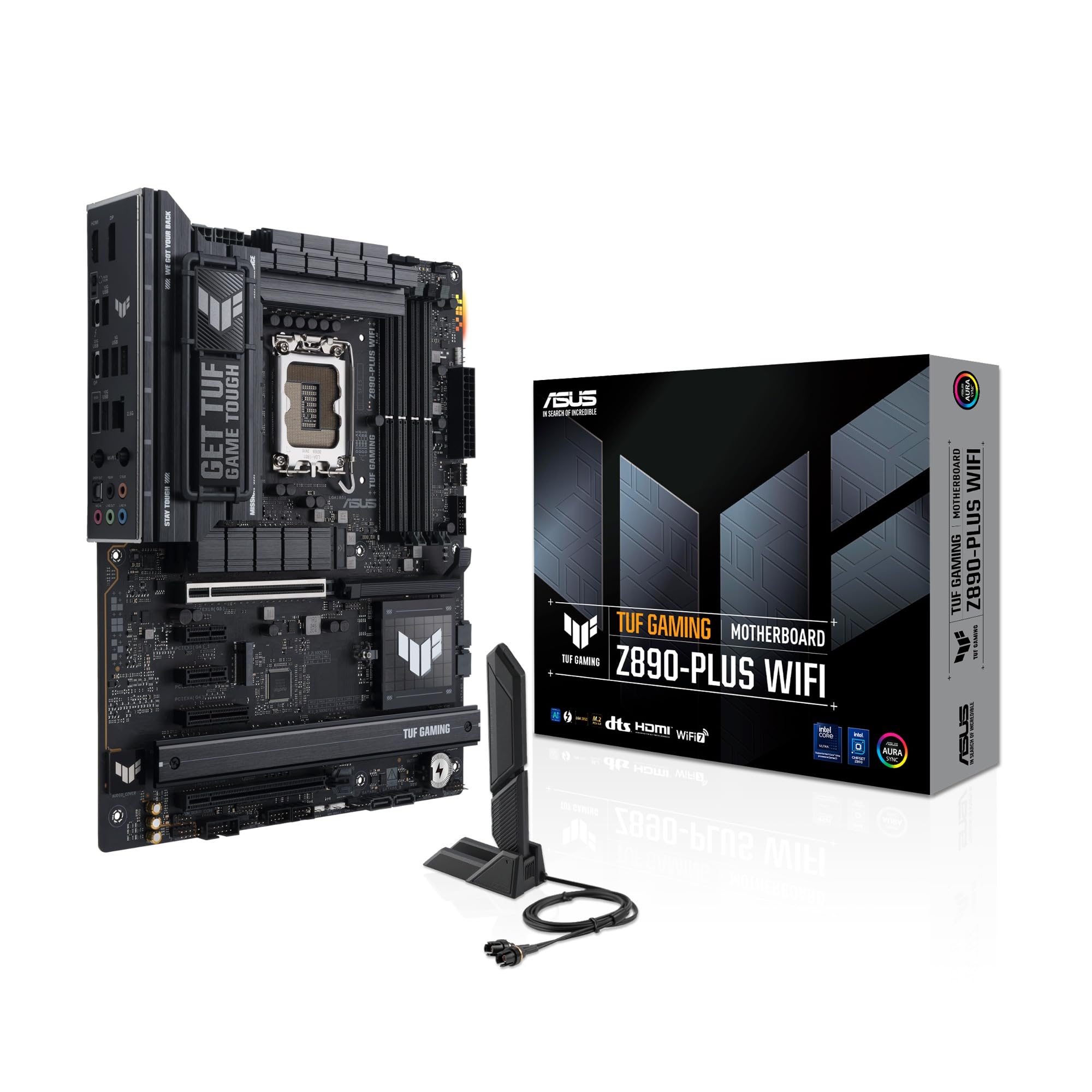
Figure 1: ASUS TUF GAMING Z890-PLUS WIFI Motherboard with its retail packaging and included Wi-Fi antenna.
설정 및 설치
마더보드와 구성 요소를 올바르게 설치하려면 다음 단계를 따르세요.
1. 포장 풀기 및 초기 검사
Carefully remove all components from the packaging. Verify that all items listed in the 'What's in the Box' section are present and inspect the motherboard for any visible damage.

Figure 2: Contents typically found in the ASUS TUF GAMING Z890-PLUS WIFI retail box.
2. CPU 설치 (LGA 1851)
Open the CPU socket retention lever. Align the triangular mark on your Intel processor with the corresponding mark on the socket. Gently place the CPU into the socket, ensuring it sits flush. Close the retention lever to secure the CPU.

그림 3: 이상view of the motherboard layout, showing the LGA 1851 CPU socket.
3. 메모리(RAM) 설치
This motherboard supports DDR5 memory modules. Open the clips on the DIMM slots. Align the notch on the DDR5 memory module with the key in the DIMM slot. Press down firmly on both ends of the memory module until the clips snap into place. The motherboard supports up to 256GB of DDR5 RAM across its four slots.
4. 저장장치(M.2 SSD) 설치
The motherboard features multiple M.2 slots for high-speed NVMe SSDs. Utilize the ASUS M.2 Q-Latch and M.2 Q-Release features for tool-less installation. To install, remove the M.2 heatsink (if present) by tapping the M.2 Q-Release button. Insert the M.2 SSD into the slot, then secure it with the M.2 Q-Latch mechanism. The M.2 Q-Slide design accommodates various SSD sizes.

Figure 4: EZ PC DIY features for simplified component installation, including M.2 Q-Latch and Q-Release.

Figure 5: Demonstrating the M.2 heatsink removal process.
5. 확장 카드 설치(PCIe)
Insert your graphics card or other PCIe expansion cards into the appropriate PCIe slots. The primary PCIe 5.0 x16 slot is designed for next-generation GPUs. Use the PCIe Slot Q-Release button to easily unlock the security latch for card removal.

Figure 6: Layout of PCIe slots, indicating PCIe 5.0 and PCIe 4.0 compatibility.
6. 주변 장치 및 전원 연결
Connect your power supply unit (PSU) cables to the motherboard's 24-pin ATX power connector and CPU power connectors. Attach front panel connectors (USB, audio, power/reset switches) to their respective headers. Install the included Wi-Fi antenna to the rear I/O panel for Wi-Fi 7 connectivity. Connect USB devices, Ethernet cables, and display outputs as needed.

Figure 7: Detail of a USB header for connecting front panel USB ports.

Figure 8: The rear input/output panel, showing various ports and the Wi-Fi antenna connection.
메인보드 작동 방법
Once assembled, power on your system and configure the BIOS/UEFI settings.
1. BIOS/UEFI 구성
Access the BIOS/UEFI setup utility by pressing the 'Delete' or 'F2' key during system startup. The intuitive interface allows for easy navigation and configuration of system settings, boot order, and hardware parameters.
2. AI Intelligence Features
The ASUS TUF GAMING Z890-PLUS WIFI motherboard integrates several AI-powered features to enhance user experience and system performance:
- AI Advisor: Utilizes AI technology to understand natural-language questions, helping users explore motherboard functionality and BIOS settings.
- AI 냉각 II: Optimizes thermal performance and reduces noise through dynamic adjustment of fan speeds based on CPU temperatures.
- AI 네트워킹 II: 네트워크 성능을 최적화하여 끊김 없는 연결과 최대 Wi-Fi 7 속도를 제공합니다.

그림 9: 이상view of the motherboard's AI Intelligence features.

Figure 10: The AI Advisor interface, providing assistance with motherboard functions.
3. 성능 최적화
Leverage advanced features for optimal system performance:
- AEMP III: Advanced firmware for unparalleled memory performance with cutting-edge DDR5 modules.
- DIMM FIT: An ASUS-exclusive BIOS feature that precisely analyzes individual memory modules to optimize performance and pinpoint potential issues.
- NPU BOOST: This BIOS feature overclocks the NPU with one click, increasing performance by up to 24%.

Figure 11: Key performance enhancement features of the motherboard.
유지
적절한 유지관리는 마더보드의 수명과 안정적인 작동을 보장합니다.
1. 열 관리
The motherboard features an optimized thermal design, including large VRM heatsinks, M.2 heatsinks, and PCH heatsinks, along with hybrid fan headers and Fan Xpert 4 with AI Cooling II. Ensure proper airflow within your PC case and regularly clean dust from fans and heatsinks to maintain optimal temperatures.

Figure 12: The motherboard designed for efficient cooling, compatible with advanced cooling solutions.

Figure 13: AI Cooling II dynamically adjusts fan speeds for optimal thermal performance.
2. 청소
Periodically clean the motherboard and internal components of your PC using compressed air to remove dust buildup. Ensure the system is powered off and unplugged before cleaning.
문제 해결
문제가 발생하면 다음의 기본 문제 해결 단계를 고려하세요.
- 전원 없음: Check all power connections from the PSU to the motherboard and components. Ensure the power supply is switched on.
- 디스플레이 없음: Verify that the graphics card is properly seated and connected to the monitor. Test with a different display cable or monitor if possible.
- 시스템 불안정성: Ensure RAM modules are correctly installed. Check for proper CPU cooler installation. Update BIOS to the latest version.
- 네트워크 문제: Confirm Wi-Fi antenna is securely attached. Check Ethernet cable connections. Utilize the AI Networking II feature for diagnostics.
- Consult AI Advisor: For specific issues, the AI Advisor can provide guidance based on natural language queries.
보다 자세한 문제 해결 방법은 ASUS 공식 지원 페이지를 참조하십시오. web해당 사이트 또는 자세한 사용자 설명서 PDF를 참조하십시오.
명세서
Key technical specifications for the ASUS TUF GAMING Z890-PLUS WIFI motherboard:

그림 14: 이상view of advanced connectivity and memory features.
| 특징 | 세부 사항 |
|---|---|
| 상표 | 아수스 |
| 모델명 | 90MB1IQ0-M0EAY0 |
| CPU 소켓 | LGA 1851 |
| 호환 프로세서 | Intel Core Ultra 200S Plus and 200S Series |
| 칩셋 유형 | 인텔 Z890 |
| RAM 기술 | DDR5 |
| 메모리 클럭 속도 | 최대 8600MHz |
| 최대 RAM 용량 | 256GB (XNUMX기가바이트) |
| 메모리 슬롯 | 4 |
| 그래픽 인터페이스 | PCI-Express x16 (PCIe 5.0 supported) |
| Total PCI Slots | 4 |
| 총 SATA 포트 수 | 6 |
| 총 USB 포트 | 15 (various types including USB4, USB 20Gbps) |
| 이더넷 | 인텔 2.5Gb 이더넷 |
| 무선 연결 | 와이파이 7(802.11be) |
| 치수(길이x너비x높이) | 24.4L x 24.4W x 1Hcm |
| 무게 | 1.5 킬로그램 |

Figure 15: Highlighting the DDR5 memory speed support.

Figure 16: The integrated Intel 2.5 Gb Ethernet controller.
보증 및 지원
1. 제품 보증
This ASUS motherboard comes with a 2년 제품 보증 구매일로부터. 보증 청구를 위해 구매 증빙을 보관하세요.
2. 제조업체 연락처 정보
For technical support, warranty inquiries, or further assistance, please contact ASUS:
- 제조업체: ASUS Computer GmbH
- 이메일: LegalCompliance@asus.com
- Web대지: https://www.asus.com/it/
- 주소: Harkortstraße 21-23, Ratingen, 40880, Germany
3. 추가 문서
Further detailed information can be found in the official PDF documents: