
소개
This manual provides essential information for the safe and efficient operation of your HEAD HTJ4500 Treadmill. Designed for home use, this electric treadmill offers a maximum speed of 16 km/h, integrated speakers, and compatibility with popular fitness applications like Kinomap and Zwift. It features a clear LED display for monitoring your workout data and 16 pre-set training programs to enhance your fitness journey.
Please read this manual thoroughly before assembly and first use to ensure proper setup, operation, and maintenance, thereby maximizing the lifespan and performance of your treadmill.

Figure 1: The HEAD HTJ4500 Treadmill, showcasin컴팩트한 디자인입니다.
1. 설치 및 조립
The HEAD HTJ4500 Treadmill requires some assembly. Follow these steps carefully to ensure a stable and safe setup.
1.1 풀기
- 포장에서 모든 구성 요소를 조심스럽게 제거합니다.
- Verify that all parts listed in the 'What's in the Box' section (see Specifications) are present and undamaged.
- 미래의 보관이나 운송을 위해 포장재를 보관하세요.
1.2 조립 단계
- 본체 프레임을 평평하고 안정적인 표면에 놓으십시오.
- Attach the uprights to the main frame, securing them with the provided hardware.
- Mount the console to the top of the uprights, ensuring all cables are properly connected and not pinched.
- Attach the handlebars and any safety features as per the detailed assembly instructions included in the product box.
- 사용하기 전에 모든 나사와 볼트가 단단히 조여졌는지 확인하십시오.
1.3 배치 및 휴대성
Choose a location with sufficient space around the treadmill for safe operation and access. The treadmill is designed to be easily stored and transported thanks to its folding design and integrated front wheels.

Figure 2: The folding mechanism and front wheels facilitate easy storage and movement.

Figure 3: Treadmill dimensions for space planning.
2. 사용 설명서
운동을 시작하기 전에 제어판과 기능을 숙지하십시오.
2.1 제어판 및 디스플레이
The treadmill features an LED display that shows key workout metrics such as distance, speed, time, and calories burned. The control panel allows you to start, stop, and adjust the speed.

Figure 4: The control panel with integrated buttons for speed adjustment and program selection.
2.2 운동 시작하기
- Ensure the safety key is properly placed on the console and attached to your clothing.
- 전원 코드를 접지된 전기 콘센트에 연결합니다.
- Press the 'Start' button to begin the treadmill belt movement. The belt will typically start at a low speed and gradually increase.
- Adjust the speed using the '+' and '-' buttons on the console or handlebars. The maximum speed is 16 km/h.
2.3 교육 프로그램
The HEAD HTJ4500 Treadmill includes 16 pre-set training programs designed to vary intensity and help achieve different fitness goals. Consult the detailed program guide in your product box for specific program profiles.
2.4 App Connectivity (Kinomap & Zwift)
Enhance your training experience by connecting your treadmill to Kinomap or Zwift applications. These apps offer interactive workouts, virtual routes, and competitive features.
- Download the Kinomap or Zwift app on your smartphone or tablet.
- 기기에서 Bluetooth가 활성화되어 있는지 확인하세요.
- Follow the in-app instructions to pair your device with the HEAD HTJ4500 Treadmill.
- Once connected, the app can control the treadmill's speed and display real-time workout data.
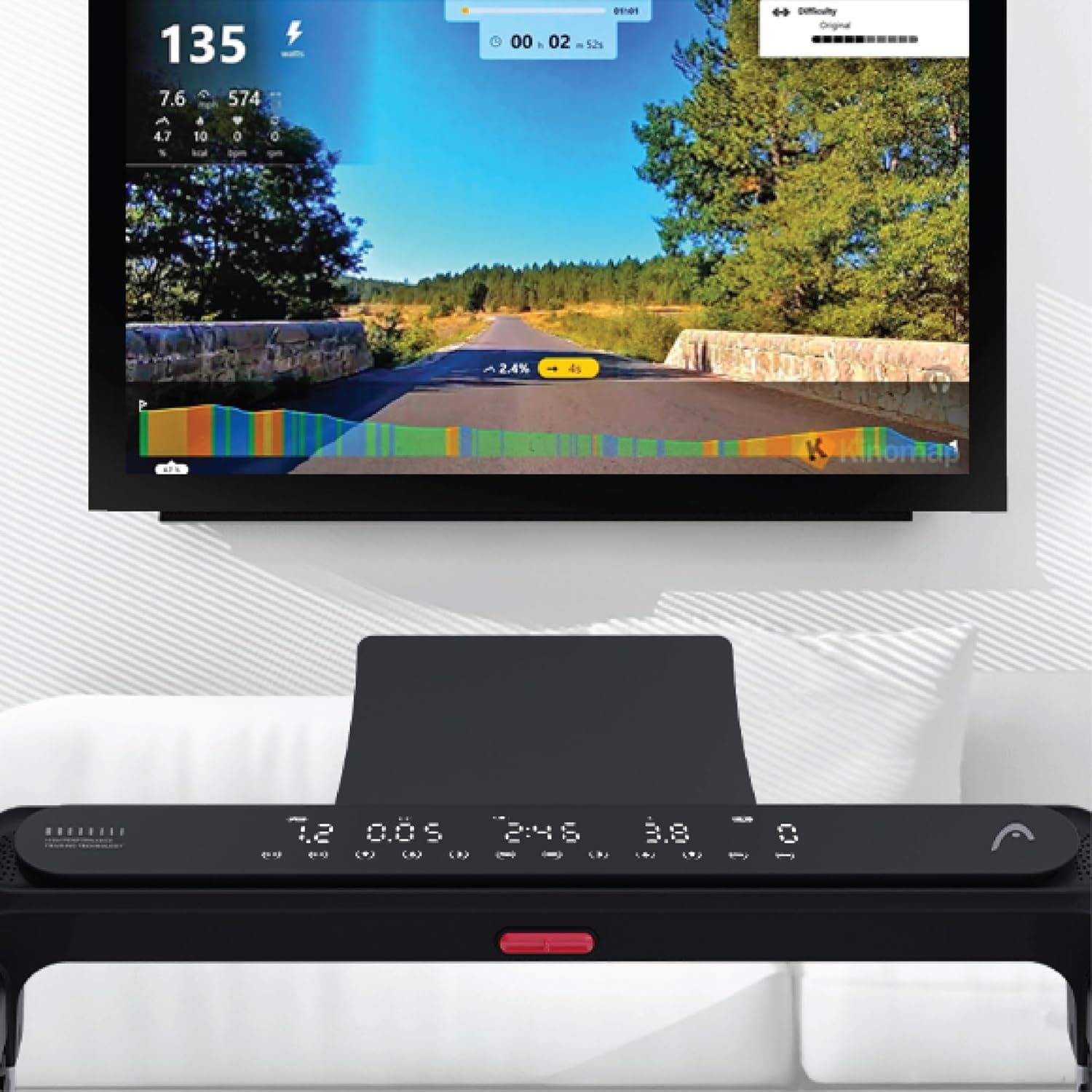
Figure 5: Treadmill display showing connection to Kinomap for interactive training.
2.5 통합 스피커
The treadmill features integrated speakers for an immersive audio experience. Connect your audio device via Bluetooth or auxiliary cable (if applicable) to enjoy music during your workout.

Figure 6: Detail of the console area, highlighting the integrated speaker.
3. 유지관리
정기적인 유지관리는 러닝머신의 수명과 최적의 성능을 보장합니다.
3.1 청소
- 세척하기 전에는 항상 러닝머신의 플러그를 뽑으세요.
- 콘솔과 외부 표면을 부드러운 천으로 닦아주세요.amp 천으로 닦으세요. 연마성 세제나 용제는 사용하지 마세요.
- 러닝머신 아래를 주기적으로 진공청소기로 청소하여 먼지와 이물질이 쌓이는 것을 방지하십시오.
3.2 벨트 윤활
The running belt requires periodic lubrication to reduce friction and extend its lifespan. Refer to your product's specific lubrication instructions and recommended lubricant type. Typically, lubrication is needed every few months depending on usage.
3.3 벨트 장력 및 정렬
Check the running belt tension and alignment regularly. A belt that is too loose may slip, while one that is too tight can cause excessive wear on the motor and belt. Adjust the tension bolts at the rear of the treadmill as needed, ensuring the belt remains centered.
4. 문제 해결
이 섹션에서는 러닝머신에서 발생할 수 있는 일반적인 문제에 대해 설명합니다.
4.1 런닝머신이 작동하지 않음
- 전원 확인: Ensure the power cord is securely plugged into a working outlet and the treadmill's power switch is on.
- 안전 열쇠: Verify that the safety key is correctly placed on the console. The treadmill will not operate without it.
- 회로 차단기: 집의 차단기가 작동했는지 확인하세요.
4.2 Belt Slipping or Hesitating
- 벨트 장력: The running belt may be too loose. Adjust the tension bolts at the rear of the treadmill.
- 매끄럽게 하기: Insufficient lubrication can cause friction. Apply lubricant as per maintenance instructions.
4.3 특이한 소음
- 느슨한 부품: Check for any loose screws or bolts on the frame or console and tighten them.
- Belt Friction: If the noise is a squeaking or rubbing sound, the belt may need lubrication.
- Motor/Deck: If the noise persists or is a grinding sound, discontinue use and contact customer support.
4.4 디스플레이가 작동하지 않음
- 전원 연결: 러닝머신의 전원이 켜져 있는지 확인하세요.
- 케이블 연결: Check the cable connections between the console and the main frame.
For issues not covered here, please refer to the comprehensive troubleshooting guide in your product's original manual or contact HEAD customer support.
5. 사양
| 특징 | 세부 사항 |
|---|---|
| 상표 | 머리 |
| 모델 번호 | 8427542134925 |
| 색상 | 검은색 |
| 치수(길이 x 너비 x 높이) | 150cm x 77cm x 118cm |
| 제품 무게 | 46 킬로그램 |
| 최대 속도 | 시속 16킬로미터 |
| 디스플레이 유형 | 주도의 |
| 전원 | 전기 케이블 |
| 조립이 필요합니다 | 예 |
| 포함된 구성 요소 | Front wheels, Surround sound speakers, User manual, Warranty |
| 측정 유형 | Distance, Speed |
6. 보증 및 지원
Your HEAD HTJ4500 Treadmill comes with a manufacturer's warranty. Please refer to the warranty card included in your product packaging for specific terms, conditions, and duration of coverage.
6.1 고객 지원
For technical assistance, warranty claims, or spare parts, please contact HEAD customer support. Contact information can typically be found on the warranty card or the official HEAD website. When contacting support, please have your product model number (8427542134925) and proof of purchase readily available.
For more information about HEAD products, visit the official HEAD store on Amazon: HEAD Store