
1. 서론
구매해주셔서 감사합니다asing the Philco Portable CD Player Boombox. This versatile audio system combines modern and classic audio playback options, including CD, cassette, FM radio, and Bluetooth connectivity. This manual provides essential information for safe and efficient use of your device.
2. 중요 안전 지침
- 장치를 작동하기 전에 모든 지침을 읽으십시오.
- 이 설명서를 향후 참고용으로 보관하세요.
- 화재나 감전을 방지하기 위해 장치를 비나 습기에 노출시키지 마십시오.
- 적절한 환기를 확보하세요. 환기구를 막지 마세요.
- 제조사가 지정한 부속품/액세서리만 사용하세요.
- 번개가 치거나 장기간 사용하지 않을 때에는 장치의 플러그를 뽑아 두십시오.
- 모든 서비스는 자격을 갖춘 서비스 담당자에게 의뢰하세요.
- c를 열지 마세요asing; 내부에 사용자가 수리할 수 있는 부품이 없습니다.
- 라디에이터, 난방 장치, 스토브 또는 기타 장치(예: 열원) 근처에 장치를 두지 마십시오. amp열을 생성하는 발전기.
3. 제품 구성 요소 및 제어
Familiarize yourself with the various parts and controls of your Philco Portable CD Player Boombox.
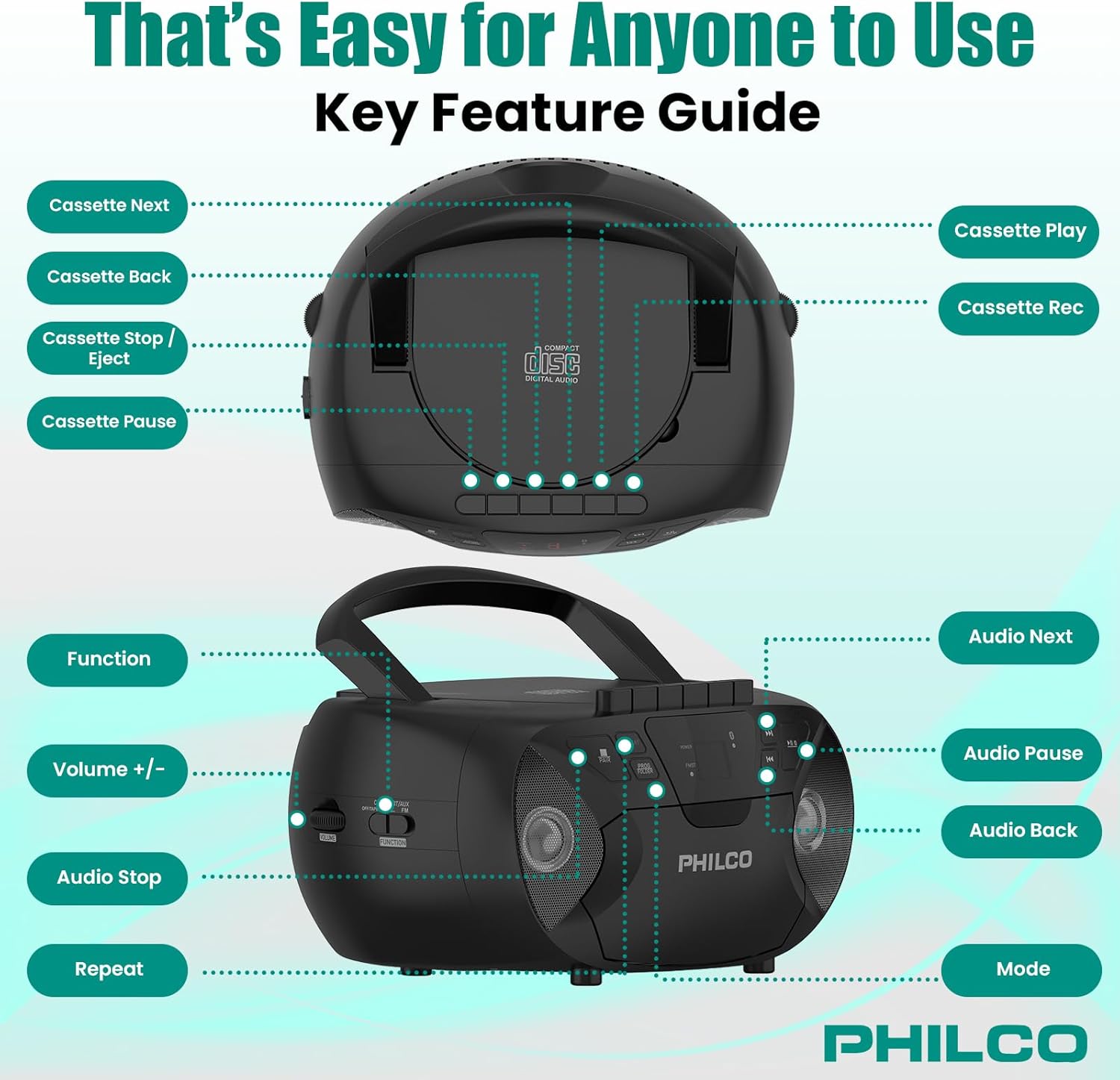
이미지 3.1: 상단 및 측면 view of the Philco Boombox with key controls labeled. This image shows the layout of buttons for cassette functions (Next, Back, Stop/Eject, Pause, Play, Record) and audio controls (Next, Pause, Back, Mode, Volume, Function, Stop, Repeat).
전면 패널 컨트롤:
- 전원 버튼: 장치를 켜거나 끕니다.
- MODE 버튼: Switches between CD, Cassette, FM Radio, Bluetooth, and AUX modes.
- PLAY/PAUSE Button (CD/Bluetooth): 재생을 시작하거나 일시 중지합니다.
- STOP Button (CD/Bluetooth): 재생을 중지합니다.
- 건너뛰기/검색 버튼(<< / >>): 트랙을 건너뛰거나 빨리 감기/되감기를 합니다.
- 볼륨 조절: 오디오 출력 레벨을 조정합니다.
- FM TUNER Dial: Selects FM radio stations.
카세트 데크 컨트롤:
- 재생 버튼: 카세트 테이프 재생을 시작합니다.
- 녹음 버튼: Initiates cassette recording (from CD, FM, or AUX).
- REWIND/FAST FORWARD Buttons: Rewinds or fast forwards the tape.
- 정지/배출 버튼: Stops tape playback/recording and opens the cassette door.
- 일시 정지 버튼: Temporarily pauses cassette playback/recording.
Rear/Side Panel Connections:
- AC 전원 입력: AC 전원 코드를 연결합니다.
- 배터리 칸: Holds 6 x 'C' size batteries (not included) for portable use.
- AUX IN 잭(3.5mm): 외부 오디오 장치를 연결합니다.
- 헤드폰 잭(3.5mm): 헤드폰을 끼고 개인적으로 감상하세요.
- FM 안테나: FM 수신 성능 향상을 위한 확장형 안테나.
4. 설정
4.1 장치 전원 공급
필코 붐박스는 교류 전원 또는 배터리로 작동할 수 있습니다.

이미지 4.1: Illustration of AC power connection and battery installation for the Philco Boombox.
AC 전원:
- 장치가 꺼져 있는지 확인하십시오.
- Connect the supplied AC power cord to the AC power input jack on the back of the unit.
- AC 전원 코드의 다른 쪽 끝을 표준 벽면 콘센트(AC 120V ~ 60Hz)에 꽂습니다.
배터리 전원:
- 장치가 꺼져 있고 AC 전원이 분리되어 있는지 확인하세요.
- 장치 하단이나 후면에 있는 배터리 칸 덮개를 엽니다.
- 배터리 칸 내부에 표시된 극성(+/-)을 확인하여 'C' 사이즈 배터리 6개(별도 구매)를 삽입하십시오.
- 배터리 덮개를 단단히 닫으세요.
메모: When using AC power, batteries are automatically disconnected. Remove batteries if the unit will not be used for an extended period to prevent leakage.
4.2 초기 전원 켜기
를 누르세요 힘 button to turn on the unit. The unit will typically default to the last used mode or CD mode.
5. 운영
5.1 CD 플레이어 작동
이미지 5.1: Demonstrating the top-loading CD compartment for disc insertion.
- 를 누르세요 방법 "CD" 모드가 선택될 때까지 버튼을 누릅니다.
- CD 수납 공간 문을 살짝 들어 올려서 엽니다.
- Place a CD (CD-R, CD-RW, MP3, WMA compatible) onto the spindle with the label side facing up.
- CD 보관함 덮개를 단단히 닫으십시오.
- 를 누르세요 재생/일시정지 버튼을 눌러 재생을 시작합니다.
- 사용하세요 건너뛰기/검색 트랙 사이를 탐색하려면 버튼(<< / >>)을 사용합니다.
- 를 누르세요 멈추다 재생을 종료하려면 버튼을 클릭하세요.
- 를 누르세요 반복하다 현재 재생 중인 트랙 또는 모든 트랙을 반복 재생하는 버튼입니다.
5.2 카세트 플레이어/레코더 작동법

이미지 5.2: View of the cassette deck with a tape loaded, ready for playback or recording.
카세트테이프 재생하기:
- 를 누르세요 방법 button until "TAPE" or "CASSETTE" mode is selected.
- 를 누르세요 중지/꺼내기 버튼을 눌러 카세트 도어를 엽니다.
- Insert a cassette tape with the open edge facing upwards and the side to be played facing you.
- 카세트 도어를 닫습니다.
- 를 누르세요 놀다 버튼을 눌러 재생을 시작합니다.
- 사용 되감기/빨리 감기 테이프를 탐색하는 버튼.
- 를 누르세요 중지/꺼내기 재생을 멈추고 테이프를 꺼내는 버튼입니다.
카세트에 녹음:
- 빈 카세트 테이프를 카세트 데크에 넣습니다.
- Select the desired source (CD, FM Radio, or AUX) using the 방법 단추.
- Start playback on the source (e.g., play a CD track, tune to an FM station).
- 를 누르세요 기록 카세트 데크의 버튼. 놀다 버튼도 작동합니다.
- 녹음을 일시 정지하려면 정지시키다 버튼을 누르세요. 다시 누르면 재개됩니다.
- 녹음을 중지하려면 중지/꺼내기 단추.
5.3 FM 라디오 작동
- 를 누르세요 방법 "FM" 모드가 선택될 때까지 버튼을 누르세요.
- Extend the FM telescopic antenna for optimal reception.
- 회전하다 FM 튜너 dial to select your desired radio station.
- 조정하다 용량 control to your preferred listening level.
5.4 블루투스 오디오 스트리밍

이미지 5.3: The Philco Boombox wirelessly connected to a smartphone via Bluetooth for audio streaming.
- 를 누르세요 방법 button until "BT" or "BLUETOOTH" mode is selected. The unit will enter pairing mode, indicated by a flashing Bluetooth indicator.
- Bluetooth가 활성화된 기기(예: 스마트폰, 태블릿)에서 Bluetooth를 활성화하고 사용 가능한 기기를 검색하세요.
- Select "PHILCO BOOMBOX" (or similar name) from the list of devices to pair.
- 연결이 완료되면 블루투스 표시등이 깜빡임을 멈추고 계속 켜져 있습니다.
- Start playing audio on your connected device. The sound will be streamed to the boombox.
- 붐박스와 연결된 기기 모두의 볼륨을 조절하세요.
중요 참고 사항: This boombox is designed to 받다 audio via Bluetooth from other devices. It cannot 부치다 audio to Bluetooth headphones, earbuds, or speakers.
5.5 AUX 입력 작동

이미지 5.4: The AUX input jack on the Philco Boombox, used for connecting external audio sources.
- 3.5mm 오디오 케이블(별도 구매)의 한쪽 끝을 붐박스의 AUX IN 단자에 연결하십시오.
- 오디오 케이블의 다른 쪽 끝을 외부 장치(예: MP3 플레이어, 스마트폰)의 헤드폰 잭이나 오디오 출력에 연결합니다.
- 를 누르세요 방법 "AUX" 모드가 선택될 때까지 버튼을 누르십시오.
- Start playing audio on your external device.
- 붐박스와 외부 기기의 볼륨을 모두 조절하세요.
5.6 헤드폰 사용
For private listening, plug any standard 3.5mm headphones into the 헤드폰 jack. The internal speakers will automatically mute.
6. 유지관리
6.1 장치 청소
- 부드러운 천으로 기기 외부를 닦아주세요.amp 천. 연마성 세척제나 용매를 사용하지 마십시오.
- For the CD lens, use a specialized CD lens cleaning kit.
- 카세트 데크의 경우, 주기적으로 면봉으로 테이프 헤드와 핀치 롤러를 가볍게 닦아주세요.amp이소프로필 알코올로 소독함.
6.2 배터리 관리
- Remove batteries if the unit will not be used for an extended period to prevent battery leakage and corrosion.
- 오래된 건전지와 새 건전지, 다른 종류의 건전지를 혼용하지 마세요.
- 사용한 배터리는 현지 규정에 따라 책임감 있게 폐기하십시오.
7. 문제 해결
| 문제 | 가능한 원인 | 해결책 |
|---|---|---|
| 전원이 없습니다 | AC 코드가 연결되지 않았습니다. 배터리가 소모되었거나 잘못 삽입되었습니다. | AC 코드 연결을 확인하세요. 배터리를 교체하거나 극성이 올바른지 확인하세요. |
| No sound from CD/Cassette/Radio/Bluetooth/AUX | Volume too low; Incorrect mode selected; Headphones connected; CD/Cassette inserted incorrectly or damaged; Bluetooth not paired. | Increase volume; Select correct mode; Disconnect headphones; Check/replace media; Re-pair Bluetooth device. |
| CD가 건너뛴다 | CD dirty or scratched; Unit on an unstable surface. | Clean or replace CD; Place unit on a stable, flat surface. |
| FM 수신 불량 | 안테나가 확장되지 않았습니다. 신호가 약합니다. | FM 안테나를 완전히 펼치고 조정하십시오. 기기를 다른 위치로 옮겨 보십시오. |
| 블루투스 기기가 페어링되지 않습니다 | Boombox not in pairing mode; Device too far; Bluetooth already connected to another device. | Ensure boombox is in BT pairing mode; Move device closer; Disconnect from other devices and try again. |
| Cassette tape not playing/recording correctly | Tape damaged; Tape heads dirty; Buttons stuck (as per review). | Try a different tape; Clean tape heads; If buttons are stuck, gently try to free them or contact support if persistent. |
8. 사양
- 상표: 필코
- 모델: B0DHYKCWYN
- 연결 기술 : 블루투스
- 색상: 검은색
- 스피커 유형: 스테레오 재생
- 항목 치수(L x W x H): 10.08 x 5.71 x 10.75 인치
- 전원: 교류 120V ~ 60Hz 또는 'C'형 배터리 6개(별도 구매)
- 호환 장치: MP3 Player (via AUX)
- 지원되는 오디오 형식: CD, CD-R, CD-RW, MP3, WMA (from CD)
- 연사 수: 2
- 오디오 출력 모드: 스테레오 재생
- 블루투스 지원 : Yes (receive only)
- 내장 미디어: CD, Cassette, FM Radio
9. 보증 및 지원
9.1 보증 정보
For specific warranty details, please refer to the warranty card included with your product or visit the official Philco web사이트. 보증 약관은 지역 및 소매업체에 따라 다를 수 있습니다.
9.2 고객 지원
If you encounter any issues or have questions not covered in this manual, please visit the official Philco website for support resources, FAQs, and contact information. You can typically find support links on the product page where you purchased the item or by searching for "Philco customer support" online.