
1. 서론
This manual provides detailed instructions for the setup, operation, and maintenance of your KLARVUE Guardian Pro WiFi Trail Camera. Designed for wildlife monitoring, property security, and outdoor observation, this camera captures high-resolution images and videos with advanced features like 4K UHD recording, 32MP photos, and no-glow night vision. Please read this manual thoroughly before using your camera to ensure optimal performance and longevity.
2. 상자 안에 무엇이 들어있나요?
패키지에 모든 구성품이 들어 있는지 확인하세요.
- 1x KLARVUE Guardian Pro WiFi Trail Camera
- 1x 32GB SD 카드
- 장착 스트랩 1개
- 1x USB Micro-A cable
- 1x User Manual & Warning Sticker
3. 주요 특징
- 와이파이 연결 및 앱 제어: Connect via Bluetooth to the camera's WiFi for easy settings adjustment, live streaming, and media download via the intuitive user app. No monthly fees or remote control required. (Note: The app connects to the built-in WiFi of the trail camera and does not support connecting to home WiFi.)
- Native 4K Ultra High-Definition Video & True 32MP High-Resolution Photos: Capture genuine 32MP (7680x4320) images and authentic 4K (3840x2160@30fps) UHD video. Features a built-in 2.4-inch full-color LCD screen for view주고받음.
- IP67 Waterproof Rating & 0.2s Instant Shot Activation: Fully waterproof design provides protection against heavy rain, snow, dust, and extreme temperatures. Ultra-responsive 0.2-second trigger speed ensures rapid capture of motion.
- 100ft No Glow Night Vision: Advanced no-glow infrared technology delivers detailed black-and-white video and images from up to 100 feet away, ensuring stealthy monitoring.
- Hassle-free Setup and Operation: Easy installation with the included mounting strap. Supports on-demand photo and video capture.
4. 설정 가이드
4.1. 배터리 설치
The KLARVUE Guardian Pro requires 8xAA batteries (not included). Ensure correct polarity when inserting batteries into the battery compartment.

Image: Inserting 8xAA batteries into the camera's battery tray.
4.2. SD 카드 설치
Insert the included 32GB SD card into the designated SD card slot. Ensure the card is inserted correctly until it clicks into place.
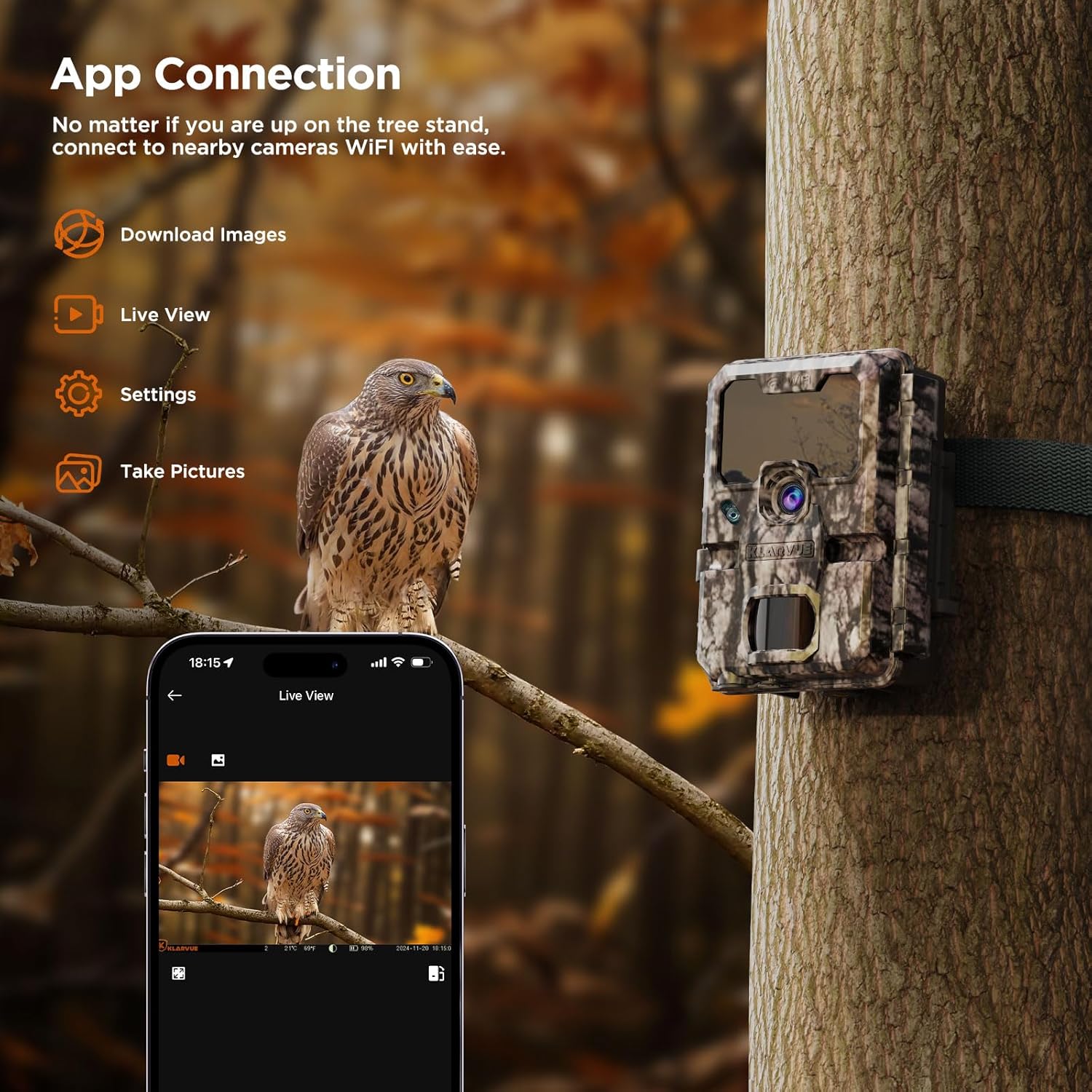
Image: Inserting the 32GB SD card into the camera.
4.3. 전원 켜기 및 기본 설정
Toggle the power switch to the "ON" position. Use the navigation buttons (up, down, left, right, OK, Menu) to access and adjust settings on the built-in 2.4-inch LCD screen. Set the date, time, and preferred capture mode (Photo, Video, or Dual).

Image: Navigating the camera's internal menu for settings adjustment.
4.4. 앱 연결
Download the "KLARVUE" app from the App Store or Google Play. Enable Bluetooth and Wi-Fi on your smartphone. Follow the in-app instructions to connect to your camera's built-in Wi-Fi. This allows for remote control, live view, and media download within Wi-Fi range.

Image: Smartphone displaying the KLARVUE app connected to the camera.
5. 사용 설명서
5.1. 캡처 모드
- 사진 모드 : Captures still images. Adjust image quality (up to 32MP) and photo burst settings.
- 비디오 모드: Records video clips. Adjust video quality (up to 4K UHD) and video length (up to 10 seconds).
- 듀얼 모드: 각 트리거 이벤트마다 스틸 이미지와 비디오 클립을 모두 캡처합니다.
5.2. 고급 설정
- PIR 간격: Set the delay between trigger events.
- PIR 감도 : Adjust the motion sensor's sensitivity (Auto, Low, Medium, High) to prevent false triggers.
- 영업 시간: Define specific timeframes for the camera to be active.
- 타임 랩스: Configure the camera to take photos at set intervals for time-lapse sequences.
- 야간 모드: Select "Long Range" for optimal 100ft no-glow night vision.
6. 미디어 통합
6.1. 제품 이미지
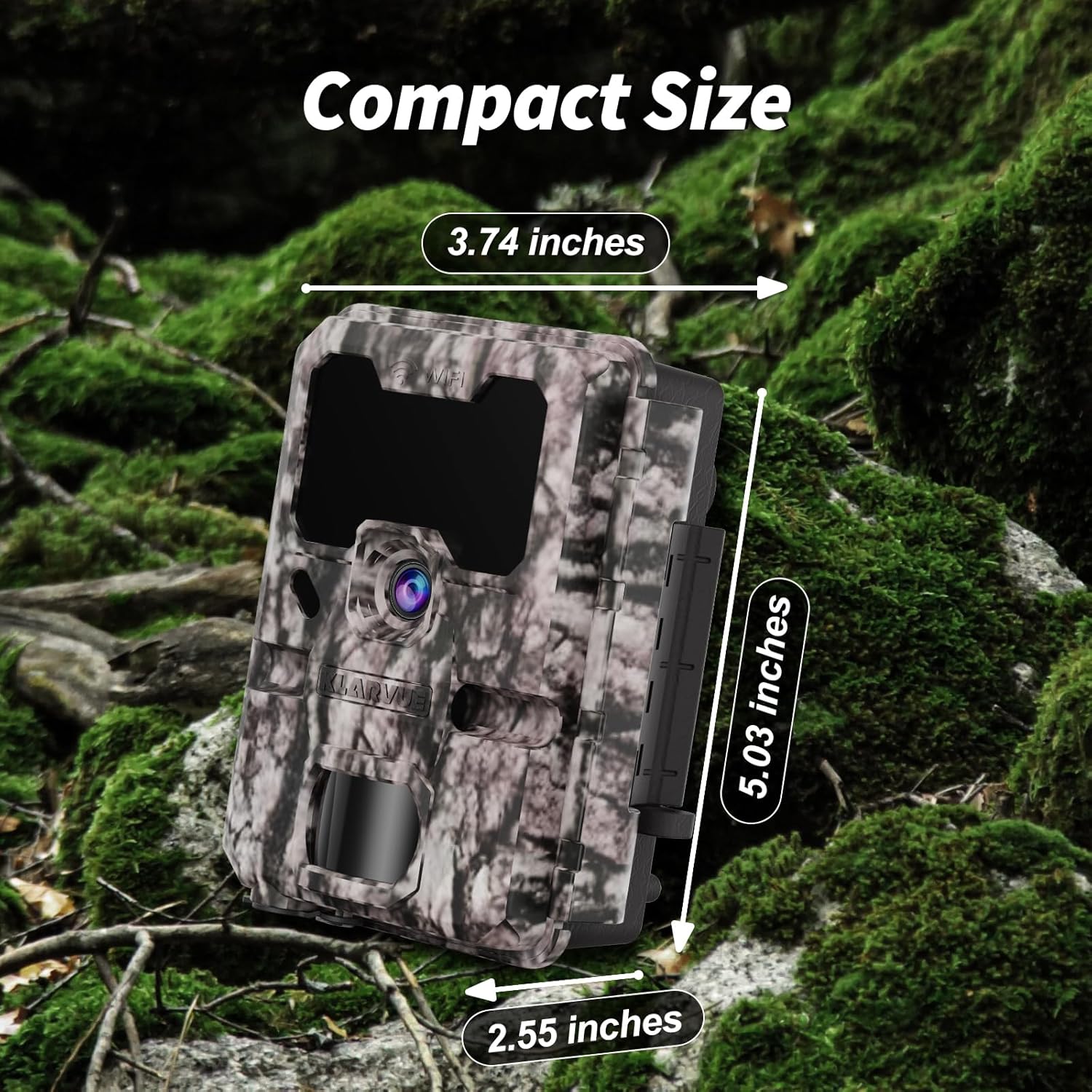
Image: KLARVUE Guardian Pro trail camera securely mounted on a tree using the provided strap.

Image: Dimensions of the compact KLARVUE Guardian Pro trail camera, measuring 5.03 inches in height, 3.74 inches in width, and 2.55 inches in depth.
6.2. 공식 제품 영상
The following videos provide additional guidance on setting up and using your KLARVUE Guardian Pro WiFi Trail Camera:
Klarvue Guardian Pro WiFi Game Camera - Quick Start
Video: A quick start guide demonstrating the initial setup and basic functions of the Klarvue Guardian Pro WiFi Game Camera.
WiFi 트레일 카메라
비디오: 오버view of the WiFi connectivity features of the Klarvue Trail Camera, showing how to connect and manage the device.
7. 문제 해결
If you encounter issues with your KLARVUE Guardian Pro, please refer to the following common solutions:
- 카메라 전원이 켜지지 않음: Ensure batteries are correctly inserted and fully charged. Check that the power switch is in the "ON" position.
- 촬영된 이미지/동영상이 없습니다. Verify the SD card is properly inserted and not full. Check PIR sensitivity settings and ensure the camera is in an active operating hour.
- 앱 연결 문제: Ensure your phone's Bluetooth and Wi-Fi are enabled. Make sure you are within the camera's Wi-Fi signal range. Restart both the camera and your phone, then try connecting again.
- 이미지/비디오 품질이 좋지 않음: Check the selected image and video quality settings. Ensure the lens is clean and free from obstructions.
8. 유지관리
To ensure the longevity and optimal performance of your KLARVUE Guardian Pro WiFi Trail Camera, follow these maintenance guidelines:
- 정기 청소: Periodically clean the camera lens and PIR sensor window with a soft, dry cloth to remove dust, dirt, or smudges.
- 배터리 점검: Monitor battery levels regularly, especially before extended deployment. Replace batteries when low to prevent interruption of recording.
- SD 카드 관리 : Format the SD card periodically to maintain optimal performance and prevent data corruption. Back up important media before formatting.
- 환경 보호: While IP67 rated, avoid prolonged submersion or direct high-pressure water exposure. Ensure all latches are securely closed to maintain waterproof integrity.
9. 사양
| 특징 | 세부 사항 |
|---|---|
| 상표 | 클라르뷰 |
| 모델명 | 가디언 프로 |
| 이미지 해상도 | 32MP(7680x4320) |
| 비디오 해상도 | 4K UHD (3840x2160@30fps) |
| 트리거 속도 | 0.2초 |
| 나이트 비전 범위 | 100 Feet (No-Glow Infrared) |
| 방수성 | IP67 방수 |
| 연결성 | 블루투스, Wi-Fi |
| 저장 | 32GB SD Card (included), supports up to 512GB |
| 전원 | 8xAA Batteries (not included) |
| 표시하다 | 2.4-inch Full-Color LCD |
| 치수 | 5 x 3.9 x 2.7 인치 |
| 무게 | 1.12파운드 |
10. 보증 및 지원
The KLARVUE Guardian Pro WiFi Trail Camera comes with a 1-Year Worry-Free Warranty and life-long technical support. For any questions or assistance, please do not hesitate to contact KLARVUE customer service via Amazon.