
Ebitcam B0DHX2WK2T
Ebitcam 실내 카메라 사용 설명서
Model: B0DHX2WK2T
브랜드: 에비트캠
1. 서론
The Ebitcam Indoor Camera is a versatile home security device designed to provide comprehensive monitoring with its 360° pan/tilt capabilities, 1080P HD video, and advanced features like color night vision and two-way audio. This camera is ideal for monitoring pets, babies, or for general home security. It operates on 2.4GHz WiFi networks.

Figure 1.1: Ebitcam Indoor Camera and its mobile application interface.
2. 상자 안에 무엇이 들어있나요?
모든 품목이 들어 있는지 확인하려면 패키지 내용물을 확인하세요.
- 1x Ebitcam Smart Security Camera
- USB 어댑터 1개
- 케이블 1개
- 1x 빠른 설치 안내서
- 1x 장착 액세서리
3. 설정 가이드
- 카메라 전원 켜기: Connect the camera to a power source using the provided USB adapter and cable. The camera will power on automatically.

Figure 3.1: Connect the camera to power.
- Download the EbitCam App: Scan the QR code in the Quick Installation Guide or search for "EbitCam" in your mobile app store (iOS or Android) to download and install the application.

Figure 3.2: Download the EbitCam mobile application.
- 앱에 장치 추가: Open the EbitCam app, create an account if you don't have one, and log in. Tap the "+" icon to add a new device. Follow the on-screen instructions to connect the camera to your 2.4GHz Wi-Fi network. Ensure your phone is connected to the same 2.4GHz Wi-Fi network during setup.

Figure 3.3: Steps to add the camera in the EbitCam app.
- View 생방송: Once successfully connected, you can view the live video feed from your camera through the EbitCam app.

그림 3.4: 라이브 view of the camera feed on a smartphone.
4. 사용 설명서
4.1. 좌우 회전 및 상하 회전 제어
The Ebitcam Indoor Camera offers a 355° horizontal and 115° vertical rotation range, allowing you to monitor a wide area. Control the camera's movement directly from the EbitCam app by swiping on the live video feed.
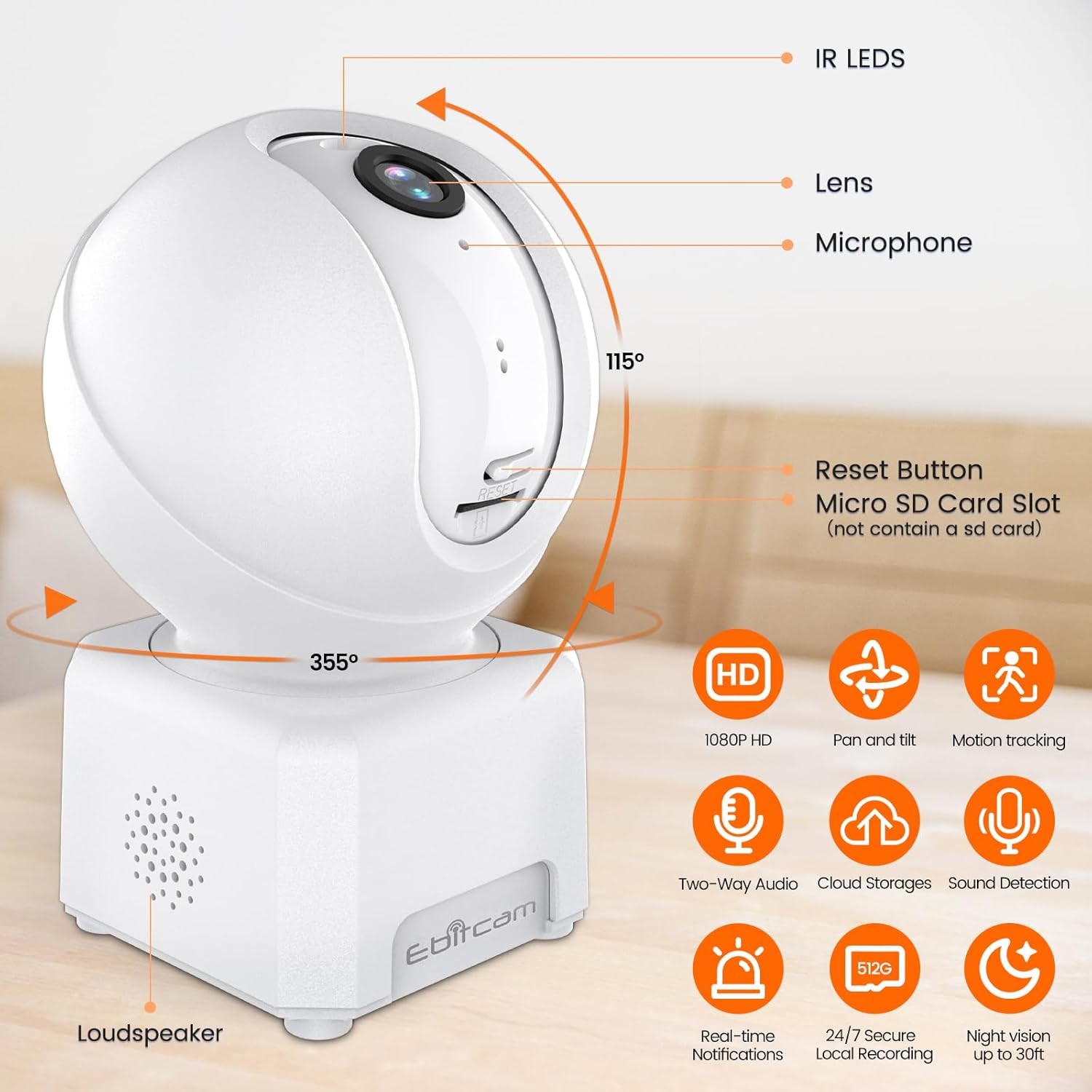
그림 4.1: 카메라의 좌우 회전 및 상하 회전 기능.
4.2. 1080P HD Color Night Vision
The camera provides sharp 1080P HD resolution and features advanced color night vision technology with a dual-source lighting system. Equipped with 1 PIR LED, it offers clear visibility up to 20 feet in low-light conditions. You can select between vivid full-color night vision or traditional infrared night vision modes within the app.

Figure 4.2: Clear day and night vision capabilities.
4.3. AI Human/Sound/Motion Detection
The camera is equipped with advanced motion sensors and intuitive analytics. It can detect human movement and unusual sounds, sending timely notifications to your EbitCam app. This feature helps minimize unnecessary alerts while ensuring important events are captured.

Figure 4.3: Motion detection and tracking in action.
4.4. Two-Way Audio & Alexa Integration
With a built-in microphone and speaker, the camera supports two-way audio communication, allowing you to speak with and listen to your baby, pet, or family members remotely. The camera also works with Alexa; simply ask Alexa to display the camera's view 호환되는 기기에서 사용 가능합니다.
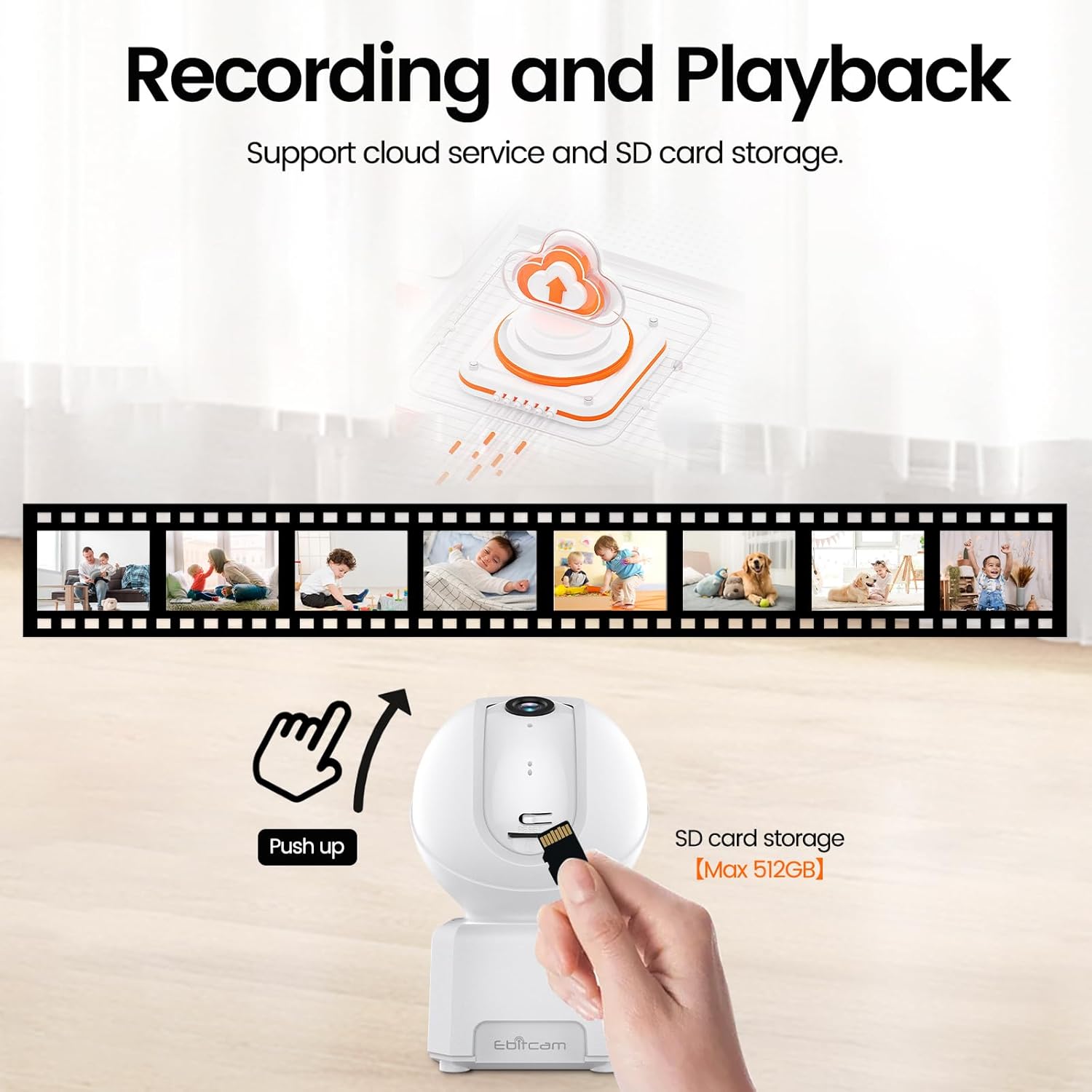
Figure 4.4: Camera integration with Alexa for voice control.
4.5. Multi-User Support
The EbitCam mobile application allows multiple users to control and view the camera simultaneously on both iOS and Android devices. You can easily share access to the camera with friends and family members.

Figure 4.5: Multiple users can access the camera feed.
4.6. 녹음 및 저장
The camera supports two storage options for continuous 24/7 recording:
- 클라우드 스토리지: Financial encryption video storage technology allows private recording in the EbitCam cloud storage (sold separately). A 30-day free cloud trial is available for first-time users.
- 로컬 SD 카드 저장소: The camera supports a Micro SD card up to 512GB (not included) for local storage, providing continuous recording without a subscription fee. To access the Micro SD card slot, gently push the camera head upwards.

Figure 4.6: Cloud and local SD card storage options.
5. 유지관리
To ensure optimal performance and longevity of your Ebitcam Indoor Camera, follow these maintenance guidelines:
- 청소: Use a soft, dry cloth to clean the camera's exterior. For the lens, use a microfiber cloth specifically designed for optics. Avoid using harsh chemicals or abrasive cleaners.
- 놓기: Place the camera in a stable location, away from direct sunlight, heat sources, and excessive moisture. Ensure proper ventilation around the device.
- 펌웨어 업데이트: Regularly check the EbitCam app for available firmware updates to ensure your camera has the latest features and security enhancements.
6. 문제 해결
If you encounter issues with your Ebitcam Indoor Camera, refer to the following common problems and solutions:
| 문제 | 가능한 원인 | 해결책 |
|---|---|---|
| 카메라 전원이 켜지지 않음 | Power adapter or cable issue; power outlet problem. | Ensure the power adapter is securely connected to the camera and a working power outlet. Try a different outlet. |
| Wi-Fi에 연결할 수 없습니다 | Incorrect Wi-Fi password; 5GHz Wi-Fi network; camera too far from router. | Verify Wi-Fi password. Ensure you are connecting to a 2.4GHz Wi-Fi network. Move the camera closer to the router. |
| 비디오 품질이 좋지 않음 | Wi-Fi 신호가 약하고 렌즈가 더러워요. | Check your Wi-Fi signal strength in the app. Clean the camera lens with a soft cloth. |
| 동작 감지가 작동하지 않음 | Detection settings disabled or sensitivity too low. | Check the motion detection settings in the EbitCam app and adjust sensitivity as needed. |
| SD 카드가 녹화되지 않습니다 | SD card not inserted correctly; card full or corrupted; incorrect format. | Ensure the SD card is inserted correctly. Check card capacity and format (FAT32 recommended). Try reformatting the card via the app or replacing it. |
7. 기술 사양
| 특징 | 사양 |
|---|---|
| 모델 | B0DHX2WK2T |
| 비디오 캡처 해상도 | 1080p |
| View잉 각도 | 360 Degrees (355° horizontal, 115° vertical) |
| 연결 기술 | 와이파이(2.4GHz) |
| 나이트 비전 범위 | 6 Meters (approx. 20 ft) |
| 저장 | Micro SD(최대 512GB), 클라우드 스토리지 |
| 양방향 오디오 | 예 |
| 동작 감지 | AI Human/Sound/Motion Detection |
| 호환 장치 | Amazon Alexa, Android, Apple HomeKit (via app) |
| 전원 | 유선 전기 (5볼트 DC, 5와트) |
| 치수(길이 x 너비 x 높이) | 3.15 x 4.21 x 2.83 인치 |
| 품목 무게 | 9.9 온스 |
| 재료 | 아크릴로니트릴 부타디엔 스티렌(ABS) |
8. 보증 및 지원
Ebitcam is committed to customer satisfaction. Your Ebitcam Indoor Camera comes with a 1년 보증 from the date of purchase. Additionally, Ebitcam offers 평생 기술 지원 제품에 대해서요.
If you encounter any problems or have questions regarding your camera, please contact Ebitcam customer service. They aim to reply within 24 hours for assistance with returns, refunds, or technical queries.
For support, please refer to the contact information provided in your Quick Installation Guide or visit the official Ebitcam web대지.
Ask a question about this manual
Ask about setup, troubleshooting, compatibility, parts, safety, or missing instructions. Manuals+ will review the question and use this page’s manual context to help answer it.