소개
Thank you for choosing the Generic Wireless Earbuds. These earbuds are designed for comfort, high-fidelity audio, and reliable connectivity, perfect for small ears and active lifestyles. Featuring a long-lasting battery, AI noise reduction for clear calls, IPX5 water resistance, and stable Bluetooth 5.3, they are built to enhance your audio experience. This manual provides detailed instructions on how to set up, operate, maintain, and troubleshoot your new earbuds.

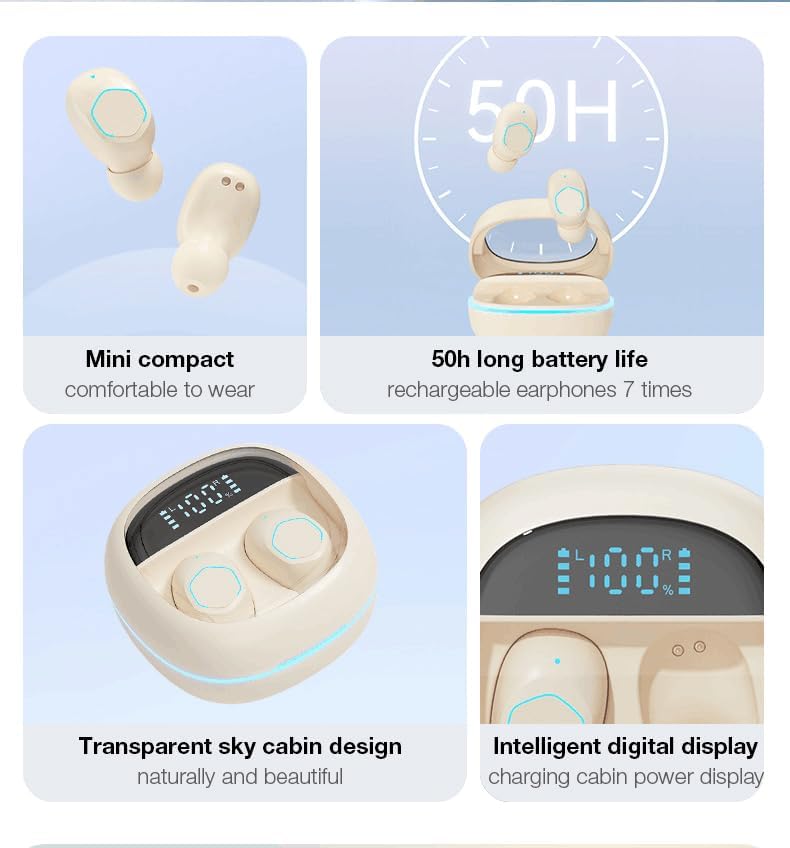
The Generic Wireless Earbuds in their open charging case, displaying the battery percentagLED 화면에 표시됩니다.
상자 안에 무엇이 들어있나요?
모든 품목이 들어 있는지 확인하려면 패키지 내용물을 확인하세요.
- 사용자 설명서
- 충전 스테이션(충전 케이스)
- USB-C 충전 케이블
- 무선 이어버드 (좌우 세트)
설치 가이드
1. 초기 충전
Before first use, fully charge the earbuds and the charging case. Connect the provided USB-C cable to the charging case and a power source. The LED display on the case will show the battery percentage, indicating charging progress. A full charge typically takes approximately 1.5 hours.

The charging case with earbuds inside, showing the LED power display and RGB lighting.
2. 블루투스 페어링
- 충전 케이스를 여세요. 이어버드가 자동으로 켜지고 페어링 모드로 진입합니다.
- 기기(스마트폰, 태블릿 등)에서 Bluetooth를 활성화하세요.
- 검색 available Bluetooth devices and select "Generic Earbuds" (or similar name) from the list.
- 연결되면 확인음이 들리고 이어버드를 사용할 준비가 됩니다.
The earbuds utilize Bluetooth 5.3 for stable and fast connections up to 50 feet (15 meters).
3. 이어버드 착용
These earbuds are designed to be compact and comfortable, especially for small ears. Gently insert each earbud into the corresponding ear (L for left, R for right) and rotate slightly to find a secure and comfortable fit. The skin-friendly silicone tips ensure stability during various activities.
The earbud's compact design ensures a secure and comfortable fit, even for petite ears.
작동 지침
터치 컨트롤
The earbuds feature intuitive touch controls on their outer surface. Refer to the following table for common functions:
| 행동 | 기능 |
|---|---|
| 한 번 탭하기 (왼쪽 또는 오른쪽 이어버드) | 음악 재생/일시 정지, 전화 받기/종료 |
| 더블 탭(오른쪽 이어버드) | 다음 노래 |
| 더블 탭(왼쪽 이어버드) | 이전 노래 |
| 트리플 탭(오른쪽 이어버드) | 볼륨을 높이다 |
| 트리플 탭(왼쪽 이어버드) | 볼륨 낮추기 |
| 길게 누르기(2초) | 전화 거부 |
| 길게 누르기(3초) | 음성 지원 활성화 |

Visual representation of the smart button controls for music and calls.
LED 전원 표시
The charging case features an LED digital display that shows the exact battery percentage of the case and individual battery levels for the left and right earbuds. This allows you to monitor power levels at a glance.
오디오 기능
- 360° Hi-Fi Sound: Custom-tuned drivers deliver rich, immersive audio with deep bass.
- AI HD Call Clarity: Equipped with 4 microphones and AI noise reduction technology, these earbuds reduce up to 60% of ambient noise, ensuring crystal-clear voice calls.

The 'Whale Cavity' design enhances 360° stereo sound for a more immersive listening experience.
지연 시간이 짧은 게임 모드
The earbuds feature a low-latency algorithm, providing minimal delay between audio and video, which is ideal for gaming and video playback. This ensures a synchronized and immersive experience.

Experience low game delay for instant audio-visual synchronization during gameplay.
유지
청소
정기적인 청소는 음질과 위생을 유지하는 데 도움이 됩니다.
- 부드럽고 마른 보푸라기 없는 천으로 이어폰과 충전 케이스를 닦으세요.
- 이어폰 끝에 묻은 귀지나 이물질은 작고 부드러운 브러시나 면봉을 사용하세요.
- 연마성 세척제, 알코올, 화학 용제는 사용하지 마세요.
저장
사용하지 않을 때는 항상 충전 케이스에 넣어 보관하여 먼지와 손상으로부터 보호하고 충전 상태를 유지하세요.
배터리 관리
배터리 수명을 연장하려면:
- 배터리를 자주 완전히 방전시키지 마세요.
- 이어폰과 케이스는 장기간 사용하지 않더라도 정기적으로 충전하십시오.
- 극한의 온도를 피해 서늘하고 건조한 곳에 보관하세요.
방수 기능(IPX5)
The earbuds are rated IPX5 water-resistant, meaning they can withstand splashes and sweat. They are suitable for workouts and light rain. However, they are not designed for submersion in water or use during swimming. Ensure the earbuds are dry before placing them back in the charging case.
문제 해결
이어버드에 문제가 발생하면 다음 해결 방법을 시도해 보세요.
- 소리 없음:
- 이어폰이 충전되어 있는지 확인하세요.
- 기기의 Bluetooth 연결을 확인하세요.
- 이어버드와 기기의 볼륨을 모두 조절하세요.
- 이어버드가 페어링되지 않음:
- 이어버드가 페어링 모드(케이스 열기)인지 확인하세요.
- 기기의 Bluetooth를 껐다가 켜세요.
- Bluetooth 설정에서 기기를 삭제하고 다시 페어링하세요.
- 이어버드가 완전히 충전되었는지 확인하세요.
- 한쪽 이어버드가 작동하지 않음:
- Place both earbuds back in the charging case, close it, and then open it again.
- 양쪽 이어버드가 모두 충전되어 있는지 확인하세요.
- 충전 문제:
- USB-C 케이블과 전원 어댑터를 확인하세요.
- 이어버드와 케이스의 충전 접촉면에 이물질이 없는지 확인하십시오.
- 통화 품질이 좋지 않음:
- 이어폰이 귀에 제대로 꽂혀 있는지 확인하세요.
- 연결된 장치에 더 가까이 다가가세요.
- 환경 소음 간섭이 있는지 확인하세요.
If the issue persists, please refer to the support information provided with your purchase or contact customer service.
명세서
| 특징 | 세부 사항 |
|---|---|
| 상표 | 일반적인 |
| 모델 | B0DH3DQ7TY |
| 색상 | 베이지색 |
| 귀 위치 | 귀에 |
| 폼 팩터 | 귀에 |
| 임피던스 | 80옴 |
| 블루투스 버전 | 5.3 |
| 방수성 | IPX5 |
| 총 재생 시간(케이스 포함) | 최대 30시간 |
| 빠른 충전 | 10-minute charge = 2-hour playback |
| 무게(이어버드당) | 3.8g |
보증 및 지원
These Generic Wireless Earbuds come with a standard manufacturer's warranty. Please refer to the warranty card included in your packaging for specific terms and conditions, including the warranty period and coverage details. For technical support, troubleshooting assistance beyond this manual, or warranty claims, please contact the retailer or manufacturer's customer service. Contact information can typically be found on the product packaging or the brand's official web대지.