
1. 제품 오버view
The Riokko YM119 OBD2 Scanner is a diagnostic tool designed for car owners to easily read and clear engine fault codes. It provides real-time data, freeze frame information, and supports various diagnostic functions for OBDII/EOBD compliant vehicles manufactured since 1996. Its intuitive interface and compact design make it suitable for both professional technicians and home users.

Figure 1.1: Riokko YM119 OBD2 Scanner. This image shows the main diagnostic tool with its color screen, control buttons, and the attached OBDII connector cable.
2. 설정 및 초기 사용
2.1 패키지 내용
- Riokko YM119 OBD2 Scanner Unit
- 사용 설명서 (본 문서)
2.2 스캐너 연결
- Locate the vehicle's Data Link Connector (DLC). This is typically located under the dashboard on the driver's side.
- Ensure the vehicle's ignition is turned ON (engine can be off or running, depending on the test).
- Plug the OBDII connector of the YM119 scanner firmly into the vehicle's DLC. The scanner will power on automatically.
2.3 언어 선택
The YM119 supports 13 national languages. To change the language:
- From the main menu, navigate to "Setting" using the arrow keys.
- 를 누르세요 OK button to enter the Setting menu.
- "언어"를 선택하고 목록에서 원하는 언어를 선택하세요.
- 누르다 OK 선택을 확인하세요.
3. 스캐너 작동
3.1 탐색 버튼
- 출구: Returns to the previous screen or main menu.
- 위/아래 화살표: 메뉴 옵션을 탐색합니다.
- 좌/우 화살표: Navigate through data screens or adjust settings.
- OK : 선택을 확인하거나 하위 메뉴로 들어갑니다.
- 박쥐: Initiates the battery voltag전자 테스트.

Figure 3.1: Main Menu and Professional Functions. This image illustrates the scanner's main menu interface and highlights its key diagnostic capabilities such as Engine Fault Diagnostics, Quick Clear Fault Code, Real-time Data Stream, and Battery Life Test.
3.2 진단 기능
From the main menu, select "Diagnosis" to access the primary diagnostic functions.

Figure 3.2: OBD II Diagnostic Test Items. This image shows the comprehensive list of diagnostic tests available on the scanner, from reading and erasing codes to advanced sensor and component tests.
3.2.1 코드 읽기
이 기능은 차량 컴퓨터에서 진단 문제 코드(DTC)를 검색합니다. 이 코드는 차량의 내장 진단 시스템에서 감지된 특정 문제를 나타냅니다.
- Select "Read Codes" from the Diagnosis menu.
- 스캐너는 저장된, 보류 중인 또는 영구적인 모든 DTC를 표시합니다.
- 사용하세요 위/아래 arrows to scroll through the codes.
- For detailed information on a specific code, use the "DTC Lib" function or refer to a reliable automotive repair database.
3.2.2 명확한 코드
This function erases DTCs from the vehicle's computer and turns off the Malfunction Indicator Lamp (MIL), 즉 엔진 점검 경고등이라고도 합니다. Note: Clearing codes does not fix the underlying problem. The MIL will illuminate again if the fault persists.

Figure 3.3: Check and Turn Off Engine Light. This image demonstrates the scanner's ability to diagnose and clear engine fault codes, effectively turning off the Check Engine Light on the vehicle's dashboard.
- Select "Erase Codes" from the Diagnosis menu.
- 메시지가 표시되면 작업을 확인하세요.
- The MIL should turn off.
3.2.3 Real-time Data (Live Data Stream)
View real-time sensor data from the vehicle's engine control unit (ECU). This data can be displayed in text or graphical format, allowing for dynamic monitoring of vehicle performance.
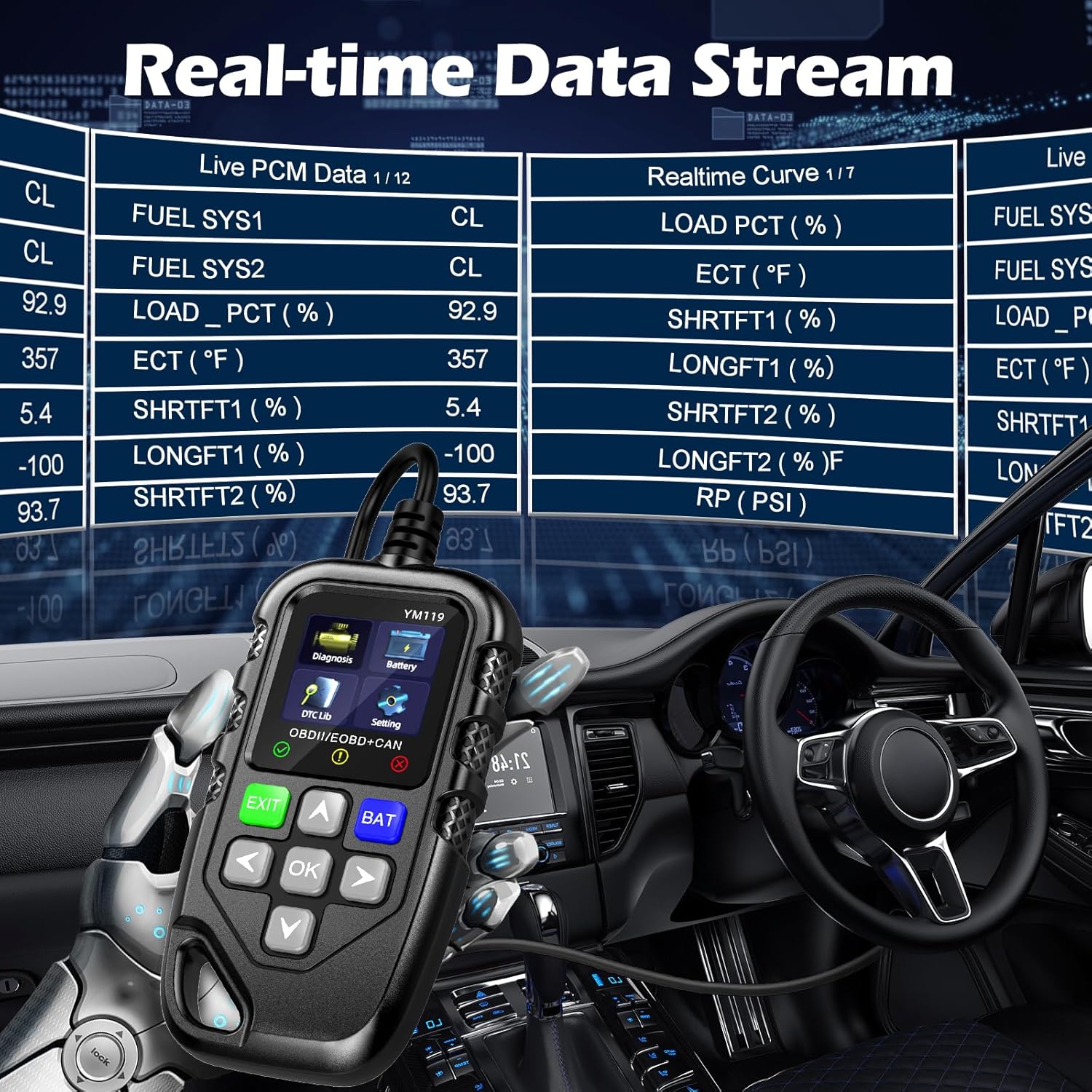
Figure 3.4: Real-time Data Stream. This image shows the scanner's capability to display live engine data, including various sensor readings and their corresponding real-time curves, aiding in dynamic vehicle diagnostics.
- Select "Live Data" or "Realtime Curve" from the Diagnosis menu.
- 사용하세요 위/아래 arrows to scroll through different data parameters.
- 사용하세요 왼쪽/오른쪽 arrows to switch between text and graph views (if available for the parameter).
3.2.4 정지 화면 데이터
When an emission-related fault occurs, the vehicle's computer records a snapshot of operating conditions at the time of the fault. This "freeze frame" data helps in diagnosing intermittent problems.
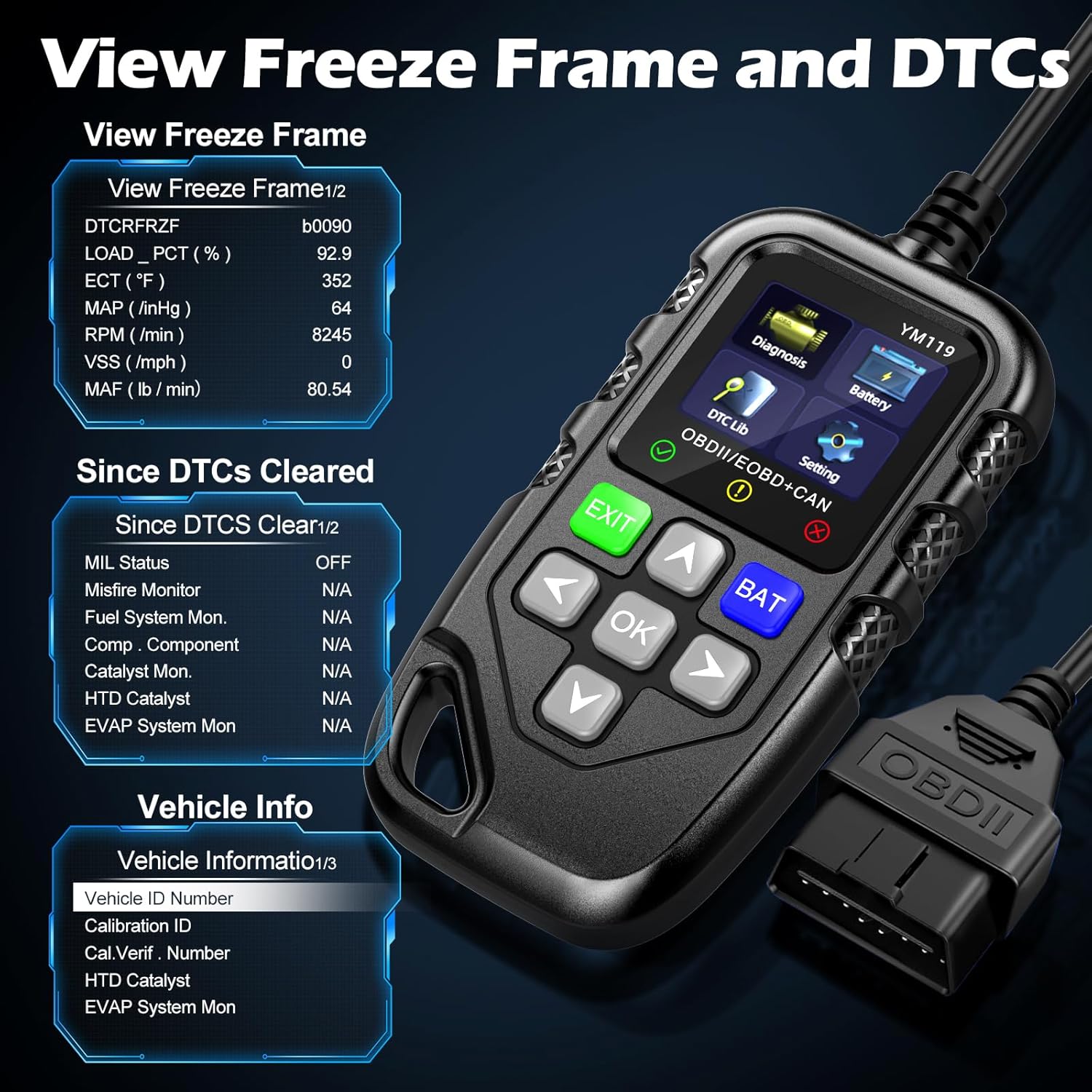
그림 3.5: View Freeze Frame and DTCs. This image displays the scanner's ability to capture and show freeze frame data, which provides a snapshot of engine conditions at the moment a fault code was set, aiding in diagnosis.
- 선택하다 "View Freeze Frame" from the Diagnosis menu.
- Review the recorded parameters.
3.2.5 DTC Query (DTC Lib)
The built-in DTC Library allows you to look up definitions for generic (P0, P2, P34, B0, C0, U0) and manufacturer-specific (P1, P30-P33, B1, C1, U1) codes.
- From the main menu, select "DTC Lib".
- Enter the DTC code using the arrow keys and OK 단추.
- 스캐너는 코드의 정의를 표시합니다.
3.2.6 I / M 준비
This function checks the readiness of the emission-related monitoring systems on the vehicle. It's useful for determining if the vehicle is ready for an emissions test.
- Select "I/M Readiness" from the Diagnosis menu.
- The scanner will display the status of various monitors (e.g., Misfire Monitor, Fuel System Monitor). "OK" indicates the monitor has completed its test, "INC" indicates incomplete, and "N/A" indicates not applicable.
3.2.7 배터리 용량tage 테스트
The YM119 can perform a basic battery voltage test to assess the vehicle's battery health.

Figure 3.6: Estimate Battery Life Test. This image shows the scanner's dedicated function for monitoring and assessing the vehicle's battery voltage and overall health.
- From the main menu, select "Battery" or press the 박쥐 단추.
- 스캐너는 현재 배터리 용량을 표시합니다.tage.
3.2.8 차량 정보
이 함수는 차량의 차량 식별 번호(VIN), 교정 ID(CALID) 및 교정 확인 번호(CVN)를 검색합니다.
- Select "Vehicle Info" from the Diagnosis menu.
- 스캐너는 차량에 대한 이용 가능한 정보를 표시합니다.
4. 유지관리
4.1 장치 청소
스캐너의 성능과 외관을 유지하려면:
- 부드러운 천으로 기기를 닦으십시오. damp 옷감.
- 연마성 세척제나 용제를 사용하지 마십시오.
- Ensure the device is dry before storage.
4.2 보관
Store the scanner in a clean, dry environment away from extreme temperatures and direct sunlight. Keep the OBDII connector free from dust and debris.
5. 문제 해결
| 문제 | 가능한 원인 | 해결책 |
|---|---|---|
| 스캐너의 전원이 켜지지 않습니다. |
|
|
| "링크 오류" 또는 "통신 오류" 메시지. |
|
|
| Engine light reappears after clearing codes. | Underlying fault has not been repaired. | Clearing codes only turns off the light; it does not fix the problem. Diagnose and repair the underlying issue before clearing codes again. |
| Inaccurate or missing data readings. |
|
|
6. 사양
| 특징 | 세부 사항 |
|---|---|
| 모델 번호 | AE0004L (YM119) |
| 상표 | Riokko |
| 화면 크기 | 2.8 인치 |
| 지원되는 프로토콜 | Nine standard OBDII/EOBD protocols |
| 지원 언어 | 13개 국어 |
| 품목 무게 | 7.8 온스(약 221그램) |
| 패키지 크기 | 8.11 x 5.35 x 1.14인치(약 20.6 x 13.6 x 2.9cm) |
| 첫 번째 가능한 날짜 | 16년 2024월 XNUMX일 |
7. 보증 및 지원
7.1 보증 정보
The Riokko YM119 OBD2 Scanner comes with a 3년 보증 구매일로부터. 이 보증은 정상적인 사용 하에서 재료 및 제조상의 결함을 포함합니다.
7.2 반품 정책
A 30일 이내 이유 불문 반품 정책 is offered for your purchase. Please refer to your retailer's specific return instructions.
7.3 고객 지원
For technical assistance, warranty claims, or any other inquiries, please contact Riokko customer service. 24/7 고객 서비스 도와드릴 수 있습니다.
Please visit the official Riokko web최신 연락처 정보는 해당 사이트를 방문하거나 제품 포장을 참조하세요.