
소개
The M-VAVE Blackbox Bluetooth MIDI Controller is a compact, wireless, and versatile foot switch designed for musicians, guitarists, bassists, and music producers. It aims to streamline performance and recording setups by offering wireless Bluetooth connectivity for easy control over Digital Audio Workstations (DAWs), guitar pedals, and other MIDI-compatible devices.
This all-in-one processor provides unparalleled versatility with its robust features, including a comprehensive effects suite and fully customizable controls, making it an essential tool for both live performances and studio work.
설치 가이드
패키지 내용
- M-VAVE Blackbox Bluetooth MIDI Controller
- USB Type-C 케이블
- 사용 설명서 (본 문서)
장치 충전하기
The M-VAVE Blackbox comes with a built-in rechargeable Lithium Ion battery. Before first use, ensure the device is fully charged.
- Connect the provided USB Type-C cable to the USB-C port on the rear of the Blackbox.
- Connect the other end of the USB cable to a compatible 5V power adapter (not included) or a computer's USB port.
- The device will indicate charging status on its display. A full charge provides up to 10 hours of continuous use.
초기 전원 켜기
To power on the device, locate the power switch on the rear panel and slide it to the 'ON' position.
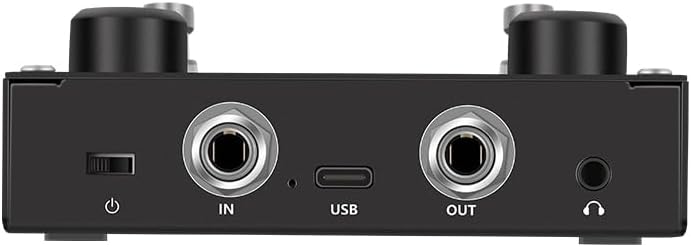
이미지: 후면 view of the M-VAVE Blackbox, highlighting the power switch, input/output jacks, and USB-C port for charging and data transfer.
블루투스 페어링
The M-VAVE Blackbox supports wireless Bluetooth MIDI connectivity.
- Ensure the Blackbox is powered on.
- On your computer (PC/Mac), tablet (iOS/Android), or other compatible device, enable Bluetooth.
- 검색 available Bluetooth devices and select 'M-VAVE Blackbox' to pair.
- Once paired, the device is ready for wireless MIDI control.
유선 연결(USB)
For a wired connection, use the USB Type-C port.
- Connect the USB Type-C cable from the Blackbox to your computer.
- The Blackbox will be recognized as a MIDI device by your operating system and compatible DAWs.
작동 지침
위에view 컨트롤의
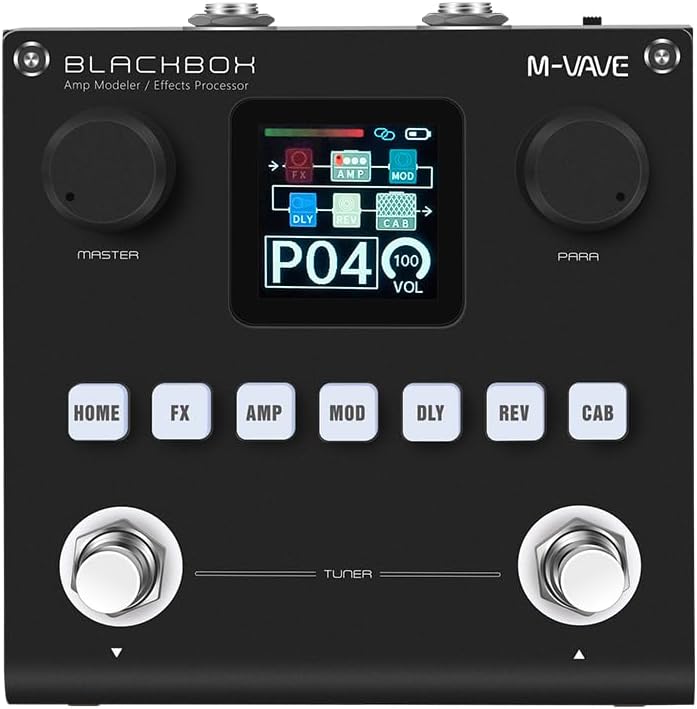
이미지: 앞면 view of the M-VAVE Blackbox, displaying its central screen, two large rotary knobs (Master and Para), six effect module buttons (Home, FX, Amp, Mod, Dly, Rev, Cab), and two foot switches with a 'Tuner' label.
- 디스플레이 화면: Shows current preset, effect chain, volume, and other parameters.
- 마스터 노브: 전반적인 출력 볼륨을 제어합니다.
- 파라 노브: Adjusts parameters of selected effects or settings.
- Effect Module Buttons (HOME, FX, AMP, MOD, DLY, REV, CAB): Used to navigate between different effect modules and settings.
- Foot Switches: Four programmable foot switches (two visible on the front, two implied by 'Fully Customizable' feature) for changing presets, toggling effects, or sending custom MIDI commands. The front two are labeled for Tuner functionality.
Effect Modules and Presets
The Blackbox features 6 powerful effects modules and 80 fully editable presets.
- FX : Noise Gate, Boost, Compressor.
- AMP: 20 사전amp 옵션.
- 모드: 7 modulation effects.
- DLY: 5 delay effects.
- REV : 6 reverb effects.
- 택시: 20 IR cabinet slots.
Use the corresponding effect module buttons to enter their settings. The 'Para' knob can then be used to adjust specific parameters within that module. Presets can be saved and recalled to store your customized effect chains and settings.

Image: The M-VAVE Blackbox display showing 'P21' indicating preset 21, and '093 VOL' indicating the current volume level.
Customizing Foot Switches
The four programmable foot switches allow for flexible control. Refer to the device's companion software (if available) or the on-screen menu for detailed instructions on assigning MIDI commands to each foot switch. This enables control over effects toggling, loop activation, preset changes, and other MIDI-enabled functions.
유지
To ensure the longevity and optimal performance of your M-VAVE Blackbox, follow these maintenance guidelines:
- 청소: Use a soft, dry cloth to clean the exterior of the device. Do not use abrasive cleaners, solvents, or waxes.
- 저장: 직사광선, 극한 온도 및 높은 습도를 피해 서늘하고 건조한 곳에 기기를 보관하십시오.
- 손질: The Blackbox features a robust casing, but avoid dropping the device or subjecting it to strong impacts.
- 배터리 관리 : 최적의 배터리 수명을 위해 배터리를 자주 완전히 방전하지 마십시오. 장기간 보관할 경우 몇 달에 한 번씩 배터리를 약 50%까지 충전하십시오.
- 펌웨어 업데이트: M-VAVE 공식 웹사이트를 확인하세요. web사이트를 주기적으로 방문하여 펌웨어 업데이트가 있는지 확인하십시오. 업데이트 시 제공되는 지침을 주의 깊게 따르십시오.
문제 해결
| 문제 | 가능한 원인 | 해결책 |
|---|---|---|
| 장치의 전원이 켜지지 않습니다. | 배터리가 방전되었습니다. 전원 스위치가 꺼져 있습니다. | Charge the device using the USB-C cable. Ensure the power switch on the rear is in the 'ON' position. |
| Bluetooth를 통해 연결할 수 없습니다. | Bluetooth is off on host device. Device is out of range. Interference. | Ensure Bluetooth is enabled on your computer/mobile device. Move the Blackbox closer to the host device. Minimize other wireless devices nearby. Try re-pairing the device. |
| No sound or effect. | Incorrect cabling. Volume is too low. Effect is bypassed or off. | Check all audio cable connections (IN/OUT). Increase the Master volume knob. Ensure the desired effect module is active and not bypassed. |
| Foot switches not responding. | Incorrect MIDI mapping. Device not connected. | Verify MIDI assignments in your DAW or companion software. Ensure the Blackbox is properly connected (Bluetooth or USB). |
| 배터리 수명이 짧습니다. | Battery degradation over time. Frequent full discharges. | Ensure the device is fully charged before use. Avoid leaving the battery completely drained for long periods. If battery life significantly degrades, contact support. |
명세서
- 모델: 블랙박스
- 상표: M-VAVE
- 품목 무게: 470g
- 배송 치수: 12.8 x 11.5 x 5cm
- 색상: 검은색
- 배터리: 리튬 이온 배터리 1개 (포함)
- 배터리 수명: Up to 10 hours (continuous play on full charge)
- 전원 입력: USB Type-C, 5V ≥ 300mA
- 커넥터 유형: 블루투스, USB Type-C
- 하드웨어 인터페이스: USB-C타입
- 호환 장치: Guitar, Bass, Mixer, DAW
- 하드웨어 플랫폼 : PC/Mac/iOS/안드로이드
- 제어 유형: Knobs, Programmable Foot Switches
- 지원 소프트웨어: Various DAWs
- 효과 모듈: Noise Gate, Boost, Compressor, Preamp (20 options), Modulation (7 options), Delay (5 options), Reverb (6 options), IR Cabinet (20 slots)
- 사전 설정 : 80 fully editable presets
보증 정보
제품 정보에는 구체적인 보증 내용이 포함되어 있지 않습니다. 제조사 공식 보증서를 참조하십시오. website or contact your retailer for warranty terms and conditions.
지원하다
For technical support, product inquiries, or further assistance, please visit the official M-VAVE website or contact their customer service department. Contact information may also be available on the product packaging.