
소개
Thank you for choosing the Yoidesu Cordless Phone System. This system combines a corded base unit with a cordless handset, offering advanced features such as a digital answering machine, photo dialing, smart call blocking, and an expandable design. This manual will guide you through the setup, operation, and maintenance of your new phone system to ensure optimal performance.
패키지 내용
아래 나열된 모든 품목이 패키지에 포함되어 있는지 확인해 주세요. 품목이 누락되었거나 손상된 경우 고객 지원팀에 문의해 주세요.
- 유선 본체 및 핸드셋
- 무선 핸드셋
- Cordless Handset Charging Base
- AC Power Adapters (2)
- 전화선 코드
- 무선 단말기용 충전식 배터리
- 사용 설명서 (본 문서)
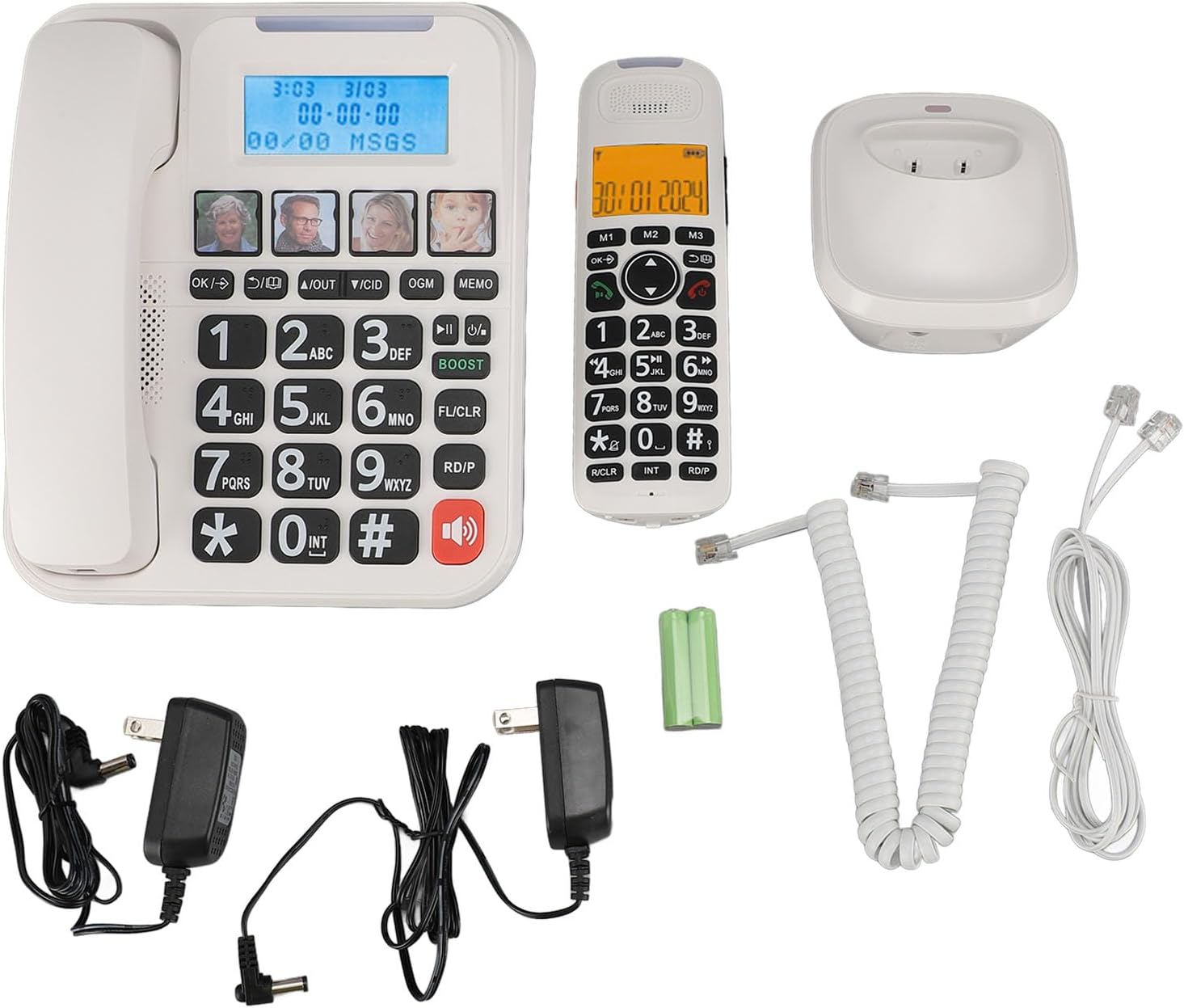
그림 1: Complete package contents of the Yoidesu Cordless Phone System.
제품 끝view
유선 베이스 유닛
The base unit serves as the central hub for your phone system, featuring a large display, keypad, and dedicated buttons for answering machine functions and photo dialing.
- 대형 2인치 화면: Displays caller ID, call history, and answering machine status with high-contrast text.
- 대형 키패드: Oversized buttons for easy dialing, especially in low-light conditions.
- Photo Dialing Buttons: Four customizable buttons for quick access to frequently dialed numbers with associated photos.
- AMP 단추: Enhances call volume by up to 28dB for improved clarity.
- Answering Machine Controls: Play/Stop, Skip, Record, and Memo functions.

그림 2: 앞쪽 view of the Corded Base Unit.
무선 핸드셋
The cordless handset provides mobility and convenience, allowing you to make and receive calls away from the base unit.
- 디스플레이 화면: Shows caller information, menu options, and battery status.
- 탐색 버튼: For menu navigation and volume adjustment.
- Talk/End Buttons: To initiate and terminate calls.
- Intercom (INT) Button: For internal calls between handsets or base unit.

그림 3: 앞쪽 view of the Cordless Handset.
설정
1. 베이스 유닛 연결
- 전화선 코드의 한쪽 끝을 기본 장치 뒷면의 TEL LINE 잭에 연결합니다.
- 전화선 코드의 다른 쪽 끝을 벽면 전화 잭에 연결합니다.
- Plug one AC power adapter into the DC IN 6V jack on the back of the base unit.
- AC 전원 어댑터의 다른 쪽 끝을 표준 전기 콘센트에 꽂습니다.

그림 4: Rear connections of the Base Unit.
2. 휴대폰 배터리 설치
- 무선 핸드셋 뒷면의 배터리 덮개를 엽니다.
- Insert the supplied rechargeable battery, ensuring correct polarity (+/-).
- 배터리 덮개를 닫습니다.
3. 휴대폰 충전
- Plug the second AC power adapter into the DC IN 6V jack on the cordless handset charging base.
- AC 전원 어댑터의 다른 쪽 끝을 표준 전기 콘센트에 꽂습니다.
- Place the cordless handset onto its charging base. The charging indicator on the handset should illuminate.
- 처음 사용하기 전에 최소 12시간 동안 핸드셋을 충전하여 배터리 용량을 완전히 확보하세요.

그림 5: Cordless Handset on Charging Base.
4. 추가 핸드셋 등록(선택 사항)
The system supports up to five handsets. Refer to the specific instructions provided with additional handsets for registration procedures. Typically, this involves placing the base unit in registration mode and then initiating registration from the new handset.
작동 지침
전화 걸기 및 받기
- 전화를 걸려면: 유선 핸드셋을 들어 올리거나 버튼을 누르십시오. 말하다 무선 핸드셋의 버튼을 누른 후 전화번호를 누르세요.
- 전화를 받으려면: 유선 핸드셋을 들어 올리거나 버튼을 누르십시오. 말하다 전화가 울리면 무선 핸드셋의 버튼을 누르세요.
- 통화를 종료하려면: 유선 핸드셋을 받침대에 다시 놓거나 버튼을 누르세요. 끝 무선 핸드셋의 버튼.
통화 볼륨 조정
통화 중에 AMP button on the base unit to increase the volume by 28dB. On the cordless handset, use the navigation buttons to adjust the earpiece volume.
Using the Digital Answering Machine
The integrated answering machine can record up to 60 minutes of messages, outgoing announcements, and memos.
- 재생 메시지: 를 누르세요 재생/정지 베이스 유닛의 버튼.
- 발신 메시지 기록(OGM): 를 누르세요 오그메 button and follow the voice prompts.
- Record Memo: 를 누르세요 메모 button and speak after the tone.
Photo Dialing
Set up four frequently dialed numbers with associated photos for quick access.
- 프로그래밍하려면: Select an empty photo slot on the base unit. Follow the on-screen prompts to enter the contact's name and phone number. You can then insert a printed photo into the designated slot.
- 전화하려면: Simply press the desired photo button on the base unit.

그림 6: Using the Photo Dialing feature.
Smart Call Blocker and Caller ID
The system can store up to 30 incoming call numbers on handsets and 29 on the base unit. The call block function helps prevent unwanted calls.
- 거는 사람 확인: Incoming call numbers are displayed on both the base unit and handset screens.
- 통화 차단: Access the call block menu to add numbers manually or block numbers from the caller ID history. You can set it to manual or automatic mode, allowing only calls from saved contacts.
Phonebook and Call History
Store up to 50 phonebook entries. Review 10 outgoing call numbers and incoming call numbers (30 on handset, 29 on base).
- 주소록에 추가: Navigate to the phonebook menu and enter the name and number.
- Review 역사: Use the navigation buttons to scroll through incoming and outgoing call lists.
Intercom and 3-Way Calling
The expandable system allows for internal communication and conference calls.
- 기내 통화 장치: 를 누르세요 국제 button on a handset or base unit to call another registered handset or the base unit.
- 3자 통화: Supports conference calls between a landline, a sub-phone (handset), and a third-party phone. Refer to the system menu for initiating this feature.
유지
청소
부드러운 천으로 전화 시스템을 닦아주세요.amp 천을 사용하십시오. 강한 화학 물질이나 연마성 세제는 사용하지 마십시오. 청소하기 전에 장치의 플러그를 뽑으십시오.
배터리 관리
To prolong battery life, always return the cordless handset to its charging base when not in use. If the phone will be unused for an extended period, remove the battery from the handset.
문제 해결
| 문제 | 가능한 원인 | 해결책 |
|---|---|---|
| 다이얼 톤이 없습니다 | 전화선 코드가 분리되었거나 고장났습니다. | Ensure the telephone line cord is securely connected to both the base unit and the wall jack. Test with another phone if possible. |
| 핸드셋이 충전되지 않습니다 | Handset not properly seated on charging base; charging base not powered; faulty battery. | Ensure the handset is correctly placed on the charging base. Check that the charging base's power adapter is plugged in. Replace battery if necessary. |
| 응답기가 녹음되지 않음 | 자동응답기가 꺼져 있습니다. 메모리가 꽉 찼습니다. | Ensure the answering machine is turned on. Delete old messages to free up memory. |
| 통화 품질 불량/잡음 | Interference from other electronic devices; handset too far from base unit. | Move the base unit away from other electronics. Ensure the handset is within range of the base unit. |
명세서
- 모델 번호: Yoidesuav12iq6wt4-14
- 자동응답기 녹음 시간: 최대 60분
- Handset Expansion: Up to 5 handsets per base unit
- 벨소리 볼륨: 최대 90dB(조정 가능)
- 통화 음량 증폭: +28dB via AMP 단추
- 화면 크기: 2 inches (handset and base unit)
- Caller ID Storage: 30 incoming calls (handset), 29 incoming calls (base unit)
- Phonebook Entries: 50
- 발신 통화 저장: 10
- 패키지 크기: 12.99 x 9.06 x 3.94 인치
- 품목 무게: 2.84파운드
보증 및 지원
For warranty information or technical assistance, please contact Yoidesu customer support. Keep your purchase receipt as proof of purchase for any warranty claims.
제조업체: 요이데스
첫 이용 가능 날짜: 5년 2024월 XNUMX일