
1. 서론
Thank you for choosing the KAISER KXB-3008 8-inch Studio Speaker. This manual provides essential information for the safe and efficient operation of your new portable speaker. Please read this manual thoroughly before use and retain it for future reference.
2. 제품 오버view
2.1 주요 특징
- Bluetooth Connectivity: Seamlessly connect your devices wirelessly.
- LED Lights: Enhance your audio experience with dynamic LED lighting.
- Karaoke Function: Enjoy singing along with built-in karaoke features.
- Voice Effects: Experiment with various voice effects for entertainment.
- Rechargeable Battery: Portable design with a long-lasting rechargeable battery.
- KSR-Link Technology: Connect with another compatible KAISER speaker for enhanced stereo sound.
2.2 포함된 구성 요소
- 1 x KAISER KXB-3008 Speaker
- 1 x 유선 마이크
- 1 x 사용자 설명서
- 1 x 전원 케이블

그림 1: 전면 view of the KAISER KXB-3008 speaker, showcasing its grille and dynamic LED lighting.

Figure 2: The wired microphone provided with the speaker, featuring an on/off switch.
3. 설정
3.1 초기 충전
Before first use, fully charge the speaker for at least 4 hours. Connect the power cable to the speaker's power input and a suitable power outlet. The charging indicator light will show the charging status.
3.2 전원 켜기/끄기
- To turn on the speaker, locate the ON/OFF switch on the control panel and slide it to the "ON" position.
- 스피커를 끄려면 ON/OFF 스위치를 "OFF" 위치로 밀어주세요.

Figure 3: Top control panel showing the power switch and other function buttons.
4. 운영
4.1 블루투스 연결
- 스피커를 켜세요.
- 디스플레이에 "BLUE"가 나타날 때까지 "MODE" 버튼을 누르세요. "BLUE"는 블루투스 모드임을 나타냅니다.
- 기기(스마트폰, 태블릿 등)에서 Bluetooth를 활성화하세요.
- 검색 "KXB-3008" in your device's Bluetooth list and select it to pair.
- 페어링이 성공적으로 완료되면 확인음이 울립니다.
4.2 KSR-Link Technology (True Wireless Stereo)
KSR-Link allows you to connect two KAISER KXB-3008 speakers wirelessly for a stereo sound experience.
- Ensure both KXB-3008 speakers are powered on and in Bluetooth mode.
- On one speaker (this will be the master speaker), press and hold the "MODE" button for a few seconds until you hear a pairing tone.
- 두 스피커는 자동으로 서로 연결됩니다.
- Once connected, pair your device to the master speaker via Bluetooth as described in section 4.1.
4.3 Using USB/Micro SD
Insert a USB flash drive or Micro SD card into the respective port on the control panel. The speaker will automatically switch to USB/SD mode and begin playing compatible audio files(예: MP3).
4.4 라디오 FM
Press the "MODE" button to switch to FM radio mode. Use the playback control buttons (previous/next track) to scan for stations. The display will show the current frequency.
4.5 노래방 기능
Connect the wired microphone to the "MIC" input. Adjust the microphone volume and echo effects using the dedicated knobs on the control panel. Play your music and sing along.
Video 1: Demonstration of a Kaiser 8-inch speaker, highlighting its features and controls. Note: This video features a similar 8-inch Kaiser speaker model.
5. 제어 및 연결
5.1 제어판 이상view
The top panel of the speaker features various buttons and knobs for controlling playback, volume, and other functions.
그림 4: 상세 view of the top control panel, including volume, mode, playback, and bass controls.
- VOL (Volume Knob): 스피커의 전체 볼륨을 조절합니다.
- MIC VOL (Microphone Volume Knob): 연결된 마이크의 볼륨을 조절합니다.
- ECHO (Echo Knob): 마이크의 에코 효과를 조정합니다.
- BASS (Bass Button): Activates or adjusts the bass boost.
- MODE 버튼: Switches between input modes (Bluetooth, FM Radio, USB, Micro SD, AUX).
- 라이트 버튼: Toggles or changes the LED light patterns.
- 재생 컨트롤: 재생/일시정지, 이전 트랙, 다음 트랙.
5.2 입력/출력 포트
The rear panel of the speaker provides various ports for connectivity.
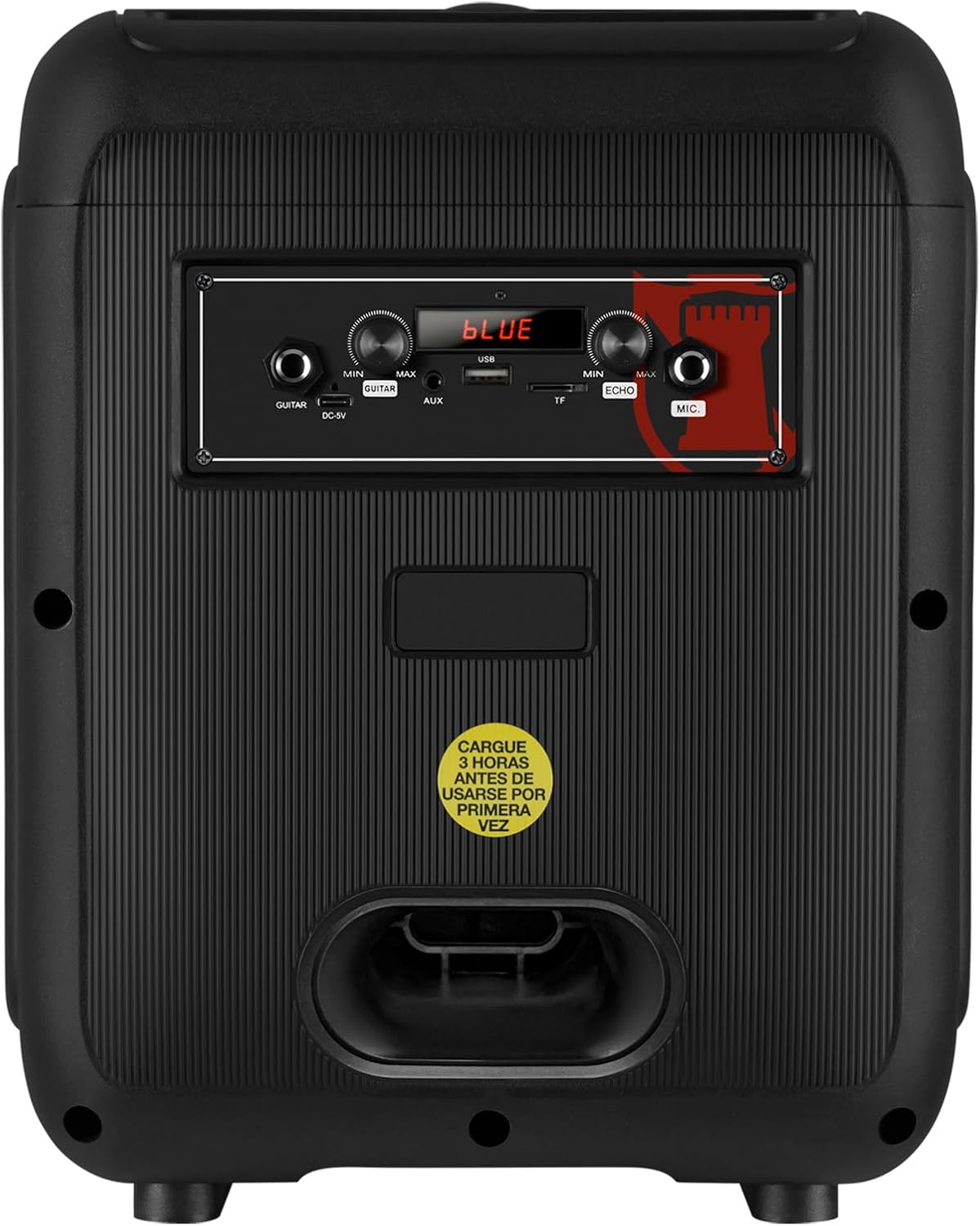
Figure 5: Rear panel showing the AUX, USB, Micro SD, and Microphone input ports, along with the power input.
- 보조 입력: 3.5mm 오디오 케이블을 사용하여 외부 오디오 장치를 연결합니다.
- USB 포트: MP3 재생을 위해 USB 플래시 드라이브를 삽입하세요.
- 마이크로 SD 슬롯: Insert a Micro SD card for MP3 playback.
- 마이크 입력: Connect a wired microphone for karaoke or announcements.
- DC-9V Input: 스피커를 충전하기 위한 전원 입력.
6. 사양
| 특징 | 설명 |
|---|---|
| 모델명 | KXB-3008 |
| 스피커 유형 | 휴대용 스피커 |
| 특별 기능 | Lightweight, LED Light, Karaoke Function |
| 추천 용도 | Gaming Consoles, Laptops, Smartphones, Tablets |
| 호환 장치 | Smartphone, Tablet, Laptop, Gaming Console |
| 서브우퍼 직경 | 8 인치 |
| 색상 | 검은색 |
| 제품 치수 | 31cm(깊이) x 29cm(너비) x 42cm(높이) |
| 제품 무게 | 5 킬로그램 |
| 방수복 | 거짓 |
| 제어 방법 | 원격 제어 |
| 무선 기술 | 블루투스 |
| 전원 | 배터리 |
| 최대 스피커 출력 | 30 와트 |
| 평균 배터리 수명 | 6시간 |
| 오디오 출력 모드 | 스테레오, 서라운드 |
| 장착 유형 | 바닥 설치형, 테이블 설치형 |
7. 유지관리
- 청소: 부드럽고 마른 천을 사용하여 스피커 외부를 닦으세요. 연마성 세제나 용제를 사용하지 마세요.
- 저장: 스피커는 직사광선과 극한의 온도를 피해 시원하고 건조한 곳에 보관하세요.
- 배터리 관리 : 배터리 수명을 연장하려면 배터리를 자주 완전히 방전하지 마세요. 장시간 사용하지 않더라도 스피커를 정기적으로 충전하세요.
- 물을 피하세요: This speaker is not waterproof. Keep it away from liquids to prevent damage.
8. 문제 해결
| 문제 | 가능한 해결책 |
|---|---|
| 스피커가 켜지지 않습니다. | Ensure the battery is charged. Connect the power cable and try again. Check the power switch position. |
| 소리가 나지 않습니다. | Check the volume level on both the speaker and your connected device. Ensure the correct input mode is selected (Bluetooth, AUX, USB/SD). |
| 블루투스 페어링에 실패했습니다. | Ensure the speaker is in Bluetooth mode. Make sure your device's Bluetooth is enabled and within range. Forget previous pairings on your device and try pairing again. |
| 마이크가 작동하지 않습니다. | Ensure the microphone is properly connected to the MIC input. Check the microphone's ON/OFF switch and adjust the MIC VOL knob. |
| KSR-Link connection issues. | Ensure both speakers are KXB-3008 models and are in Bluetooth mode. Try re-initiating the KSR-Link pairing process. |
9. 보증 및 지원
This product comes with a Limited Warranty. Please refer to the warranty card included in the packaging for detailed terms and conditions.
For technical support or customer service, please visit the official Kaiser web사이트를 방문하거나 현지 대리점에 문의하십시오.