
소개
This instruction manual provides essential information for the safe and effective use of your Sony PXW-Z200 4K XDCAM Camcorder. The PXW-Z200 is designed for professional video production, offering UHD 4K60 HDR footage with advanced features like AI-powered autofocus, 20x optical zoom, and versatile recording formats. Please read this manual thoroughly before operating the camcorder and retain it for future reference.
설정
1. 포장 풀기 및 내용물 확인
상자에서 모든 품목을 조심스럽게 꺼내세요. 다음 구성품이 모두 있는지 확인하세요.
- Sony PXW-Z200 4K 1" CMOS Sensor XDCAM Camcorder
- AC 어댑터
- 전원 코드
- 배터리 충전기
- BP-U35 Battery Pack (2 included in bundle)
- LCD Hood
- 렌즈 후드
- 세안 컵
- 마이크 홀더
- Cold Shoe Kit
- 64GB 메모리 카드
- Large Case
- 망원렌즈
- 메모리 카드 리더
- 필터 키트
- Wide Angle Lens Attachment
- 메모리 카드 지갑
- 렌즈 캡 키퍼
- 청소 키트
- HDMI 케이블
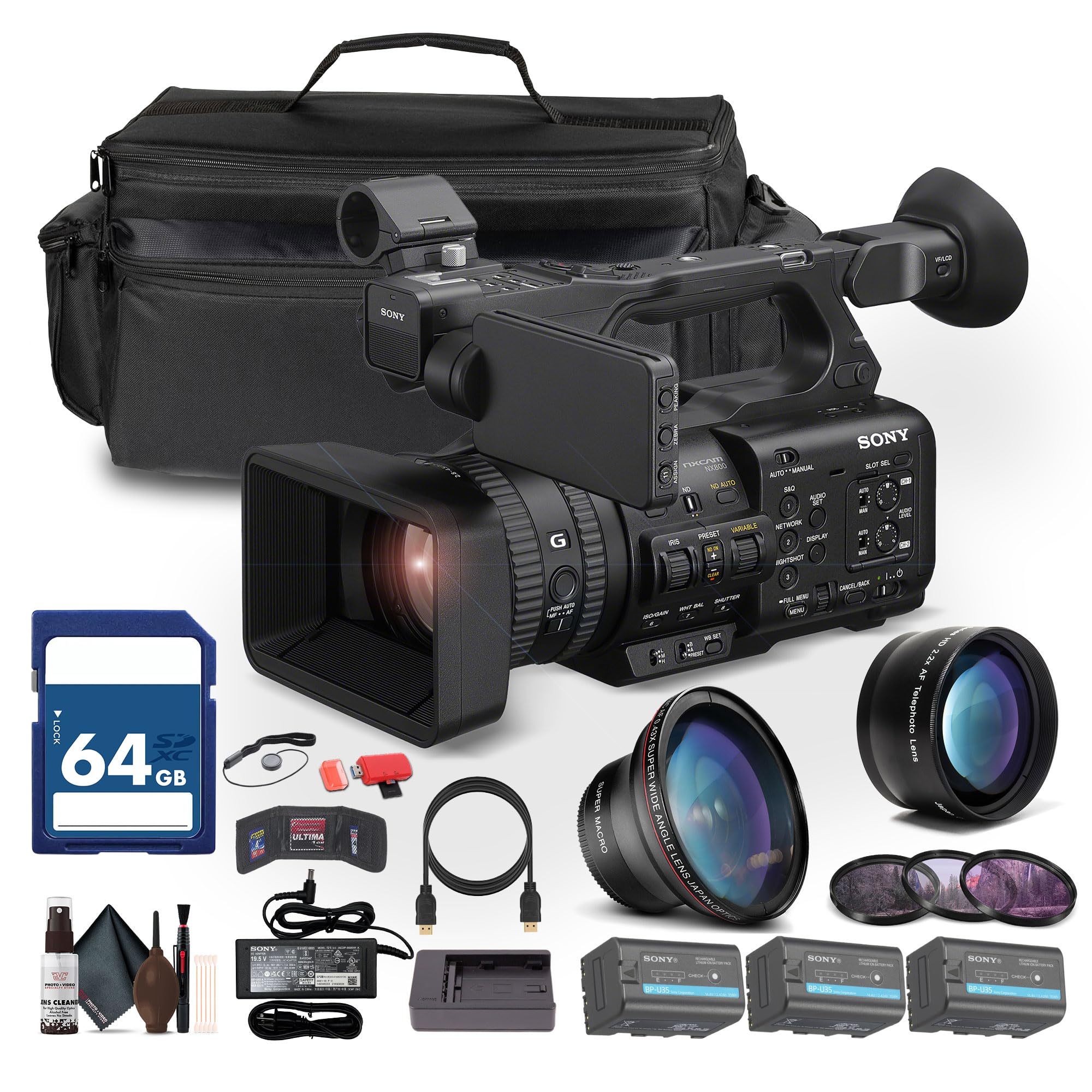
Figure 1: Sony PXW-Z200 4K XDCAM Camcorder (main unit).
2. 렌즈 후드와 아이컵 부착
- Attach the provided lens hood to the front of the camcorder's lens to reduce glare and protect the lens.
- Attach the eyecup to the view편안한 것을 찾는 사람 view주고받음.
3. 배터리 설치 및 충전
- Insert the BP-U35 battery pack into the battery slot on the rear of the camcorder until it clicks into place.
- Connect the AC adapter to the camcorder's DC IN jack and plug it into a power outlet. The battery will begin charging.
- Alternatively, use the external battery charger to charge the BP-U35 battery packs.
- 처음 사용하기 전에 배터리가 완전히 충전되었는지 확인하십시오.
4. 메모리 카드 삽입
The PXW-Z200 supports dual CFexpress Type-A/SD card slots.
- 메모리 카드 슬롯 커버를 엽니다.
- Insert a compatible CFexpress Type-A or SD card into the designated slot with the label facing the correct direction until it clicks.
- 메모리 카드 슬롯 커버를 닫습니다.
- Format the memory card in the camcorder's menu before first use to ensure optimal performance.
캠코더 작동
1. 전원 켜기 / 끄기
- 전원을 켜려면 전원 스위치를 ON 위치로 밀어주세요.
- 전원을 끄려면 전원 스위치를 OFF 위치로 밀어주세요.
2. 기본 녹음
- 녹화 시작/정지: Press the REC START/STOP button to begin or end recording.
- 녹음 형식: The camcorder supports XAVC S-I, HS-L, S-L, and HD/QFHD recording formats. Select your desired format via the menu.
- 프레임 속도: 고프레임률 캡처tage at 4K120 and 1080p240 for slow-motion effects.
- HDR: The camcorder supports UHD 4K60 HDR with HLG (Hybrid Log-Gamma) for high dynamic range content.
3. Focus and Zoom Control

Figure 2: AUTO/MANUAL switch for focus and exposure control.
- 자동 초점 : The camcorder features AI-driven autofocus and auto-framing for precise tracking of subjects. Engage AUTO mode using the switch (refer to Figure 2).
- 수동 초점: For precise control, switch to MANUAL mode and adjust the focus ring on the lens.
- 광학 줌: Utilize the 20x optical zoom for clear magnification.
- 선명한 이미지 확대: In 4K, the camcorder offers a 30x Clear Image Zoom, extending your reach without significant loss of quality.
4. 오디오 설정
The PXW-Z200 includes 4-channel audio input.
- Connect external microphones to the XLR inputs for professional audio capture.
- Adjust audio levels using the dedicated audio controls on the camcorder body or via the menu.
- 헤드폰 잭에 연결된 헤드폰을 통해 오디오를 모니터링하세요.
5. Networking and Streaming
The camcorder supports integrated dual-band 2.4/5 GHz Wi-Fi and Ethernet for live streaming and file 이전.
- Connect to a Wi-Fi network or an Ethernet cable.
- Utilize RTMP/RTMPS, SRT, and FTP protocols for direct live streaming and file 이전.
- Configure network settings and streaming parameters through the camcorder's menu.
6. Color Profiles
The PXW-Z200 supports various color profiles for creative flexibility and matching with other Sony Cinema Line cameras.
- Select from S-Cinetone, ITU709, 709tone, and HLG profiles in the menu to achieve your desired look.
7. Using the Sony Monitor & Control App
Download and install the Sony Monitor & Control app on a compatible smartphone or tablet to remotely control and monitor the camcorder.
- Connect your device to the camcorder via Wi-Fi.
- Use the app for remote control of recording, zoom, focus, and other settings, as well as for monitoring live footage.

Figure 3: Sony PXW-Z200 camcorder in a typical usage scenario.
유지
1. 캠코더 청소
- Use the provided cleaning kit to gently clean the lens and camcorder body.
- For the lens, use a soft, lint-free cloth and lens cleaning solution. Avoid harsh chemicals.
- For the body, wipe with a dry, soft cloth.
- 용제나 연마제를 사용하지 마십시오.
2. 배터리 관리
- 사용하지 않을 때는 배터리를 서늘하고 건조한 곳에 보관하십시오.
- 배터리 수명을 연장하려면 배터리를 자주 완전히 방전시키지 마세요.
- Charge batteries using only the specified Sony charger or the camcorder's AC adapter.
3. 보관
- When storing the camcorder for extended periods, remove the battery.
- Store the camcorder in a dry, dust-free environment, preferably in the large case provided.
- 극한의 온도와 높은 습도를 피하세요.
문제 해결
If you encounter issues with your Sony PXW-Z200, refer to the following common problems and solutions.
| 문제 | 가능한 원인 | 해결책 |
|---|---|---|
| 캠코더의 전원이 켜지지 않습니다. | Battery is not charged or not inserted correctly. AC adapter is not connected. | Ensure battery is fully charged and properly inserted. Verify AC adapter connection. |
| Cannot record footage. | Memory card is full, not inserted, or not formatted. Recording mode is incorrect. | Check memory card status, insert/format if necessary. Verify recording settings. |
| 자동 초점이 제대로 작동하지 않습니다. | Camcorder is in Manual Focus mode. Subject is too close or lacks contrast. | Switch to AUTO focus mode. Ensure adequate lighting and distance to subject. |
| 오디오가 녹음되지 않았습니다. | Microphone is disconnected or audio levels are too low. | Check microphone connections. Adjust audio input levels. |
| Cannot connect to Wi-Fi/Stream. | Incorrect network settings. Out of range. | Verify Wi-Fi password and network settings. Move closer to the access point. |
보다 자세한 문제 해결 방법은 소니 공식 지원 페이지를 참조하십시오. web사이트를 방문하거나 고객 서비스에 문의하세요.
명세서
Key technical specifications for the Sony PXW-Z200 4K XDCAM Camcorder:
| 특징 | 세부 사항 |
|---|---|
| 상표 | 소니 |
| 모델명 | PXW-Z200 |
| 센서 유형 | 1" Exmor RS CMOS |
| 비디오 캡처 해상도 | UHD 4K (3840 Pixels), 720p, 480p |
| 광학 줌 | 20배 |
| Clear Image Zoom (4K) | 30배 |
| 최대 조리개 | 조리개값 1.8 |
| 최대 초점 거리 | 154.21mm (XNUMXmm) |
| 비디오 캡처 형식 | XAVC S-I, HS-L, S-L, HD/QFHD |
| 지원되는 오디오 형식 | Dolby Digital/AC-3 |
| 화면 크기 | 1 inch (LCD Hood included) |
| 연결 기술 | HDMI, 12G-SDI, Wi-Fi (2.4/5 GHz), Ethernet |
| 특별 기능 | AI-Driven Autofocus, Auto-Framing, 4K HDR Capture (HLG), High Frame Rates (4K120, 1080p240), Direct Live Streaming (RTMP/RTMPS, SRT, FTP), S-Cinetone |
| 저장 매체 | Dual CFexpress Type-A/SD card slots |
| 품목 무게 | 4.3 파운드 |
| 방수 레벨 | 방수가 되지 않음 |
| 이미지 안정화 | 아니요 |
보증 및 지원
The Sony PXW-Z200 Camcorder is manufactured by Sony. For detailed warranty information, including terms, conditions, and registration, please refer to the warranty card included with your product or visit the official Sony support web대지.
For technical support, service, or to download the latest firmware and software, please visit: 소니 지원 Web대지.


