
1. 서론
Welcome to the WONNIE DC105P Digital Camera user manual. This guide provides essential information for setting up, operating, and maintaining your new camera. Designed for ease of use, this camera captures vivid 56MP photos and Full HD 1080P videos, making it perfect for young photographers to explore their creativity.
2. 안전 정보
- 카메라를 물이나 극한의 온도에 노출시키지 마세요.
- 카메라를 강한 자기장에서 멀리 두세요.
- 지정된 배터리와 충전 케이블만 사용하십시오.
- 카메라를 떨어뜨리거나 강한 충격을 주지 마세요.
- 부드럽고 마른 천으로 렌즈를 닦아주세요.
3. 상자 안에 무엇이 들어있나요?
Upon unboxing your WONNIE DC105P Digital Camera, please ensure all the following items are present:
- WONNIE DC105P Digital Camera
- 32GB TF 카드
- 충전식 배터리 (2개)
- Type-C USB 케이블
- 매는 밧줄
- 보관 가방
- 사용자 매뉴얼(이 문서)
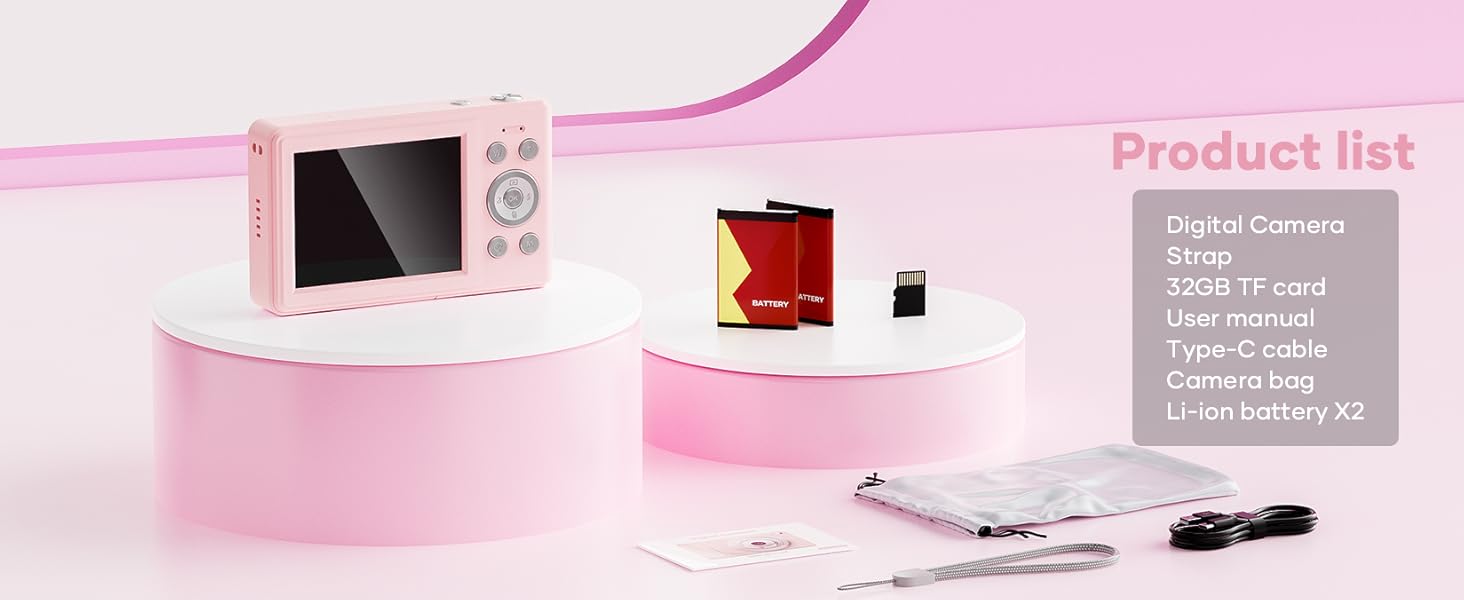
This image displays the WONNIE DC105P Digital Camera alongside its accessories: two rechargeable batteries, a 32GB TF card, a Type-C USB cable, a lanyard, and a soft storage bag, all neatly arranged.
4. 제품 오버view
카메라의 구성 요소와 제어 장치에 대해 알아보세요.
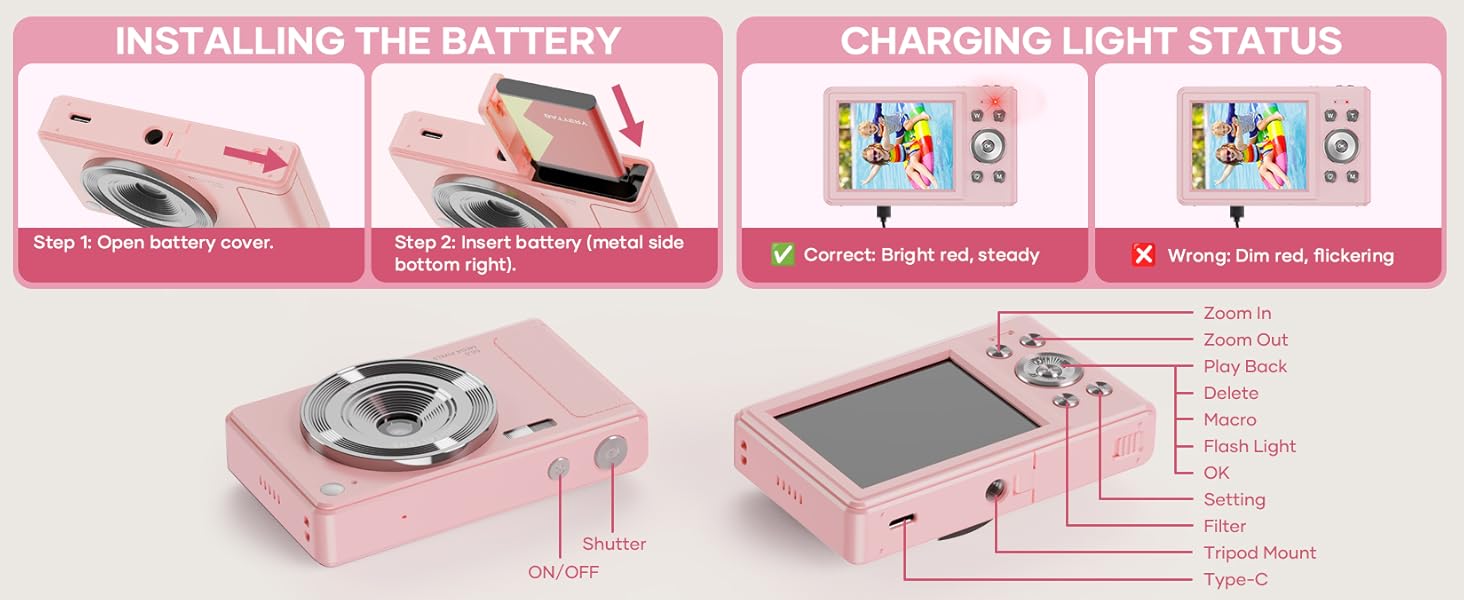
This diagram highlights the various buttons and ports on the WONNIE DC105P Digital Camera, including the power button, shutter button, zoom controls, playback button, menu button, OK button, flash light, tripod mount, and Type-C port.
주요 구성 요소:
- 렌즈: 이미지와 비디오를 캡처합니다.
- 플래시: 조명이 어두운 환경에서 조명을 제공합니다.
- 셔터 버튼: 사진을 찍거나 비디오 녹화를 시작/중지하려면 누르세요.
- 전원 버튼: 카메라를 켜거나 끕니다.
- LCD 화면: 라이브로 표시 view메뉴 및 재생.
- 탐색 버튼(위/아래/왼쪽/오른쪽/확인): 메뉴 탐색 및 옵션 선택에 사용됩니다.
- 줌 버튼(W/T): 디지털 줌을 조정합니다.
- 재생 버튼: 재생 모드로 들어갑니다 view 캡처된 미디어.
- 메뉴 버튼: 카메라 설정에 접근합니다.
- C 형 포트 : 충전 및 데이터 전송용입니다.
- 삼각대 마운트: For attaching the camera to a tripod.
5. 설정
5.1 배터리 설치
- 카메라 측면에 있는 배터리 덮개를 여세요.
- Insert the rechargeable battery with the metal contacts facing down and to the right, ensuring it clicks into place.
- 배터리 덮개를 단단히 닫으세요.
This image illustrates the two steps for battery installation: first, opening the battery cover, and second, inserting the battery with the metal side facing down and to the right.
5.2 SD 카드 설치
The camera supports a 32GB TF (Micro SD) card. Insert the TF card into the designated slot in the battery compartment until it clicks.
5.3 배터리 충전
- 제공된 USB Type-C 케이블을 사용하여 카메라를 전원에 연결하십시오.
- The charging indicator light will show the charging status. A bright red, steady light indicates correct charging. A dim, flickering light indicates an issue.
This image displays the camera's charging light status: a bright red, steady light for correct charging, and a dim, flickering light indicating an incorrect status.
5.4 랜야드 부착하기
Thread the lanyard through the designated loop on the camera body to prevent accidental drops.
6. 카메라 작동
6.1 전원 켜기/끄기
Press and hold the Power button (labeled ON/OFF) on the top of the camera to turn it on or off.
6.2 사진 촬영
In photo mode, frame your shot using the LCD screen and press the Shutter button to capture an image. The camera features 56MP resolution for clear photos.

This image shows a child holding the pink WONNIE DC105P Digital Camera, with the screen displaying a photo of children. Other children are in the foreground, emphasizing the camera's ease of use for capturing vibrant 56MP photos and smooth FHD 1080P videos.
Special Photo Features:
- 16배 디지털 줌: Use the 'W' and 'T' buttons to zoom in or out.
- 20 Fun Filters: Apply various creative filters to your photos via the menu.
- 셀프타이머: Set a delay (2s, 5s, 10s) before taking a photo, ideal for group shots.
- 연속 촬영(버스트 모드): Capture a rapid sequence of 3 photos.
- 흔들림 방지: 디지털 이미지 안정화 기능은 카메라 흔들림으로 인한 흐림 현상을 줄여줍니다.
- 빛을 채우다: Activate the built-in fill light for brighter photos in dim environments. (Note: Fill light won't activate in macro mode or when battery is too low.)
- Smile Recognition: 미소가 감지되면 자동으로 사진을 촬영합니다.

This image showcases three key features: Self Timer for perfect selfies, Continuous Shooting to capture every moment, and Anti Shake for steady shots.

This image illustrates the camera's 16x digital zoom capability with examples at 4x, 8x, and 16x, alongside a selection of 20 fun filters like Normal, Cold Filter, Warm Filter, and more, for endless creativity.
6.3 비디오 녹화
Switch to video mode (usually indicated by a camcorder icon in the menu) and press the Shutter button to start recording. Press again to stop. Videos are recorded in FHD 1080P with a built-in microphone.
6.4 Playback/Viewing 미디어
Press the Playback button to enter playback mode. Use the navigation buttons to scroll through your photos and videos. Press the OK button to play videos.
6.5 전송 Files
You have several options to transfer your media:
- USB를 PC에 연결: Connect the camera to your computer using the Type-C cable. The camera will appear as a removable disk.
- OTG to Phone: Use a compatible OTG cable adapter (sold separately) to connect the camera to your smartphone (e.g., iPhone 15, Samsung).
- 카드 리더: Remove the TF card and insert it into a card reader to transfer files to a computer or phone.

This image illustrates three convenient ways to view and transfer media: directly connecting the camera via USB to a PC, using an OTG adapter to connect to a smartphone, or using a card reader with a smartphone.
6.6 Web캠 기능
Connect the camera to a computer via the Type-C USB cable. Select 'Webcam' mode on the camera (if prompted) to use it for video calls or live streaming.

This image demonstrates the WONNIE DC105P Digital Camera's capability to function as a webcam, showing it mounted on a laptop for a video call and for live streaming.
7. 비디오 데모
이 영상은 일반적인 내용을 제공합니다.view of the WONNIE Digital Camera, highlighting its features and suitability for kids and teens.
This video offers an introduction to the digital camera, demonstrating its basic functions and design.
8. 유지관리
- 청소: 부드럽고 보풀이 없는 천을 사용하여 카메라 본체와 화면을 닦으세요. 렌즈의 경우, 특수 렌즈 세척 천과 세척액을 사용하세요.
- 저장: Store the camera in its provided storage bag in a cool, dry place away from direct sunlight and humidity. Remove the battery if the camera will not be used for an extended period.
- 배터리 관리 : Fully charge batteries before first use. Avoid completely draining the battery frequently to prolong its lifespan.
9. 문제 해결
| 문제 | 가능한 해결책 |
|---|---|
| 카메라의 전원이 켜지지 않습니다. | 배터리가 올바르게 삽입되어 있고 완전히 충전되었는지 확인하세요. |
| 사진 촬영이나 동영상 녹화가 불가능합니다. | Check if the SD card is inserted correctly and has sufficient free space. Ensure the battery is not critically low. |
| 이미지가 흐릿합니다. | Ensure the lens is clean. Use the anti-shake feature. Hold the camera steady while shooting. |
| 전송할 수 없습니다 files to computer/phone. | Verify the USB cable connection. Ensure the camera is in the correct mode for data transfer (if prompted). Try a different USB port or cable. For phones, ensure OTG compatibility and adapter. |
| Charging indicator is flickering. | Refer to Figure 5.2 for correct charging status. Re-insert the cable or try a different power source. |
10. 사양
| 특징 | 세부 사항 |
|---|---|
| 사진 센서 해상도 | 56 MP |
| 비디오 해상도 | 1080p 풀HD |
| 광학 줌 | 16배 디지털 줌 |
| 화면 크기 | 2.8인치 LCD |
| 이미지 안정화 | 디지털 |
| 저장 매체 | 32GB TF Card (included), Max 32GB supported |
| 연결성 | OTG, USB Type-C |
| 특별 기능 | 타임 스트리트amp, Anti-shake, Time-lapse, Continuous Shoot, Face Detection, Self-timer, Webcam, Filter Effect, Fill light, Selfie mirror, Auto Shut-off, Built-in Microphone |
| 품목 무게 | 0.22킬로그램(약 0.48파운드) |
| 치수 | Approx. 3.8 x 0.78 x 2.4 inches (based on image) |
| 배터리 유형 | Lithium Ion (1000mAh, 3.8V) |
11. 보증 및 지원
Your WONNIE DC105P Digital Camera comes with a 1년 보증. We are committed to providing excellent customer service and offer a hassle-free replacement policy. For any inquiries, missing accessories, or support needs, please contact our customer service team. We aim to respond within 24 hours.
For further assistance, please visit the official WONNIE Store on Amazon: WONNIE Store