
1. 서론
The JMDHKK K18+ is a versatile multi-function detector designed to enhance your privacy and security. This device effectively identifies hidden cameras, wireless bugging devices, and magnetic tracking devices, providing peace of mind in various environments such as homes, offices, hotels, and vehicles.
Its user-friendly design features simple two-button operation, an LED signal strength indicator, and customizable sound or vibration alerts, making it an essential tool for personal and professional security.
2. 제품 오버view
The K18+ detector combines three primary detection functions: Hidden Camera Detection, RF Signal Detection (Bug Detection), and Magnetic Field Detection. It is equipped with an upgraded smart chip and a high-capacity battery for reliable performance.
2.1 패키지 내용
- JMDHKK K18+ Detector Unit
- RF 안테나
- 자기장 프로브
- USB 충전 케이블
- 사용 설명서 (본 문서)
- 보관 파우치
2.2 장치 구성 요소
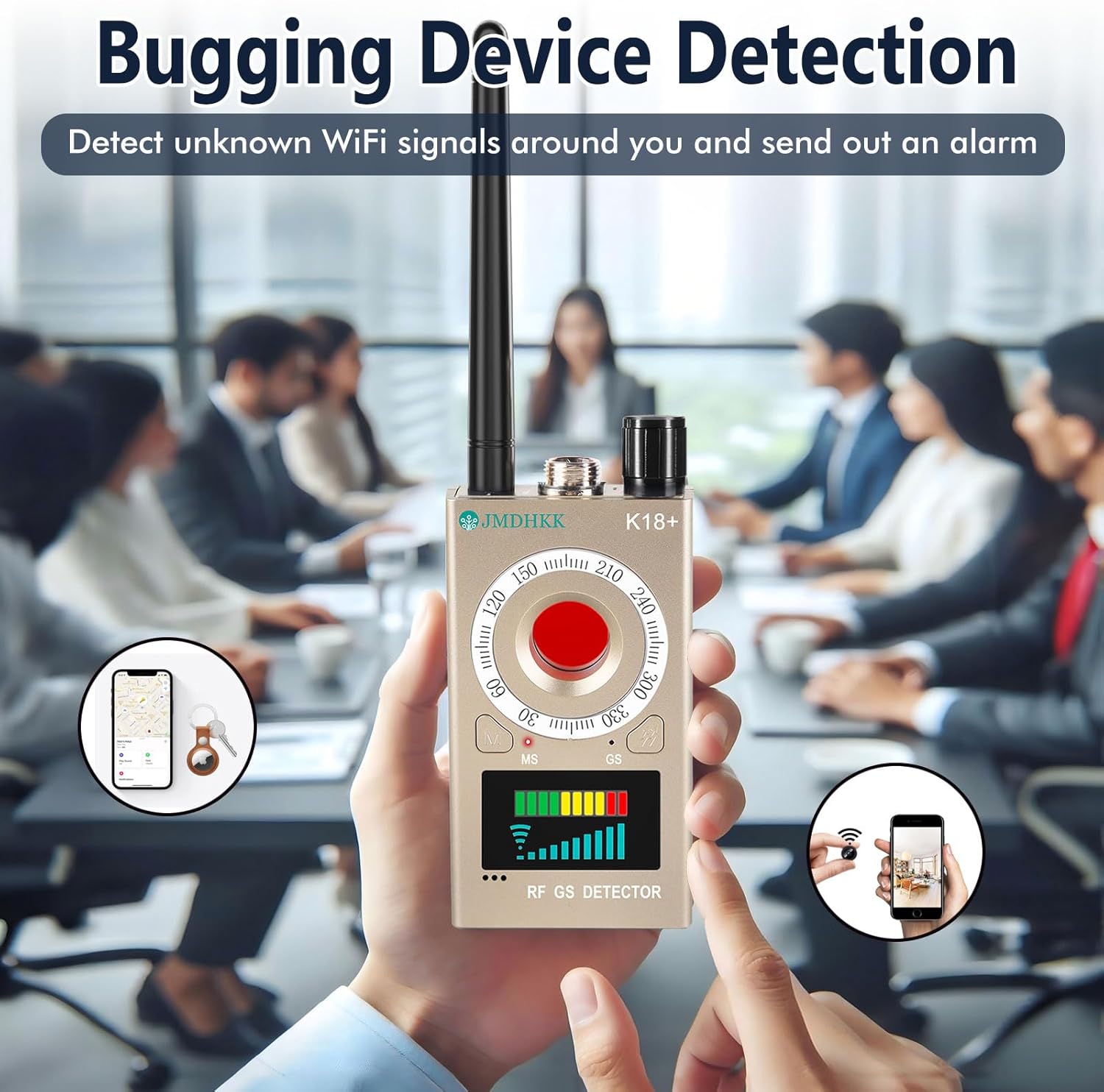
Refer to the image below for a visual guide to the K18+ detector and its accessories.

The device features a main unit with a display, a red button for camera detection, and ports for the RF antenna and magnetic probe. The display shows signal strength indicators.

3. 설정
3.1 장치 충전
Before first use, fully charge the K18+ detector. Connect the provided USB charging cable to the device's charging port and a standard USB power adapter (not included). The charging indicator will show the charging status and turn off when fully charged. A full charge ensures optimal performance.
3.2 액세서리 부착하기
- RF 안테나: Screw the RF antenna into the designated port on the top of the device for wireless signal detection.
- 자기장 탐침: Connect the magnetic field probe to its dedicated port for magnetic object detection.
4. 사용 설명서
The K18+ detector is designed for ease of use with two main control buttons. It offers 10 sensitivity levels to adjust the detection range as needed.
4.1 Power On/Off and Sensitivity Adjustment
- 전원을 켜려면 전원 버튼을 길게 누르세요.
- 전원을 끄려면 전원 버튼을 다시 길게 누르세요.
- Adjust sensitivity using the designated button or dial. Higher sensitivity increases the detection range but may also increase false positives. Lower sensitivity narrows the range for precise localization.
4.2 Hidden Camera Detection (Optical)
This mode uses infrared laser scanning to visually identify hidden pinhole cameras, even when they are not actively transmitting signals.
- 장치의 전원이 켜져 있는지 확인합니다.
- Activate the camera detection mode (usually by pressing the red button). The device will emit a red LED light.
- Scan the area by looking through the device's viewing window while sweeping the red light across surfaces.
- Hidden camera lenses will reflect the red light, appearing as bright red dots.

4.3 RF Signal Detection (Bug Detection)
This mode detects wireless signals emitted by bugging devices, GPS trackers, and other unauthorized wireless transmitters.
- Attach the RF antenna to the device.
- Select RF detection mode.
- 점검하고자 하는 영역 주변을 기기를 천천히 움직여 닦아주세요.
- The LED signal strength indicator on the display will light up, and the device will emit an audible alarm or vibrate when a wireless signal is detected. The intensity of the signal (more LEDs lit) indicates proximity to the source.
- Adjust sensitivity to narrow down the location of the signal source.
4.4 자기장 감지
This mode is used to detect magnetic objects, often associated with GPS trackers or other surveillance devices that are magnetically attached to surfaces.
- Attach the magnetic field probe to the device.
- Select magnetic detection mode.
- Move the probe slowly over surfaces, especially in vehicles (under seats, bumpers, wheel wells) or other areas where magnetic devices might be hidden.
- The device will indicate the presence of a magnetic field through its display and/or alerts. Note that the magnetic detector typically requires close proximity (within approximately 1 inch) to the object for effective detection.

4.5 Alert Customization
The K18+ allows you to choose between sound alerts and vibration alerts. This feature is useful for discreet operation in sensitive environments. Consult the device's interface for options to switch between these alert types.

5. 유지관리
- 청소: 부드럽고 마른 천으로 기기를 닦으세요. 강한 화학 물질이나 연마성 세제는 사용하지 마세요.
- 저장: Store the K18+ in a cool, dry place, away from direct sunlight and extreme temperatures. Use the provided storage pouch to protect it from dust and scratches.
- 배터리 관리 : For optimal battery life, avoid fully discharging the device frequently. If storing for extended periods, charge the battery to about 50% every few months.
6. 문제 해결
- False Positives (RF Detection): The detector may pick up signals from common electronic devices like Wi-Fi routers, mobile phones, or Bluetooth devices. Reduce sensitivity to narrow the detection range and pinpoint the exact source. Temporarily turn off known wireless devices in the area to isolate unknown signals.
- Magnetic Detection Not Working: Ensure the magnetic probe is properly attached. The magnetic detection function requires the probe to be in very close proximity (within approximately 1 inch) to the magnetic object.
- 장치 전원이 켜지지 않음: 배터리가 충분히 충전되었는지 확인하십시오. 기기를 전원에 연결하고 최소 30분 동안 충전한 후 다시 전원을 켜십시오.
- Inconsistent Detection: Adjust the sensitivity settings. High sensitivity might lead to detection of weak background signals, while low sensitivity might miss weaker, distant threats. Experiment with different sensitivity levels for your environment.
- 신호 없음 표시: Check if the correct antenna/probe is attached for the selected detection mode. Ensure the device is in the appropriate mode (RF, Camera, or Magnetic).
7. 사양
| 특징 | 사양 |
|---|---|
| 모델명 | K18+ |
| 치수(길이 x 너비 x 높이) | 3.94 x 2.17 x 0.79 인치 |
| 품목 무게 | 6.4 온스 |
| 재료 | 플라스틱 |
| 전원 | 배터리 구동(리튬 이온 배터리 1개 포함) |
| 권tage | 3.7 볼트 |
| 왓tage | 4.07 와트시 |
| 연결 기술 | 무선 전화 |
| 실내/실외 사용 | 실내 |
| 특징 | 가지고 다닐 수 있는 |
8. 보증 및 지원
JMDHKK is committed to providing quality products and customer satisfaction. For any questions, technical assistance, or support regarding your K18+ detector, please contact JMDHKK customer service through the retailer where you purchased the product or visit the official JMDHKK brand store online.
보증 청구나 지원 문의를 위해 구매 증빙 서류를 보관해 주세요.