1. 서론
구매해주셔서 감사합니다asing the STN-28 Colorful Cat Ear Luminous Bluetooth Headset. This headset combines wireless audio technology with a unique luminous cat ear design, offering a comfortable and immersive listening experience. This manual provides essential information on how to set up, operate, and maintain your new headset.
2. 안전 정보
- 헤드셋을 극한의 온도, 습도 또는 부식성 물질에 노출시키지 마세요.
- 헤드셋을 떨어뜨리거나 강한 충격을 주지 마십시오.
- 헤드셋을 직접 분해하거나 수리하려고 하지 마십시오. 보증이 무효화됩니다.
- 헤드셋은 부드럽고 마른 천으로 닦으십시오. 강한 화학 약품이나 연마제를 사용하지 마십시오.
- 장시간 높은 볼륨으로 청취하면 청력 손상이 발생할 수 있습니다. 볼륨을 안전한 수준으로 조절하세요.
3. 패키지 내용
- STN-28 무선 헤드셋 본체
- USB 충전 케이블
- 사용 설명서 (본 문서)
4. 제품 오버view 및 제어
헤드셋의 구성 요소와 제어 버튼에 익숙해지세요.
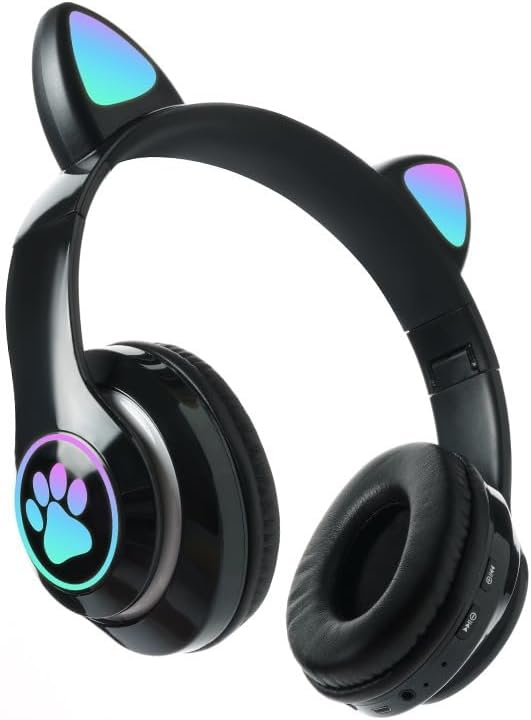
이미지: 앞면 view of the STN-28 headset in black, showcasing the luminous cat ears and paw print design on the earcups.

Image: Two STN-28 headsets, one in purple and one in pink, displayed on a wooden stand, highlighting their colorful design and cat ear feature.
Control Buttons (Typical Layout - Refer to your specific model for exact placement):
- 전원 버튼: 켜기/끄기, 재생/일시정지, 통화 받기/끊기.
- 볼륨 높이기(+): 볼륨을 높이려면 길게 눌러 다음 트랙으로 이동하세요.
- 볼륨 낮추기(-): 볼륨 줄이기, 이전 트랙 (길게 누르기).
- 모드 버튼(M): Switch between Bluetooth and TF Card mode.
- USB 충전 포트 : 헤드셋을 충전합니다.
- TF 카드 슬롯 : Insert external TF card for music playback.
- LED 표시 등 : 전원, 연결 상태 및 충전 상태를 표시합니다.
5. 설정
5.1 헤드셋 충전
- Connect the USB charging cable to the headset's USB charging port.
- 케이블의 다른 쪽 끝을 USB 전원(예: 컴퓨터 USB 포트, USB 벽면 어댑터)에 연결합니다.
- The LED indicator light will show a red light during charging.
- A full charge takes approximately 2 hours. The red light will turn off when fully charged.
Note: Ensure the headset is fully charged before first use for optimal battery life.
5.2 전원 켜기/끄기
- 전원을 켜려면: Press and hold the Power button for a few seconds until the LED indicator lights flash red and blue.
- 전원을 끄려면: Press and hold the Power button for a few seconds until the LED indicator light turns off.
5.3 블루투스 페어링
- 헤드셋이 완전히 충전되었는지, 전원이 꺼져 있는지 확인하십시오.
- Press and hold the Power button until the LED indicator lights flash red and blue alternately. This indicates the headset is in pairing mode.
- 기기(스마트폰, 태블릿, 노트북)에서 Bluetooth를 활성화하고 사용 가능한 기기를 검색하세요.
- 검색된 장치 목록에서 "STN-28" 또는 "LX-B39C"를 선택하십시오.
- Once successfully paired, the LED indicator light on the headset will flash blue slowly.
Note: The headset supports Bluetooth 5.0+EDR for stable and efficient connection.
6. 사용 설명서
6.1 음악 재생 (블루투스 모드)
- 재생/일시 중지: 전원 버튼을 짧게 누릅니다.
- 볼륨 업: "+" 버튼을 짧게 누르세요.
- 볼륨 작게 : "-" 버튼을 짧게 누르세요.
- 다음 트랙: "+" 버튼을 길게 누르세요.
- 이전 트랙 : "-" 버튼을 길게 누르세요.
6.2 전화 통화
- 전화 받기: 전화벨이 울리면 전원 버튼을 짧게 누르세요.
- 통화 종료: 통화 중에 전원 버튼을 짧게 누르세요.
- 전화 거부: 전화벨이 울릴 때 전원 버튼을 길게 누르세요.
6.3 TF 카드 재생
- MP3 오디오가 있는 TF(MicroSD) 카드를 삽입하세요 fileTF 카드 슬롯에 넣습니다.
- The headset will automatically switch to TF card playback mode, or you may need to short press the "M" (Mode) button to switch.
- Use the Play/Pause, Volume Up/Down, and Next/Previous Track buttons as described in section 6.1.
6.4 Luminous Cat Ear Feature
The cat ears and paw print on the earcups feature luminous accents. This feature is typically activated automatically when the headset is powered on. There is no specific control mentioned for this feature, implying it's always on when the headset is active.
7. 유지관리 및 관리
- 청소: Wipe the headset regularly with a soft, dry, lint-free cloth. Do not use liquid cleaners or sprays.
- 저장: When not in use, store the headset in a cool, dry place away from direct sunlight and extreme temperatures.
- 배터리 관리 : 배터리 수명을 연장하려면 배터리를 자주 완전히 방전시키지 마십시오. 장시간 사용하지 않더라도 헤드셋을 정기적으로 충전하십시오.
- 방수 기능: The headset is listed as "Waterproof". While it offers protection against water, avoid submerging it in water or exposing it to heavy rain for prolonged periods to prevent damage.
8. 문제 해결
| 문제 | 가능한 원인 | 해결책 |
|---|---|---|
| 헤드셋의 전원이 켜지지 않습니다. | 배터리가 부족합니다. | 헤드셋을 완전히 충전하세요(약 2시간). |
| 기기와 페어링할 수 없습니다. | 헤드셋이 페어링 모드가 아닙니다. 기기에서 블루투스가 꺼져 있습니다. 기기가 너무 멀리 떨어져 있습니다. | Ensure headset is flashing red/blue; enable Bluetooth on device; keep devices within 10 meters. Try forgetting the device on your phone and re-pairing. |
| 소리가 나지 않거나 볼륨이 작습니다. | Volume too low on headset or device; headset not connected. | Increase volume on both headset and connected device. Ensure headset is properly paired. |
| TF 카드가 작동하지 않습니다. | 카드가 올바르게 삽입되지 않았습니다. 지원되지 않는 카드입니다. file format; headset not in TF card mode. | Reinsert TF card; ensure files are MP3; press 'M' button to switch to TF card mode. |
9. 사양
| 모델 | STN-28 / LX-B39C |
| 착용방법 | Head-mounted folding |
| 블루투스 버전 | 블루투스 5.0+EDR |
| 지원되는 블루투스 모드 | A2DP 1.2, AVRCP 1.0, HSP, HSF 1.5 |
| 배터리 용량 | 400mAh Polymer A-grade Lithium Battery |
| Speaker Size / Impedance | 40mm / 32Ω |
| 전송 범위 | ≤10 meters (33 feet) |
| 충전 시간 | 약 2시간 |
| 음악 재생 시간 | ≤6시간 |
| 통화 시간 | ≤6시간 |
| 대기 시간 | 200시간 |
| 주파수 범위 | 20Hz - 20,000Hz |
| 방수 레벨 | 방수복 |
| 제어 유형 | Media Control, Touch (via buttons) |
| 특별 기능 | Luminous Cat Ears, TF Card Playback |
10. 보증 및 지원
This product comes with a standard manufacturer's warranty. For specific warranty terms, conditions, and duration, please refer to the warranty card included with your purchase or contact the retailer where you purchased the product.
For technical support or inquiries, please contact your retailer or the manufacturer directly. Keep your purchase receipt as proof of purchase for warranty claims.


