
OnePlus OnePlus Nord N30
원플러스 노드 N30 5G 사용자 설명서
Model: OnePlus Nord N30
소개
This manual provides comprehensive instructions for the setup, operation, maintenance, and troubleshooting of your OnePlus Nord N30 5G smartphone. Please read this manual carefully to ensure proper use and to maximize the device's capabilities.

이미지: 앞면과 뒷면 view 원플러스 노드 N30 5G 스마트폰을 소개합니다.asin디자인과 카메라 모듈.
설정
1. 언박싱 및 초기 검사
모든 구성품을 포장에서 조심스럽게 꺼내세요. 다음 품목이 모두 있는지 확인하세요.
- 원플러스 노드 N30 5G 스마트폰
- 50W 충전기
- USB 케이블
- SIM 이젝터 도구
- 빠른 시작 가이드(포함된 경우)
2. SIM 카드 및 MicroSD 카드 설치
The device supports a single SIM card and a microSDXC card for expandable storage. Locate the SIM tray on the side of the device. Use the provided SIM ejector tool to open the tray. Insert your Nano-SIM card and microSD card into the designated slots, ensuring correct orientation. Close the tray securely.
3. 초기 전원 켜기 및 설정
Press and hold the Power button located on the side of the device until the OnePlus logo appears. Follow the on-screen prompts to complete the initial setup process, which includes selecting your language, connecting to a Wi-Fi network, and signing in to your Google account.
4. 장치 충전
Connect the 50W charger to the USB-C port at the bottom of the phone. Plug the charger into a power outlet. The device features 67W SUPERVOOC fast charging, allowing for rapid battery replenishment.

이미지: 내부 view of the OnePlus Nord N30 5G, highlighting the 5000mAh battery and the charging connection point.
작동 지침
1. 디스플레이 및 탐색
The OnePlus Nord N30 5G features a 6.72-inch LCD display with a 120Hz adaptive refresh rate, providing smooth scrolling and visual experience. Navigate the interface using touch gestures: tap to select, swipe to scroll, pinch to zoom.

Image: Close-up of the OnePlus Nord N30 5G display, emphasizing its large screen size and high refresh rate capabilities.
2. 카메라 사용
The device is equipped with a triple rear camera system, featuring a 108 MP main sensor with f/1.7 aperture, a 2 MP macro lens, and a 2 MP depth sensor. The front camera is 16 MP. Open the Camera application to capture photos and videos. Utilize the 9-in-1 pixel binning technology for brighter and more colorful images, especially in challenging lighting conditions.

이미지: 상세 view of the OnePlus Nord N30 5G's rear camera setup, highlighting the 108MP main sensor.
3. 오디오 기능
The OnePlus Nord N30 5G includes dual stereo speakers for an enhanced audio experience. It also retains a 3.5mm audio jack for wired headphone connectivity. The device supports a 200% Ultra Volume Mode for increased audio output.

Image: A user holding the OnePlus Nord N30 5G, illustrating the device's use for audio consumption and its dual speaker capability.
4. 성능 및 게임
Powered by the Qualcomm Snapdragon 695 processor and 8GB of RAM (with up to 8GB of expandable virtual RAM), the device is designed for smooth multitasking and gaming. OxygenOS based on Android 13 includes gamer-friendly features such as Quick Start, Game Tools, Game Focus Mode, and GPA Frame Stabilizer.

Image: A person engaged in mobile gaming on the OnePlus Nord N30 5G, demonstrating its performance capabilities for entertainment.

Image: Visual representation of the OnePlus Nord N30 5G's internal components, highlighting the Snapdragon processor and RAM for enhanced speed.
5. 연결성
The OnePlus Nord N30 5G supports 5G connectivity for North and South American networks (n2/n5/n12/n25/n66/n71/n41/n77/n78) and global 4G LTE bands. It also features Bluetooth 5.1 for wireless accessory connections.
유지
1. 배터리 관리
To prolong battery life, avoid exposing the device to extreme temperatures. Use only the provided 50W charger. For optimal performance, keep the battery charge between 20% and 80% when possible.
2. 소프트웨어 업데이트
Regularly check for and install software updates to ensure your device has the latest features, security patches, and performance improvements. Updates are typically found in the device's Settings menu under "System" or "About phone."
3. 장치 청소
Use a soft, lint-free cloth to clean the screen and body of the phone. Avoid using harsh chemicals or abrasive materials that could damage the finish or display.
4. 스토리지 관리
The device comes with 128GB of internal storage. To manage storage, regularly clear cache, uninstall unused applications, and transfer large files (photos, videos) to cloud storage or the microSD card.
문제 해결
1. 네트워크 연결 문제
If you experience issues with network connectivity (calls, data), ensure your SIM card is properly inserted and your mobile data is enabled. Verify that your carrier supports the device's network bands. Some users have reported specific compatibility considerations with certain carriers like T-Mobile or MetroPCS; ensure your carrier's requirements are met for unlocked devices.
2. 배터리가 빠르게 소모됨
High screen brightness, extensive use of demanding applications, and continuous background processes can lead to faster battery drain. Adjust screen brightness, close unused apps, and review battery usage in settings to identify power-consuming applications.
3. Device Performance Slowdown
If the device becomes slow or unresponsive, try restarting it. Clear app caches and ensure sufficient free storage space. If issues persist, consider a factory reset (back up your data first).
명세서
| 특징 | 세부 사항 |
|---|---|
| 표시하다 | 6.72-inch LCD, 120Hz Refresh Rate, 1080x2400 (FHD+), 391 PPI |
| 프로세서 | 퀄컴 스냅드래곤 695 옥타코어 |
| 숫양 | 8GB (expandable virtual RAM) |
| 내부 저장소 | 128GB(microSDXC로 확장 가능) |
| 후방 카메라 | 108MP(광각), 2MP(매크로), 2MP(심도) |
| 전면 카메라 | 16 MP |
| 배터리 | 5000mAh, 50W SUPERVOOC 고속 충전 |
| 운영 체제 | OxygenOS based on Android 13 |
| 연결성 | 5G (North & South America bands), 4G LTE, Bluetooth 5.1 |
| 오디오 잭 | 3.5mm (XNUMXmm) |
| 치수 | 6 x 4 x 4 인치 |
| 무게 | 1.1파운드 |
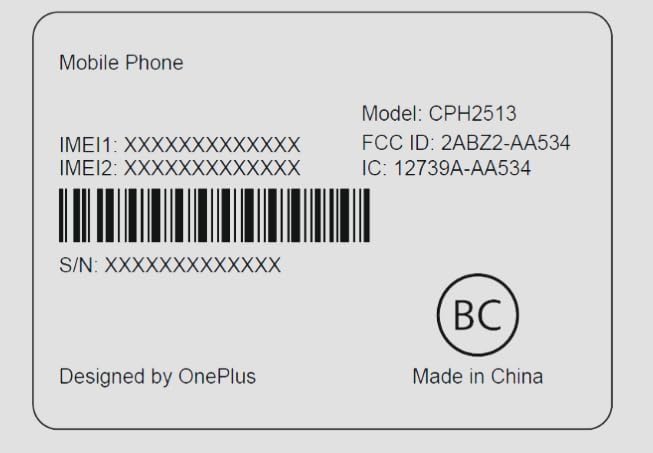
Image: Regulatory label for the OnePlus Nord N30 5G, showing model number CPH2513 and FCC ID: 2ABZ2-AA534.
보증 및 지원
Please note that for the discontinued T-Mobile Unlocked Model, there is no manufacturer's warranty. For general support inquiries or further assistance, please refer to the official OnePlus support web해당 웹사이트를 방문하거나 고객 서비스 센터에 문의하십시오. 향후 서비스 요청 시를 대비하여 구매 영수증을 보관하십시오.
Ask a question about this manual
Ask about setup, troubleshooting, compatibility, parts, safety, or missing instructions. Manuals+ will review the question and use this page’s manual context to help answer it.